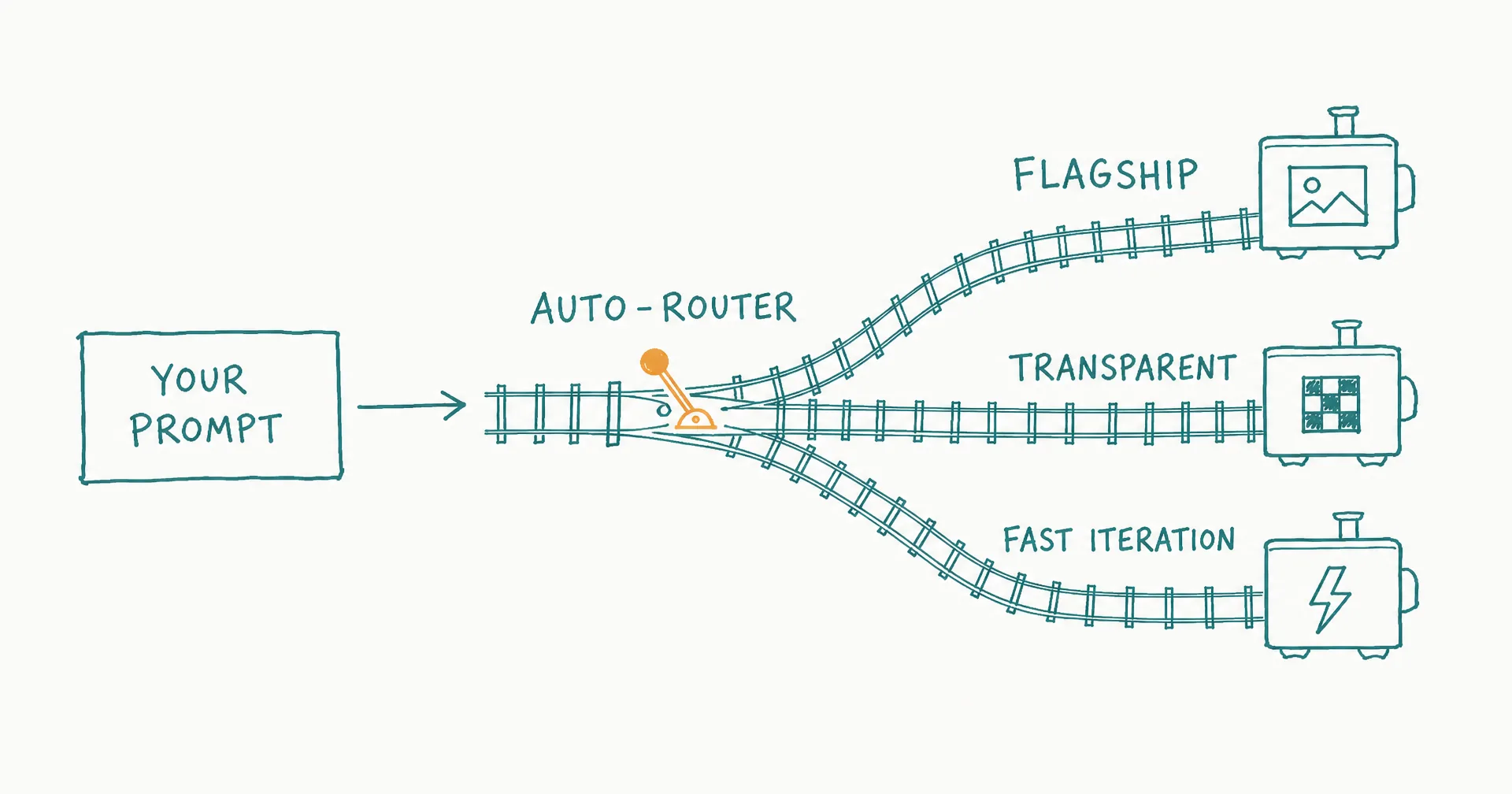
CellCog now ships with three dedicated image generation engines - and your agent automatically picks the right one. GPT Image 2, OpenAI’s most capable image model, joins the lineup as the new flagship.
The philosophy here is the same one that runs through the whole platform: you describe the outcome, the agent makes the tool decisions. Image generation just became the clearest example of it.
- CellCog now ships with three dedicated image generation engines, and your agent automatically picks the right one per request - live since April 24, 2026.
- GPT Image 2 joins as the flagship: near-perfect text rendering for infographics and posters, state-of-the-art photorealism, and flexible sizing up to 4K.
- Multi-reference compositing supports up to 16 input images, plus style transfer and text translation inside images.
- A dedicated transparent-background engine handles logos, stickers, product cutouts, and overlay assets with clean alpha channels.
- A fast conversational engine with full thread memory covers iterative creative work where you refine characters and scenes across turns.
- Want a specific engine? Name it in your prompt and the agent switches immediately - no configuration.
§ 01The Three Engines
The conversational default. Fast, iterative, with full thread memory - built for creative work where you refine characters and scenes across multiple turns. It remembers what you made three prompts ago, so “same character, now at night” just works.
The transparency specialist. Dedicated to transparent backgrounds: logos, stickers, product cutouts, overlay assets - anything that needs a clean alpha channel. Transparency is a genuinely different generation problem, which is why it gets its own engine rather than a checkbox.
GPT Image 2, the flagship. OpenAI’s most capable image model, now available directly in CellCog:
- Near-perfect text rendering for infographics, posters, and ads
- State-of-the-art photorealism
- Flexible sizing up to 4K resolution
- Multi-reference compositing with up to 16 input images
- Style transfer, virtual try-on, and text translation in images
§ 02The Routing Is the Feature
Your agent handles the choice. Ask for an infographic - it picks GPT Image 2, because text rendering is the hard part. Need a transparent logo - the alpha-channel engine. Iterating on a character across a story - the conversational engine with its thread memory.
Want a specific engine? Just say so in your prompt and the agent switches immediately. No configuration needed.
This matters beyond convenience. A multimodal agent producing a real deliverable - a deck, a campaign, a dashboard - generates many images with different requirements in one session. Per-asset engine selection is exactly the kind of judgment you want the agent making silently, the same way a designer picks tools without narrating the choice.
§ 03The Honest Caveats
Flagship quality costs flagship compute: GPT Image 2 generations are slower and pricier than the conversational default, which is why routing reserves it for the requests that need it. Text rendering is near-perfect, not perfect - dense small type still deserves a proofread. And references beat descriptions for anything brand-critical: pass the actual logo or product image rather than describing it, and the compositing engines will preserve it faithfully.
Three engines. Adaptive routing. The right tool for every image.
Q1Why three engines instead of one?
Because image tasks pull in different directions. Text rendering and photorealism reward the heaviest model; transparent-background assets need a dedicated alpha-channel engine; fast iterative work rewards speed and thread memory. One engine forces compromises - routing gives each request the right tool.
Q2What should I use GPT Image 2 for?
Anything where text inside the image must be right - infographics, posters, ads, social cards - plus photorealistic scenes and high-resolution work up to 4K. It also composites from up to 16 reference images for style transfer and product placement.
Q3Do I need to learn which engine is which?
No. Describe what you want and the agent routes it. The engine names only matter if you want to force a choice, which you can do by naming one in your prompt.
Q4What does multi-reference compositing enable?
Passing multiple reference images in one generation: put this product in this scene in this style. Character consistency, virtual try-on, brand-faithful compositions - driven by references rather than descriptions.
Q5Does this change how AI employees produce visuals?
Yes, quietly: an employee producing marketing assets, dashboards, or documents picks the right engine per asset without you specifying anything - the routing is part of the platform’s judgment.