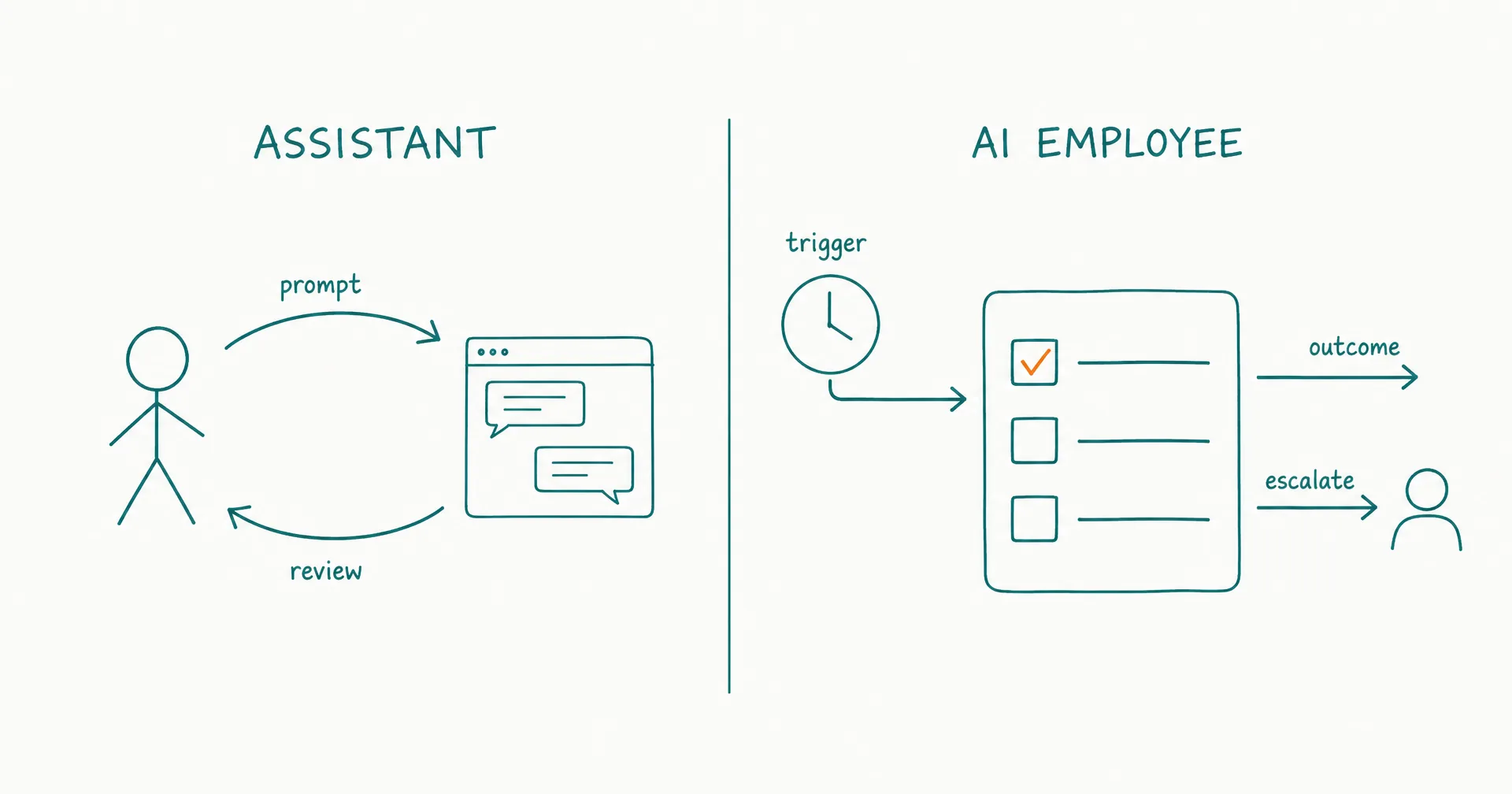
The practical difference between an AI assistant and an AI employee is not intelligence. It is who owns the workflow.
An AI assistant helps a person perform work. The person usually starts the interaction, supplies the immediate goal, carries the broader task state, decides what happens next, and remains present for most of the loop.
An AI employee is assigned a bounded recurring responsibility. Schedules, events, inboxes, or queues can start the work; the system preserves state; defined permissions let it act; exceptions route to a human; and performance is measured across outcomes rather than individual answers.
Modern assistants can use tools, remember preferences, run scheduled tasks, and complete multi-step work. Modern AI employees can also respond on demand. The categories overlap at the feature level. The useful boundary is the operating contract: does the AI help you do the work, or does it carry defined work forward until an accepted outcome, escalation, or stop condition?
On this page · 16 sectionsOpen
- AI Assistant vs AI Employee at a Glance
- What Is an AI Assistant?
- What Is an AI Employee?
- What Is the Real Difference Between Assistance and Ownership?
- Which Features Do Not Settle the Comparison?
- When Is an AI Assistant the Better Choice?
- When Is an AI Employee the Better Choice?
- When Should You Use Both?
- What Does the Assistant Coordination Tax Look Like?
- How Do Implementation and Governance Differ?
- How Do You Convert Repeated Assistant Work Into an AI Employee Role?
- What Are Common AI Assistant vs AI Employee Mistakes?
- How Does CellCog Support Assistants and AI Employees?
- What Are Practical AI Assistant vs AI Employee Examples?
- How Do You Decide in 10 Questions?
- The Bottom Line
- An AI assistant is usually request-driven: you prompt, collaborate, review, and decide the next step.
- An AI employee is responsibility-driven: a trigger starts work, persistent state carries it forward, and the role reports an outcome, blocker, or escalation.
- Tools, memory, autonomy, and schedules do not settle the comparison; assistants increasingly have all four.
- Use an assistant when the work is irregular, exploratory, highly interactive, or difficult to define as a recurring outcome.
- Use an AI employee when the work has a standing owner, stable inputs, observable completion, controlled actions, and a clear supervisor.
- CellCog provides both a direct chat surface and AI Employees with roles, inboxes, shifts, wake conditions, memory, task boards, approvals, KPIs, and handovers.
§ 01AI Assistant vs AI Employee at a Glance
| Dimension | AI assistant | AI employee | Buyer implication |
|---|---|---|---|
| Primary contract | Help the user with a request | Own a bounded recurring responsibility | Decide whether you are buying leverage or delegation |
| Typical initiator | Human prompt; sometimes schedule | Schedule, event, message, queue, or human | Proactivity alone is not enough |
| Workflow owner | Human | AI role, under a human supervisor | Ownership must be explicit |
| Task state | Often carried by the user or conversation | Maintained across shifts and status changes | Long-running work needs durable state |
| Context | Supplied or selected for the interaction | Role, project, account, and open-work context | Persistence needs governance |
| Action | Suggests, drafts, or acts through tools | Takes permitted actions toward a standing outcome | Authority should be action-specific |
| Follow-through | User usually reopens or advances the work | Role checks progress and resumes within policy | Measure chase work, not just output quality |
| Escalation | User is already present | Exception routes to a named person | Absence of a human requires a clear return path |
| Measurement | Helpfulness or task quality | Accepted outcomes, quality, reliability, escalation, cost, and risk | Activity is not accountability |
| Best fit | Irregular, interactive, exploratory work | Recurring, observable, bounded work | Many teams need both |
The table describes operating defaults, not universal product limits. A branded “assistant” may support schedules and API actions; a branded “employee” may still wait for prompts. Evaluate behavior, not the label.
§ 02What Is an AI Assistant?
An AI assistant is software that collaborates with a user on requested work. It answers questions, generates or edits artifacts, analyzes information, uses available tools, and may remember preferences or run configured tasks.
The user remains the center of the operating loop.
The normal assistant loop
- The user notices a need.
- The user opens the assistant or invokes it inside another product.
- The user describes the task and supplies context.
- The assistant answers, drafts, analyzes, or acts.
- The user reviews the result.
- The user decides whether to revise, send, schedule, save, or continue.
The assistant can be extremely capable inside steps 3–5. The distinction is that the user often supplies continuity between loops.
Assistants can be general or specialized
A general assistant can move between research, writing, coding, planning, and analysis. A specialized assistant may support one function, such as meeting notes, design, legal research, or customer-service drafting.
Specialization does not make it an employee. A tax assistant may be deeply knowledgeable yet still perform only the questions a user brings to it.
Assistants can use tools
Tool use does not create role ownership.
An assistant may:
- search the web;
- read files;
- query a connected application;
- edit a spreadsheet;
- create a document;
- send an approved message;
- run code; or
- call an external API.
The question is what happens after the tool call. Does the user coordinate the next step, or does a standing role preserve state and continue the responsibility?
Assistants can remember
Memory can personalize future interactions or preserve conversation context. It does not automatically create a governed business role.
For example, an assistant might remember preferred tone. An employee-level role needs more: authoritative sources, account scope, open commitments, correction paths, expiry, task state, and a named owner. Those records should be deliberately captured, scoped, retrieved, corrected, and retired.
Assistants can be proactive
OpenAI’s current Scheduled Tasks documentation shows that ChatGPT can run one-off or recurring tasks, monitor for meaningful changes, use available apps, and notify a user. OpenAI also documents workspace agents that teams can schedule or trigger through an API.
That matters because “it runs on a schedule” is no longer a reliable category test. A reminder, monitoring task, reusable agent, or scheduled prompt can be proactive without owning a complete operating responsibility.
§ 03What Is an AI Employee?
An AI employee is an operating model that places AI capability inside a standing role with a recurring outcome, persistent work state, bounded authority, review, and human accountability.
The role is organizational software. It is not a claim that the system is a legal employee, a person, or a replacement for human judgment.
If you need the category boundary first, the five-part AI employee definition checks role, continuity, initiative, agency, and accountability.
The normal employee loop
- A schedule, event, message, queue item, or person starts work.
- The role loads the current goal, task state, sources, and permitted context.
- It plans and performs the allowed work.
- It records evidence, decisions, actions, and status.
- It completes, waits, follows up, or escalates.
- A supervisor reviews defined checkpoints and outcome metrics.
- The next shift resumes from durable state.
The role can still ask a person for a decision. Delegation does not require pretending the AI never needs help.
A role has a queue
An assistant receives conversations. An employee receives responsibilities expressed as tasks, messages, monitored conditions, or scheduled deliverables.
A queue needs trigger, priority, owner, status, deadline or service expectation, evidence, blocker, reviewer, completion condition, and archive or handover behavior.
Without those objects, “working in the background” can become invisible activity rather than managed work.
A role has authority
An AI employee may read, prepare, propose, or execute in connected systems. The allowed state should vary by action.
For example:
- read a support ticket;
- draft a response;
- classify urgency;
- propose an account credit;
- send low-risk replies after approval;
- never change billing details; and
- escalate security or legal requests.
The action-by-action permission matrix belongs in the role’s governance design. The comparison-level lesson is that responsibility and authority must be designed together.
A role has accepted outcomes
“Generated 40 drafts” is activity. “Delivered 12 accepted briefings by deadline with required sources and correct escalation” is role performance.
An employee contract needs a useful unit of work, a quality rubric, required evidence, approval state, postconditions, exception rules, a cost boundary, and a stop or narrow condition.
The role earns more autonomy through accepted work, not through confident language.
A role has a supervisor
The supervisor owns role scope, source quality, permissions, approval policy, evaluation, exception handling, incident response, performance review, and retirement.
An AI employee changes where human work happens. It does not remove human accountability.
§ 04What Is the Real Difference Between Assistance and Ownership?
Assistance optimizes a person’s next move. Ownership keeps a defined workflow moving.
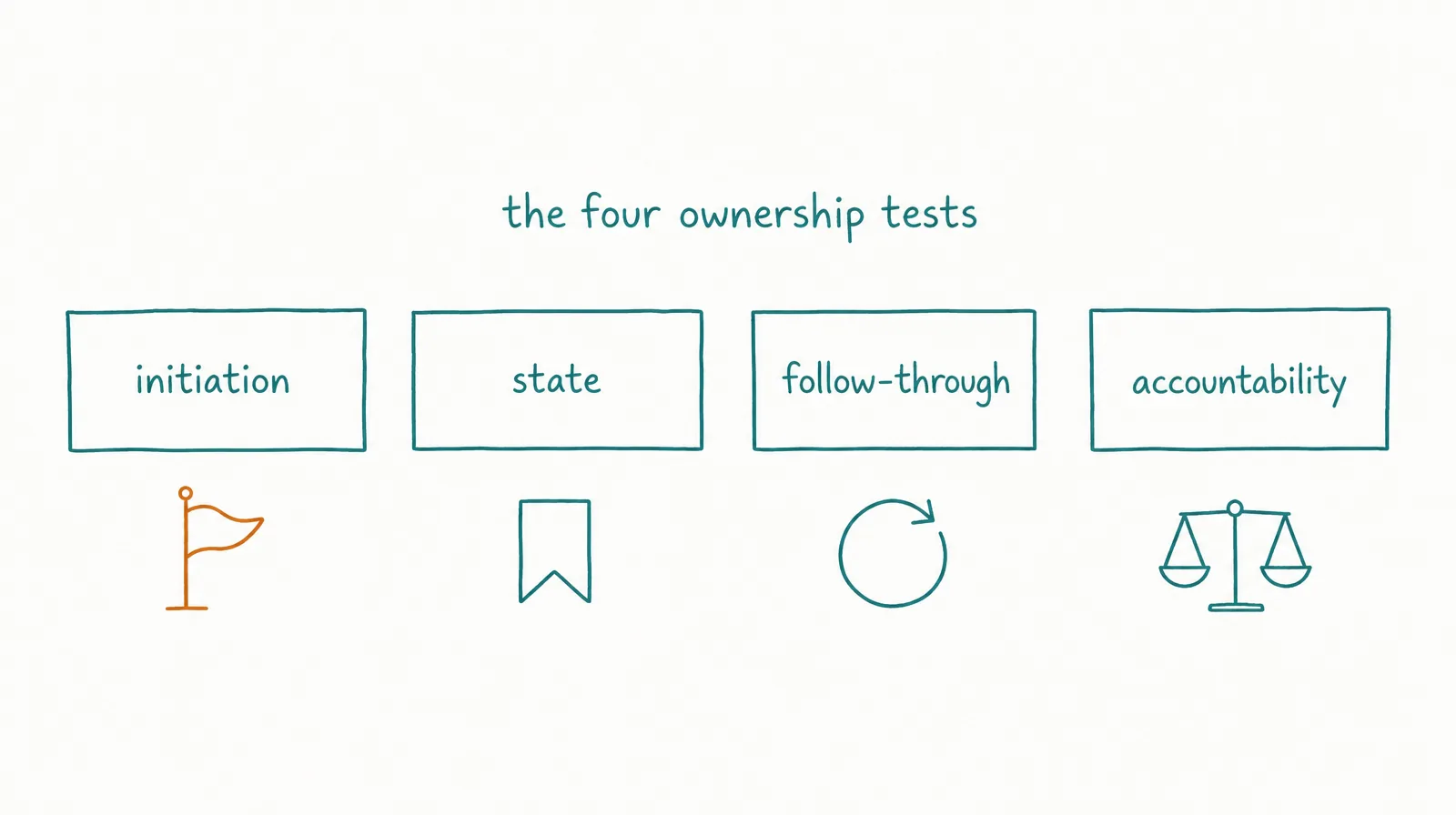
Use four tests: initiation, state, follow-through, and accountability.
Test 1: Who notices that work should begin?
Assistant pattern. The user notices that the monthly report is due, opens the assistant, attaches the latest exports, and asks for analysis.
Employee pattern. The reporting role wakes on the first business day, checks whether approved data is available, opens the task, gathers inputs, and either produces the report or escalates the missing source.
The difference is not the report’s prose quality. It is who carries the obligation to start.
Test 2: Who carries state between steps?
Assistant pattern. The user remembers that finance has not approved the variance, finds the prior thread, and tells the assistant where to resume.
Employee pattern. The task remains in Waiting on approval, with the variance, source, approver, due date, and next action attached. A later shift resumes when the approval event arrives.
Conversation history can help, but task state is a stronger operating object.
Test 3: Who checks what happened next?
Assistant pattern. The assistant drafts an outreach email. The user sends it, watches for a reply, decides when to follow up, and reports the result.
Employee pattern. The role prepares or sends within policy, records the action, stops follow-ups on reply, updates task state, and routes a meeting or exception to the named person.
Follow-through includes knowing when not to continue.
Test 4: Who is measured across the recurring outcome?
Assistant pattern. The user evaluates whether each answer was helpful.
Employee pattern. The supervisor reviews accepted outcomes, first-pass quality, correct escalation, cycle time, reopen rate, cost per accepted outcome, and incidents over a period.
The role’s KPI scorecard should separate outcome measures from prompts, runs, tokens, and other activity diagnostics.
| Test | Assistant signal | Employee signal | Red flag |
|---|---|---|---|
| Initiation | A person starts most work | Multiple approved triggers can open work | Automatic runs with no demand control |
| State | User/conversation holds the thread | Task system holds current state | “Memory” is the only status mechanism |
| Follow-through | User re-prompts or checks | Role resumes, closes, or escalates | Repeated activity with no postcondition |
| Accountability | Helpfulness per interaction | Role metrics and named supervisor | Vendor claim with no operating owner |
§ 05Which Features Do Not Settle the Comparison?
A feature checklist can identify capability, but it cannot prove ownership.
Memory, tools, schedules, autonomy, and custom instructions now appear across assistants, agents, automation platforms, and employee products. The complete configuration determines the operating model.
Memory does not settle it
Assistant memory can preserve preferences, previous conversation details, or user-specific context. A custom assistant may also have uploaded reference knowledge. OpenAI’s current documentation says custom GPTs can contain instructions, knowledge, capabilities, apps, or actions, but each GPT conversation starts fresh without saved memory or previous conversations. Other assistant products implement memory differently.
Employee memory should preserve role-relevant context and open-work continuity across shifts. It needs provenance, scope, ownership, correction, and expiry because it may influence future action.
The difference is not simply “has memory.” It is whether memory participates in a governed role lifecycle.
Schedules do not settle it
A scheduled assistant can send a reminder, prepare a briefing, or check a condition. This is valuable for a well-defined recurring request.
A scheduled employee should also manage the surrounding responsibility:
- verify inputs;
- deduplicate repeated starts;
- create or resume task state;
- apply source and permission policy;
- identify exceptions;
- perform permitted actions;
- check postconditions;
- hand over unfinished work; and
- report outcome measures.
Running the same prompt every Monday is a trigger. It is not automatically a role.
Tool use does not settle it
An assistant may query Gmail, edit a spreadsheet, create a presentation, or update a ticket while the user supervises the session.
An employee role may use the same tools asynchronously inside an action policy. The buyer must know which objects and actions it can access, whether approval is required, what state changed, and how a person reverses or recovers from error.
Tool breadth measures reach. It does not measure accountability.
Autonomy does not settle it
An assistant or agent can perform a complex multi-step task after one prompt. The user still assigned one run and receives one result.
An employee role can act between supervisor interactions, but only toward its recurring scope. Standing autonomy should be narrower than “do anything useful.”
This is the adjacent boundary covered in the AI agent vs AI employee comparison: agentic capability explains how a system pursues a goal; the employee layer explains why, when, and under whose authority it keeps doing so.
A name or avatar does not settle it
Naming software can make collaboration easier. It can also make a prompt template look more operational than it is.
Ask for standing responsibilities, trigger records, durable task state, memory boundaries, tool permissions, approval records, outcome metrics, escalation, handovers, and a human owner.
If those objects are absent, the name is packaging.
§ 06When Is an AI Assistant the Better Choice?
Choose an AI assistant when the user should remain the workflow owner.
That is not a compromise. Interactive assistance is often safer, faster to start, and better suited to work that changes with every conversation.
The work is irregular
Use an assistant for an unfamiliar research question, a first draft of a board memo, exploring a new market, debugging an unusual issue, comparing several strategic options, or creating an artifact that may never recur.
Building a standing role for one uncertain request adds unnecessary setup and monitoring. And if the goal changes materially during the work, a person should shape the path in real time: the assistant provides leverage while the user supplies judgment.
The work is exploratory
Strategy, ideation, design critique, and early investigation benefit from dialogue. The user may not know the desired output until several alternatives appear.
Some tasks are valuable precisely because the scope is open. Forcing them into a recurring role can reward completion before the real problem is understood.
The decision is consequential
Use an assistant to prepare evidence, options, and counterarguments for legal decisions, financial commitments, security changes, hiring or termination, medical decisions, crisis communication, and other high-impact judgment.
The qualified person remains responsible for the decision and should verify critical facts. An assistant can structure the record, find conflicts, and produce a draft. It should not turn an advisory role into silent autonomous authority.
The user already owns the next step
If the operator is already in the spreadsheet, codebase, CRM, or document and wants help with the next move, an embedded assistant minimizes handoff cost.
The user can correct assumptions while they are still cheap. A three-message clarification is often better than configuring a full role for a task that changes daily.
The task does not justify persistent state
A self-contained request with a clear output may need only the current prompt, a few source files, an acceptance check, and a saved artifact.
It does not need an inbox, recurring queue, handover, or role-level memory.
| Choose an assistant when… | Why it fits | What the user still owns |
|---|---|---|
| The request is one-off | No standing operating system is needed | Initiation and follow-up |
| The objective changes during dialogue | Human judgment shapes scope | Direction and acceptance |
| The user is already in the workflow | Collaboration is immediate | System state and next action |
| Consequence requires qualified review | Human remains at the decision | Evidence verification and action |
| Context should be temporary | Less persistent data and governance | Saving the accepted artifact |
| Volume is too low for role setup | Coordination is cheaper than implementation | Repeating the prompt when needed |
§ 07When Is an AI Employee the Better Choice?
Choose an AI employee when a recurring responsibility is valuable enough to deserve an operating contract.
The task should be observable, bounded, and recoverable before it becomes autonomous.
The same outcome recurs
Examples: a weekly competitor-change briefing, daily support triage, a monthly KPI report, a recurring content-production queue, scheduled account research, inbox monitoring and routing, or data-quality review.
The output, cadence, sources, and acceptance criteria recur even when individual cases vary.
Repetition alone is not enough. A recurring task can still belong in workflow automation when the rules and inputs are stable. Use an AI employee when the work also requires interpretation, planning, source selection, or exception handling.
Work should start without the user
Time-based triggers start a shift at an approved time or cadence. Event-based triggers start work from a new email, a Slack message, a queue item, a status change, a new file, an API event, or a monitored threshold.
Each trigger needs deduplication, concurrency, quiet-period, and suppression rules. “Always on” is not a complete trigger design.
Follow-through creates the value
The first output is not the outcome. A research memo may require a reviewer decision. An outreach draft may require a reply stop condition. A support case may require confirmation that the customer received the correct resolution.
The role should know whether to continue, wait, remind, retry, stop, reopen, escalate, or close.
Open work must survive. If a task crosses shifts, the system needs objective, evidence, decisions, blockers, next action, ownership, and deadlines. Reconstructing this from chat history recreates the coordination burden the employee was meant to remove.
Work has a bounded action envelope
The role needs enough authority to make progress - perhaps read, draft, classify, prepare, or execute a reversible action.
High-risk, ambiguous, novel, or irreversible cases return to a person. A role that escalates correctly is not failing; escalation is part of the job.
Performance can be reviewed over time
A reviewer can distinguish accepted, corrected, rejected, escalated, missed, and reopened outcomes. The supervisor can increase task scope, data access, tool access, schedule, or action authority only after representative evidence passes.
The best tasks for AI employees have recurring demand, available inputs, observable quality, manageable exceptions, controlled actions, and a recoverable failure path.
| Choose an AI employee when… | Minimum proof | Avoid if… |
|---|---|---|
| A useful outcome recurs | Demand and cadence history | Work is only occasionally repeated |
| Work should start from a trigger | Defined trigger and suppression | A person must reinterpret every start |
| State crosses sessions or shifts | Task status and source record | Chat history is the only continuity |
| Follow-up is part of completion | Postcondition and stop rule | “Send output” is treated as final value |
| Actions can be bounded | Object/action permission matrix | Authority cannot be narrowed |
| Quality can be sampled | Acceptance rubric and owner | Success is subjective or unobservable |
| Exceptions can return to a person | Escalation owner and response expectation | No qualified human can take over |
§ 08When Should You Use Both?
Most teams should use assistants and AI employees together.
The assistant supports human-led thinking. The employee handles the recurring operational loop. The same underlying model or platform can provide both surfaces - capability evidence such as the DeepResearch Bench standings applies to both, because research quality is upstream of every knowledge-work surface built on it.
Human-led design, employee-led execution
Use an assistant to define the workflow, examine edge cases, draft the role charter, identify authoritative sources, build evaluation cases, design the quality rubric, and pressure-test the escalation rules.
Use the AI employee to receive recurring work, execute the approved routine, preserve state, use permitted tools, request approvals, record evidence, report outcomes, and surface changes that require redesign.
The assistant helps create the operating system. The employee works inside it.
Employee-generated exception, assistant-supported decision
The employee detects an unusual account conflict and escalates with the source record, attempted actions, risk, and decision needed.
The supervisor uses an assistant to compare options, inspect policy, draft a decision, or simulate consequences. The approved decision then returns to the employee’s task state.
This keeps complex judgment interactive without abandoning workflow continuity.
Assistant for ad hoc work, employee for recurring work
| Function | Assistant job | Employee job |
|---|---|---|
| Research | Explore a new question with the user | Produce and maintain a recurring monitored brief |
| Content | Co-draft an unusual launch narrative | Operate the approved editorial queue |
| Support | Help a specialist reason through a rare case | Triage routine cases and prepare responses |
| Sales | Analyze one strategic account | Maintain recurring account research and follow-up state |
| Data | Investigate a new anomaly | Refresh an approved report and escalate variance |
| Operations | Design a process change | Run the recurring checks and exception queue |
The split should follow workflow ownership, not department names.
§ 09What Does the Assistant Coordination Tax Look Like?
An assistant can have a low subscription price and still consume substantial operator time. An AI employee can have a higher setup and run cost while reducing repeated coordination.
Compare total work, not only software price.
Calculate the assistant operating load
For one recurring workflow:
Assistant operating load = initiation + context reconstruction + prompt refinement + review + next-step coordination + follow-up + correction
The software may generate the artifact in minutes. The human may still spend time noticing the need, gathering inputs, restarting context, chasing dependencies, saving outputs, and remembering what happens next.
Illustrative weekly briefing
Assume one briefing runs 48 times per year:
| Human activity | Assistant-led workflow | AI-employee workflow |
|---|---|---|
| Annual role/setup design | 2 hours | 6 hours |
| Initiation and context per run | 20 minutes | 2 minutes exception average |
| Review per run | 20 minutes | 15 minutes |
| Follow-up/state per run | 10 minutes | 5 minutes |
| Annual human time | 42 hours | 23.6 hours |
Illustrative arithmetic:
- Assistant: 2 + (50 minutes x 48 / 60) = 42 hours
- AI employee: 6 + (22 minutes x 48 / 60) = 23.6 hours
These are assumptions, not CellCog or industry results. If the work changes every week, employee setup and maintenance may exceed the saved coordination. If inputs, output, and exceptions are stable, removing repeated initiation and state reconstruction can matter.
Calculate the employee operating load
Employee operating load = role design + source preparation + integration + permission design + evaluation + review + exception handling + monitoring + correction
Delegation does not make work free. It moves human effort from prompting every run toward designing, supervising, and improving the role.
Hidden employee costs include source cleanup, role instructions, context maintenance, connector setup, permission review, test cases, output review, exception response, incident recovery, model or platform changes, memory correction, and decommissioning.
The complete comparison should calculate total cost per accepted outcome rather than comparing headline subscription prices.
Measure the break-even condition
An employee-level setup is justified when:
Coordination time avoided per cycle x expected cycles > setup + ongoing supervision difference
Suppose employee setup requires 8 additional hours and saves 25 minutes per accepted weekly cycle. Time break-even occurs after:
8 hours / (25 / 60 hours) = 19.2 cycles
Round up to 20 accepted cycles. This remains illustrative; real correction and exception time can move the result sharply.
Do not automate toward employee ownership merely because the time calculation is positive. A single severe error may outweigh dozens of saved hours. Compare first-pass acceptance, correction minutes, missed escalation, worst-error severity, reopens, recovery time, and permission exposure.
§ 10How Do Implementation and Governance Differ?
An assistant can often begin with one prompt. An AI employee needs an operating specification.
That extra work is justified only when the responsibility recurs.
Assistant implementation
An assistant may need an account and workspace, a prompt or conversation, selected sources, optional custom instructions, approved tools, user review, and an artifact destination. Time to first useful output can be one session.
The primary control is that the user is present and decides what to accept or do. This is a strong control, provided the user has the expertise and attention to review.
The main failure mode: the assistant looks productive, but the user becomes a permanent coordination layer - restarting context, copying data, checking state, and chasing follow-up.
AI employee implementation
An employee needs a recurring outcome, in-scope and out-of-scope tasks, trigger and suppression rules, a source hierarchy, context and memory policy, a queue and status model, tool permissions, an approval matrix, completion and postconditions, an escalation owner, a KPI contract, handovers, test cases, and a stop condition.
The AI employee hiring guide converts these objects into a role charter and evaluation process.
The primary control changes position: the supervisor is not present for every step, so control moves into configuration, authentication, authorization, approval, logging, sampling, escalation, and incident response.
The main failure mode: the system receives standing access and recurring triggers before the team can define accepted work. Activity compounds faster than governance.
| Stage | Assistant | AI employee | Decision evidence |
|---|---|---|---|
| Define | Current request | Recurring role and non-goals | Role charter |
| Context | User supplies relevant material | Governed source and memory scopes | Source hierarchy |
| Start | Human interaction | Schedule, event, queue, message, or human | Trigger record |
| Access | In-session tools | Standing, action-specific permissions | Permission matrix |
| Test | Review current output | Representative normal, edge, unsafe, and failure cases | Evaluation set |
| Launch | Begin using | Observe, shadow, draft, approve, then bounded action | Stage-gate record |
| Monitor | User evaluates usefulness | Supervisor reviews outcome, quality, escalation, cost, and risk | KPI dashboard |
| Change | Adjust prompt | Version role, sources, tools, memory, and tests | Change record |
| Stop | End conversation | Pause triggers, revoke access, preserve evidence, retire memory | Decommission checklist |
The employee path is heavier because the user is delegating persistence and initiative, not just generation.
§ 11How Do You Convert Repeated Assistant Work Into an AI Employee Role?
Do not promote an entire assistant history into a role. Extract one recurring workflow and prove it in stages.
Step 1: Find repeated coordination
Review four to eight recent cycles and mark repeated work: same prompt, same source gathering, same export, same format, same follow-up, same reviewer, same correction, same status update, or same deadline. The range is a practical sampling suggestion, not a benchmark.
Do not automate a step merely because it repeats. Mark where a person adds judgment, authorization, relationship context, or accountability that should remain.
Step 2: Name one accepted outcome
Weak role: help with marketing.
Stronger role: every Thursday, produce a source-backed competitor-change briefing covering the approved watchlist, with material changes, conflicts, and unresolved items visible for strategy review by Friday at 10:00 a.m.
The stronger version names cadence, artifact, scope, evidence, and review.
Step 3: Define the trigger and inputs
Choose one trigger: schedule, new message, queue item, data change, file arrival, explicit human assignment, or monitored condition.
For each source, define authority, access method, freshness, expected format, missing-data behavior, sensitivity, and owner.
Step 4: Define state and follow-through
A small state model may include To do, In progress, Waiting, Review, Done, and Reopened. Add states only when they change ownership or behavior.
Define what must be true after output: artifact saved, reviewer notified, source links present, system record updated, recipient response detected, approval recorded, or exception routed.
Step 5: Bound tools and actions
Start below the maximum: no connection, sandbox, read-only, prepare/draft, approval-required action, or bounded execution. Do not give a standing role every permission the assistant occasionally used under direct supervision.
Separate objects and actions. “CRM access” is too broad. Define which accounts, fields, reads, writes, exports, deletions, and notifications are permitted.
Step 6: Build the evaluation set
Test normal cases, missing inputs, conflicting sources, stale data, duplicate triggers, tool failure, permission denial, unsafe instructions, high-impact exceptions, and stop conditions.
Record the accepted outcome, quality rubric, source use, action trace, correct escalation, correction time, cost, and worst observed failure.
Step 7: Onboard in stages
Observe and shadow: let the role inspect work and produce a proposed result without affecting production. Draft: the role creates the artifact; a person reviews and performs any external action. Approved reversible action: allow selected actions only after required approval and postcondition checks. Bounded independent shifts: expand only the task subtype and action that passed.
A graduated onboarding plan should use evidence gates rather than a universal number of days.
Step 8: Keep the assistant path
The promoted workflow should still return unusual cases to interactive work.
Do not force every exception into the role. A supervisor can open an assistant, examine the evidence, make a decision, and return the approved result to task state.
§ 12What Are Common AI Assistant vs AI Employee Mistakes?
The main mistake is treating a marketing noun as an architecture. Use operating evidence to avoid six predictable failures.
Mistake 1: Calling any powerful assistant an employee
A product completes an impressive multi-step task, so the team assumes it can own the recurring workflow. One successful run does not prove trigger control, persistent state, follow-through, evaluation, or exception handling. Test the role over repeated cycles, including missing data and interruption.
Mistake 2: Calling any scheduled task an employee
A prompt runs every morning and sends an output. The system may not know whether the last run succeeded, whether inputs changed, whether the output was accepted, or whether a person acted. Add demand control, task state, postconditions, and accepted-outcome review - or keep it as scheduled assistance.
Mistake 3: Making the employee fully autonomous on day one
The team grants broad tool access to avoid manual review, but role scope, source quality, permission boundaries, and failure recovery have not been proven together. Start in observation or draft mode and expand one material authority at a time.
Mistake 4: Using memory as task management
The system is expected to “remember” deadlines, ownership, status, and approval. Unstructured memory can be stale, ambiguous, or inconsistently retrieved. Keep task state in explicit fields. Use memory for governed continuity, not as the only workflow database.
Mistake 5: Ignoring human coordination
The team compares $20 assistant software with a higher employee-platform cost and stops there. Prompting, context reconstruction, follow-up, correction, and state management remain human work. Calculate total cost and time per accepted outcome under the same workflow.
Mistake 6: Assuming “employee” removes supervision
The organization treats asynchronous operation as transferred accountability. Someone still owns permissions, policies, review, incidents, and external consequences. Name a human supervisor and an escalation path before the first trigger.
| Mistake | Early warning | Consequence | Corrective decision |
|---|---|---|---|
| Powerful run = employee | Demo evidence only | Repeated work restarts | Test standing state |
| Schedule = employee | Output appears with no closure | Activity without outcome | Add postconditions |
| Full autonomy first | Broad connection scopes | High blast radius | Stage permissions |
| Memory = task board | Deadlines live in prose | Lost or duplicated work | Use explicit status |
| Price = total cost | Human chase time unmeasured | False economy | Normalize accepted outcome |
| No supervisor | “The AI owns it” | Unhandled exception | Assign accountable human |
§ 13How Does CellCog Support Assistants and AI Employees?
CellCog separates direct chat with its super-agent from the AI Employee operating surface.
Its chat surface is direct work: the user sends a message and the agent responds. The same platform routes standing work toward AI Employees with an inbox, schedule, persistent task board, memory across shifts, and autonomy to act while the user is away.
CellCog chat is the assistance surface
Use direct chat to ask a question, explore a problem, run one research assignment, create a document or media artifact, analyze a dataset, build a tool, revise interactively, or supervise a complex one-off task. The user defines the current task and remains in the interaction.
Capability is not the boundary. CellCog’s chat surface uses its general-purpose super-agent. It can produce multi-step work and many artifact types, so the employee distinction is not that chat is simple. The same capability can sit inside two contracts: one prompt and a finished task, or one role and repeated shifts.
CellCog AI Employees are the ownership surface
CellCog’s current AI Employees page describes a role with a name, goals and KPIs, its own inbox, a task list, scheduled and on-demand shifts, wake conditions, persistent context across shifts, approvals, handovers, and defined permissions.
These are role primitives. The buyer must still configure them into a safe and useful job.
Trigger and queue: CellCog describes starts from schedules, email, Slack messages, and other events. The role’s inbox and task board provide operating surfaces beyond a conversation.
Continuity: memory and handovers carry approved context and open work across shifts. This can reduce repeated briefing only when sources, scope, corrections, and task state are well governed.
Accountability: goals, KPIs, approvals, and human handback create places to define success and control. They do not prove that a new role is ready; the buyer’s tests and review do.
CellCog documents its own assistant-to-employee use case
CellCog publishes a first-party account of how it uses its own platform, distinguishing interactive sessions from standing employees used for recurring operations. Its employee setup uses a role brief, weekday or event-driven shifts, repository and Gmail connections, autonomous work, handovers, and escalation to a person.
This is a useful product example because it names both sides: the employee progresses recurring work; a person remains available for consequential decisions. It is an owned company example, not independent evidence that every buyer will get the same result.
Product labels and facts change
CellCog publishes vendor comparison pages for buyers making a vendor-specific decision. Use them together with current first-party documentation from both products.
The category boundary is not “ChatGPT cannot schedule” or “assistants cannot act.” OpenAI’s July 2026 documentation shows scheduled and monitoring tasks, app use, and workspace agents with schedule or API triggers.
That evolution reinforces the point: a calendar, tool, or agent feature does not settle whether a configured system owns the entire recurring responsibility.
| Buyer requirement | Relevant CellCog surface | Evidence to verify in a pilot |
|---|---|---|
| On-demand collaboration | Chat / Super Agent | One representative artifact and review trace |
| Standing role | AI Employees | Role, non-goals, supervisor, queue |
| Scheduled start | Shifts/schedule | Trigger history, timezone, duplicate behavior |
| Event start | Wake conditions/inbox | Allowed event, suppression, quiet period |
| Persistent continuity | Memory/handovers | Source, scope, correction, resume test |
| Visible work state | Task list/board | Owner, status, blocker, review, closure |
| Controlled action | Permissions/approvals | Object/action granularity and denied-action test |
| Measured outcome | Goals/KPIs/dashboards | Buyer-defined accepted outcome and drill-down |
| Human return path | Approval/handover | Named owner, response expectation, state after escalation |
The buyer should verify each row in the live account. A feature name is the start of diligence, not the result.
§ 14What Are Practical AI Assistant vs AI Employee Examples?
The same function can contain assistant work, employee work, deterministic automation, and human-only judgment. Classify the workflow at the task level.
Example 1: Executive briefing
Assistant version. An executive uploads several documents, asks for a summary, explores implications, and edits the final memo. Best when the question is new, the sources change, executive judgment shapes the analysis, and no recurring delivery obligation exists.
Employee version. A research role monitors an approved company list, produces a weekly change brief, preserves unresolved claims, requests review, and updates the next cycle. Best when the watchlist is stable, the cadence recurs, required sources are defined, material-change criteria are testable, and a reviewer owns strategic interpretation.
Example 2: Customer support
Assistant version. A support specialist asks for help drafting a difficult reply while reviewing the account and policy.
Employee version. A support role triages inbound tickets, applies approved categories, prepares routine responses, routes sensitive cases, records state, and monitors whether the case reopens.
Human-only boundary. Legal threats, safety issues, complex refunds, or relationship-sensitive cases may require a qualified person. The employee should package the evidence and escalate rather than improvise.
Example 3: Content operations
Assistant version. A marketer collaborates on a campaign concept, tests angles, and iterates on one flagship piece.
Employee version. A content role operates the approved production queue: brief, source collection, draft, review, revision, CMS preparation, and status reporting.
Workflow automation boundary. Slug creation, metadata checks, file naming, publication notifications, and other deterministic steps may belong in rules-based automation rather than model judgment.
Example 4: Sales research
Assistant version. A seller asks for one account brief before an important meeting.
Employee version. A research role prepares account packets when qualified opportunities enter a defined stage, refreshes stale fields, flags uncertainty, and hands the packet to the account owner.
Permission boundary. The role may prepare a CRM update while the account owner approves material changes. Action scope should reflect data sensitivity and recovery cost.
Example 5: Operations monitoring
Assistant version. An operator asks the AI to interpret a current anomaly.
Employee version. A role checks an approved dashboard on schedule, compares current state with thresholds, gathers supporting evidence, opens an incident task, and routes a decision when the condition is material.
Deterministic boundary. If one stable threshold always opens one fixed alert, ordinary monitoring automation may be simpler and more reliable. Add an AI employee only when classification, investigation, or exception handling requires judgment.
| Workflow | Assistant | AI employee | Human |
|---|---|---|---|
| Executive reporting | Explore the question | Produce recurring brief | Decide strategy |
| Support | Draft unusual case | Triage routine queue | Resolve high-impact exception |
| Content | Shape novel campaign | Operate production queue | Approve brand and publication |
| Sales | Analyze strategic account | Prepare recurring packets | Own relationship and commitment |
| Operations | Interpret one anomaly | Monitor and investigate | Authorize consequential response |
§ 15How Do You Decide in 10 Questions?
Score one workflow, not the whole department. Answer each question with Yes, Partly, or No.
The 10-question ownership test
- Does the same useful outcome recur?
- Can a schedule, event, message, or queue item start it reliably?
- Are the required sources known and accessible?
- Can accepted output be distinguished from completed activity?
- Can the task retain explicit state across sessions or shifts?
- Can tool and data permissions be narrowed by object and action?
- Are common exceptions identifiable?
- Is a qualified human available for escalation?
- Can failure be detected and recovered?
- Is the saved coordination worth setup, supervision, and risk?
Route the result
| Pattern | Recommended model | Why |
|---|---|---|
| Mostly No on recurrence and trigger | AI assistant | Work is irregular or user-led |
| Yes on recurrence, No on judgment | Workflow automation | Stable rules should stay deterministic |
| Yes on recurrence, state, evaluation, and bounded action | AI employee candidate | Responsibility can be operationalized |
| Yes on recurrence, No on recovery or escalation | Keep human-led | Consequence exceeds control |
| Mixed answers | Hybrid | Assistant, automation, employee, and human each own a layer |
Do not total the answers as a universal maturity score. A single No on recovery, permission control, or qualified escalation can block employee-level autonomy even when nine other answers are Yes.
Make the final assignment
Choose an assistant if a person should initiate every cycle, the objective changes during interaction, the user needs collaborative thinking, context is short-lived, volume is low, or the user must approve nearly every step.
Choose an AI employee if a bounded outcome recurs, work should begin without a person, state and follow-through matter, inputs and sources are governable, actions can be narrowed, exceptions have an owner, and performance can be sampled over time.
Choose both if routine work can be delegated, exceptional decisions remain interactive, and approved decisions can return to durable task state.
§ 16The Bottom Line
The difference between an AI assistant and an AI employee is who carries the work between interactions.
An assistant is the better tool when you are present, the objective is changing, and collaboration is the point. An AI employee becomes useful when one bounded outcome recurs, starts from approved triggers, retains explicit state, uses scoped authority, follows through, and reports an accepted outcome or exception.
Use this order:
- identify one repeated assistant workflow;
- separate stable rules from model judgment;
- define the accepted outcome and human owner;
- design trigger, state, sources, permissions, postconditions, and escalation;
- test in observation and draft modes; and
- expand only after repeated evidence passes.
To evaluate the product model, explore CellCog AI Employees. To turn the decision into a real role, use the AI employee hiring process and classify one workflow as help on demand, deterministic automation, owned AI work, or human-only judgment.
Q1Is an AI employee just a more advanced AI assistant?
Not necessarily. An assistant can be as capable as the model inside an employee product. The employee distinction is the operating layer: a recurring role, triggers, durable task state, permissions, follow-through, outcome measurement, escalation, and a human supervisor.
Q2Can an AI assistant run scheduled tasks?
Yes. Current assistant products can support reminders, recurring work, monitoring, app use, schedules, or API triggers. Scheduling proves proactivity, not responsibility. Check whether the system also manages task state, postconditions, exceptions, accepted outcomes, and accountability.
Q3Does an AI employee work without humans?
It can perform bounded work between human interactions, but people still define the role, sources, permissions, approvals, quality standard, escalation, and stop conditions. High-impact or ambiguous decisions should return to a qualified person.
Q4Is an AI assistant the same as an AI copilot?
The terms often overlap because both usually help a user inside an active workflow. Copilot emphasizes that the human remains the primary operator. The important distinction here is whether the system provides request-driven help or owns a standing responsibility.
Q5Is an AI employee the same as a virtual assistant?
No. AI assistant here means software. Virtual assistant can refer to a human contractor or outsourced support role, which changes availability, judgment, employment, management, privacy, and cost considerations. That human-versus-software decision deserves a separate comparison.
Q6Should a small business start with an assistant or an AI employee?
Start with an assistant when the workflow is still being discovered. Once one useful outcome repeats, inputs stabilize, exceptions are understood, and quality is observable, test that task as an AI employee in observation or draft mode. Do not start by delegating an entire department.