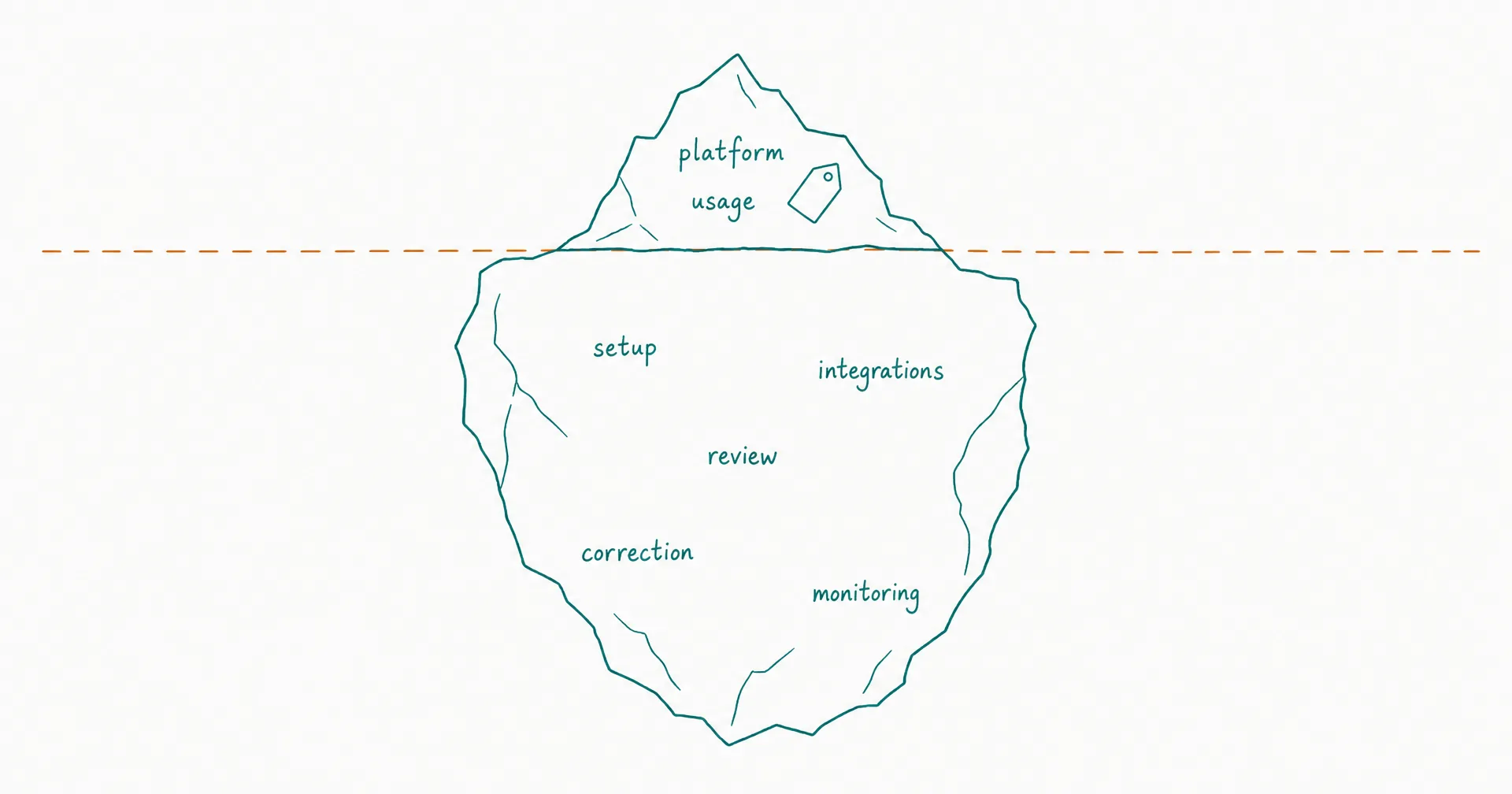
An AI employee can cost from a small monthly subscription to thousands of dollars per month, but the plan price is not the total cost.
The useful calculation has 7 layers: platform, variable usage, setup, integrations, human review, correction and rework, and monitoring plus failure exposure. The answer changes with the role, session frequency, task complexity, output type, acceptance rate, and authority level.
For CellCog specifically, the live pricing page showed monthly plans from $8 for 800 credits to $500 for 50,000 credits as of July 19, 2026, plus higher visible Pro and Nitro variants. CellCog’s Billing Guide (figures dated September 6, 2026) puts a typical working session at about $3 to $4 on Flash and about $20 to $25 on Max, and the cost depends purely on how much work you assign. That is a direct-usage estimate - not a complete operating budget.
Calculate the cost of one bounded role with visible assumptions. Do not mistake an entry plan for the role’s price or call raw credit spend “ROI.”
On this page · 18 sectionsOpen
- The 7 Cost Layers at a Glance
- What Does “AI Employee Cost” Actually Mean?
- How Is AI Employee Pricing Usually Structured?
- What Does CellCog Cost in July 2026?
- Why Does CellCog Quote a Range Instead of One Number?
- What Are the 7 Layers of Total AI Employee Cost?
- What Is the Total-Cost Formula?
- What Does a Weekly Research AI Employee Cost?
- What Does a Weekday Operations AI Employee Cost?
- When Is an On-Demand Agent Cheaper?
- What Hidden Costs Cause AI Employee Budget Overruns?
- How Should You Budget a 30-Day Pilot?
- How Do You Compare Vendors Fairly?
- When Is CellCog Cost-Effective?
- What Should You Track After Launch?
- How Do You Calculate the Break-Even Point?
- What Should Procurement Ask Before Approving the Budget?
- Final Recommendation
- Total AI employee cost equals platform + usage + setup + integrations + review + correction + monitoring and failure exposure.
- As of July 19, 2026, CellCog’s live pricing showed Starter at $8/800 credits, Basic at $20/2,000, base Pro at $40/4,000, and base Nitro at $500/50,000, with top-ups at 90 credits per $1.
- CellCog’s Billing Guide (figures dated September 6, 2026) puts a typical working session at about $3 to $4 on Flash and about $20 to $25 on Max; the cost depends purely on how much work you assign.
- In the weekday operations scenario below, $550 of direct usage (22 working sessions at the Billing Guide’s $25 Max ceiling) becomes roughly $1,030/month after review, corrections, setup amortization, and administration.
- The most important metric is total cost per accepted outcome - not credits spent, tasks started, or outputs generated.
- Budget one bounded, observable AI employee task before purchasing capacity for a broad job title.
§ 01The 7 Cost Layers at a Glance
| Cost layer | What it includes | Billing shape | Common omission |
|---|---|---|---|
| 1. Platform | Subscription, workspace, storage, support tier | Monthly/annual | Treating entry price as role price |
| 2. Usage | Model, tools, credits, tokens, runs, media, compute | Variable | Ignoring retries and idle triggers |
| 3. Setup | Role design, context pack, tests, workflow mapping | One-time | Calling internal labor “free” |
| 4. Integration | Connectors, API work, authentication, data cleanup | One-time + ongoing | Counting connector availability as implementation |
| 5. Review | Approval, sampling, factual review, exception decisions | Ongoing labor | Assuming human oversight disappears |
| 6. Correction | Rework, rejected outputs, repeated runs, rollback | Variable | Counting generated output as accepted output |
| 7. Operations/risk | Monitoring, access reviews, incidents, change management | Ongoing + expected loss | Excluding rare but material failures |
The first 2 layers appear on a vendor invoice. The other 5 often appear in employee time, implementation work, delayed output, or incident cost. A credible budget includes all 7.
§ 02What Does “AI Employee Cost” Actually Mean?
AI employee cost is the full monthly or annual spend required to produce accepted work from a standing AI role.
The definition of an AI employee matters because a standing role adds costs that a one-off agent does not always carry: persistent context and memory, schedules and event triggers, a task queue, connected systems, permissions and approvals, evaluation and KPIs, handovers, exception handling, and ongoing monitoring.
The platform may sell credits, seats, runs, tasks, actions, or a flat subscription. Your business buys accepted outcomes.
Direct cost versus operating cost
Use 2 subtotals:
Direct vendor cost = subscription + top-ups + paid tools Operating cost = setup amortization + integration/admin + review + correction + monitoring + expected failure cost
Then: total AI employee cost = direct vendor cost + operating cost.
This prevents a $20 plan from being presented as a $20 employee when the role consumes top-ups, 6 hours of monthly review, and ongoing system administration.
Cost is role-specific
A weekly research briefing and a full-time multimodal content role use different run frequency, context volume, model modes, tool calls, output formats, file storage, correction work, approval frequency, and failure exposure.
Ask “What does this role cost?” rather than “What does AI cost?”
§ 03How Is AI Employee Pricing Usually Structured?
AI employee platforms use several pricing units. The unit changes what must be measured.
| Pricing model | Vendor bills for | Buyer must measure | Main risk |
|---|---|---|---|
| Subscription | Access or included capacity | Actual utilization | Paying for unused capacity |
| Credit/token | Model and tool consumption | Credits per accepted outcome | Variable usage and opaque conversion |
| Per task/run | Each execution | Retry and rejection rate | Paying repeatedly for failed runs |
| Per action | Tool or workflow action | Trigger/action volume | Event storms and branch expansion |
| Per seat | Human or AI worker access | Active role utilization | Shelfware |
| Outcome-based | Defined completed result | Acceptance contract | Disputes over quality/completion |
| Custom enterprise | Capacity, support, terms, controls | Full contract economics | Bundled costs hide unit economics |
An employee can consume several units at once: a platform subscription, model credits, third-party API charges, and human review. For cost calculation, normalize every pricing model into the same monthly role and accepted workload.
§ 04What Does CellCog Cost in July 2026?
CellCog uses monthly credit bundles. Every AI operation consumes credits, and the live page says more complex work consumes more.
As of July 19, 2026, CellCog displayed these monthly options:
| Plan | Monthly price | Included credits shown | Implied price per included credit if fully used | Other visible inclusions |
|---|---|---|---|---|
| Starter | $8 | 800 | $0.0100 | All chat modes, 800 MB Drive |
| Basic | $20 | 2,000 | $0.0100 | All chat modes, 2 GB Drive |
| Pro (base selection) | $40 | 4,000 | $0.0100 | All chat modes, 4 GB Drive, priority processing |
| Nitro (base selection) | $500 | 50,000 | $0.0100 | All chat modes, 50 GB Drive, priority processing, dedicated support |
| Additional credits | $1 | 90 | $0.0111 | Purchased as needed |
The page also displayed Pro price selectors at $80, $160, and $320 and a Nitro selector at $1,000. The displayed prices alone do not establish their credit allocations, so verify the selected variant on the live pricing page before budgeting. The page advertised roughly 8% savings for yearly billing; all examples below use monthly pricing.
Included-credit math
If every included credit is used, the 4 visible base bundles each work out to $0.01 per included credit. Top-ups cost $1 ÷ 90 credits = $0.0111 per credit - about 11.1% more per credit than a fully utilized base bundle. The difference is small; underutilization can matter more.
Underutilization changes the effective rate
If a business buys 4,000 credits for $40 but consumes only 2,000 before the eligible period ends, the effective rate is $40 ÷ 2,000 = $0.0200 per consumed credit. The rate doubles. Track consumed, remaining, expired, top-up, and role-attributed credits, and verify the current credit-validity rules on the live pricing page - validity terms can change. CellCog’s billing guide documents how plans, credits, top-ups, and validity work.
§ 05Why Does CellCog Quote a Range Instead of One Number?
Different figures describe different tiers.
CellCog’s Billing Guide (figures dated September 6, 2026) gives typical credits per working session by tier: 300 to 400 on Flash, built for speed, and 2,000 to 2,500 on Max, its deepest reasoning. At the subscription rate of 100 credits per $1 that is about $3 to $4 on Flash and about $20 to $25 on Max. A heavier assignment (deep research, a video, many attachments) runs above these figures; a light check-in runs below them. CellCog does not publish monthly totals - the cost depends purely on how much work you assign.
| Tier | Typical credits per working session | At 100 credits per $1 |
|---|---|---|
| Flash | 300 to 400 | about $3 to $4 |
| Max | 2,000 to 2,500 | about $20 to $25 |
These numbers are not guaranteed consumption rates. A session may use more or fewer credits depending on tier, task, tools, context, and output.
§ 06What Are the 7 Layers of Total AI Employee Cost?
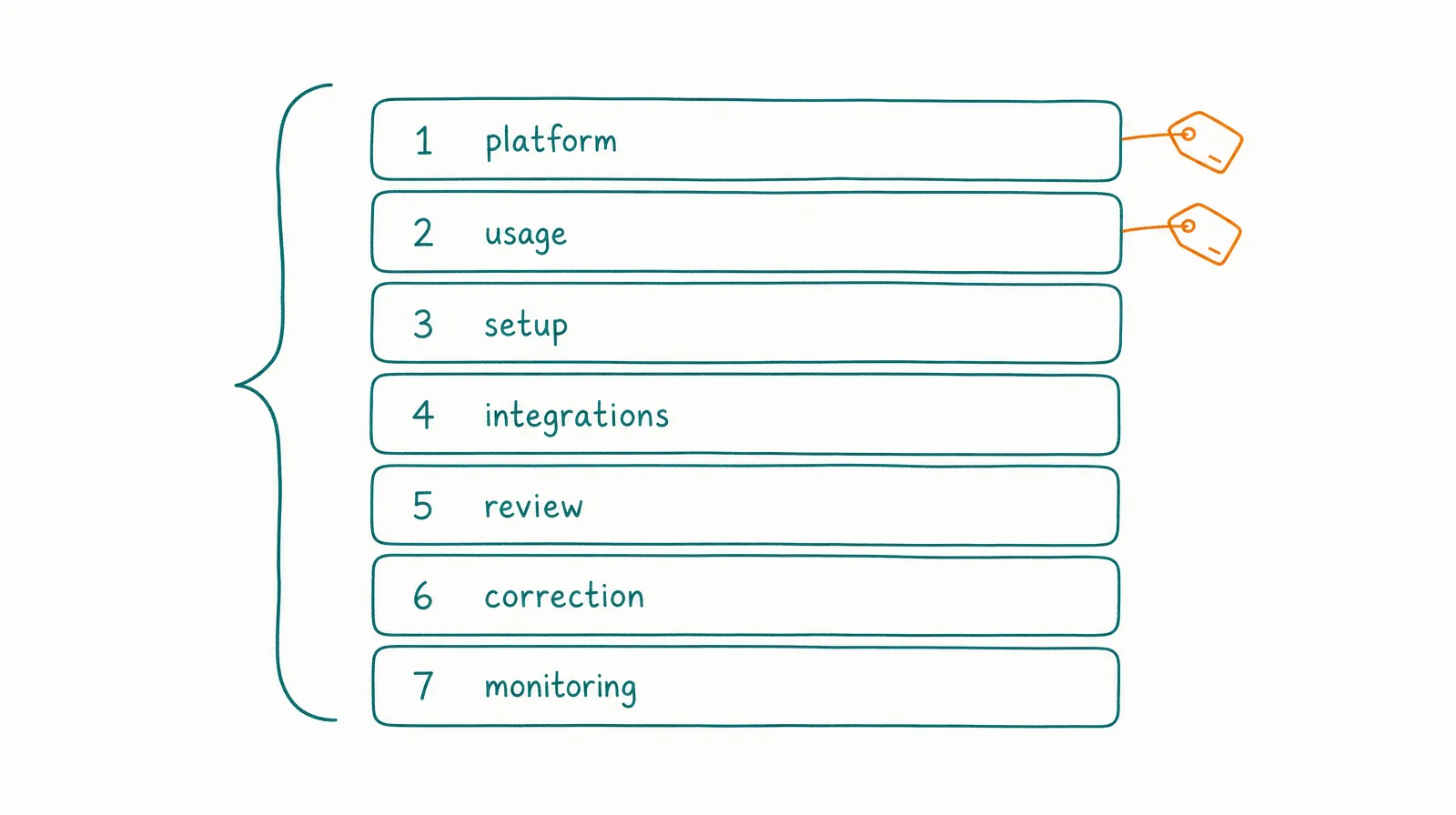
1. Platform subscription. The recurring plan or contract amount. Record the monthly/annual commitment, included usage, rollover/validity, storage, support, user/role limits, overage/top-up rate, upgrade path, and cancellation/refund terms.
2. Variable usage. Usage can increase with more sessions, longer context, more model turns, higher-cost modes, agent teams, tool calls, web research, code execution, media generation, file processing, retries, and duplicate triggers. AWS guidance on serverless agentic-AI cost identifies token use, invocation volume, event-driven triggers, knowledge-base expansion, tool calls, and unbounded loops as cost drivers worth monitoring.
3. Setup and role design. Process inventory, role charter, task and decision mapping, source hierarchy, context pack, KPI and acceptance rubric, evaluation cases, prompt/instruction design, permission mapping, escalation, incident plan, and pilot review. The outcome-first hiring process reduces implementation risk, but it still consumes owner, domain, security, and reviewer time. Amortize one-time setup: monthly setup cost = one-time setup cost ÷ expected useful months. Use 6 months only as an illustrative planning window.
4. Integrations and data. A connector logo does not mean the role is production-ready. Budget authentication, API setup, field mapping, data cleanup, sandboxes, service accounts, workflow changes, testing, monitoring, schema drift, third-party API fees, and revocation. A Salesforce connection may expose 100 actions while the role needs 3 - the cost comes from making the correct 3 safe and reliable.
5. Human review. Output acceptance, source checks, approval, exception decisions, quality sampling, KPI review, access review, and incident review. Review cost = review hours × fully loaded reviewer hourly cost. Illustrative examples below use $60/hour for arithmetic, not as a market wage claim.
6. Correction and rework. Generated is not accepted. Correction cost includes editing, factual repair, reruns, tool retries, duplicate cleanup, task reopening, rollback, customer recovery, and downstream work caused by a bad output. Track correction minutes per accepted outcome. A cheaper model or mode can raise total cost if rejection and correction increase.
7. Monitoring and failure exposure. Standing roles require usage dashboards, budgets and alerts, trigger monitoring, logs, source freshness, permission review, policy updates, regression tests, incident response, recovery, and decommissioning. Google Cloud’s AI/ML cost guidance recommends defining both costs and business value, assigning owners, monitoring continuously, using pilots, and iterating from observed KPIs. NIST’s AI RMF says potential costs - including non-monetary costs from errors or system behavior - should be examined and documented relative to risk tolerance.
§ 07What Is the Total-Cost Formula?
Use: monthly total cost = P + U + (S ÷ M) + I + R + C + O + E
| Variable | Meaning |
|---|---|
| P | Platform subscription |
| U | Variable usage, top-ups, and paid tools |
| S | One-time setup cost |
| M | Months used to amortize setup |
| I | Monthly integration/admin cost |
| R | Human review and approvals |
| C | Corrections, retries, and rework |
| O | Monitoring and governance |
| E | Expected monthly failure exposure |
Expected failure exposure can be estimated as E = estimated incident frequency × average remediation cost. Use severity bands if the average hides tail risk - a single high-impact incident may justify stricter approval even when its expected monthly value looks small.
Keep the formula auditable: each input needs an owner, source, period, actual-or-estimated label, last update, inclusion rule, and confidence. Do not hide review inside “existing payroll” - that labor could be used elsewhere and belongs in the decision.
§ 08What Does a Weekly Research AI Employee Cost?
This is an illustrative scenario, not a CellCog quote or performance benchmark. Assumptions: 4.33 working sessions per month on Max at $25 per session direct usage (the Billing Guide’s Max ceiling), $600 setup amortized over 6 months, 20 minutes review per session at $60/hour, one 15-minute correction per month, and $40/month admin.
| Cost layer | Math | Monthly cost |
|---|---|---|
| Direct usage | 4.33 × $25 | $108.25 |
| Setup amortization | $600 ÷ 6 | $100.00 |
| Review | 4.33 × 20/60 × $60 | $86.60 |
| Correction | 1 × 15/60 × $60 | $15.00 |
| Admin/monitoring | Assumption | $40.00 |
| Total | Sum | $349.85 |
Direct usage is 31% of this illustrative total. The example demonstrates why quoting a per-session figure does not answer the budgeting question. Your review, setup, and admin may be lower or higher.
§ 09What Does a Weekday Operations AI Employee Cost?
This scenario uses 22 weekday working sessions on Max in an illustrative month: $25 per session direct usage (the Billing Guide’s Max ceiling), $600 setup over 6 months, 10 minutes review per session at $60/hour, 4 corrections × 15 minutes, and $100/month admin.
| Cost layer | Math | Monthly cost |
|---|---|---|
| Direct usage | 22 × $25 | $550 |
| Setup amortization | $600 ÷ 6 | $100 |
| Review | 22 × 10/60 × $60 | $220 |
| Correction | 4 × 15/60 × $60 | $60 |
| Admin/monitoring | Assumption | $100 |
| Total | Sum | $1,030 |
The complete illustrative budget is 87.3% above the $550 direct-usage estimate. That is not a CellCog markup - the difference represents the buyer’s assumed operating labor and setup.
Add failure exposure separately. Suppose the role creates one $600 remediation event every 12 months: $600 ÷ 12 = $50 expected monthly exposure, and the budget becomes $1,080/month. This is illustrative expected-value math, not a forecast.
§ 10When Is an On-Demand Agent Cheaper?
An AI employee adds persistent-role overhead. If work is irregular, an on-demand agent may be cheaper.
| Work pattern | Cost-efficient default | Why |
|---|---|---|
| 1-2 unrelated tasks/month | On-demand agent | No standing queue, context, or admin |
| Stable 5-step recurring rule | Workflow automation | Predictable low marginal cost |
| Weekly variable research | AI employee candidate | Recurrence can repay setup and context |
| Daily queue with bounded exceptions | AI employee + workflows | Role continuity and deterministic rails |
| High-impact rare decision | Human + AI preparation | Standing autonomy adds little value |
The cheapest architecture is the simplest one that reliably finishes the work.
§ 11What Hidden Costs Cause AI Employee Budget Overruns?
| Overrun driver | Early signal | Control |
|---|---|---|
| Trigger storm | Runs increase without workload growth | Deduplication, frequency limit, budget alert |
| Long context | Credits/run climb after memory growth | Curate context, freshness, retrieval limits |
| Agent loops | Tool calls repeat without progress | Step/run caps, exit conditions |
| Retried failures | Same task consumes multiple runs | Root-cause tool/instruction issue |
| Media-heavy output | Video/audio costs dwarf text work | Require format approval |
| Unused plan | Credits expire or remain idle | Right-size subscription |
| Wrong model/mode | Premium mode used for routine work | Route by complexity after evaluation |
| Weak acceptance | More output, low usable work | Accepted-output rubric |
| Manual integration | Humans copy data between systems | Reliable API/workflow or narrower scope |
| Review bottleneck | Waiting and reviewer time increase | Narrow risk, improve evidence packet |
| Scope creep | New tasks inherit broad access | New-role/change review |
| Incident recovery | One bad action creates downstream work | Least privilege, approval, rollback |
§ 12How Should You Budget a 30-Day Pilot?
Build 3 budgets: expected (normal frequency, expected usage, normal review, likely corrections), stress (higher usage, retries, top-ups, more review, one moderate incident, integration repair), and stop-loss (maximum spend, maximum run count, maximum tool calls, and the threshold that pauses the role).
| Pilot budget line | Expected | Stress | Stop-loss |
|---|---|---|---|
| Platform/credits | Role estimate | +25-50% illustrative buffer | Hard dollar cap |
| Setup | Planned owner hours | + rework | No scope expansion |
| Review | Planned sample/approval | Every output | Pause if queue exceeds limit |
| Correction | Baseline estimate | 2× illustrative | Pause on severe repeat |
| Incident | $0 base | 1 remediation event | Immediate pause for high severity |
The 25-50% and 2× figures are scenario assumptions, not benchmark recommendations. Replace them after the first week of observed usage. A spending cap without an authority cap controls the invoice but not the risk.
§ 13How Do You Compare Vendors Fairly?
Normalize the same role: same 20-50 representative cases, same sources, same permissions, same acceptance rubric. Compare monthly platform cost, included usage and its rules, overage rate, actual spend on the case set, accepted outputs, review and correction hours, setup and integration effort, severe failures, and - the normalized result - cost per accepted outcome.
Permission, recovery, evidence, and data-fit failures should remain disqualifying even when one vendor is cheaper. If one option is an internal build, price 36 months of engineering, evaluation, integrations, security, memory, monitoring, incident response, model change, and exit - a framework prototype is not a like-for-like alternative to an operated platform.
CellCog’s own comparison pages can help identify product categories, but they are CellCog-authored. Verify competitor pricing and product claims on each vendor’s current official pages.
§ 14When Is CellCog Cost-Effective?
CellCog is most likely to be cost-effective when the outcome recurs, the work path varies, the Super-Agent’s broad research, data, code, document, and media capabilities replace multiple disconnected runs, persistent context reduces reconstruction, schedules and triggers reduce repeated prompting, task state and handovers prevent dropped work, tools are scoped to the role, accepted outcomes can be measured, and review and correction remain proportionate.
CellCog may be poor value when a fixed workflow can do the task, work is rare and unrelated, most outputs are rejected, the role requires live voice calls (which CellCog does not currently offer), the required security, compliance, data-residency, or SLA evidence is not available, high-impact decisions need constant specialist review, or broad multimodal capability does not improve the chosen outcome.
§ 15What Should You Track After Launch?
| Metric | Formula | Decision |
|---|---|---|
| Credits per run | Credits ÷ runs | Detect mode/context drift |
| Credits per accepted outcome | Credits ÷ accepted outputs | Normalize usable work |
| Acceptance rate | Accepted ÷ completed | Detect quality decline |
| Correction minutes | Correction time ÷ accepted | Measure hidden labor |
| Review minutes | Review time ÷ completed | Measure oversight |
| Retry rate | Repeated runs ÷ initiated tasks | Detect execution waste |
| Escalation precision | Correct escalations ÷ all escalations | Detect human queue noise |
| Cost per accepted outcome | Total cost ÷ accepted | Compare roles/vendors |
| Incident cost | Remediation + downstream cost | Quantify tail risk |
| Unused-credit rate | Unused eligible credits ÷ purchased | Right-size plan |
Review weekly during the pilot and monthly after stability. Recalculate after any change to model, mode, context, schedule, tools, permissions, output, or role scope.
Right-size the plan when the role meets its thresholds but repeatedly leaves eligible credits unused. Improve the role before expanding when usage grows faster than accepted outcomes - buying more credits would fund the defect. Expand cautiously when at least 2 measurement periods show stable acceptance, bounded correction and review time, no unresolved high-severity incident, reliable escalation, and positive net value - and expand one dimension at a time so any change is attributable. Pause or stop when the role breaches its spend limit, repeatedly exceeds authority, creates an unacceptable incident, or remains uneconomic after the agreed repair window. The goal is not to preserve an AI employee deployment; it is to buy useful, accepted work at a controlled total cost.
§ 16How Do You Calculate the Break-Even Point?
An AI employee breaks even when the value of accepted work exceeds its total operating cost - not when the subscription costs less than a salary.
Monthly net value = accepted output value + avoided loss − total AI employee cost
If each accepted outcome has roughly equal economic value: break-even accepted outcomes = total monthly cost ÷ value per accepted outcome.
Example: research briefs. The weekly research scenario costs $349.85/month. If one accepted brief avoids 90 minutes of analyst work at a fully loaded $80/hour, each brief is worth $120 of avoided labor. Break-even volume: $349.85 ÷ $120 = 2.92 - the role needs at least 3 accepted briefs per month. Four completed briefs do not guarantee break-even: if only 2 are accepted, the role misses the threshold.
| Research result | Accepted briefs | Gross value | Monthly cost | Net value |
|---|---|---|---|---|
| Below break-even | 2 | $240 | $349.85 | −$109.85 |
| Break-even crossed | 3 | $360 | $349.85 | $10.15 |
| Productive month | 4 | $480 | $349.85 | $130.15 |
Example: operations exceptions. The weekday operations scenario costs $1,030/month. If each accepted exception saves $35 of handling cost, the role needs $1,030 ÷ $35 = 30 accepted exceptions per month. If the role handles 100 items but only 24 create $35 of value, task volume looks impressive while economics remain negative. Add avoided loss only when it has a defensible basis, and never count the same benefit twice as both labor saved and loss avoided.
Use contribution, not revenue, for growth tasks. If 1 accepted campaign produces $2,000 in incremental revenue at a 40% contribution margin, compare $800 - not $2,000 - with total role cost, and require an incrementality method (holdout, matched period, or documented assisted-conversion rule).
Run sensitivity ranges. Calculate at least conservative, expected, and strong cases across acceptance rate, review minutes, value per outcome, and incident cost. A role that works only in the strong case is not ready to scale. And report cash value, capacity value, and risk value separately - do not add capacity to cash unless staffing or contractor spend actually changes.
§ 17What Should Procurement Ask Before Approving the Budget?
Pricing and usage: Which activities consume credits? Can model, mode, tool, file, media, or agent-team choices change consumption? Are failed, canceled, or retried runs charged? How long do included and purchased credits remain valid? Can usage be exported by role, workspace, person, and period? Are top-ups automatic, capped, or approval-gated? What changes at each displayed price selector? “It depends on usage” is incomplete without a measurement path.
Implementation and support: Which work is included in the plan and which requires internal labor, a services package, or a partner - role design, source setup, connectors, custom tools, evaluation cases, migration, security review, training, incident support, offboarding? Dedicated support on a plan does not necessarily mean implementation, managed operations, or a response-time commitment.
Control and change: Can administrators set per-role budgets, run and tool-call limits, approval thresholds, permission scopes, alerts before capacity is exhausted, audit-log retention, and immediate pause plus credential revocation? If a control is required for the business case, verify it in the product or contract - do not treat a roadmap statement as a current capability.
Evidence to retain: dated pricing and checkout evidence, the selected plan and billing period, contract and cancellation terms, usage exports, role configuration, evaluation results, reviewer and correction logs, incidents and remediation cost, and the assumptions behind outcome value. This evidence turns the initial estimate into a budget that survives renewal, an owner change, or a pricing change.
§ 18Final Recommendation
Budget an AI employee as an operating system, not a plan badge. Start with platform + usage + setup amortization + integration + review + correction + monitoring + failure exposure.
For CellCog, the live July 19, 2026 page gives a usable starting point: visible base bundles priced fully used included credits at $0.01 each, top-ups at $0.0111 per credit, and the Billing Guide’s September 2026 figures put a working session at about $3 to $4 on Flash and $20 to $25 on Max.
Those figures become decision-grade only after one role produces observed usage, accepted outputs, correction time, and incidents. Run the smallest bounded role, set a stop-loss budget, and recalculate after every material change.
Q1How much does a CellCog AI employee cost per month?
CellCog does not publish a monthly price; you pay for the work, not the hire. Its Billing Guide puts a typical working session at about $3 to $4 on Flash and about $20 to $25 on Max, and the cost depends purely on how much work you assign. Budget from observed usage, then add setup, integrations, review, correction, monitoring, and failure exposure.
Q2Is CellCog's $8 plan enough for an AI employee?
The Starter plan showed $8 for 800 credits. Whether it is enough depends on the role’s actual credit use. It is an entry bundle, not a published full-time-role allowance. Test the task and measure consumption.
Q3How much is one CellCog credit?
The visible base monthly plans worked out to $0.01 per included credit if fully consumed. Additional credits were 90 per $1, or about $0.0111 each. Underused subscription capacity raises the effective cost per consumed credit.
Q4Why does CellCog quote a range instead of one number?
Because the same assignment costs different amounts on different tiers. The Billing Guide’s September 2026 figures are 300 to 400 credits per working session on Flash and 2,000 to 2,500 on Max, and a heavier assignment runs above them. Always identify the tier, the credit rate, and the workload behind the number.
Q5Should you compare an AI employee's cost with a salary?
No. A plan price and a compensation package measure different things, and a comparison of job titles hides the review and correction labor that decides whether the role pays off. Compare the same bounded output, quality, risk, and human work left.
Q6What is the most important AI employee cost metric?
Use total cost per accepted outcome: all vendor, setup, integration, review, correction, monitoring, and expected failure costs divided by accepted outputs. Keep error severity beside the average so one serious failure is not hidden.