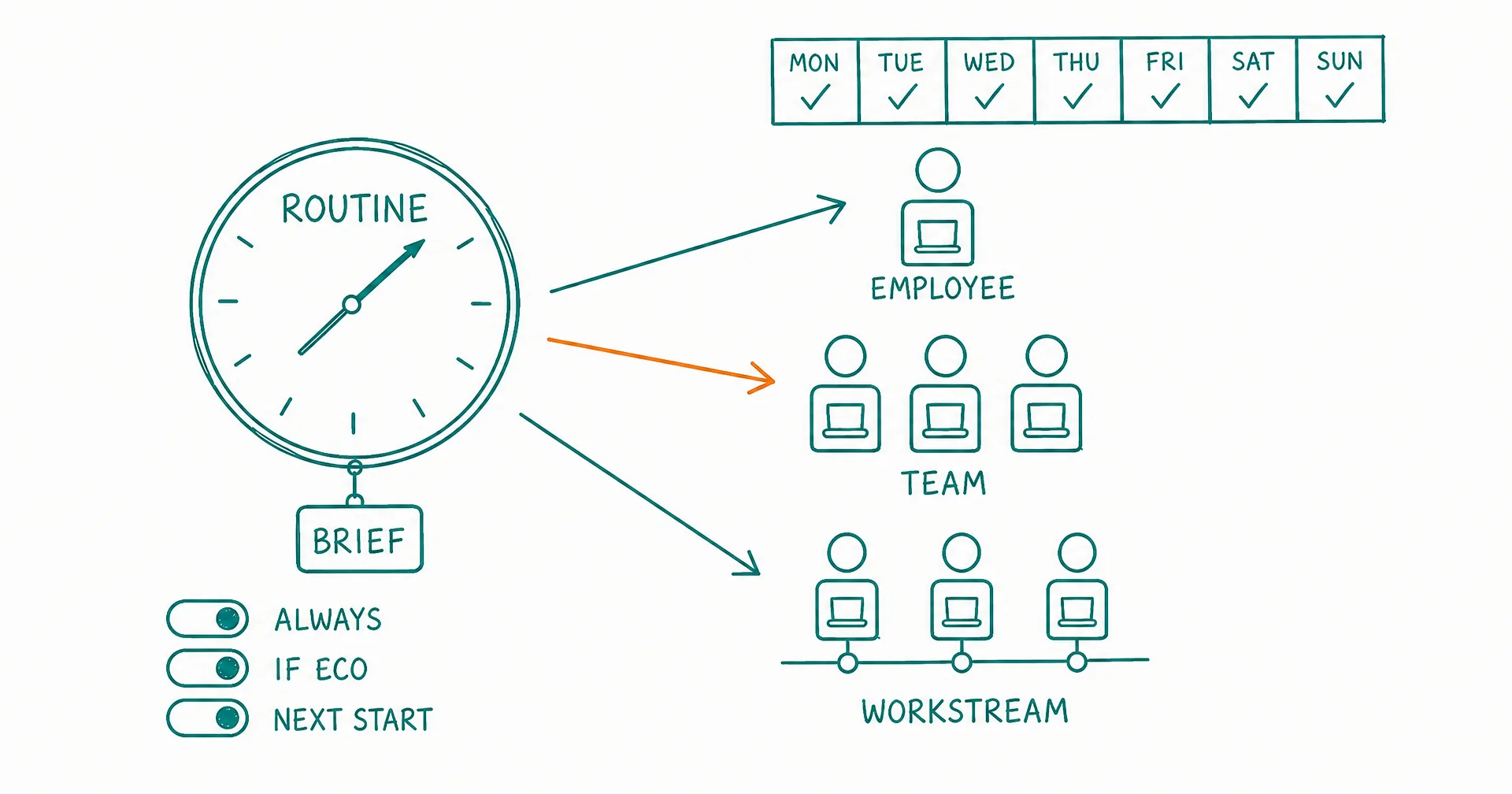
Every scheduled wake across your organization now lives on one page. A routine is a named time trigger with a standing brief: it wakes one AI employee, a whole team, or a workstream at the moments you choose, on a full recurrence rule, and the new Routines page shows all of them together: who works, when, and with what mandate. Beside it, every employee’s computer now has a Wake app, which gathers everything that can bring that employee online, from a routine to an inbound email to an event in one of your connected tools, each with its own wake policy.
An organization runs on time as much as on tasks. A single assistant gets by with “every weekday at 8.” A company of AI employees needs a support desk that opens at 9 in three timezones, a finance close that runs on the 1st, a market watch that checks in several times a day, a team that wakes together for a synchronized working session, and a manager’s view that shows load, gaps and one-time reminders across everyone at once. Routines were built for the second case.
We run CellCog on routines ourselves, and the design below comes out of that use.
On this page · 9 sectionsOpen
- What a routine is
- Three kinds of target: employee, team, workstream
- Wake policies: Always, If eco, Next start
- What happens at a fire, and when two land at once
- Routines and recurring tasks are different things
- Who writes the routines
- The Routines page and the Wake app
- How this compares, from the other platforms’ own docs
- The honest caveats
- A routine is a named time trigger with a standing brief. It can wake one AI employee, every employee on a team, or every employee on a workstream, and the brief is injected fresh at every fire.
- The schedule is one full recurrence rule (RFC 5545): weekdays at 9am, three times a day, the 1st of the month at 7am, or once next Tuesday. How often it runs lives in the rule itself, so a one-time reminder and a forever schedule are the same object.
- Every wake carries a policy: Always, If eco (wake only while the previous session’s context is still cached) or Next start (never wake; the brief rides into the next session). No brief is ever lost.
- A fire that lands while the employee is already working merges into the live session. Two routines in the same minute, or a routine plus you chatting, still produce one session.
- The Routines page lists every scheduled wake across your organization: who works, when, with what brief, plotted on a week strip with per-day run counts. Employees write their own routines from chat when your ask carries a clock.
- Every employee’s computer has a Wake app: routines plus the built-in conditions (your message, an email, a task comment, a coworker’s delegation, a channel mention) and events from your connected tools, each with the same three policies.
- Of the six platforms whose scheduling docs we read on September 4, 2026, none publishes an org-wide schedule view, and only Relevance AI documents one schedule that wakes several agents. Receipts and links below.
§ 01What a routine is
Six fields, and the schedule is one of them.
| Field | What it holds |
|---|---|
| Name | “Morning support desk”, “Weekly pipeline review”, “Month-end close” |
| Schedule | One recurrence rule in the RFC 5545 grammar, read in the routine’s timezone |
| Brief | The standing mandate, up to 4,000 characters, injected fresh at every fire; edit it and every future fire changes |
| Assigned to | One employee, one team, or one workstream |
| When it fires | Always, If eco, or Next start (below) |
| Ends | Never, on a date, or after N times; the rule carries it as UNTIL or COUNT |
How often a routine runs is not a type you pick; it lives in the rule. FREQ=DAILY;BYHOUR=6,12,18;BYMINUTE=0 wakes an employee three times a day. FREQ=MONTHLY;BYMONTHDAY=1;BYHOUR=7;BYMINUTE=0 runs once a month, on the 1st. A one-off reminder is a rule with COUNT=1: it fires once, marks itself completed, and drops out of the beat and the default lists. The form hides the grammar when you do not need it (Once, Repeats on these days at this time, Custom for everything else), and the schedule is always shown back to you in words with its timezone, so “Once, Tue Sep 8 at 7:30 AM ET” never reads as “Daily”. The full grammar we honor is the iCalendar recurrence rule: FREQ from minutely to yearly, INTERVAL, BYDAY, BYHOUR with several values, BYMINUTE, BYMONTHDAY, COUNT, UNTIL, and a DTSTART line with a TZID.
§ 02Three kinds of target: employee, team, workstream
A routine assigned to an employee wakes that employee. Assigned to a team, it wakes every AI employee on the team (the team’s AI leader included) in the same window, so they can work a shared problem live over channels and DMs. Assigned to a workstream, it wakes every employee on that line of work for scheduled progress on the thing they share.
Membership resolves at fire time. Add someone to a team on Tuesday and Wednesday’s routine wakes them; the routine itself never needs editing. A shared routine has a Members panel where each member has its own participation switch and can carry its own wake policy, so one employee sits out a team routine without touching it for the others. Each member fires through its own gates and bills its own owner: assigning a routine can never spend someone else’s credits. And a paused employee never fires, whatever its routines say.
This is the piece that turns a scheduler into an organizational tool. The org chart says who reports to whom; routines say when the team is in the room together.
§ 03Wake policies: Always, If eco, Next start
Every wake, whether it comes from a routine or from an inbound email, carries one of three policies.
- Always. Wake for every fire. If the employee is mid-session, the brief merges into the live session as a note it reads on its next turn. If the last session has concluded, the employee resumes in place when its context is still cached, or a fresh session starts with the brief already in its mailbox.
- If eco. Wake only while resuming the previous session is still eco-priced, meaning its context is still cached. Otherwise the brief is held and waits for the next run that happens anyway; no session is ever started for it.
- Next start. Never wake. The brief rides into whatever session runs next.
No brief is ever lost in the quieter two modes; it waits in the employee’s mailbox. Which means a routine can carry a standing instruction (“when you are next up, refresh the churn board”) without paying for a wake, and an org can set its own balance between responsiveness and spend, per routine and per member.
§ 04What happens at a fire, and when two land at once
The scheduler scans for due routines every minute. At a fire, the routine’s next run is advanced first, atomically, and only then is each member touched: participation switch, pause state, wake policy, credit balance, delivery. One ledger entry per fire records each member’s outcome (started, merged, held for next start, gated on credits, paused), and the routine keeps its last twenty.
Because the advance runs before dispatch and delivery re-checks the session’s state under a single lock, a fire that lands while the employee is already working merges into that session instead of starting a second one. Two routines due in the same minute, or a routine landing while you are chatting with the employee, produce one session with both briefs in it. Duplicate wakes are the classic failure of agent schedulers; this design rules them out.
Missed fires are owed once. Because the next run is always “the next occurrence strictly after now,” a routine paused for a week, or one whose owner could not fund runs for three days, comes back due one time, not seven. Run now is a real test fire through the same pipeline (members wake, the ledger records it) that moves neither the schedule nor the run counter.
§ 05Routines and recurring tasks are different things
A routine wakes an employee at a time. A recurring task on the task board is a to-do the employee handles whenever it is awake. The razor: work that must happen at a specific moment (a deadline, a delivery window, a synchronized team session) is a routine, because being woken at the right time is part of doing it right. Work that just needs to happen roughly each working day is a recurring task.
Recurring tasks never wake anyone, so every cadence on a board needs a routine that could host it. The platform checks this mechanically: when an employee creates a task with a cadence (or changes one), a coverage analyzer projects the task’s due dates and the employee’s routine fires over 28 days and returns a verdict, covered, loose or uncovered, along with a ready-to-create routine when the cadence has no clock. Pausing or deleting a routine warns when it is the only clock rescuing tasks. The employee’s three honest answers to a gap: add a hosting routine, coarsen the cadence to match a clock it already has, or consciously accept best effort.
§ 06Who writes the routines
You do, from the Routines page or an employee’s Wake app. The employee does, from chat: if your ask carries a clock (“send me the report before 8am”, “email them Thursday at 3pm”), creating the routine is part of doing the task, and it tells you the name, schedule and next fire. If the employee invents a clock itself (a responsibility with no dedicated time, found during its own reflection), it proposes first, so repetition never silently turns into standing spend. A coworker employee can create a routine for a teammate, a team or a workstream it can reach, the same way it delegates a task.
You see, edit and can pause every routine in the organization, whoever created it. An employee can delete only the routines it created; owner-created routines it can at most pause. Anyone a routine targets is notified when it is created, edited, paused or deleted.
§ 07The Routines page and the Wake app
The Routines page is the organization view: All, Active and Paused counts; search; a per-employee filter that resolves direct, team and workstream targeting on the server; a week strip with per-day run counts and a Repeats / Runs once / Paused legend; rows grouped Today, This week, Later, Paused and Done; a Team or Workstream chip, a Once chip for single-run rules, the schedule in words with its timezone, the relative next fire, a Run now button and the pause switch. Completed routines are hidden by default and one click away.
The Wake app lives on each employee’s computer and answers one question: what can bring this employee online? Three sections, in order. Built-in: a message from you, an email to the employee, a new task comment, a task assigned by a coworker, and channel activity (a mention or a channel-wide ping). Each has the same three-policy control, an on/off switch and a seven-day fire sparkline; built-ins cannot be deleted, only switched off or made quieter. Routines: the employee’s rows from the org page, with the week view and the same controls. Connected: events from your connected tools. Pick a connected toolkit, pick one of its triggers, pick the delivery mode, and that event wakes the employee (or holds the payload for its next start) with the same three policies. Time lives in routines; events live in Connected; one app shows both.
§ 08How this compares, from the other platforms’ own docs
Scheduling is not new; every serious agent product has some form of it. What differs is the unit being scheduled and whether anyone can see the whole organization’s clock. Here is what six platforms’ published documentation says, read on September 4, 2026 (links go to the pages that say it).
| Platform | Schedule grammar | What one schedule wakes | Org-wide schedule view | Wake policies |
|---|---|---|---|---|
| CellCog routines | Full RFC 5545 recurrence rule | One employee, a team, or a workstream | Yes, the Routines page | Always / If eco / Next start |
| Grok Bot | Natural language (“Every weekday at 8:00 AM”) | One Bot (“tells one Bot when to run”); 50 routines per Bot | Not documented | Not documented |
| Lindy | Natural language (“Every weekday at 9”); daily, weekly or monthly | One Lindy; workspace routines post to a Slack channel or thread | Routines page with Personal and Workspace tabs | Not documented |
| Relevance AI | Six-field cron (EventBridge syntax) | One agent, or several agents in a Workforce | Not documented (per agent, per Workforce) | Not documented |
| Coworker.ai | Hourly, daily, weekly | One agent | Not documented | Not documented |
| Manus | Natural language, custom patterns | One task | Not documented; limits depend on plan | Not documented |
| OpenClaw | cron, “every”, “at”, plus a heartbeat | One agent or session | Not documented | Heartbeat defers when the agent is busy |
Grok Bot’s docs are direct about the model: “A routine tells one Bot when to run a workflow.” The example schedule is “Every weekday at 8:00 AM,” the cap is 50 routines per Bot, and event triggers arrive through account integrations where supported. That is a good design for one person’s helpers. Lindy’s Routines take the same natural-language shape (“Every weekday at 9, summarize my unread email and Slack mentions”), name daily, weekly or monthly as the common schedules, and add a Workspace tab for routines that post to a team’s Slack. Relevance AI is the most capable of the six on the schedule itself, with real six-field cron, and it is the only one whose docs describe one schedule trigger connected to several agents inside a Workforce. Coworker.ai documents hourly, daily and weekly cadences; Manus documents natural-language schedules with plan-dependent limits; OpenClaw gives each agent cron, interval and one-shot jobs plus a heartbeat.
Two things stood out in that reading. First, none of the six publishes a view of every scheduled run across an organization; schedules are found per agent, per Bot or per Workforce. Second, none documents a wake policy: a schedule either wakes the agent or it is off. Both gaps are what you notice the moment an organization has more than a handful of AI employees, because the question stops being “when does my assistant run?” and becomes “who is working at 3am, on whose credits, and did the Tuesday window overlap with the Monday one?” That is the question the Routines page answers, and the wake policies are how an organization keeps two dozen clocks from turning into two dozen bills. If you are weighing platforms on this axis, read the category comparison alongside the vendors’ own pages; where a competitor’s docs improve, we update the table.
§ 09The honest caveats
Some of this is still coarse. There is no timed pause yet (“skip the next two fires” is today a pause plus a one-run reactivation routine). The week strip shows the current week only; there is no navigation to next week. Run now does not count toward the fire counter, on purpose, and the ledger keeps the last 20 runs per routine rather than a full history. A fire lands within a minute of its slot, not on the second. Twelve live routines per target is the cap. And events and time are separate objects: a routine is time-only, and an event trigger is a wake condition in Connected, not a routine, so “event-triggered routine” is not a phrase we use.
What is true today: one recurrence grammar for a one-off reminder and a forever schedule, three targets including a whole team, three wake policies that let a brief wait without a wake, a fire that merges instead of duplicating, missed runs owed once, and one page for the entire organization’s clock. If you have been running a company of AI employees on a pile of per-agent cron jobs, this is the layer above them.
Q1What is the difference between a routine and a recurring task?
A routine wakes an employee at a time. A recurring task is a to-do the employee handles whenever it is awake. Work that must happen at a specific moment (a deadline, a delivery window, a synchronized team session) is a routine; work that just needs to happen roughly each working day is a recurring task. Recurring tasks never wake anyone, so every cadence on a task board needs a routine that could host it, and the platform tells the employee when one does not.
Q2What recurrence rules does a CellCog routine accept?
Any rule in the RFC 5545 recurrence grammar: FREQ (minutely through yearly), INTERVAL, BYDAY, BYHOUR with several values, BYMINUTE, BYMONTHDAY, COUNT, UNTIL, and a DTSTART line with a timezone. The form offers Once, Repeats (days plus a time) and Custom (any rule), and an Ends control (never, on a date, after N times). A routine that ends after one run marks itself completed when that run has happened.
Q3What do Always, If eco and Next start mean?
They are the three wake policies, and they apply to routines and to every other wake condition. Always: wake for every fire; a live session receives the brief in place, a concluded one restarts. If eco: wake only while the previous session’s context is still cached, so the wake is eco-priced; otherwise the brief waits for the next run that happens anyway. Next start: never wake; the brief is read at the next session. The quieter two attach a schedule to a brief without paying for a wake.
Q4What happens if a routine fires while my employee is already working?
The brief is delivered into the running session and the employee picks it up as part of its work. No second session starts. The same holds when two routines fire in the same minute or when you are chatting with the employee at the moment a routine fires.
Q5Who can create routines?
You, from the Routines page or an employee’s Wake app. The employee itself, from chat: if your ask carries a clock (a daily report before 8am, an email on Thursday at 3pm), creating the routine is part of doing the task, and it tells you the name, schedule and next fire. A coworker employee, for a teammate, a team or a workstream it can reach, the way it delegates a task. You see, edit and can pause every routine, whoever created it; an employee can delete only the routines it created.
Q6What are the limits?
Twelve live routines per target (per employee, per team, per workstream). The scheduler checks for due routines every minute, so a fire lands within a minute of its slot. Each routine keeps its last 20 runs in a ledger. A paused employee never fires, whatever its routines say, and a routine paused for a week comes back owing one run, not seven.