An AI employee task board should make five facts visible for every open item: who owns it, what state it is in, what evidence exists, what blocks the next action, and what must happen before closure.
Do not begin with dozens of columns. Start with a small state machine:
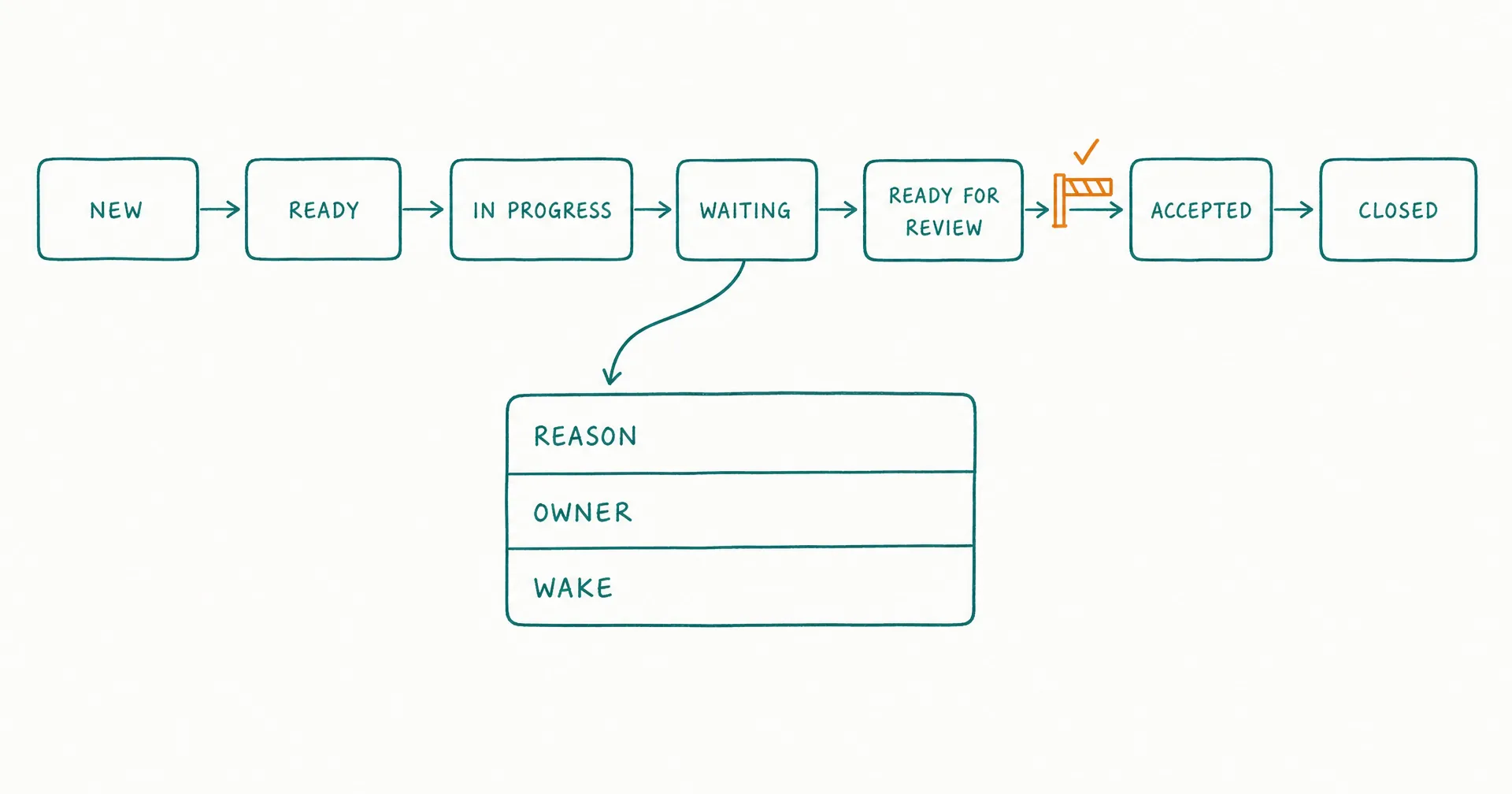
New → Ready → In Progress → Waiting → Ready for Review → Accepted → Closed
Add terminal states for bounded failure, cancellation, or incident handling. Define every transition, required field, owner, and wake condition before adding automation.
The board is not a memory aid or activity feed. It is the organization’s current record of work ownership and operational state.
On this page · 16 sectionsOpen
- The Task Board at a Glance
- Why an AI Employee Needs Visible Task State
- Define the Task Unit Before the Columns
- Build a Small State Machine
- Define Every Transition as a Contract
- Create a Task Record With Recoverable Fields
- Control Intake, Ownership, and Work in Progress
- Make Blockers, Approvals, and Dependencies First-Class
- Attach Evidence, Review, and Acceptance to the Work
- Design Aging, Alerts, and Recovery
- Measure Flow Without Rewarding Card Movement
- Copyable AI Employee Task Board Template
- Test the Board Before Scaling Work
- How CellCog Maps to the Task Board Model
- Common task-board mistakes
- Final Checklist
- Use one task for one bounded work object with one completion contract; separate status, owner, next action, blocker, approval, and evidence into explicit fields.
- Begin with seven core states - New, Ready, In Progress, Waiting, Ready for Review, Accepted, Closed - plus a few named terminal or exception states.
- Define valid transitions with required evidence; do not let workers move cards freely, and keep one accountable owner at a time.
- Represent approvals and dependencies as states with owners and expiry, not comments.
- Limit work in progress, prevent duplicate starts, and require read-back verification before a task reaches review.
- Close only after acceptance, downstream ownership, and required record updates - and measure flow without rewarding card movement.
§ 01The Task Board at a Glance
| Board element | Required answer | Failure it prevents |
|---|---|---|
| Task ID | Which work object is this? | Duplicate or untraceable work |
| Goal | Which approved outcome does it support? | Helpful but irrelevant activity |
| State | What is true about the work now? | Status based on narrative interpretation |
| Owner | Who must take the next action? | Unowned waiting |
| Next action | What specific step should occur? | “In progress” with no route |
| Trigger | What authorized the task to enter? | Work created from noise |
| Due or review time | When must it advance or be examined? | Invisible aging |
| Evidence | What proves actions and decisions? | Unsupported completion |
| Blocker | What prevents the next transition? | Repeated retries |
| Approval | Which proposed action is authorized? | Broad or stale permission |
| Dependency | Which other result must arrive? | Premature continuation |
| Completion | What must be true before review? | Output without usable handoff |
| Acceptance | Who confirms the result is usable? | Silent closure |
| Audit | Which versions and actions governed the task? | Irreconstructable decisions |
§ 02Why an AI Employee Needs Visible Task State
Long-running work crosses shifts, tools, approvals, system events, and sometimes several workers. Conversation history does not reliably answer:
- Is the work active or merely discussed?
- Did someone already execute the action?
- Which source version supported the decision?
- Is the task waiting for input, approval, a system, or a reviewer?
- Who owns the wait?
- What should wake the next step?
- Has the result been accepted?
- Can the task be safely retried?
A visible board turns those questions into fields and transitions.
State is not memory
Memory can preserve useful continuity: prior decisions, preferences, examples, or summaries. It should not be the only record of:
- current owner;
- pending approval;
- due time;
- task status;
- required next action;
- active dependency;
- retry count; or
- completion.
The AI employee memory guide governs information that persists across interactions. The task board governs current work.
State is not an activity log
An activity log says what happened:
Searched sources, opened CRM record, drafted response.
State says what is true now:
Draft version 4 passes schema validation, external sending remains unapproved, and the support lead owns the approval decision by 14:00.
Preserve both. Use the log for reconstruction and the state for coordination.
State is not a to-do list
“Research account,” “write brief,” and “send update” are labels. A managed task needs a trigger, object, scope, owner, state, evidence, authority, and completion contract.
The board is a control surface
The board should help prevent:
- work starting without authorization;
- duplicate execution;
- hidden work in progress;
- approval being inferred from silence;
- blocked tasks retrying indefinitely;
- outputs closing without review;
- tasks remaining open without an owner;
- handovers losing state; and
- permissions remaining active after closure.
NIST’s AI RMF Core calls for documented roles, responsibilities, monitoring, measurement, risk communication, and lifecycle management. A task board is one place those controls become operational for individual work objects.
§ 03Define the Task Unit Before the Columns
One task should represent one bounded unit that can reach a clear terminal state.
Good task units include:
- one approved research question;
- one new support ticket;
- one account brief;
- one document revision;
- one data exception;
- one weekly report;
- one monitored change event; or
- one approved batch with a fixed membership.
Avoid tasks such as “handle sales,” “improve the website,” “run operations,” “monitor everything,” “help with support,” or “continue working.”
Use the task-unit test
| Test | A valid task can answer |
|---|---|
| Object | Which exact record, artifact, request, or batch? |
| Outcome | What accepted state should exist? |
| Boundary | What work is outside this task? |
| Owner | Who owns the next action? |
| Authority | What may be read, drafted, recommended, or executed? |
| Evidence | What proves each consequential step? |
| Completion | What conditions end production? |
| Acceptance | Who decides the result is usable? |
| Failure | Which safe terminal or waiting state applies? |
If several items have different owners, approvals, deadlines, or acceptance rules, they should not share one card.
Connect each task to a goal and procedure
The AI employee goals guide defines the bounded outcome, constraints, priorities, and stop conditions. The AI employee SOP guide defines the repeatable path.
The task records:
- the current work object;
- inherited goal and procedure versions;
- starting inputs;
- current state;
- actions and evidence;
- open decisions;
- owner;
- due time; and
- completion.
Use parent and child tasks deliberately
Create a child task only when the subtask has its own bounded outcome, a named owner, distinct inputs, its own completion, a return artifact, and no authority beyond the parent contract.
Do not split a task merely to inflate throughput. The parent remains accountable for integrating and validating the child result.
§ 04Build a Small State Machine
Columns should represent mutually understandable states, not departments or moods.
| Core state | Meaning | Required owner |
|---|---|---|
| New | Authorized work arrived but has not been validated | Intake owner |
| Ready | Preconditions and required inputs pass | Assigned worker |
| In Progress | The worker is actively performing the next bounded action | Active worker |
| Waiting | Work cannot advance until a named event or decision | Owner of the wait |
| Ready for Review | Production is complete and acceptance evidence is attached | Reviewer |
| Accepted | Reviewer confirms the completion contract | Downstream owner |
| Closed | Required downstream state, records, and access cleanup are complete | Process owner |
Add only the exception states the process needs: rejected intake, cancelled, failed bounded, paused for policy, paused for security, incident, superseded, or duplicate.
Separate waiting reasons
One visual column can contain a controlled reason field:
| Waiting reason | Owner | Wake condition |
|---|---|---|
| Input | Requester or source owner | Required field or source arrives |
| Approval | Named approver | Valid approval or rejection |
| Dependency | Dependency owner | Required task reaches accepted state |
| System | System owner | Health check or recovery event |
| Review | Named reviewer | Review decision |
| Schedule | Task owner | Approved time arrives |
| External event | Task owner | Named event is observed |
“Blocked” without a reason, owner, and wake condition is not a state.
Distinguish accepted from closed
Acceptance means the result is usable. Closure means the process around it is finished.
A task may be accepted while still requiring delivery to a downstream system, confirmation from a recipient, deletion of temporary data, revocation of temporary access, a child-task close, a final ledger update, or archived evidence.
Do not close at “output created.”
Avoid status sprawl
Do not create columns for every action: researching, drafting, revising, formatting, uploading. Those are steps or activity events inside In Progress unless their ownership, risk, or waiting behavior differs.
The Kanban Guide emphasizes defining workflow, controlling work in progress, actively managing items, and inspecting flow. For AI employee work, the workflow definition also needs authority, evidence, and acceptance.
§ 05Define Every Transition as a Contract
A transition should specify the allowed prior state, destination state, actor, entry conditions, required fields, required evidence, validation, side effects, notification, invalid-transition behavior, and audit record.
| Transition | Entry requirement | Evidence | New owner |
|---|---|---|---|
| New → Ready | Trigger authorized, object unique, inputs valid | Trigger and validation | Assigned worker |
| Ready → In Progress | Capacity available, permission valid | Assignment and start time | Active worker |
| In Progress → Waiting | Named blocker prevents next action | Blocker packet | Wait owner |
| Waiting → Ready | Wake condition satisfied and inputs revalidated | Event or decision record | Assigned worker |
| In Progress → Ready for Review | Completion contract passes | Output, validation, provenance | Reviewer |
| Ready for Review → Accepted | Reviewer accepts or records bounded correction | Review decision | Downstream owner |
| Accepted → Closed | Downstream state verified and cleanup complete | Verification and closure record | Process owner |
Reject invalid transitions
Examples:
- New → Closed without validation and acceptance;
- Waiting → In Progress when the approval expired;
- Ready for Review → Accepted by the same actor where independent review is required;
- Failed Bounded → In Progress without a new attempt authorization; or
- Closed → In Progress instead of creating a linked reopened task.
The system should block or explicitly escalate the transition.
Revalidate before resuming
A waiting task may have stale inputs, policy, approval, target state, permission, owner, due time, or dependency results. Recheck the applicable preconditions before returning to work.
Use idempotency for action transitions
If a transition triggers an email, update, payment, publication, or other side effect, store the proposed action, approval, idempotency key, execution attempt, tool result, resulting state, and read-back verification.
A repeated event should not repeat the business action.
§ 06Create a Task Record With Recoverable Fields
A card title is not enough.
| Field group | Required fields |
|---|---|
| Identity | Task ID, type, version, tenant/account, created time |
| Purpose | Goal ID, business purpose, non-goals |
| Object | Record, artifact, request, or fixed batch membership |
| Intake | Trigger ID, requester, received time, deduplication key |
| State | Current state, reason, state-entered time |
| Ownership | Current owner, reviewer, approver, downstream owner |
| Timing | Due time, review time, expiry, next wake |
| Context | Approved source and context-pack versions |
| Procedure | SOP and rule versions |
| Authority | Permission profile, approval requirements, active approval |
| Work | Next action, completed actions, attempt count |
| Evidence | Sources, tool records, artifacts, validation |
| Blocker | Type, description, owner, unblock condition |
| Dependency | Task IDs, required states, data contract |
| Completion | Completion result and postconditions |
| Acceptance | Reviewer, decision, correction, accepted time |
| Audit | Change history, actor, timestamps, incident links |
Use stable identifiers
Prefer identifiers like task/research/2026-08-04/0042, goal/competitive-intelligence/v3, sop/research-intake/v5, approval/external-send/8871, and artifact/weekly-brief/2026-W32/v2.
“Final brief latest” is not recoverable enough for an audit or retry.
Separate state from explanation
Store the state (waiting_for_approval), reason code (external_send_required), owner (support-lead), approval object (approval/external-send/8871), expiry timestamp, proposed action as an immutable draft ID, and a concise narrative for the owner.
The narrative helps a person. Structured fields drive control.
Preserve provenance
For each material fact or decision, record the source identifier, field or passage, observed time, authority, version, transformation, rule result, and affected output.
Do not reconstruct provenance from a final paragraph.
§ 07Control Intake, Ownership, and Work in Progress
The board should not accept every event as new work.
Validate intake
Check: authorized trigger; required object ID; scope; duplicate key; required fields; source availability; goal and SOP status; permission profile; due-time validity; priority rule; and incident or pause flags.
The AI employee shifts and schedules guide covers schedules, event triggers, suppression, quiet hours, deduplication, and maximum run frequency. The board should receive only a validated task or an explicit intake exception.
Enforce one current owner
Contributors can be many. The next-action owner should be one person, role, or managed queue.
| Situation | Current owner |
|---|---|
| Waiting for requester input | Requester |
| Waiting for policy interpretation | Policy owner |
| Waiting for approval | Approver |
| Waiting for system recovery | System owner or managed recovery queue |
| Ready for review | Reviewer |
| Correction requested | Producing worker |
| Accepted, pending delivery | Downstream delivery owner |
Ownership returns through an explicit transition.
Limit work in progress
Work-in-progress limits reduce context switching, stale open work, hidden queues, unfinished drafts, duplicate actions, review overload, and cost from too many concurrent runs.
Define limits by role, task subtype, risk class, review capacity, external action class, system, customer or tenant, and time window.
Do not create a new task merely because the active limit is full. Queue it in a validated state with priority and aging visible.
Use pull, not uncontrolled push
An AI employee should start the next ready item only when capacity is available; priority permits; permissions remain valid; required inputs are current; no higher-priority stop or incident is active; and the task can be completed or safely handed over within the shift or resource window.
Prevent duplicate ownership
Use atomic assignment, a task lease or lock where appropriate, a start timestamp, lease expiry, a heartbeat for long work, idempotency keys, a duplicate detector, and a takeover procedure.
Do not let two workers assume the other will notice a duplicate side effect.
§ 08Make Blockers, Approvals, and Dependencies First-Class
A comment such as “waiting on John” is not enough.
Structure the blocker
| Blocker field | Example |
|---|---|
| Type | Missing policy decision |
| Detected at | Timestamp |
| Detected by | Worker or control |
| Affected step | Rule application before draft |
| Evidence | Conflicting policy versions |
| Action withheld | External response not drafted |
| Owner | Policy owner |
| Decision needed | Which version governs this ticket class? |
| Due or expiry | Timestamp |
| Safe state | No external action; evidence preserved |
| Wake condition | Authorized policy decision attached |
Represent approval as an object
The AI employee permissions and approvals guide defines approval as authorization for an exact action.
The board should store the approver, proposed action or immutable diff, object, channel, recipient or target, consequence or value boundary, issue time, expiry, conditions, single-use or reusable status, execution state, and revocation.
“Approved in thread” should not move a different action forward.
Represent dependencies as state contracts
A dependency should name the upstream task, required upstream state, artifact or data contract, freshness, validation, fallback, dependency owner, and what happens after expiry.
“Wait for research” is incomplete. “Resume when task/research/42 is accepted and artifact schema v3 passes validation” is operational.
Keep delegation bounded
When a task delegates a child: copy only the necessary goal and constraints; define the child outcome; limit sources and tools; preserve parent authority limits; require an output schema; set due time and return owner; keep the parent waiting on the child; and validate the result before integration.
Delegation does not transfer accountability for the parent.
§ 09Attach Evidence, Review, and Acceptance to the Work
A task should not enter review because the worker says it is done.
Use a production-complete gate
Before Ready for Review, require: output exists at the approved location; schema validation passes; required sources and provenance are attached; unknowns and conflicts are visible; decision rules are recorded; tool actions are within authority; side effects are verified; exceptions are classified; child tasks are integrated or explicitly open; the acceptance rubric is pre-scored; and no prohibited action occurred.
Use an acceptance decision
| Review result | Board behavior |
|---|---|
| Accept | Move to Accepted with reviewer and evidence |
| Correctable | Return to In Progress with bounded correction request |
| Missing input | Move to Waiting with owner and required input |
| Out of scope | Move to a declared terminal or routing state |
| Policy conflict | Pause under the policy owner |
| Incident concern | Move to incident state and invoke response path |
Do not erase the rejected version. Preserve it as evidence.
Limit correction loops
Record the correction category, severity, reviewer instruction, affected acceptance criterion, maximum attempts, updated artifact version, and result.
After the attempt limit, move to failed bounded or an authorized specialist route.
Separate reviewer from approver
An approver authorizes an action. A reviewer judges whether the output meets acceptance. The same person may perform both roles in a small team, but the records should remain distinct.
Verify the downstream handoff
The AI employee handover guide defines the full transfer packet and receiver acceptance. On the board, at minimum record the current state, accepted artifact, decisions and evidence, open exceptions, active approvals, next owner, next action, due time, and receiver acknowledgment where required.
§ 10Design Aging, Alerts, and Recovery
Every non-terminal task should have a review or wake rule.
Measure age by state
Track total task age, time in current state, active work time, waiting time by reason, review time, correction time, blocked time, time since last evidence, and time since owner acknowledgment.
A seven-day task waiting for an approved legal decision is different from a seven-day task silently stuck in progress.
Create state-specific alerts
| Condition | Alert route |
|---|---|
| New exceeds intake target | Intake owner |
| Ready exceeds queue target | Role owner |
| In Progress has no heartbeat | Current owner and supervisor |
| Waiting approaches approval expiry | Approver and task owner |
| Waiting wake event occurred but task did not resume | Process owner |
| Review exceeds target | Reviewer and downstream owner |
| Correction limit reached | Supervisor |
| Closed task receives duplicate event | System owner |
Define lease expiry and takeover
For a long-running active task:
- Check whether the current worker is still active.
- Preserve its latest state and evidence.
- Prevent concurrent execution.
- Mark the lease expired.
- Assign an authorized takeover owner.
- Revalidate inputs, approval, permission, and target state.
- Resume from the last verified checkpoint.
Do not restart from the beginning when prior side effects may exist.
Recover from system failure
The recovery record should show the last verified state, last proposed action, last executed action, tool result, idempotency key, downstream read-back, unknown side effects, retry eligibility, and recovery owner.
Repeated execution is not a recovery strategy.
Microsoft’s responsible AI guidance for agentic systems emphasizes human oversight, accountability, access control, testing, and monitoring. State-specific alerts and owned recovery routes turn those principles into task-level controls.
§ 11Measure Flow Without Rewarding Card Movement
The AI employee KPI guide should define formulas, denominators, thresholds, and decision rules.
| Measure | What it reveals | Misuse to avoid |
|---|---|---|
| Accepted throughput | Useful completed units | Counting raw closed cards |
| Acceptance rate | Quality at first review | Hiding easy-case selection |
| Correction rate | Hidden repair burden | Treating all corrections equally |
| Cycle time | Time from validated intake to acceptance | Ignoring waiting reasons |
| Active time | Production effort | Rewarding unnecessary tool use |
| State age | Stalled work | Using one threshold for every state |
| WIP | Concurrent open work | Maximizing utilization |
| Escalation quality | Correct boundary handling | Minimizing necessary escalation |
| Duplicate rate | Intake and idempotency failure | Deleting duplicates from history |
| Reopen rate | Premature acceptance or closure | Blaming only the last worker |
| Worst-error severity | Consequence | Averaging away rare serious errors |
Segment before interpreting
Segment by task subtype, risk class, channel, language, customer or account class, worker, procedure version, tool, source quality, approval path, and exception type.
Do not reward motion
Card moves, comments, subtasks, tool calls, tokens, and hours can explain cost or failure. They do not prove accepted value.
Watch queue health
Review: unowned tasks; tasks without next action; tasks without wake condition; expired approvals; invalid dependencies; aging by state; WIP above limit; repeated correction; duplicate triggers; closed tasks with open children; and tasks using retired goal or procedure versions.
§ 12Copyable AI Employee Task Board Template
Start with these states:
| State | Entry rule | Exit rule |
|---|---|---|
| New | Authorized intake record created | Validated, rejected, duplicate, or cancelled |
| Ready | Preconditions pass and owner assigned | Capacity lease starts |
| In Progress | Worker owns active next action | Wait, review, bounded failure, or incident |
| Waiting | Named blocker, owner, and wake condition exist | Condition satisfied and revalidated |
| Ready for Review | Completion gate passes | Accept, correct, wait, pause, or incident |
| Accepted | Reviewer accepts result | Downstream verification and cleanup complete |
| Closed | Closure contract passes | Reopen only through linked new task |
Required task fields:
- Task ID and type
- Goal and procedure version
- Trigger and deduplication key
- Covered object and population
- Current state and reason
- Current owner and next action
- Due, expiry, and next-wake times
- Sources and context versions
- Permission and approval records
- Evidence and artifacts
- Blocker and dependency records
- Attempt and correction counts
- Completion result
- Review and acceptance decision
- Downstream handoff
- Audit and incident links
Transition template
| Transition field | Entry |
|---|---|
| Transition ID | Stable identifier |
| From state | Allowed current state |
| To state | Resulting state |
| Actor | Authorized role or system |
| Preconditions | Facts that must be true |
| Required fields | Structured data required |
| Evidence | Records attached |
| Validation | Checks before commit |
| Side effects | Tool or system changes |
| Notification | Recipient and content |
| Failure | Invalid-transition route |
| Audit | Actor, time, versions, result |
Waiting-state template
| Waiting field | Entry |
|---|---|
| Reason code | Input, approval, dependency, system, review, schedule, event |
| Blocked step | Exact next action prevented |
| Evidence | Facts supporting the wait |
| Owner | Person, role, or managed queue |
| Request | One precise decision or input |
| Due or expiry | Time boundary |
| Safe state | Actions withheld and preserved work |
| Wake condition | Event that permits revalidation |
| Escalation | Route if the condition does not arrive |
Closure checklist
- The accepted artifact or state exists.
- The reviewer and acceptance decision are recorded.
- Required side effects were read back and verified.
- Open corrections are resolved or separately owned.
- Child tasks are closed or explicitly transferred.
- Downstream ownership is accepted.
- Temporary access or approval is revoked where required.
- Required evidence is retained.
- Prohibited or temporary data is deleted.
- Goal, SOP, rule, and tool versions are recoverable.
- The card has no remaining next action.
§ 13Test the Board Before Scaling Work
Test the state machine with normal and adversarial cases.
| Test case | Expected behavior |
|---|---|
| Duplicate trigger | One active task; duplicate linked and suppressed |
| Missing required field | Intake exception with owner; no start |
| Two workers start | One lease succeeds; other receives conflict |
| Approval expires while waiting | Task cannot resume without new approval |
| Target changes before action | Revalidation blocks stale execution |
| Tool times out after possible write | Read-back before retry |
| Review requests correction | Version preserved; bounded correction route |
| Correction limit reached | Safe failed state or specialist route |
| Child task fails | Parent remains owned and does not claim completion |
| Reviewer absent | Waiting state with review owner and escalation |
| Incident concern | Affected work pauses and evidence is preserved |
| Closed task receives event replay | No repeated action; system route |
OpenAI’s agent-building guide recommends starting with clear actions, guardrails, human intervention, and evaluation. The board should make every intervention and exception visible rather than hiding it in a transcript.
Run a shadow board
During the first stage: copy or simulate tasks; let the worker propose transitions; compare proposed and expected state; score ownership and evidence; test invalid transitions; measure duplicate suppression; inspect waiting and escalation behavior; and do not execute live side effects.
The first 30 days with an AI employee provides an evidence-gated progression for this launch.
Promote one transition at a time
A useful authority ladder is:
- Read board state.
- Propose state changes.
- Create drafts and evidence.
- Update low-risk internal fields.
- Move declared task types between tested states.
- Execute named reversible actions with approval.
- Expand only after evaluation and incident review.
The AI employee pilot guide can precommit promotion, hold, revise, or stop decisions.
Test for prompt injection and unsafe task content
The OWASP AI Agent Security Cheat Sheet recommends treating external content as untrusted and constraining tools through least privilege and validation.
A task description, attachment, comment, or retrieved page must not change the goal; change the procedure; expand permission; create approval; override stop conditions; expose unrelated data; or force a state transition.
§ 14How CellCog Maps to the Task Board Model
CellCog’s public material describes a task board as part of an AI Employee’s standing operating machinery, alongside goals, KPIs, inboxes, schedules, wake conditions, memory, permissions, approvals, shifts, and handovers.
| Board need | CellCog capability to configure | Organization-owned decision |
|---|---|---|
| Work object | AI Employee tasks | Task unit and completion contract |
| Intake | Inbox, schedules, wake conditions, delegation | Authorized trigger and deduplication |
| State | Task board | State meanings and valid transitions |
| Ownership | Employee and team assignments | One next-action owner |
| Context | Task context, Context Trees, memory | Source authority and permitted scope |
| Authority | Permissions and approvals | Exact operation, object, and consequence |
| Continuity | Shifts and handovers | Checkpoint and receiver acceptance |
| Measurement | KPIs and dashboards | Formula, denominator, and decision rule |
| Delegation | Other AI Employees | Child-task contract and return validation |
The CellCog AI Employees page is the product entry point. Verify the current interface and APIs against your required fields, transitions, permissions, audit records, exports, and recovery behavior.
Users set the employee’s goals, schedule, permissions, and connected accounts, and remain responsible for monitoring its work and the actions it takes on their behalf.
Configure the board as an operating contract
Do not assume that a visible column enforces permission, approval, deduplication, WIP, state validation, reviewer separation, retention, data deletion, or side-effect recovery.
Implement enforceable controls in the board, connected systems, and role configuration.
§ 15Common task-board mistakes
Using only To Do, Doing, and Done
This hides intake validation, waiting ownership, review, acceptance, and closure.
Putting the AI employee’s name in every owner field
When work waits for a requester, approver, reviewer, or system owner, that actor owns the next action.
Treating comments as state
Comments cannot reliably drive due dates, wake conditions, approval expiry, or recovery.
Closing after output creation
Require review, acceptance, downstream verification, and cleanup.
Allowing unlimited work in progress
More active cards can increase stale context, review queues, and duplicate action.
Reopening closed tasks in place
Create a linked new task so the original acceptance, evidence, and versions remain intact.
Deleting failed or duplicate tasks
Preserve them as evidence for intake quality, idempotency, and incident analysis.
§ 16Final Checklist
Before activating an AI employee task board, confirm:
- One task represents one bounded work object.
- Every task maps to an active goal and procedure.
- Core states have precise entry and exit rules.
- Waiting always has a reason, owner, and wake condition.
- One actor owns the next action at a time.
- Intake validates scope, required fields, and duplicates.
- Work-in-progress limits reflect review and risk capacity.
- Every transition requires fields, evidence, and validation.
- Approval binds to an exact proposed action and expiry.
- Dependencies name a required upstream state and artifact.
- Side effects use idempotency and read-back verification.
- Review, acceptance, and closure are distinct.
- Aging and alerts are state-specific.
- Failed, duplicate, and incident records remain visible.
- Board KPIs reward accepted outcomes, not card movement.
- Recovery can resume from the last verified checkpoint.
If these conditions are true, the board can coordinate work across shifts and workers without asking anyone to reconstruct state from conversation history.
Begin with the seven-state model, one task template, one transition contract, and one WIP limit. Test duplicate, waiting, approval, correction, and recovery paths before adding more work to a CellCog AI Employee.
Q1What columns should an AI employee task board have?
Start with New, Ready, In Progress, Waiting, Ready for Review, Accepted, and Closed. Add only controlled exception or terminal states required by the process, such as duplicate, cancelled, failed bounded, policy pause, security pause, or incident.
Q2What information should every AI employee task contain?
Include task ID, goal, work object, trigger, state, owner, next action, due or wake time, context and SOP versions, authority, approval, evidence, blocker, dependencies, completion, acceptance, and audit history.
Q3Should "Blocked" be a task-board column?
It can be a visual column, but each blocked task needs a structured reason, blocked step, evidence, next-action owner, due or expiry time, safe state, wake condition, and escalation. A generic blocked label is not enough.
Q4How do you prevent two AI employees from doing the same task?
Use a deduplication key at intake, atomic assignment, a task lease or lock, idempotency keys for side effects, and a takeover procedure. Verify system state before retrying an action that may already have executed.
Q5When is an AI employee task complete?
Production is complete when its output, schema, evidence, authority, verification, and exception conditions pass. The task is accepted when the reviewer confirms usability. It is closed only after downstream state and required cleanup are complete.
Q6Is memory enough for tracking AI employee work?
No. Memory can support continuity, but current owner, state, approval, due time, next action, blocker, and completion should live in explicit task records. A reviewer should not need to infer open work from a transcript.