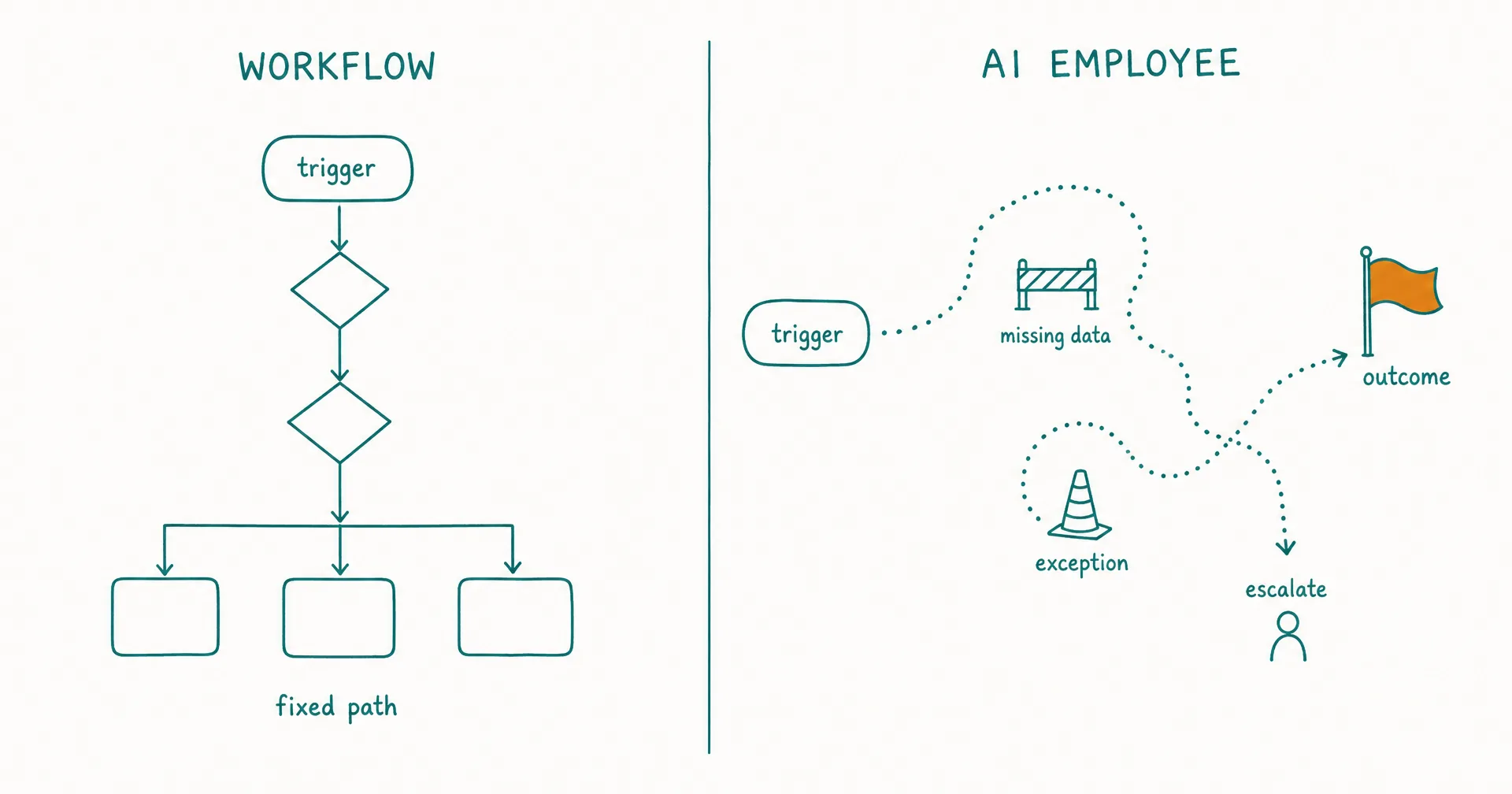
Workflow automation follows a process you define. An AI employee pursues an outcome inside a role you define.
That is the practical difference. A workflow is strongest when the path is stable enough to encode as triggers, conditions, actions, retries, and terminal states. An AI employee is useful when the goal is stable but the path changes with messages, documents, missing context, tool results, or exceptions.
Neither is universally better. If the rule is predictable, deterministic automation is usually cheaper, faster, easier to test, and easier to audit. If the next step cannot be specified without interpreting unstructured context, an agentic worker may reduce the amount of brittle branching a person has to build and maintain.
The best production system often uses both: the AI employee handles ambiguity, the workflow enforces stable policy, and a person retains consequential judgment.
On this page · 17 sectionsOpen
- AI Employee vs Workflow Automation at a Glance
- What Is Workflow Automation?
- What Is an AI Employee?
- What Is the Real Difference: Path Ownership or Outcome Ownership?
- Can Workflow Automation Be “Autonomous”?
- Which Tasks Belong in Workflow Automation?
- Which Tasks Belong With an AI Employee?
- When Should You Combine an AI Employee and Workflow Automation?
- How Do Exceptions Change the Decision?
- Which Is Easier to Test and Audit?
- Which Is Cheaper?
- How Do Governance and Permissions Differ?
- How Do You Choose in 15 Minutes?
- What Does CellCog Add Beyond a Workflow Builder?
- What Is a Safe Pilot Design?
- What Usually Breaks?
- What Is the Final Decision Rule?
- Use workflow automation when you can specify the trigger, data, branches, actions, error handling, and finish state before the run begins.
- Use an AI employee when one recurring role must interpret variable inputs, choose among tools, manage open work across shifts, and escalate exceptions.
- A schedule does not make a system an employee. Both workflows and AI employees can start from time, email, queue, database, or application events.
- An AI employee does not eliminate workflows. It can call deterministic checks, APIs, and state machines as tools while the employee layer owns the queue, context, KPIs, approvals, and handovers.
- The central buying test is path predictability: stable path plus stable rules favors automation; stable outcome plus variable path favors an AI employee.
- CellCog AI Employees are designed for the second pattern, while CellCog openly frames fixed trigger-action work as a case where conventional workflow tools may be the better fit.
§ 01AI Employee vs Workflow Automation at a Glance
| Decision dimension | Workflow automation | AI employee | Default choice |
|---|---|---|---|
| What you define | Steps, branches, conditions, and actions | Role, outcome, context, authority, and controls | Define the most stable object |
| Next-step selection | Code, rules, or configured graph | Agentic reasoning inside permissions | Workflow for predictable paths |
| Input shape | Structured or normalized | Structured plus unstructured | Employee when interpretation dominates |
| Trigger | Event, schedule, request, webhook | Event, schedule, message, queue, task, or delegation | Tie; both can be proactive |
| State | Variables and workflow state | Task state, role context, memory, and handover | Depends on continuity need |
| Exception handling | Prebuilt branch, retry, alert, or failure | Interpret, investigate, propose, or escalate | Employee for novel exceptions |
| Action | Configured connector/API/RPA step | Tool selected and used inside delegated authority | Workflow when action is fixed |
| Testing | Path and state coverage | Scenario, evaluator, trace, and outcome review | Workflow is easier to exhaustively test |
| Cost driver | Runs, steps, infrastructure, maintenance | Model/tool usage, platform, review, corrections, incidents | Compare cost per accepted outcome |
| Main risk | Brittle branches and silent integration failures | Variable output, excess authority, drift, or stale context | Choose the more governable risk |
The categories overlap. A workflow can contain AI steps, and an AI employee can call workflows. The question is which layer chooses the next step and which layer owns the recurring outcome.
§ 02What Is Workflow Automation?
Workflow automation is software that executes a defined sequence of work when a trigger or request starts it. The sequence may include actions, conditions, parallel branches, waits, retries, approvals, and error states.
Microsoft Power Automate’s trigger-and-action documentation gives the cleanest low-code definition: a trigger is the event that starts a cloud flow, and actions are the operations the flow performs afterward. A saved cloud flow requires at least 1 trigger and 1 action.
At the developer end, AWS Step Functions represents a workflow as a state machine. Each execution moves through defined task and flow states, passes data between steps, and ends at a success, failure, or other terminal condition.
The implementation can be a no-code trigger-action builder, a business-process management suite, an integration platform, a state machine, scheduled code, a robotic process automation bot, an approval workflow, or a custom orchestration service.
The workflow’s core unit is the path
The author decides which states exist and how execution moves between them. Inputs may select different branches, but the allowed routes are encoded before the run.
A simple lead-routing workflow might:
- Start when a form is submitted.
- Check whether required fields exist.
- Normalize company and email data.
- Route by geography and employee count.
- Create or update the CRM record.
- Notify the correct owner.
- Record success or failure.
This is excellent automation when the rules are known. Adding an agent to decide a deterministic territory map would increase cost and variance without creating value.
Modern workflows can still use AI
AI inside a workflow does not automatically turn the whole system into an agent or employee. A fixed process can call a model to classify a message, summarize a document, or extract fields, then continue along predefined branches.
The useful boundary is control:
- Workflow: application logic determines what happens next.
- Agent: the model-driven system determines what happens next.
- AI employee: a role operating layer governs recurring agentic work and its accountability.
Anthropic’s guide to building effective agents uses essentially this workflow-versus-agent distinction and recommends adding agentic complexity only when it demonstrably improves outcomes.
§ 03What Is an AI Employee?
An AI employee is agentic software assigned a continuing business role. It receives recurring work, carries approved context across work sessions, chooses steps and tools inside permissions, and reports through tasks, metrics, approvals, escalations, and handovers.
The practical definition of an AI employee uses 5 tests: role, continuity, initiative, agency, and accountability. Workflow automation can satisfy initiative and accountability extremely well, but it normally does not choose an open-ended path from a role-level goal.
An employee operating layer usually includes:
- a role and recurring outcome;
- a work queue, inbox, schedule, or wake conditions;
- approved business context and task state;
- one or more agents;
- tools and connected systems;
- role-shaped permissions;
- approval and escalation rules;
- quality measures and KPIs; and
- handovers between work sessions or owners.
If you are deciding whether you need that wrapper at all, the AI agent versus AI employee comparison separates the underlying execution capability from the accountable role built around it.
The employee’s core unit is the outcome
The operator defines what must remain true or keep getting done, not every step for every future case.
For example: maintain a source-backed weekly competitor-change briefing for the leadership team. Flag material pricing, positioning, and product changes. Preserve unresolved claims, request approval before publication, and hand open monitoring tasks into the next shift.
The outcome and controls are stable. The sources, evidence, changes, and research path vary.
§ 04What Is the Real Difference: Path Ownership or Outcome Ownership?
Workflow automation owns a route through known states. An AI employee owns a bounded outcome across changing states.
| Operating question | Workflow answer | AI-employee answer |
|---|---|---|
| What begins the work? | A configured trigger or request | A trigger, assignment, queue, message, or delegation |
| Who chooses the next step? | The workflow definition | The agent inside role policy |
| What happens with an unknown input? | Default branch, error, or manual review | Interpret, gather context, propose a path, or escalate |
| Where does state live? | Variables, database, workflow execution | Task board, role context, memory, artifacts, and handover |
| What proves completion? | Terminal state and action results | Accepted outcome, evidence, metric, and closed or transferred work |
| Who changes behavior? | Builder edits the process | Owner updates role, policy, context, permissions, or evaluation |
This distinction is more reliable than “simple versus complex.” A workflow can contain hundreds of states and remain deterministic. An AI employee can own a narrow 5-minute task and still choose its path from context.
Stable rules favor encoded control
If a finance policy says every invoice over a configured amount needs 2 approvals, encode it. Do not ask a model to remember the threshold and decide whether the rule applies.
If an order-status email always needs the same 3 database lookups and one template response, encode those operations. A model may help interpret unusual language, but the stable transaction should remain deterministic.
Variable paths favor agentic planning
If a project-risk briefing requires reconciling meeting notes, task updates, stakeholder messages, and inconsistent evidence, the exact sequence changes each time. A builder can create branches for known patterns, but the graph may become brittle as the exception surface grows.
An AI employee can interpret the new case, gather missing context, choose an investigation path, and stop when it needs human judgment. The employee layer then preserves the open task and accountability.
§ 05Can Workflow Automation Be “Autonomous”?
Yes. Autonomy is not exclusive to agents.
A deterministic workflow can run for months without a person starting each execution. It can wake from an event, call APIs, update systems, retry failures, wait for callbacks, and alert an owner. In many stable processes, it is more operationally autonomous than an agent because it requires less case-by-case supervision.
The word “autonomous” therefore hides 4 different questions:
- Can work start without a fresh human prompt?
- Can the system choose its next step?
- Can it change external systems?
- Can it keep owning work across time?
| Capability | Workflow automation | AI employee |
|---|---|---|
| Starts without a prompt | Yes | Yes |
| Chooses among prebuilt branches | Yes | Yes |
| Invents/adapts a plan outside encoded branches | Usually no | Core capability, inside policy |
| Acts through connected systems | Yes | Yes |
| Owns a role-level queue | Product/design dependent | Expected |
| Preserves open-work handover | Can be engineered | Expected |
Do not buy “24/7” as proof of agentic intelligence or employee behavior. A cron job is available 24/7. The meaningful evidence is how the system handles ambiguity, authority, exceptions, and unfinished work.
§ 06Which Tasks Belong in Workflow Automation?
Automate tasks with stable inputs, rules, actions, and failure handling.
| Task pattern | Why a workflow fits | Example control |
|---|---|---|
| Field synchronization | Source and destination are known | Schema validation and idempotency key |
| Threshold approval | Rule can be expressed directly | Amount and role-based approval branch |
| Scheduled export | Same query and destination recur | Retry and missing-data alert |
| Notification routing | Event-to-owner mapping is stable | Deduplication and rate limit |
| Document collection | Required files and status transitions are known | Completeness check |
| Account provisioning | Required systems and entitlements are defined | Least-privilege template and revocation |
| Data transformation | Input/output contract is structured | Type validation and reconciliation |
| Retention/deletion job | Policy and schedule are explicit | Audit record and failure alert |
The stronger the need for exact repeatability, low latency, high volume, or exhaustive path testing, the stronger the workflow case.
Workflow automation is not “old”
Agentic marketing sometimes treats workflows as a category to replace. That is a mistake.
Deterministic automation provides predictable branching, explicit state, repeatable tests, bounded input/output contracts, straightforward retries, consistent latency, clear audit events, and low marginal inference cost.
Those properties remain valuable even when a model helps design the flow or handles one ambiguous step.
The maintenance cost is the real limit
Workflow automation breaks when business variation creates branch sprawl. Every new exception adds a condition, mapping, error path, and test. Integrations change, field names drift, owners leave, and undocumented assumptions become production logic.
The problem is not that a workflow cannot be complex. It is that the organization must keep its encoded model of the world current.
§ 07Which Tasks Belong With an AI Employee?
Assign recurring tasks that are observable, bounded, and variable enough to need judgment where the outcome is stable but the route changes.
| Task pattern | Why an AI employee fits | Required boundary |
|---|---|---|
| Weekly executive briefing | Evidence and emphasis change each cycle | Approved sources and editor acceptance |
| Competitive monitoring | Material changes require interpretation | Definition of “material” and citation rule |
| Project-risk review | Signals are spread across unstructured updates | No silent scope/budget changes |
| Content operations | Research, drafting, revision, and repurposing vary by topic | Editorial rubric and publication approval |
| First-pass account research | Sources and decision signals differ by account | No unsupported personalization |
| Support triage | Intent and context vary by message | Policy checks and escalation boundaries |
| Knowledge-base maintenance | Gaps emerge from tickets and product changes | Source of truth and reviewer |
| Recurring data narrative | Analysis path changes with the data | Reproducible calculations and source links |
CellCog publishes role-specific examples such as an AI Operations Manager on its AI Employees hub: recurring reports, process documentation, KPI dashboards, and issue flagging. The title is less important than whether the buyer can define one accepted outcome and the systems required to produce it.
Observable outputs come before autonomy
Start with work whose result can be inspected: a document, a spreadsheet, a task record, a proposed system update, a source-backed recommendation, a draft message, or an escalation with evidence.
Do not start with “improve operations.” That is neither a measurable output nor a permission boundary.
Novel exceptions need a named human
An AI employee may handle unfamiliar cases better than a fixed graph, but “better at improvising” is not permission to finalize every decision.
Define when it must stop:
- required data is missing;
- sources conflict;
- the action is irreversible;
- policy is ambiguous;
- legal, financial, hiring, medical, or security impact is material;
- the request is outside the role; or
- confidence or evidence does not meet the acceptance standard.
§ 08When Should You Combine an AI Employee and Workflow Automation?
Combine them when a process contains both ambiguous interpretation and stable controls.
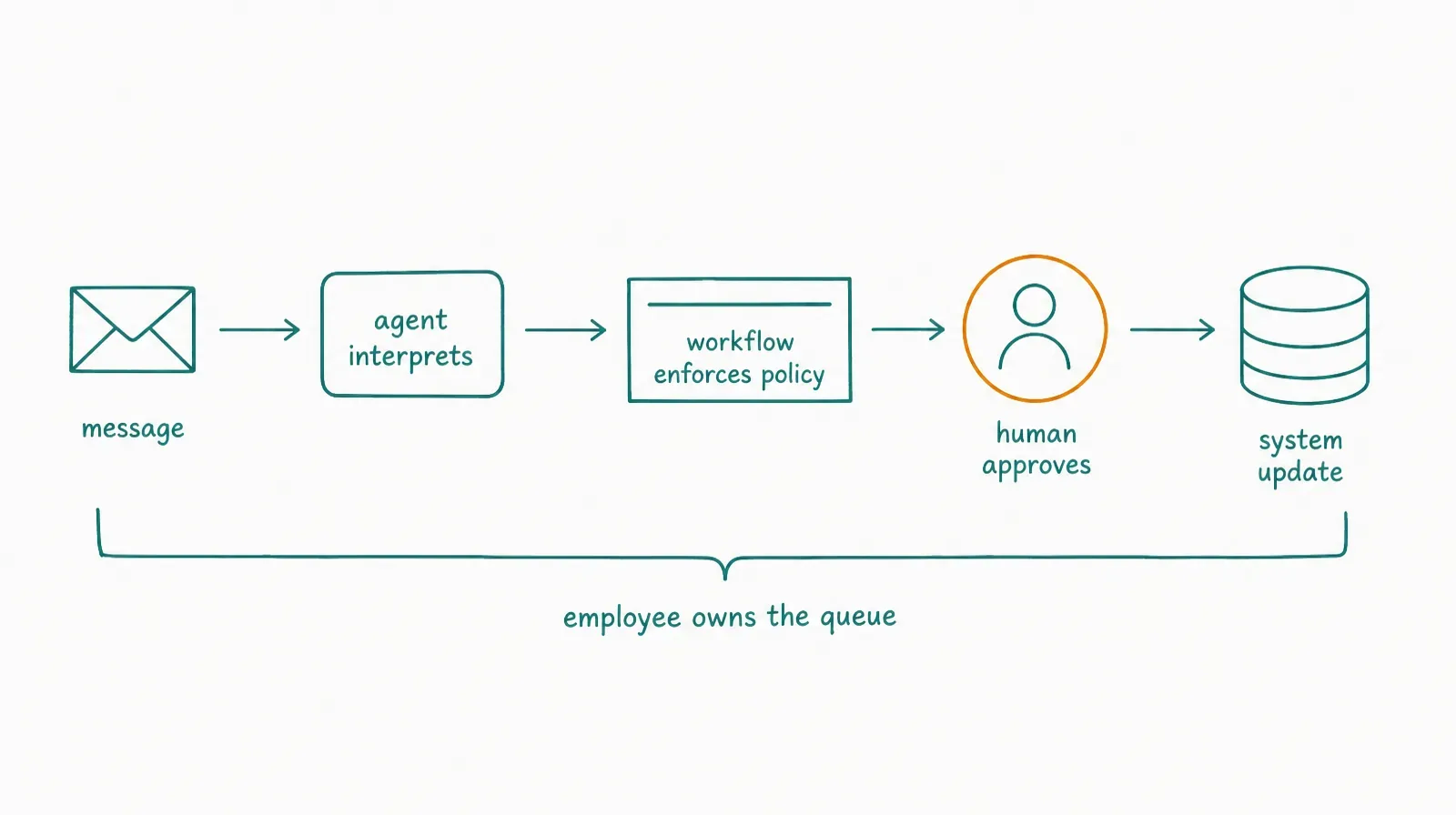
| Stage | Best execution pattern | Reason |
|---|---|---|
| Receive an unstructured message | Agent inside employee role | Intent must be interpreted |
| Retrieve account and policy data | Deterministic connector/API | Source and contract are known |
| Decide which policy applies | Agent with cited evidence | Language and context may vary |
| Enforce a hard limit | Deterministic rule | Threshold should not vary |
| Draft the response | Agent | Content depends on the case |
| Approve a consequential exception | Human | Judgment and accountability remain human |
| Update systems | Workflow/API inside permission | Write path should be predictable |
| Preserve open work | Employee task board and handover | Responsibility continues across shifts |
The workflow becomes a trusted tool inside the employee’s authority. The employee does not rewrite stable policy on every run.
Pattern 1: agent at the edge, workflow at the core
Use the agent to convert messy input into a structured request. Let deterministic automation execute the core transaction.
Example:
- Employee reads a customer email.
- Agent extracts intent, account, product, and requested change.
- Workflow validates the account and policy.
- Human approves any exception.
- Workflow applies the change.
- Employee explains the result and updates the task.
This pattern keeps natural-language flexibility away from the most sensitive write.
Pattern 2: workflow at the edge, agent for the exception
Let automation handle the normal path and call an AI employee only when a case falls outside known rules.
Example: a workflow validates a standard invoice. When tax treatment, contract terms, or line-item evidence conflicts, it routes a review task. The employee gathers context and proposes a resolution, and a qualified owner approves the consequential decision.
A process with many normal fields is not automatically “98% automatable”; the relevant question is whether the exceptions are costly. Do not assume your exception rate before measuring it.
Pattern 3: employee owns the process; workflows enforce rails
The employee maintains the queue, priorities, context, and handover. It calls multiple deterministic services for validation, notifications, state changes, and reporting.
This is appropriate when no single fixed graph can represent the role, but important sub-processes still have exact contracts.
§ 09How Do Exceptions Change the Decision?
Exceptions are the economic hinge.
A workflow is attractive when exceptions are rare, recognizable, and routable. It becomes expensive when the team continuously adds branches for new language, sources, circumstances, and missing data.
An AI employee is attractive when exceptions require interpretation but remain bounded. It becomes unsafe when exceptions require authority or expertise the system should not have.
| Exception profile | Best pattern | Why |
|---|---|---|
| Rare and machine-detectable | Workflow branch | Encode and test it |
| Rare but consequential | Workflow to human | Do not add model variance |
| Frequent and language-heavy | Agent triage + workflow controls | Interpretation is the bottleneck |
| Frequent and research-heavy | AI employee + human approval | Path varies, outcome recurs |
| Novel and low-risk | AI employee inside reversible authority | Flexible planning can help |
| Novel and high-impact | AI employee prepares; human decides | Evidence can be automated, accountability cannot |
| Unobservable | Redesign before automating | Neither pattern can be governed well |
Track the percentage routed to exception, time spent per exception, repeated exception categories, false escalation, missed escalation, correction minutes, severity of the worst error, and whether the exception produced a new stable rule.
When an exception repeats and becomes predictable, move it from agentic judgment into deterministic control.
§ 10Which Is Easier to Test and Audit?
Workflow automation is usually easier to test exhaustively because its states and transitions are explicit. AI employees need scenario-based evaluation because language, planning, retrieval, and tool results can vary.
| QA layer | Workflow automation | AI employee |
|---|---|---|
| Definition test | Validate graph/schema | Validate role, goals, non-goals, and policies |
| Unit test | Step or function | Tool, prompt component, retrieval, or evaluator |
| Path test | Branch and state coverage | Representative scenario coverage |
| Data test | Input/output contract | Source relevance, grounding, freshness |
| Failure test | Timeout, retry, malformed input | Tool failure, conflicting context, unsafe request, injection |
| Acceptance test | Expected terminal state | Human/evaluator rubric for the outcome |
| Audit artifact | Execution history | Trigger, trace, sources, actions, approvals, evaluation, handover |
| Regression test | Re-run known paths | Stable task set plus adversarial and edge cases |
The audit burden does not disappear when a workflow contains AI. Once a model influences classification or routing, test the model-dependent decision separately from the deterministic steps around it.
NIST’s Generative AI Profile recommends risk management that accounts for the system’s context, human-AI configuration, review, tracking, documentation, and oversight. Treat that as risk guidance, not a claim that one universal test plan fits every role.
§ 11Which Is Cheaper?
Workflow automation is usually cheaper per predictable execution. AI employees may be cheaper to configure and maintain when the alternative is a large, changing branch graph plus substantial manual exception handling.
Compare full cost:
Workflow total cost = platform + run/step fees + integration build + maintenance + monitoring + manual exceptions + incident recovery
AI-employee total cost = platform + model/tool usage + role design + review + corrections + monitoring + incidents + change management
Hybrid total cost = workflow cost + employee cost - duplicated work avoided
The subtraction is valid only when the hybrid actually removes duplication. Do not count the same saved minute in both systems.
| Cost condition | Likely winner | Reason |
|---|---|---|
| High volume, fixed logic, low exception rate | Workflow | Low marginal cost and predictable execution |
| Low volume, changing process | Manual or on-demand agent | Standing automation overhead may not pay back |
| Moderate recurrence, variable evidence path | AI employee | Less branch construction and repeated prompting |
| Stable core, variable edge | Hybrid | Deterministic transaction plus agentic interpretation |
| High-impact, low recoverability | Workflow + human | Predictability and explicit approval dominate |
CellCog uses credits, so its role economics depend on the mode, tools, output, shift length, and frequency. As of July 19, 2026, the public CellCog pricing page said more complex operations consumed more credits, additional credits cost 90 credits per $1, and subscription credits remained valid for 60 days after the billing period.
Do not compare a monthly entry price with the labor cost of a full role. Run the target workload and use the 7-layer AI employee cost model to include reviewer time, corrections, monitoring, and failure exposure before calculating cost per accepted outcome.
Do not automate avoidable work
Before comparing platforms, ask whether the process should exist in its current form. A 12-step approval chain may contain duplicate data entry, status copying, and reviews that no policy requires.
Remove the waste first. Otherwise, workflow automation makes the waste faster while an AI employee learns to navigate it. Neither outcome improves the underlying operation.
Normalize the same workload
Compare both approaches on the same cases, outputs, quality standard, action scope, and review policy. A workflow that handles only the normal path is not directly comparable with an AI employee that also investigates exceptions.
Separate the normal-path cost, exception cost, maintenance cost, and reviewer cost. This exposes where each design actually earns its place.
Price failure, not only success
Expected cost should include the probability and impact of a bad action. A low average run price can be misleading if one duplicate payment, wrong account update, or unsupported external message creates material recovery work.
Use severity bands and inspect the worst observed failure. Tail risk can justify a deterministic control or human approval even when that step makes the average workflow slower.
§ 12How Do Governance and Permissions Differ?
Workflows express authority through service accounts, connector credentials, API scopes, roles, and configured actions. AI employees use the same infrastructure but add dynamic tool selection, persistent context, and recurring role behavior.
That creates a stricter design requirement: role, then source, then tool, then action, then limit, then approval, then log, then recovery.
| Control | Workflow implementation | AI-employee addition |
|---|---|---|
| Identity | Service account or user connection | Distinct worker/role identity where available |
| Access | Connector or API scope | Tool availability plus role-specific instructions |
| Action limit | Encoded branch/parameter | Permission tier and dynamic stop condition |
| Approval | Approval state in the graph | Approval request with evidence and current task context |
| Logging | Step input/output and status | Sources, selected actions, results, evaluation, handover |
| Revocation | Disable flow or credential | Pause role, revoke tools, clear active queue, review memory |
| Change control | Version workflow definition | Version role, instructions, policies, evaluation, and context |
CellCog’s connector documentation describes connections to communication, project, design, data, marketing, and CRM tools. Its AI Employees guide describes the surrounding role mechanics.
Review the current CellCog terms before live access. Users remain responsible for monitoring work and actions taken on their behalf. Available tool breadth does not mean every role should receive every tool.
Keep one human owner for the combined system
A hybrid can fail between layers: the employee believes the workflow owns an exception, while the workflow sends an alert nobody reviews. Assign one human owner to the full outcome, not separate owners who assume the handoff is someone else’s problem.
That owner should approve policy, access, escalation timing, quality sampling, incident response, and any expansion of the role.
§ 13How Do You Choose in 15 Minutes?
Score the process before you choose the product.
| Question | Workflow signal | AI-employee signal |
|---|---|---|
| Can we draw the normal path? | Yes, including branches | Only at a high level |
| Are inputs structured? | Mostly | Frequently unstructured |
| Can rules be stated exactly? | Yes | Judgment depends on context |
| Does the next step vary by evidence? | Rarely | Often |
| Are exceptions classifiable? | Yes | New exception types emerge |
| Is the action high-volume and latency-sensitive? | Yes | No or moderate |
| Must every path be exhaustively tested? | Yes | Scenario coverage is acceptable |
| Does open work persist across days? | Minimal | Central to the role |
| Is the main maintenance burden branch logic? | Low | High |
| Can a human review consequential exceptions? | Yes | Yes - required |
Use this routing rule:
- 8–10 workflow signals: start with deterministic automation.
- 8–10 employee signals: test an AI employee in shadow mode.
- Mixed result: design a hybrid and draw the control boundary.
These ranges are an illustrative decision aid, not a scientific score. A single high-impact constraint - such as an irreversible regulated action - can override the total.
§ 14What Does CellCog Add Beyond a Workflow Builder?
CellCog’s stated product model is a role and outcome rather than a user-authored trigger-action graph.
The underlying CellCog Super-Agent can plan, research, analyze, code, and create artifacts across documents, spreadsheets, presentations, images, video, audio, dashboards, and apps. Capability breadth alone does not turn a variable path into a standing role. The AI Employee layer adds:
- a role;
- goals and KPIs;
- a dedicated inbox;
- schedules and wake conditions;
- persistent memory;
- a task board;
- permissions and approvals;
- shifts and handovers; and
- delegation to other AI employees.
That makes CellCog relevant when the work has a recurring outcome but no stable end-to-end path.
Where CellCog should not replace a workflow
Use a workflow when the trigger-action graph is known, the rule must be exact, the transaction is high-volume, latency must be consistent, a fixed schema controls inputs and outputs, exhaustive branch testing matters, or an agent adds no decision value.
CellCog’s own comparison positioning acknowledges that visual no-code workflow platforms can be stronger for discrete, repeatable automation. That is not a weakness in the category definition. It is the buyer-fit boundary that prevents an AI employee from becoming an expensive wrapper around a 6-step rule.
Where CellCog can sit above workflows
CellCog can own the role-level queue while invoking deterministic tools for stable steps. Its employee may research a case, decide which approved process applies, call that process, inspect the result, and preserve unfinished work.
The company’s public guide to how it uses CellCog is useful first-party implementation evidence. Treat it as the vendor’s operating practice, not as an independently audited customer outcome.
§ 15What Is a Safe Pilot Design?
Hire and pilot the outcome before the job title: test the process boundary, permissions, evidence, and escalation path with an outcome-first process.
| Pilot step | Deliverable | Pass condition |
|---|---|---|
| 1. Inventory | 20–50 representative cases, including exceptions | Workload reflects normal and adverse inputs |
| 2. Classify | Stable steps, variable steps, human decisions | Every step has a proposed owner |
| 3. Encode | Deterministic rules and transactions | Fixed logic is testable and versioned |
| 4. Assign | One role outcome and explicit non-goals | Employee scope fits on 1 page |
| 5. Restrict | Read/prepare/act/approve permission map | No unnecessary write access |
| 6. Shadow | Employee completes cases without live changes | Output and escalation rubric can be scored |
| 7. Stress | Missing data, tool failure, conflicting policy, injection attempt | System stops, logs, and escalates correctly |
| 8. Promote | Only reversible bounded actions go live | Recovery and audit evidence work |
| 9. Review | Cost, acceptance, correction, exception, severity | Full operating case beats the alternative |
The 20–50-case range is illustrative. Increase it when the process has many material subtypes or rare high-severity failures.
Move repeated judgment into rules
During the pilot, log every exception. If reviewers make the same decision from the same evidence, convert that decision into a deterministic rule or approval condition.
This reduces model variance and cost. The employee should retain only the ambiguity that actually benefits from interpretation.
Move unstable rules back into review
If policy changes faster than the workflow team can safely encode and test it, do not let a stale flow continue silently. Pause the action, route cases to review, and update the source of truth before resuming.
§ 16What Usually Breaks?
Both approaches fail when ownership is vague.
| Failure mode | Workflow symptom | AI-employee symptom | Fix |
|---|---|---|---|
| Bad source of truth | Correctly executes old rule | Persuasively applies stale context | Version and date policy |
| Missing owner | Alerts pile up | Escalations wait indefinitely | Named accountable person |
| Excess access | Flow can change too much | Agent selects over-broad action | Least privilege |
| Weak idempotency | Duplicate events repeat transaction | Trigger storm repeats work/messages | Deduplication key and run limit |
| Hidden partial failure | Later steps assume success | Task marked complete despite tool failure | Verify postcondition |
| No acceptance standard | “Green” run looks successful | Fluent output looks acceptable | Outcome rubric |
| Unbounded exception | Branch graph explodes | Agent improvises outside role | Scope and escalation rule |
| No recovery | Failed state is terminal | Persistent worker repeats the error | Pause, rollback, and incident path |
| Cost blindness | Step/run fees accumulate | Model and review cost drift | Cost per accepted outcome |
| Change drift | Flow and policy diverge | Instructions, memory, and KPI diverge | Change-control review |
The problem is rarely whether the platform can connect to an app. The problem is whether the organization can prove that the right policy produced the right action and that a person owns the exception.
§ 17What Is the Final Decision Rule?
Use workflow automation when you know how the work should proceed. Use an AI employee when you know what outcome must recur but the path changes.
Choose workflow automation if:
- the input/output contract is stable;
- rules and branches are expressible;
- volume, latency, repeatability, or auditability dominate;
- exceptions are rare or classifiable; and
- a builder can maintain the process.
Choose an AI employee if:
- the goal is stable but evidence and steps vary;
- unstructured documents or messages drive the work;
- the worker must plan, research, and choose tools;
- open tasks persist across shifts;
- quality can be scored;
- authority can be bounded; and
- a person can own exceptions.
Choose a hybrid if the process combines ambiguous interpretation with stable transactions. That is the normal production case.
Q1Is workflow automation the same as an AI agent?
No. A workflow follows predefined code paths, while an agent dynamically chooses steps and tool use. A workflow can call an AI model, and an agent can call a workflow, so the architecture can be hybrid.
Q2Can an AI employee replace Zapier, Power Automate, or a state machine?
It should not replace deterministic automation that already handles stable rules reliably. An AI employee is better used above or beside those systems: interpreting variable inputs, choosing an approved process, handling bounded exceptions, and preserving role-level accountability.
Q3Is a scheduled AI workflow an AI employee?
Not by schedule alone. It may be a proactive automation. An employee pattern also needs a continuing role, approved context, a work queue, role-shaped authority, outcome measurement, escalation, and handover.
Q4Which is safer: an AI employee or workflow automation?
Neither is inherently safe. A deterministic workflow is easier to constrain and test when paths are known. An AI employee can handle unfamiliar inputs but introduces output variance, dynamic tool choice, persistent context, and drift risk. Safety depends on scope, access, approval, logging, recovery, and human ownership.
Q5Should a small business start with automation or an AI employee?
Start with the simplest pattern that completes the work. Encode stable trigger-action tasks. Use an on-demand agent for irregular ambiguous work. Test an AI employee only when one recurring outcome needs context, planning, and handover across work sessions.
Q6How do I calculate ROI for the hybrid?
Measure accepted outcomes, reviewer and correction time, exception time, platform and usage cost, maintenance, and incident cost. Compare that with the current process using the same workload. Do not add workflow and AI savings independently if both claim the same avoided work.