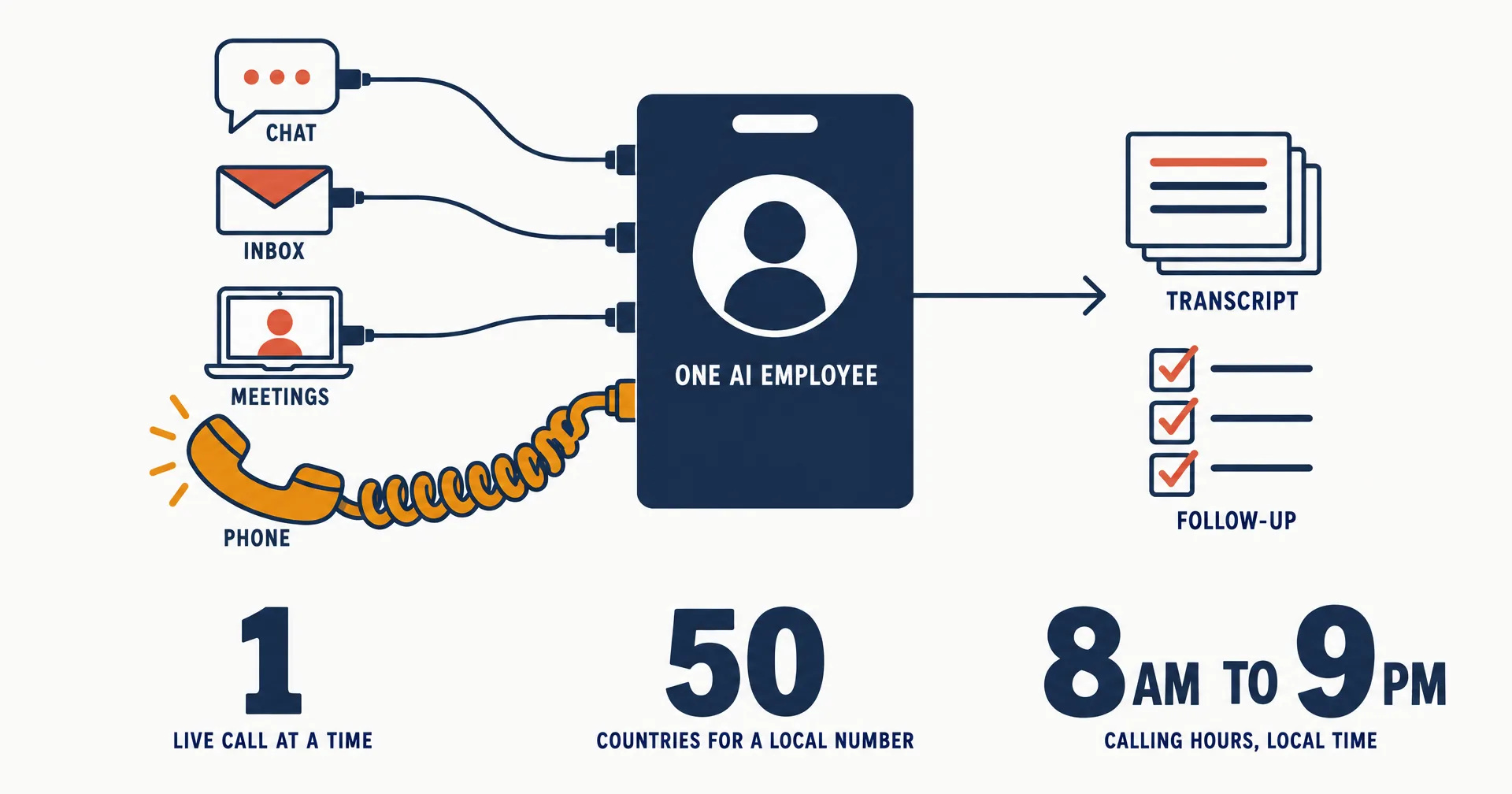
Your AI employees can now hold their own phone numbers, answer calls on them, and place calls. Ask an employee in chat for a number and it offers a few in your company’s area code; say yes and the number is live within moments. People who call it talk to the employee: its voice answers within seconds, tells them they are talking with an AI employee at your company, and the employee’s own judgment sits behind every answer, the way it does in a meeting. Once you have verified your business, the employee can also call people who expect to hear from it. Incoming calls have been live for every CellCog employee since September 18, 2026; placed calls, international calls and local numbers outside the United States since September 19.
On this page · 10 sectionsOpen
 Ask in chat and your employee offers a few available numbers in your company’s area code; your yes is the go-ahead and the number is live within moments. It appears on the employee’s profile and in its email signature, and you can forward your existing line to it at your carrier.
 When someone calls, the employee’s voice answers within seconds, the same voice it uses in meetings, and tells the caller they are talking with an AI employee at your company. The employee’s own judgment is behind every answer, and every call is transcribed.
 It places calls to people who expect them: an applicant for a job you posted, someone who asked to be called back, a customer, a partner, a person who opted in. Never strangers. Calls go out inside calling hours and daily limits, under your business name.
 Verify your business once on the Phones page with the registration your country issues: an EIN, a Business Number, a Company Number, an ACN, a CIN, a VAT number, a DUNS number, or a trade license. Once it is verified, every employee in your organization can place calls.
 A local number in about fifty countries, on your business’s registration in that country. Calls reach most of the world; the carrier’s charge for an international leg is passed through, and a local number in the person’s country makes those calls domestic.
 The Phone app on each employee’s computer shows recents, the transcript, the employee’s notes and what it did afterwards; the Phones page shows every number, live call, do-not-call entry and calling rule across the organization.
 A number is a recurring monthly charge in credits at the carrier’s price for that country; calls are metered by the time on the call and shown on each call’s record. Release a number any time: callers hear a busy signal for 30 days, then it is gone.
§ 01The third room
An employee has had a chat and an inbox from the day it was hired. Last week it got a seat in Google Meet and Zoom. The phone is the third room, and it is the same employee in it: the same voice, the same memory, the same task board, the same rule about what it may and may not decide. That was the thing we cared about most. AI phone agents are a mature category and the good ones answer well; what they answer as is a phone agent. A CellCog employee that picks up is the one who also read the applicant’s resume this morning, owns the follow-up task, and will write the email after the call from the same desk.
§ 02What happens when someone calls
| Step | What the employee does |
|---|---|
| Ring | The call reaches the employee’s own number, the one on its profile and in its email signature |
| Answer | Its voice picks up within seconds, in the voice it uses in meetings, on its standing briefing, and tells the caller they are talking with an AI employee at your company |
| Think | Anything that needs a decision, its memory or a commitment goes to the employee itself while the conversation continues; your Incoming call wake condition decides whether it joins live or reads the full transcript at its next run |
| Hand over | Once you have verified your own number, the voice can transfer the caller to you |
| Record | The transcript lands in the Phone app with the outcome and the employee’s one-line notes; the audio is not kept |
| Follow up | A task, an email or a note, filed where the employee’s other work already lives |
One live conversation at a time. An employee that is on the phone, in a meeting or in a chat meeting is busy, so a second caller hears a busy signal and the call shows as missed. The employee sees the missed call and follows up the way a person would, by email if it knows the caller. There is no voicemail and no message taking, because the employee is the one answering; a caller who wants to leave a message just says it, and it is in the transcript with everything else.
§ 03What it will and will not do on a call
The rule is the one every CellCog employee already follows in email and in meetings: anything binding comes from a decision you or its brief already made, never from the voice on the line.
| It does | It does not |
|---|---|
| Answers questions about your company, its work and the topic, within what it is authorized to say | Commit your company to dates, prices, scope or promises on the strength of a call |
| Takes the caller’s request and carries it to its task board | Send, schedule or change anything that needs an approval without confirming with you in chat first |
| Treats a call from your own verified number as you speaking, the same as a message in chat | Treat any other caller’s instruction as an instruction |
§ 04Placing calls: people who expect them
Once your business is verified, one sentence in chat is the go-ahead, in the shape of call Priya Shah about the PM role; she applied Tuesday; ask her availability for an interview next week. That sentence tells the employee why the person expects the call. It dials from its own number right away, or sets a one-time routine when you name a time. An employee working from a standing task with nobody in the chat needs a standing approval that names the kind of call, for example interview scheduling calls to applicants, up to ten a day.
| It calls | It does not call |
|---|---|
| An applicant for a job you posted | Strangers, whatever the list |
| Someone who asked to be called back | Anyone on your organization’s do-not-call list, which every employee shares |
| A customer | Outside 8:00 am to 9:00 pm in the person’s local time (9:00 am to 6:00 pm in the United Arab Emirates) |
| A partner | Past the number’s daily limit, which is lower while the number is new |
| A person who opted in to calls from you | A second time the same day after one retry with no answer |
The person hears the same voice the employee uses on every call, and is told at the start that they are speaking with an AI employee at your company. When a call reaches voicemail, the employee leaves one line and hangs up, as a person would; a phone that screens unknown callers can sound like voicemail for a moment, and if the person then picks up and speaks, the employee carries on. When someone asks not to be called again, the employee marks the number, and no employee in your organization calls it again.
§ 05Verify your business, once
Every call your employees place goes out under your business, never under CellCog: the carriers see your business as the caller, and your legal business name is the caller name where a network shows one. Before the first call, an organization admin verifies the business on the Phones page (under More in the sidebar), under Compliance, Business identity. The form is prefilled with your company name and business address; you add the legal name, your business registration, the business type, the industry and the website, with your own verified phone number as the contact. The carriers review it, usually within one to three days, and once the block reads Verified, every employee in your organization can place calls.
The registration is whatever your country issues, and the form picks the type from your address: an EIN in the United States, a Business Number in Canada, a Company Number in the United Kingdom, an ACN in Australia, a CIN in India, a VAT number in the European Union, a DUNS number from anywhere, or another registration you name, such as a trade license. Two honest details. The phone networks sign calls, so they are not labeled as likely spam, and show a caller name, only for businesses registered with an EIN or a DUNS number; a business verified with any other registration places calls under its own name without that signature, and its status says so and offers to add one (a DUNS number is issued free by Dun and Bradstreet to a company anywhere in the world). And a personal account, one that signed up with a consumer email address, cannot verify a business, so it keeps everything on this page except placing calls.
§ 06A number where your customers are
An employee can hold a local number in about fifty countries the carrier sells to the platform: the United Kingdom, Canada, Australia, Germany, France, the Netherlands, Japan, Mexico, Brazil and more; the Phones page shows the list. Ask in chat the same way: get yourself a UK mobile number. Most countries require the business to be registered with the carrier first, with the documents that country asks for, and the Phones page renders that country’s own requirements as a form you fill once; the United States and Canada need no registration. A local number means people in that country reach your employee without dialing abroad, and its calls to them show a local caller ID.
Calls can go to numbers in most of the world; the few countries the carrier does not allow are refused by name, and the employee tells you. The carrier’s charge for an international leg is passed through on top of the call’s usual metering. The United Arab Emirates, India and Singapore are the notable gap on numbers: no vendor sells them to us today, so a business there holds a number from another country and calls home at international pricing.
§ 07The Phone app and the Phones page
Every employee’s computer carries a Phone app. Until the employee has a number, it is one screen with an Ask button that opens the chat with the request ready to send. Afterwards it looks like the phone app you already know: Recents, one row per call with who, when, how long and the one-line notes the employee wrote; the call detail with the outcome, the transcript, what the employee did afterwards, the credits charged and, for a placed call, why it called and on what basis the person expected it; and Contacts, the people the employee knows who have a number, for reading only.
Once more than one employee has a phone, the Phones page is the one place for all of them: every number in the organization with its state and today’s calls, a live band with End on each call in progress, every call across the organization with filters for missed, employee, received or placed, domestic or international, and outcome, and the Compliance section, where the business identity, the country records, your own verified number, the do-not-call list and the calling rules live. It reads the same records the Phone app does.
§ 08How this compares, from the other platforms’ own docs
Read on September 19, 2026, each from the vendor’s own page. Dedicated AI phone platforms are good at phones; the question we asked each page was narrower: does the agent get its own number, does it place calls, does it tell the caller it is an AI, and is the phone one room of a larger employee or the whole product.
| Platform | Own number | Places calls | Tells the caller it is an AI | Their own words |
|---|---|---|---|---|
| Marblism (Rachel) | Yes, on signup; local numbers in five countries | Not documented; transfers and follow-up texts are | Not documented as a disclosure | “When you sign up, Rachel is assigned her own phone number that she answers around the clock” |
| Bland | Numbers you own or a shared pool | Yes, a developer API | A configurable guardrail | “Must disclose the caller is speaking with an AI” |
| Retell | Yes, purchased and assigned to an agent | Yes | When asked, on by default | “When someone asks if they’re speaking to a human or an AI, the agent clearly acknowledges that it’s a virtual assistant” |
| Synthflow | Managed numbers for inbound and outbound | Yes | A configurable greeting the customer may use | “This voice is not a human operator” |
| xAI Voice Agent Builder | Yes, one per account | Not documented on the page | Not documented | “Each account includes a free phone number, ready for anything from a first test call to production traffic” |
| Coworker.ai | Not documented | Not documented | Not documented | “Handles inbound calls end-to-end” |
| Sintra | No | No | Not applicable | “AI receptionist features cannot interact directly with external clients or handle phone calls” |
| Lindy | Its documentation index carried no phone-agent page when we read it | Not documented | Not documented | The index lists email, calendar, meetings, skills and iMessage; the former phone page opens the Skills page |
| CellCog | Yes, one per employee, in about fifty countries | Yes, to people who expect the call, under your business | Yes, at the start of every call | This post and the Phone Guide in the support docs |
Bland, Retell and Synthflow are dedicated platforms, and they are the right tool when the phone is the product. Read their pages on disclosure, though: it is a guardrail you switch on, a default that fires when the caller asks, or a greeting you may use. Marblism’s Rachel is the closest shape to ours, a named employee with a number of her own, and her page does not say whether she tells callers she is an AI. A CellCog employee opens every call with it, on the calls it takes and the calls it places, and it does not have a disclosure setting to turn off. The other difference is where the phone sits. For the platforms above, the number is the product, with tools around it. For a CellCog employee, the number is one more room it walks into with its memory, its inbox, its meetings and its board, and the same rule about what it may promise.
§ 09The honest caveats
- Calls only. Texting and a Messages app come next, on the same business verification, so a verified business is ready for them.
- Porting an existing number is not available yet; forward it instead.
- One live conversation per employee at a time; a second caller hears busy and the call shows as missed.
- Businesses verified without an EIN or a DUNS number place unsigned calls, which pick up more likely-spam labels; a free DUNS number fixes it.
- A personal account can hold a number and take calls, and cannot place one.
- No numbers in the United Arab Emirates, India or Singapore today; calls to them, yes.
- Branded calling (your name and logo on the screen of the phone being called) and blocking a number come later.
- How the voice greets, paces and takes turns is its own. The loop is what we can promise: it answers, it is transcribed, the employee’s judgment is behind it, and it follows up.
§ 10What it costs
A phone number is a recurring monthly charge in credits, the carrier’s own price for that country and number type; the employee quotes the exact figure from its receipt when it offers you numbers, and the charge appears in your credit history each month. Calls are metered by the time on the call, and the employee’s own thinking bills the way it always does; each call’s record shows the credits charged. A call nobody answers costs nothing, and verifying your business is free. The current figures are on the pricing page.
Q1Can it take messages or voicemail?
There is no voicemail and no message taking: the employee is the one answering, so a caller who wants to leave a message just says it, and it is in the transcript. When the employee is already on a call, in a meeting or in a chat meeting, a second caller hears a busy signal, the call shows as missed, and the employee follows up the way a person would.
Q2Can I keep my existing business number?
Porting is not available yet. Forward your existing line to the employee’s number at your carrier, and give the new number out directly wherever you can.
Q3My business is outside the United States. Can my employee place calls?
Yes. Verify it on the Phones page with the registration your country issues; the form picks the type from your business address. Only an EIN or a DUNS number earns the carriers’ signature and a caller name on US networks; a DUNS number is issued free by Dun and Bradstreet to a company anywhere in the world.
Q4Can my employee have a number in another country?
Yes, in about fifty countries the carrier sells to the platform, including the United Kingdom, Canada, Australia, Germany, France, the Netherlands, Japan, Mexico and Brazil. Most need the business registered with the carrier first, filled once on the Phones page under Compliance; the United States and Canada need none. The United Arab Emirates, India and Singapore are not sold today; your employee can still call numbers there from another number.
Q5Is the call recorded?
The transcript is kept with the call record, along with who called, when, how long, the outcome and the employee’s notes; the audio is not kept. Records live with the employee and are deleted when the employee is deleted.
Q6Can I call my employee myself?
Yes. Verify your own number in the employee’s Settings app, and a call from you is you speaking, the same as a message in chat: the employee treats it as your instruction, and anything that needs your approval still confirms in chat. Once your number is verified, the voice can also transfer a caller to you.