A small business shopping for an AI employee in October 2026 meets ten products that share one label and little else. Some are preset helpers you chat with, some are workflow builders you wire yourself, some live inside your team chat, and a few are standing employees that keep a role from one day to the next. Most offer a free plan or trial, the paid entry plans we charted run from $29 to $100 a month, and Lindy and Grok Bot both changed their entry plans since October 1.
We run one of these platforms and rank it first, so this page is built to be audited rather than believed. Every price below was read on the vendor’s own pricing page on October 17, 2026, every CellCog claim links to a receipt, and where a rival fits a small business better, we name it. Our general ranking, with the enterprise and sales-led platforms, lives at 10 Best AI Employee Platforms; this page keeps to products a team of under 50 people can sign up for today.
On this page · 9 sectionsOpen
 Our ranking for small businesses, October 2026: CellCog first for standing AI employees across several jobs, Lindy for Slack-first teams that want a flat per-person price, Viktor for one shared teammate in Slack or Teams.
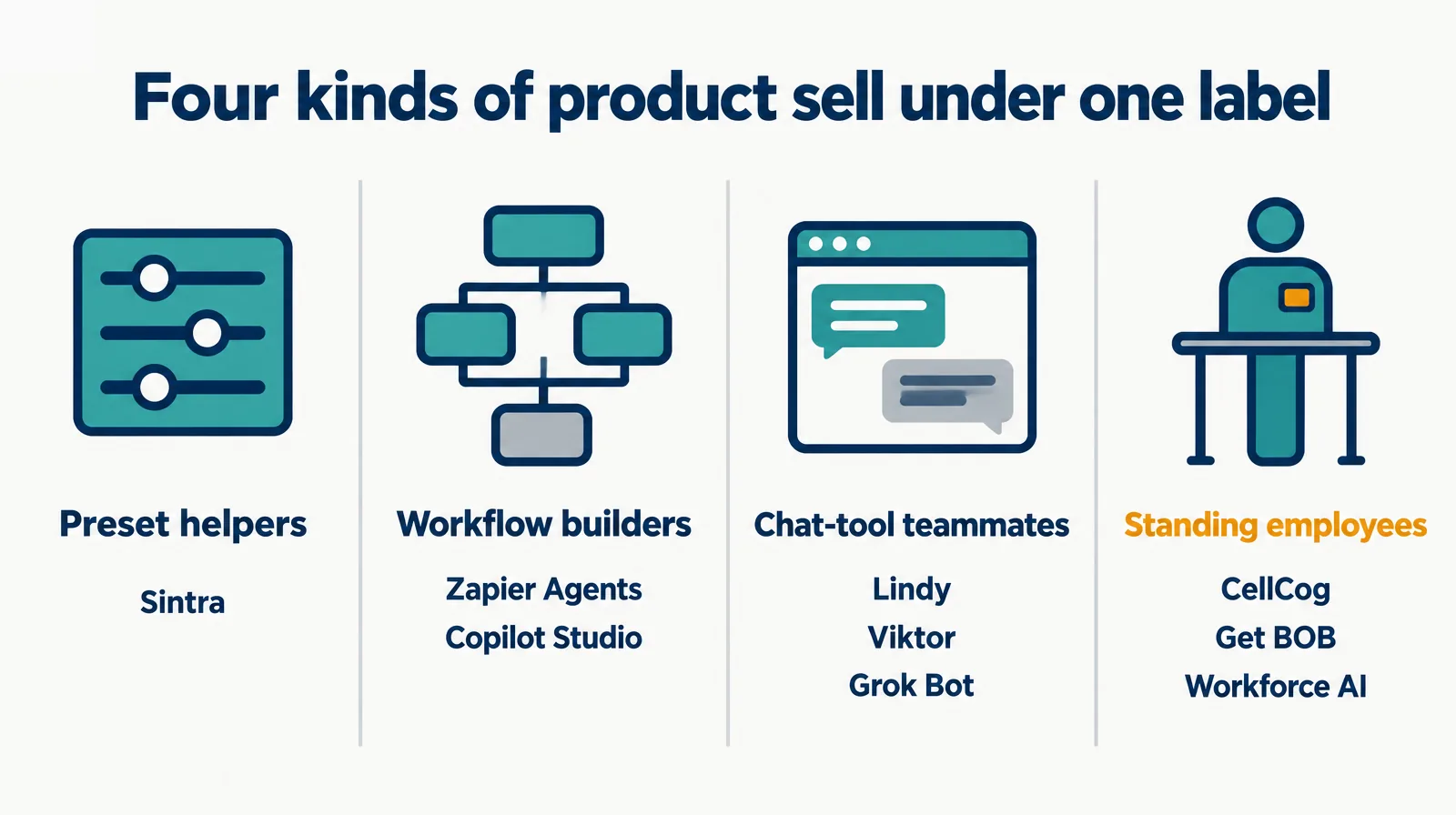
 Four kinds of product share the AI employee label: preset helpers, workflow builders, chat-tool teammates and standing employees.
 Every price was read on the vendor’s own pricing page on October 17, 2026; Lindy’s entry plan rose to $49.99 a month and Grok Bot now starts at X Premium for $30.
 Six products offer a free plan or free credits; Get BOB and Tidio offer trials, and Sintra offers a 14-day money-back guarantee.
 We publish this page and rank ourselves first; every CellCog claim links to a receipt, and the CellCog section lists our limits too.
 For one clear job, a specialist usually wins: Tidio for website support chat; for several jobs that change week to week, a standing employee fits.
§ 01Four kinds of AI employee, one label
Preset helpers. A fixed cast of named assistants you chat with, one per job. Cheap and fast to start; you drive every task. Sintra is the clearest example.
Workflow builders. Tools for wiring steps across your apps so a process runs the same way every time. Powerful, and somebody on your team owns the design. Zapier Agents and Microsoft Copilot Studio sit here.
Chat-tool teammates. One assistant that lives where your team already talks, in Slack, Teams or a subscription you hold. Lindy, Viktor and Grok Bot take this shape.
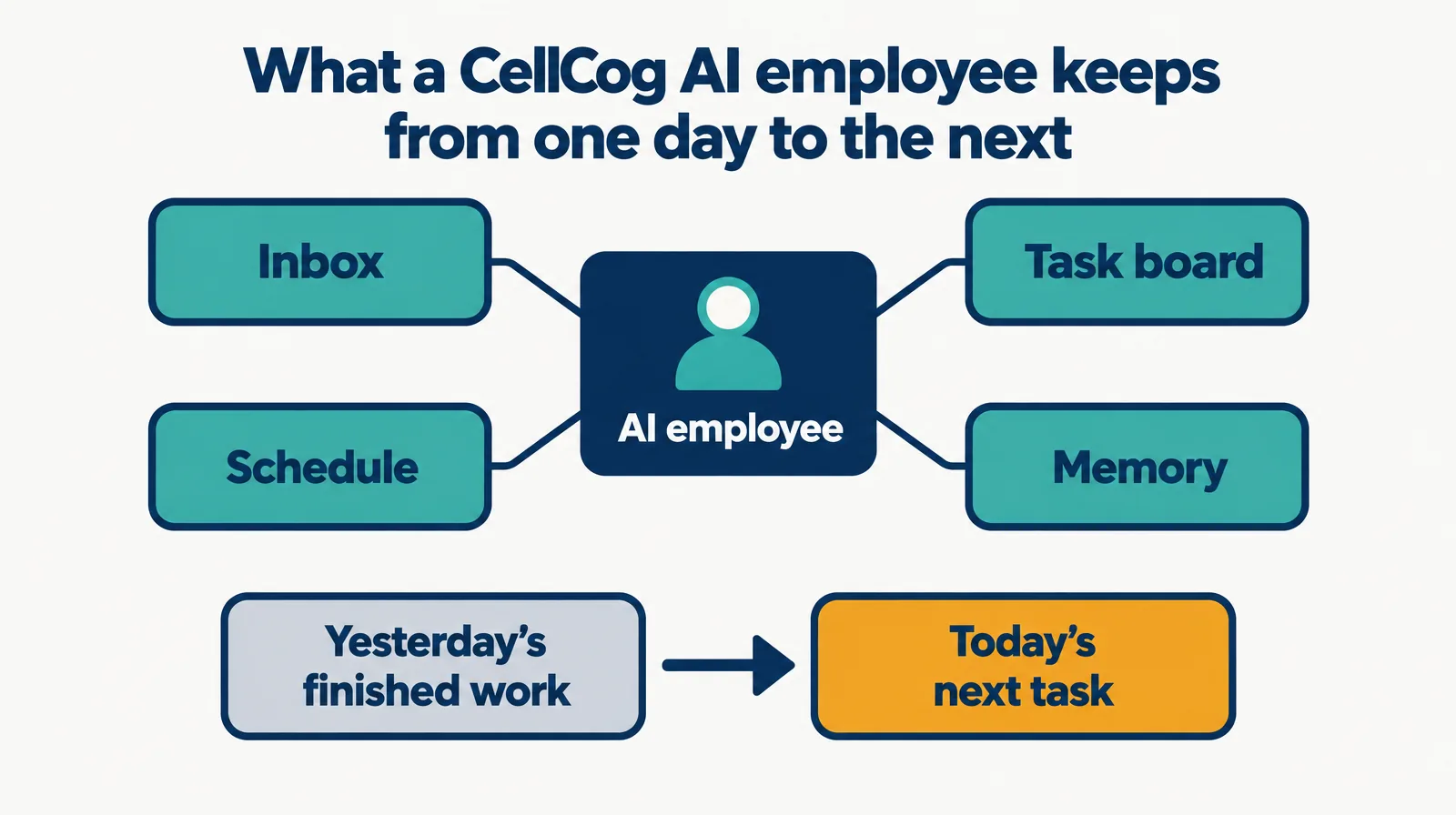
Standing employees. A worker you hire into a role, with its own inbox, task board and memory, that carries its work from one day to the next. CellCog, Get BOB and Workforce AI build toward this, in three different ways.

§ 02The ranking, October 2026
| Rank | Platform | Kind | Best for a small business that |
|---|---|---|---|
| 1 | CellCog | Standing AI employees that form teams | Wants roles filled, not chats, across several jobs |
| 2 | Lindy | Slack-first assistant with routines | Runs on Slack, the inbox and meetings, and wants a flat price |
| 3 | Viktor | Managed teammate in Slack and Teams | Wants one shared teammate inside its channels |
| 4 | Sintra | Twelve preset helpers | Wants ready-made marketing and content helpers cheaply |
| 5 | Get BOB | Digital employees paid per finished job | Wants to pay only when a job is done |
| 6 | Workforce AI | One owner-side employee with a meeting avatar | Runs on client email, Zoom and WhatsApp |
| 7 | Grok Bot | AI teammates inside the X subscription | Already pays for X Premium |
| 8 | Zapier Agents | Agent builder on the Zapier platform | Has someone who will design and maintain the workflow |
| 9 | Tidio | AI support agent plus live chat | Needs website support answered first |
| 10 | Microsoft Copilot Studio | Agent builder inside Microsoft 365 | Already runs on Microsoft 365 |
We publish this ranking and we put ourselves at the top, which is a conflict of interest. Discount the first row accordingly and check the receipts in the CellCog section. Row two is the honest alternative: if your team already lives in Slack, the inbox and meetings, and you want one predictable monthly price per person, Lindy is the closer fit, and we would pick it over us for that business. No row on this page carries a score, because we could not score ourselves fairly.
§ 03What it costs to start
| Platform | Published entry price | Pricing page |
|---|---|---|
| CellCog | Plans from $8 a month; usage-based, you pay for the work, not the hire | cellcog.ai/pricing |
| Lindy | Team plan $49.99 a month per active user, 5,000 credits each | lindy.ai/pricing |
| Viktor | Team plan $100 a month, 40,000 shared credits | getviktor.com/pricing |
| Sintra | $97 a month list, with sale prices from $15.60 a month on a 12-month plan | sintra.ai/pricing |
| Get BOB | Mini $29 a month for 50 BOB Jobs, one user | getbob.ai/pricing |
| Workforce AI | Starter $99 per user a month | hireworkforce.ai/pricing |
| Grok Bot | Included in X Premium at $30 a month | x.ai/pricing |
| Zapier Agents | Zapier Professional from $19.99 a month; Agents sold as an add-on | zapier.com/pricing |
| Tidio | Starter $24.17 a month, billed annually | tidio.com/pricing |
| Microsoft Copilot Studio | Microsoft 365 Copilot (for Department) add-on, $30 per user a month paid yearly, on a qualifying Microsoft 365 plan | microsoft.com |
CellCog is not a bar because it has no monthly plan for an employee: you pay for the work, not the hire, and the cost depends purely on how much work you assign. Zapier sells Agents as an add-on on top of its platform plans, Tidio’s entry price is billed annually, and Copilot Studio needs a Microsoft 365 plan underneath, so none of those is a like-for-like bar either. Sintra’s bar is its list price; the sale running on October 17 cut the one-month plan to $48.50.
§ 04Free ways to try
| Platform | Free option |
|---|---|
| CellCog | Free to try, no credit card |
| Viktor | Free plan with up to $100 in credits that never expire, no card |
| Lindy | $25 in free credits, no card; the credits last 7 days |
| Workforce AI | Free plan, email drafting only |
| Zapier | Free plan with 100 tasks a month |
| Get BOB | Free trial on every plan |
| Tidio | 7-day free trial |
| Sintra | No free plan; a 14-day money-back guarantee |
| Grok Bot | Not on X’s Free or Plus plans; it starts at Premium |
§ 051. CellCog: standing AI employees for a business with more than one job to fill
CellCog is our platform, so read this as the vendor’s case with the receipts attached. You hire an AI employee into a role you define, and it gets its own inbox, task board, schedule and memory. It does not reset between conversations: what it learned and finished one day is where it starts the next. For a small business, the useful part is range. One employee can research, write documents, build spreadsheets and dashboards, write code, and make images and video, so a five-person company can staff marketing, operations and support without buying three tools.
Then the part this page cannot show for anyone else: employees form teams, onboard and manage each other, and report along real lines. Our own company runs on them, and the org chart is public at /ai-organization.
| Claim | Receipt |
|---|---|
| Each employee has its own inbox, task board and schedule | AI employees |
| Memory carries from one day to the next | What is an AI employee |
| Employees form teams and manage each other | Our live org chart |
| An employee can hold a US phone number and answer calls | Our AI receptionist ranking |
| The research engine ranked #1 on Deep Research Bench (July 2026) | Public leaderboard |
| Limit: no flat monthly price per employee | The cost follows the work you assign; budget by watching the first week |
| Limit: more setup than a preset cast | You define the role and review the first results |
| Limit: its home is its own inbox and task board, not your team chat | If your company lives in Slack, Lindy or Viktor is closer |
§ 06The other nine
2. Lindy. The pick for a team that runs on Slack, email and meetings. Its pricing page lists a Slack-native teammate, scheduled routines, inbox management, meeting notes, approvals built in and 1,500+ integrations. You can start with $25 in free credits and no card, then the Team plan is $49.99 a month with 5,000 credits: “Every active user in your workspace is billed, from $49.99 a month for 5,000 credits each.” That entry plan was $29.99 when we read it on October 1, so check the price on the day you buy.
3. Viktor. One managed teammate that lives in Slack and Microsoft Teams. The free plan gives up to $100 in credits that never expire, with no card and no sales call, and the Team plan is $100 a month for 40,000 shared credits. Best for a company that wants one shared helper in its channels rather than a roster of role-holders.
4. Sintra. Twelve preset helpers for marketing, content, sales, support and more under one subscription, with 250 monthly credits. The pricing page lists $97 a month, with a sale on October 17 bringing the 12-month plan to $15.60 a month and the one-month plan to $48.50, plus a 14-day money-back guarantee. The cheapest way onto this page. The trade is that you drive each task; the helpers do not carry a role between conversations.
5. Get BOB. Digital employees built from a plain-language job description, billed by finished work: “Only Pay For Jobs Well Done.” Plans run from Mini at $29 a month for 50 BOB Jobs and one user to Medium at $99 for 200 jobs with unlimited users, and Mega at $499 adds multi-tenant workspaces that suit agencies. The closest rival to us on the standing-role idea, with a simpler price.
6. Workforce AI. One owner-side employee that drafts client email, joins Zoom with an avatar and answers by text and WhatsApp. The free plan drafts email only; Starter is $99 per user a month and Pro is $249 per user a month with three AI employees. Workforce AI publishes its own small-business ranking and lists CellCog there, calling it “one of the clearest standing-worker designs in this comparison”, which is a fair description of the difference: they sell one connected employee with a fixed client-approval boundary, we sell an organization of them.
7. Grok Bot. xAI’s always-on AI teammates, now sold inside the X subscription. x.ai/pricing lists Grok Bot from Premium at $30 a month, not on Free or Plus, with Super at $100 for 15 times Plus usage. If you already pay for Premium, it is a strong bundled deal; xAI’s own docs say a user’s Bots share one computer, which matters if you want separate roles kept apart. Our comparison covers the architecture.
8. Zapier Agents. Agents built on Zapier’s automation platform and its app connections. Zapier’s plans start free with 100 tasks a month, Professional from $19.99 and Team from $69, with Agents sold as an add-on. The right pick when someone on your team enjoys building workflows and will still maintain them in six months.
9. Tidio. Live chat plus the Lyro AI support agent. Tidio’s pricing starts at $24.17 a month billed annually with a 7-day free trial, Growth from $49.17 and Plus from $300. If website support is the job, a specialist like this beats every generalist above it.
10. Microsoft Copilot Studio. Agent building inside Microsoft 365. The Microsoft 365 Copilot (for Department) add-on is $30 per user a month paid yearly and needs a qualifying Microsoft 365 plan; publishing agents to outside channels needs a standalone Copilot Studio plan. The default for a business already on Microsoft 365, and heavy for one that is not.
§ 07How to choose, in four questions
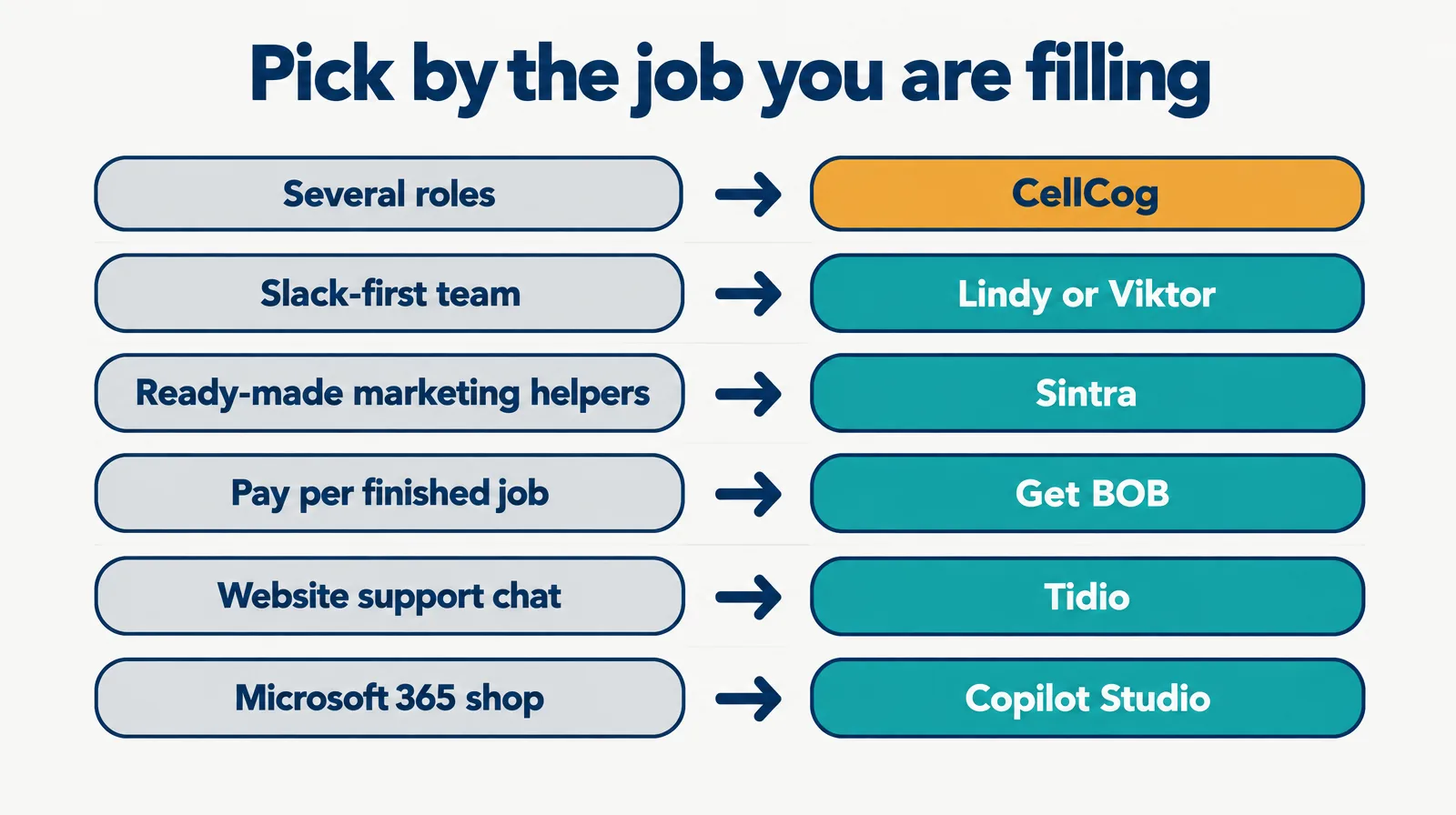
- Is the work one job or several? One job with a clear tool (support chat, phone answering, outbound) usually belongs to a specialist. Several jobs that change week to week belong to a standing employee.
- Where does your team already work? Slack first points to Lindy or Viktor; Microsoft 365 points to Copilot Studio; client email and Zoom point to Workforce AI.
- Who will maintain it? Workflow builders reward a builder on staff. If nobody wants that job, pick a product that owns the work instead.
- How do you want to pay? Flat per seat (Lindy, Workforce AI), per finished job (Get BOB), list-price bundles (Sintra, Grok Bot), or by the work done (CellCog).
§ 08The honest caveats
We publish this page and rank ourselves first; the receipts are there so you can check us rather than trust us. Prices in this category move monthly, and we read every one on October 17, 2026; read them again before you buy. Feature descriptions come from each vendor’s own pages, not from hands-on tests of every product. And a small business is not one buyer: a three-person agency and a 40-person clinic will rank this list differently, so use the “best for” column more than the rank.
§ 09Update log
- October 17, 2026: First published. All prices read on vendor pricing pages that day.
Q1What is the best AI employee platform for a small business?
For October 2026 we rank CellCog first for a business with several jobs to fill, then Lindy for teams that run on Slack, email and meetings, and Viktor for one shared teammate in Slack or Teams. If your team lives in Slack and wants a flat price per person, Lindy or CellCog is the real choice, and Lindy is the closer fit for that team.
Q2How much does an AI employee cost a small business?
Read on vendor sites October 17, 2026: Get BOB from $29 a month, Grok Bot inside X Premium at $30, Lindy $49.99 per active user, Sintra $97 list with frequent sales, Workforce AI $99 per user and Viktor $100 for a shared workspace. On CellCog you pay for the work, not the hire, and the cost depends purely on how much work you assign.
Q3Which AI employee platforms have a free plan?
CellCog is free to try with no card. Viktor gives up to $100 in credits that never expire, Lindy gives $25 in credits for 7 days, Workforce AI’s free plan drafts email only, and Zapier’s free plan includes 100 tasks a month.
Q4What is the difference between an AI employee and an AI assistant?
An assistant answers when you ask. An AI employee owns a role between conversations: its own inbox, task board, schedule and memory, so the work carries from one day to the next.
Q5Should a small business pick a specialist instead?
When the job is one clear thing, yes: Tidio for website support chat, a dedicated receptionist for phone answering. A standing employee pays off when the work spans several jobs that change week to week.