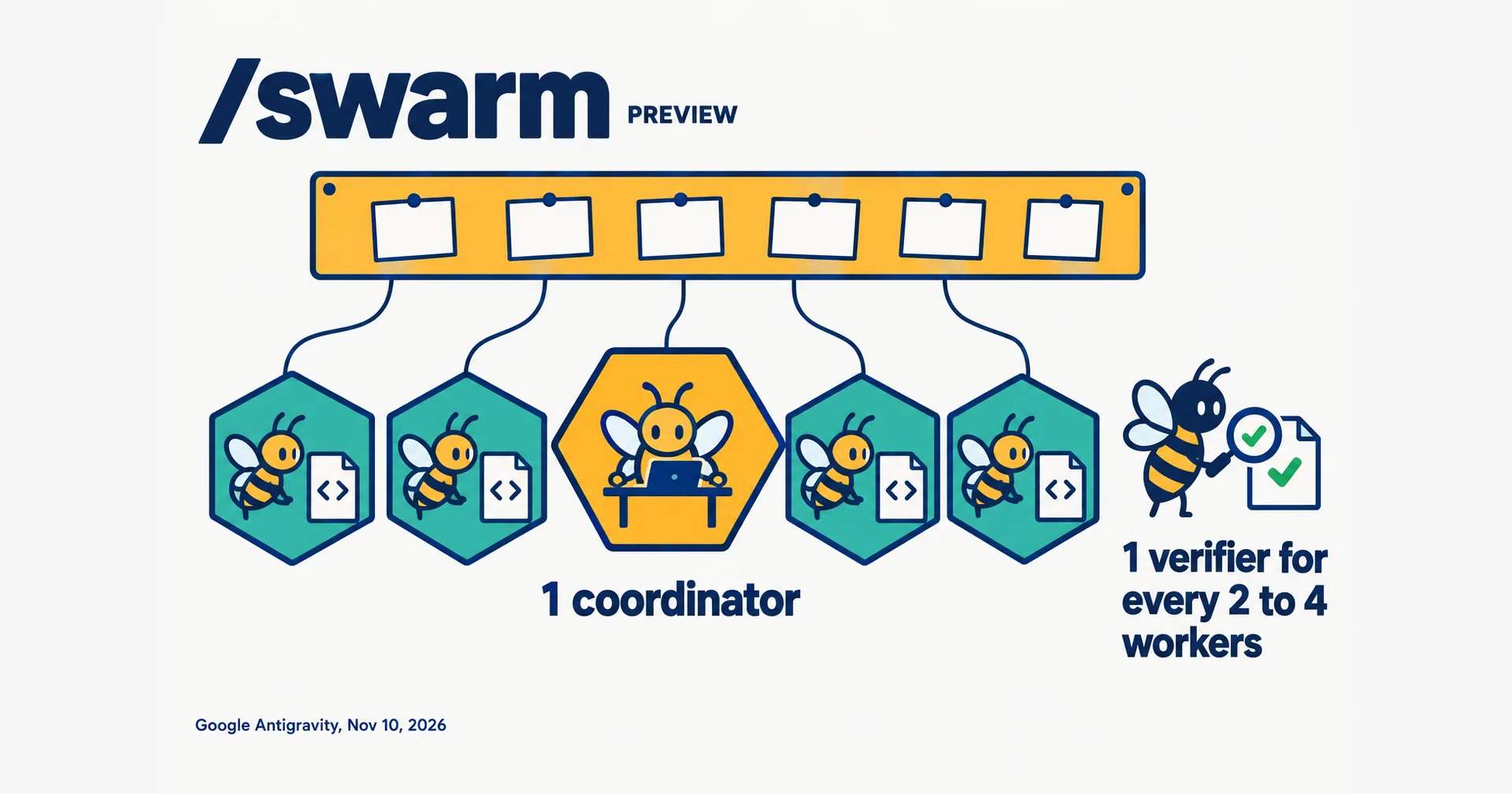
Google Antigravity has a new command, /swarm, that turns one prompt into a team of agents. Your conversation becomes a coordinator. It splits the task, starts a named worker for each piece and adds a verifier, and all of them talk on one shared board. Google put it in preview on November 10, 2026, the day Gemini 4 Carbon opened to more users.
This page sets out what Google’s blog post and documentation say about how a swarm works, who gets it and what it leaves out. We have not run /swarm ourselves.
On this page · 9 sectionsOpen
 /swarm is a new command in Google Antigravity, in preview since November 10, 2026. It turns one prompt into a team of named agents that work at the same time.
 Your conversation becomes the coordinator. It splits the task, briefs one worker per piece, and usually adds one verifier for every two to four workers.
 Every message goes on one shared board. A member with nothing to do waits there without using tokens, and wakes when another member mentions it.
 Workers run on the model of your conversation unless you ask for another. Google suggests Gemini 4 Carbon for the coordinator and the verifier, with lighter models doing the edits.
 It is on Google AI Pro and Ultra plans, in the Antigravity App and CLI. Google publishes no price for it and no maximum team size, and warns that a swarm uses quota much faster than one conversation.
 Antigravity now has four ways to put several agents on one task: subagents, /boost, /swarm and /teamwork. Google’s docs say which one is for what.
§ 01What Google announced
Google named /swarm in its Gemini 4 Carbon post and in an Antigravity blog post, both dated November 10. The Antigravity account posted it on X at 22:15 UTC:
“Announcing /swarm, a new slash command in Google Antigravity for orchestrating specialized agents in parallel across the desktop app and CLI.”
The detail is in the documentation page, which we read on November 11.

§ 02Who is in a swarm
| Member | What it does |
|---|---|
| Coordinator | Your current conversation. It names the swarm, splits the task into pieces that do not collide, briefs the workers, judges what comes back and reports to you. It does not do the technical work itself. |
| Workers | One per piece, each with a name such as @parser, @api-tests or @docs. A worker starts with a clean context in its own conversation and a public brief: what it owns, what it must not touch and what done looks like. |
| Verifier | Usually one for every two to four workers. It reads the diffs, runs the tests and reports problems to the worker that wrote the code. |
| Monitor | Stays asleep while the swarm makes progress. It posts only if every member has gone quiet before the work is done. |
The split is by piece of work, such as one worker per file or per package. Google’s advice is to use /swarm when a task divides cleanly, or when you want a second agent to review and test the changes before you see them.
§ 03The board
Workers do not message each other privately. Assignments, questions, diff summaries and test results all go on the shared board, addressed to a member, a group or everyone. The whole team conversation stays in one place and in order.
A member with nothing to do goes to sleep on the board and uses no tokens. It wakes when another member mentions it. A member that runs out of quota pauses and shows the error once. It stays paused until there is a new post on the board, its model is switched or you message it.
Each member is in one of three states: active, waiting or killed. A killed worker cannot be brought back, so the coordinator adds a new one.
§ 04Models and working copies
Workers run on the model of your conversation unless your prompt asks for another, and the model must be one you can choose in the model picker. You can ask the coordinator to move a waiting worker to another model later, and the worker keeps its conversation. One of Google’s example prompts runs the verifier on a different model from the workers, so that a second model audits the changes.
Google’s blog post suggests Gemini 4 Carbon for the coordinator, architecture, security auditing and verification roles, with lighter and faster models for the parallel edits.
The two pages describe working copies differently. The blog post says the coordinator starts workers
“in isolated git worktrees so edits never collide”
The documentation says something narrower:
“Workers share your workspace by default.”
It adds that when several workers edit or build at the same time, the coordinator can give each one its own working copy of the repository. If you rely on isolation, say so in the prompt and check what the coordinator did.
§ 05Watching and steering
In the Antigravity App a Swarm pane opens beside the conversation with three tabs. Board is the live feed of posts. Members lists the coordinator and the workers with each one’s status and model. Graph draws who mentioned whom and can replay the swarm from the first post. In the CLI, /swarm board or Alt+S opens the same board full screen.
The coordinator is the main point of contact. You tell it about a change of scope and it posts instructions to the right workers. You can also message one worker directly, and that message does not go on the board.
§ 06Four ways to use several agents
Antigravity now has four of them. This is how Google’s documentation separates them.
| Item | Subagents | /boost | /swarm | /teamwork |
|---|---|---|---|---|
| Best for | One side task, such as research or a test run | Hard bugs, algorithms and tricky refactors | Work that splits across independent files, packages or questions | Repository-scale migrations, long simulations and research projects |
| How agents coordinate | Each reports back to the agent that started it | A layered hierarchy explores hypotheses and verifies solutions | Named workers and a verifier talk on one shared board | Specialized roles work through a milestone plan with audit gates |
| How you start | The agent delegates on its own | /boost and a task | /swarm and a task | /teamwork and a goal, then a scoping interview |
| Typical horizon | Seconds to minutes | Seconds to hours | Minutes to hours | Hours to days |
§ 07What Google has not published
Read on November 11, 2026, Google’s pages answer some questions and leave others open:
- Plans: Google AI Pro and Google AI Ultra, per the documentation.
- Where it runs: the Antigravity App and CLI. The IDE extensions are not listed.
- Status: preview, rolling out from November 10, 2026.
- Price: none stated. A swarm draws on the plan’s quota.
- Quota used: much faster than one conversation, with no figure.
- Maximum number of agents: not stated.
- App or CLI version needed: not stated.
On cost, the blog post gives a warning without a number:
“parallel multi-agent systems consume quota much faster than a standard chat”
On size, the only public figure is not from a Google page. An X account, @_mohansolo, quoted the announcement and wrote:
“We have folks using swarms of 100s of agents to build large systems and products from scratch with a single prompt.”
Google’s blog post says its engineers used /swarm for five weeks before the preview, on migrations across packages, root-cause investigations and architecture redesigns. It gives no results from that period.
§ 08How we read it
Our conflict, declared: we build CellCog, where a business hires AI employees, and CellCog has its own multi-agent mode, Agent Team. We have not run /swarm, and everything above comes from Google’s pages.
The verifier is part of the default team. The check is a separate agent with a clean context, and the coordinator adds it without being asked. Review by a second agent is a design choice here and not an extra step.
The board replaces the chain of command. Google’s post says earlier subagents were held back by one coordinator context that reviewed and routed every step. In a swarm, workers post where every member can read.
The cost is stated but not sized. Both pages warn about quota and neither gives a number. Until one does, the way to learn the cost is a small swarm on a task you can check.
We made a different split. Agent Team puts two agents on one hard problem and divides them by intent: a manager that keeps pushing and a worker that keeps executing. Our AI employees are divided by what each one needs to remember (our reasoning). /swarm divides by file and package, which fits Google’s own advice to use it when the work splits cleanly.
Cursor shipped a related change the same day for teams of people: Projects went multiplayer, with teammates’ agents on one shared task board.
§ 09Sources
- Google Antigravity, Gemini 4 Carbon and /swarm, November 10, 2026
- Google Antigravity documentation, Swarm (/swarm), read November 11, 2026
- Google, Gemini 4 Carbon is now available, November 10, 2026
- @antigravity on X, the announcement, November 10, 2026, 22:15 UTC
Q1What is /swarm in Google Antigravity?
It is a slash command, in preview since November 10, 2026. Your conversation becomes a coordinator that splits the task, starts one named worker per piece and adds a verifier. All of them post to one shared message board.
Q2Which plans include /swarm?
Google’s documentation says Google AI Pro and Google AI Ultra, in the Antigravity App and the Antigravity CLI. The IDE extensions are not listed.
Q3How many agents can a swarm run?
Google publishes no maximum. Its docs say the coordinator decides how many workers to add and usually adds one verifier for every two to four workers.
Q4Do swarm workers get their own copy of the code?
Not unless the coordinator sets it up. The docs say workers share your workspace by default, and that the coordinator can give each one its own working copy when several edit or build at once. Google’s blog post describes workers in isolated git worktrees.
Q5How is /swarm different from /teamwork and /boost?
Per Google’s docs, /boost is for problems that are hard and not large, /swarm is for large tasks that split cleanly across files or packages, and /teamwork is for projects that run for hours to days with a plan and audit gates.
Q6Does CellCog use /swarm?
No. We build CellCog, a separate product, and we have not run /swarm. CellCog’s own multi-agent mode is Agent Team, and its AI employees share a task board and channels.