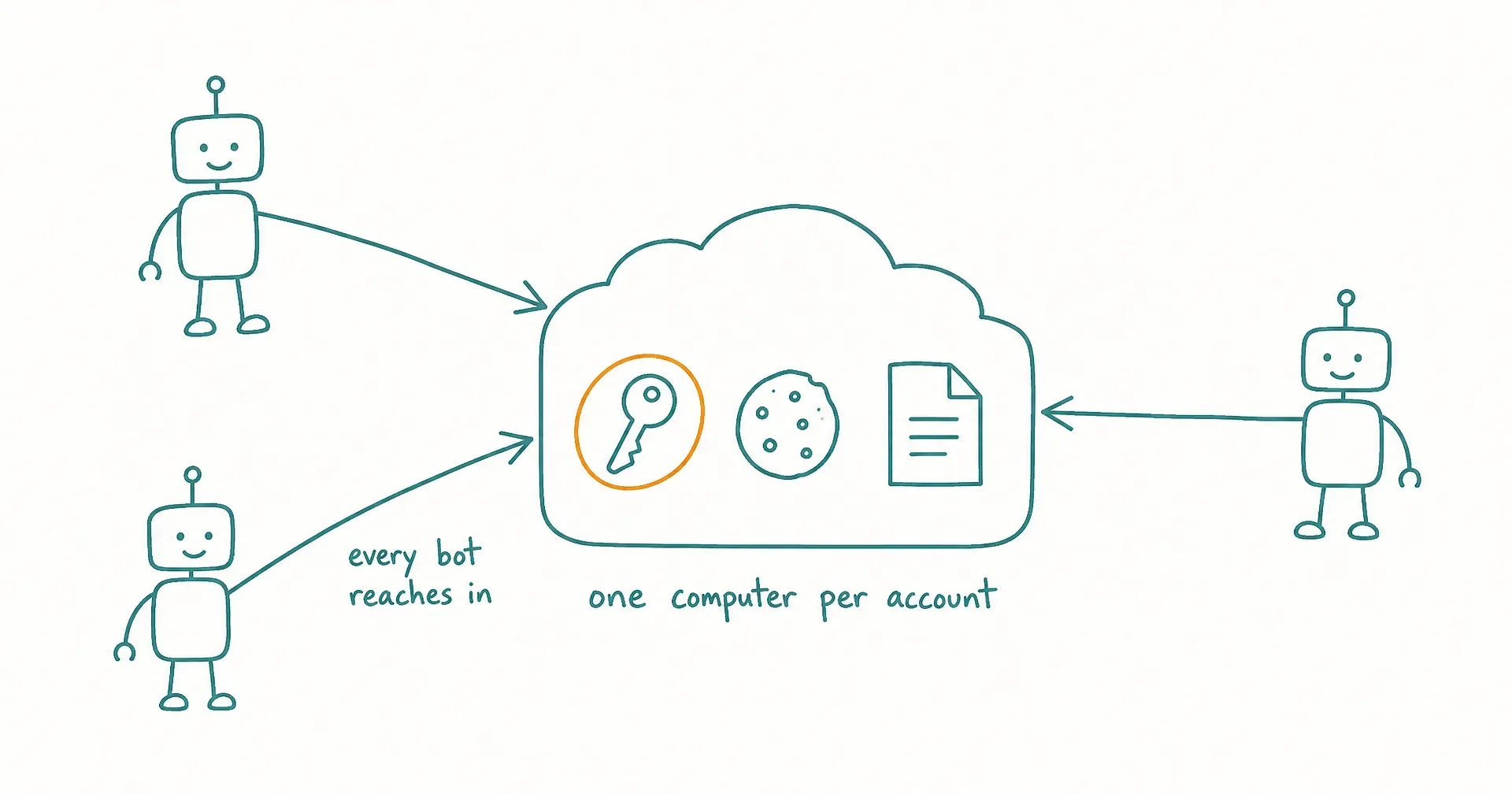
Grok Bot, SpaceXAI’s always-on AI teammates product, has been in beta since August 11, 2026, and its documentation contains one of the most consequential sentences a vendor has published about an agent product: do not use separate Bots as a security boundary.
That sentence is honest, and it deserves to be taken seriously rather than quoted as a gotcha. This guide explains what it means in practice: how the shared computer actually works, why the design is deliberate, what SpaceXAI itself recommends, what remains open as of week two of the beta, and how the alternative architecture differs. Everything about Grok Bot here is sourced from SpaceXAI’s own launch materials and documentation as of August 21, 2026.
On this page · 6 sectionsOpen
- All of a user’s Grok Bots share ONE persistent cloud computer: files, browser sessions, and app logins are pooled at the account level, not per Bot.
- SpaceXAI’s documentation states it plainly: do not use separate Bots as a security boundary. Every credential on the machine is reachable by every Bot, including Bots created later.
- Deleting a Bot does not necessarily remove its files or signed-in browser sessions from the shared computer, so offboarding a Bot is not cleanup.
- The product requires cloud data storage, and Cursor’s Privacy Mode (Legacy) blocks it entirely; there is no Grok Bot-specific spend cap, and the audit view of Bot actions is listed as coming, as of August 2026.
- SpaceXAI’s own guidance is sound and worth taking literally: start with read-only work, use least-privilege accounts, and keep sending, purchasing, publishing, and production changes behind approvals.
- The alternative architecture is per-worker isolation: AI employee platforms like CellCog run each worker in its own workspace with its own permission and approval thresholds, so one worker’s access is invisible to another.
§ 01What does “all Bots share one computer” actually mean?
Every Bot on an account works on the same persistent cloud computer: a managed virtual machine with a browser, a filesystem, and a terminal. The computer is assigned per user, not per Bot. Each Bot gets its own screen so several can work in parallel, but the screen is a display convenience, not a partition.
The pooling is total. A file one Bot downloads is on the machine for every Bot. A browser session one Bot signs into stays signed in for the next Bot that opens that site. A credential you paste for the research Bot is reachable by the invoicing Bot, and by any Bot you create next month.
Three consequences follow directly, and all three come from SpaceXAI’s own documentation rather than speculation:
- Every credential on the machine is reachable by every Bot, present and future.
- A misbehaving or misdirected Bot’s blast radius is the entire credential pool, not its own lane.
- Deleting a Bot does not necessarily remove its files or its signed-in sessions from the machine. Offboarding a Bot is not cleanup.
§ 02Why is this a deliberate design, and what does it buy?
It would be easy to read the shared computer as an oversight. It is not. Pooling is what makes Grok Bot’s best demos work: Bots hand tasks to each other without transferring files, share context without export and import, and support the chief-of-staff pattern SpaceXAI showcases, where one Bot coordinates specialists, precisely because everything lives in one place.
For a single power user automating personal workflows, that is a reasonable trade, and arguably the right one. The friction the design removes is real.
The trade stops working when you map business roles onto Bots. A business gives its bookkeeper access its marketer never sees, not out of distrust but because least privilege is how organizations contain mistakes. On a pooled machine there is no way to express that. The role names on the Bots are organizational labels; the machine underneath them has one trust level.
§ 03What does SpaceXAI itself recommend?
Credit where due: the vendor’s security guidance is direct and worth taking literally. The documentation recommends starting with read-only work, using least-privilege accounts rather than primary logins, and keeping sending, purchasing, publishing, deletion, and production changes behind approval cards.
The same documentation is honest about memory: for important decisions, it advises asking a Bot to check the current source rather than relying on what the Bot remembers. Both pieces of guidance point at the same posture. This is an early beta that its own maker says to supervise.
§ 04What is still open as of week two?
Beyond the architecture, four operational items are worth a buyer’s attention as of August 21, 2026:
- No Bot-specific spend cap. Account-level on-demand controls are the only brake on usage spend; per-product spend is visible on the dashboard, but an admin cannot cap Bot spending separately.
- The audit view is listed as coming. An action-level audit trail for Bot activity is on the roadmap rather than in the product.
- Cloud data storage is required. Cursor’s Privacy Mode (Legacy) blocks Grok Bot entirely, which matters for privacy-conscious teams and regulated organizations.
- Beta reliability. Users reported Grok Bot errors around August 19 and 20, tracked on Cursor’s community forum. Normal for a launch week, and relevant if scheduled routines are going to carry real responsibilities.
§ 05How does per-worker isolation differ?
A disclosure before this section: we build CellCog, an AI employee platform, so read what follows knowing the comparison comes from a vendor on the other side of the architecture choice.
The employee model inverts the pooling decision. Each AI employee runs in its own isolated workspace, with its own email identity, its own task board, and its own permission and approval thresholds. The access one worker holds is invisible to another. That is the least-privilege shape businesses already apply to human staff, and it means the blast radius of one worker’s mistake is that worker’s workspace, not the company’s credential pool. The architecture side-by-side shows the two models next to each other.
| Question | Grok Bot | AI employee (CellCog) |
|---|---|---|
| Who owns files and logins? | The account’s one shared computer | Each worker’s own isolated workspace |
| Can workers see each other’s credentials? | Yes, by design | No; access is granted per worker |
| What does a mistake reach? | The whole credential pool | That worker’s workspace |
| Offboarding a worker | Files and sessions can persist on the machine | The workspace and its access go with the worker |
| Handoffs between workers | Free, via the shared disk | Through messages and task boards |
The honest cost of isolation sits in that last row: handoffs travel through messages and task boards rather than a shared disk, which is more ceremony than Grok Bot’s model. That ceremony is also the audit trail. On pricing, the models differ the same way they do everywhere else: Grok Bot access is bundled into Cursor and SuperGrok subscriptions, from $20 a month as of late August 2026, while CellCog plans start at $8 a month; you pay for the work, not the hire, and the cost depends purely on how much work you assign.
And if isolation matters to you but a hosted platform does not fit, the off-the-shelf answer is not us: self-hosting an open-source framework like OpenClaw on your own hardware gives you infrastructure-level isolation you control end to end, at the cost of running the stack yourself.
§ 06A practical checklist before you hand over credentials
Whichever product you choose, the shared-computer model rewards deciding these six things up front:
- Inventory what will land on the shared computer, because everything on it is pooled.
- Create dedicated least-privilege accounts for Bot use; never hand over your primary logins.
- Assume every Bot can reach everything on the machine, including Bots you have not created yet.
- Keep anything that sends, spends, publishes, or deletes behind approvals, per the vendor’s own guidance.
- Watch the usage dashboard, since account-level controls are currently the only spend brake.
- Decide the offboarding procedure now: deleting a Bot is not cleanup, so plan to clear files and rotate the credentials it touched.
The shared computer is not a flaw. It is a choice with a specific fit: one person, pooled context, cheap handoffs. The sentence to take seriously is the vendor’s own, and the right response to it is not alarm but design: match the architecture to the trust model your situation actually needs.
Q1Do all Grok Bots share the same logins and files?
Yes. Every Bot on an account works on one persistent cloud computer, and its files, browser sessions, and app logins are pooled. The computer is assigned per user, not per Bot. SpaceXAI’s documentation states directly that separate Bots should not be treated as a security boundary.
Q2Is Grok Bot safe for business use?
It can be, within the vendor’s own guardrails: read-only starts, least-privilege accounts, and approvals on anything that sends, spends, publishes, or changes production. The open items a business should weigh as of August 2026 are the pooled credentials, the requirement for cloud data storage, the absence of a Bot-specific spend cap, and an audit view that is listed as coming rather than shipped.
Q3What happens to a Bot's files when I delete it?
Deleting a Bot does not necessarily remove the files it created or the browser sessions it signed into from the shared computer. Those belong to the account’s machine, not to the Bot. If you are offboarding a Bot that handled sensitive access, clean the shared computer and rotate the credentials it touched.
Q4Does Grok Bot work with Cursor's Privacy Mode?
Not with the legacy setting. Grok Bot requires cloud data storage, and Cursor’s Privacy Mode (Legacy) blocks the product entirely; standard privacy modes work. Teams on the legacy setting see a block message and a prompt to ask an admin.
Q5How do AI employee platforms handle isolation differently?
The employee model gives each worker its own isolated workspace, its own email identity, and its own permission and approval thresholds. On CellCog, the access one AI employee holds is invisible to another, which is the least-privilege shape a business applies to human staff. The trade is that handoffs travel through messages and task boards rather than a shared disk.
Q6Can I limit what one Grok Bot can access?
Only indirectly, as of August 2026: by limiting what reaches the shared computer at all. Practical levers are dedicated least-privilege accounts instead of your primary logins, approvals on consequential actions, and keeping credentials you would not give every Bot off the machine entirely.