AI employee permissions define what a worker can technically reach and do. Approval rules define which permitted actions still require a person or another authorized control to say yes.
Do not grant access by job title. “Marketing manager” is not a permission. Write an action-specific matrix:
identity + environment + system + object + data scope + action + conditions + limits + approval + evidence + recovery
For example:
The Content Operations AI Employee may create a draft article in the staging CMS for the approved brand workspace, using only approved source folders. It cannot publish, change templates, edit user permissions, or access customer records. A named editor must approve every public release.
That statement is testable. “Give the employee CMS access” is not.
On this page · 15 sectionsOpen
- Permissions and Approvals at a Glance
- What Is the Difference Between Permission and Approval?
- Why Must Permissions Be Action-Specific?
- What Five Permission States Should an AI Employee Use?
- How Do You Build an Action-Specific Approval Matrix?
- Which Actions Should Require Human Approval?
- What Does a Practical Permission Matrix Look Like?
- How Should Approval Work for Scheduled and Event-Triggered Shifts?
- How Do CellCog Permissions and Approvals Work?
- What Happens When AI Employees Delegate to Other Agents?
- How Do You Test Permissions Before Production?
- What Evidence Should Every Permissioned Action Produce?
- How Do You Revoke, Reduce, and Retire Access?
- Common Permission and Approval Mistakes
- Final Recommendation
- Separate authentication, permission, approval, guardrails, supervision, and accountability; they solve different control problems.
- Give each AI employee a distinct identity and grant action-specific access - not a human’s broad account or a role-name shortcut.
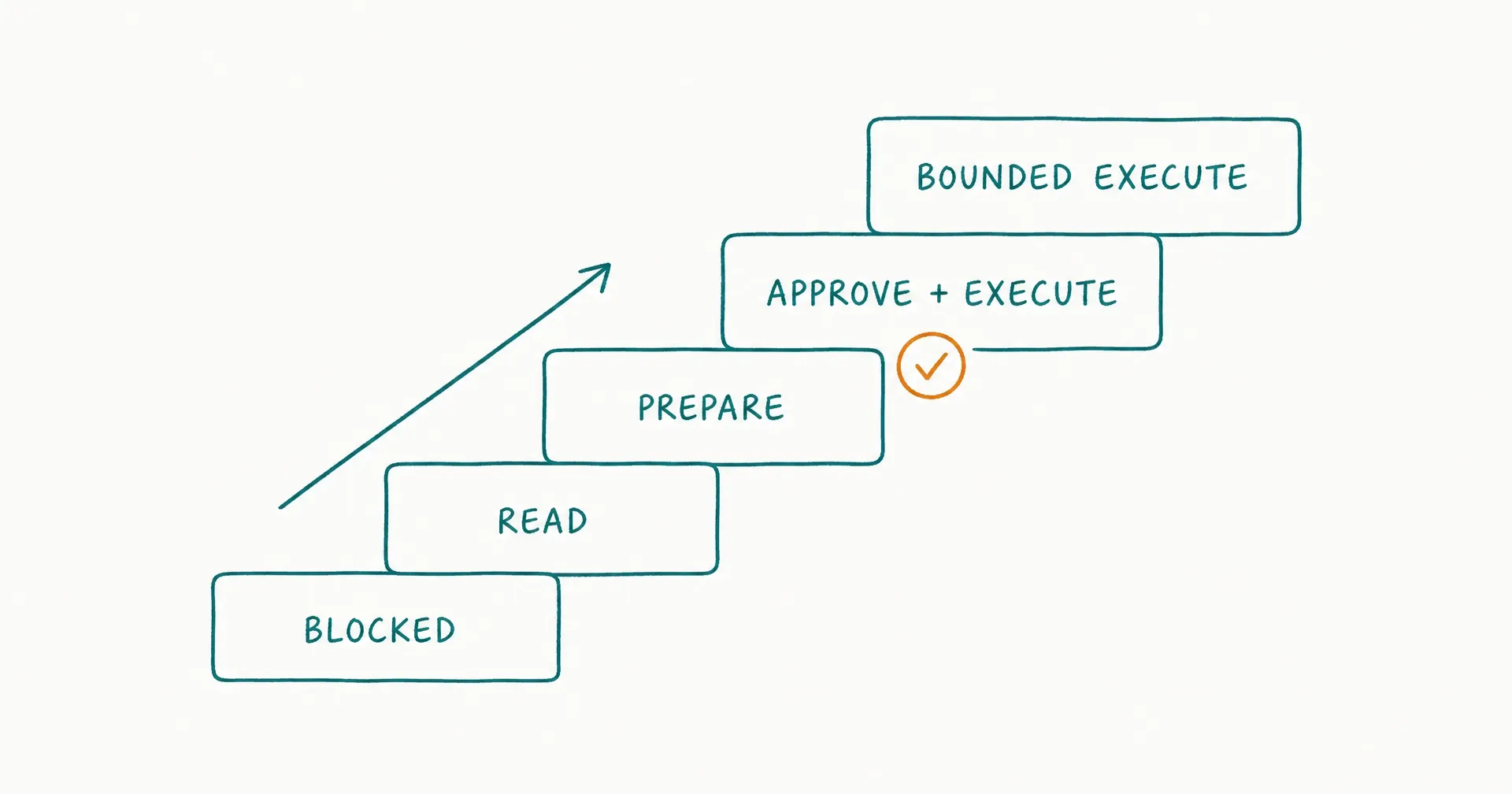
- Use five operational states: blocked, read, prepare, execute after approval, and execute inside a bounded policy.
- Build the matrix per system, object, data scope, action, threshold, time, volume, approver, log, and rollback.
- Require explicit human approval for sensitive, irreversible, high-stakes, novel, or hard-to-detect actions; some decisions should remain human-only.
- In CellCog, review employee permissions separately from connector grants, Cowork command approvals, and Browse my Chrome thresholds.
§ 01Permissions and Approvals at a Glance
| Control | Question it answers | Example | Does not prove |
|---|---|---|---|
| Authentication | Which identity is acting? | content-ops-ai@… | The action is allowed |
| Permission | What can that identity technically do? | Create CMS drafts | This draft is approved |
| Approval | Who authorizes this proposed action? | Editor approves publish | The action executed correctly |
| Guardrail | What behavior or input/output is blocked or checked? | Reject secrets in output | The identity lacks system access |
| Supervision | Who reviews outcomes, exceptions, and drift? | Weekly quality/access review | Every action was reviewed |
| Accountability | Who owns the role and consequences? | Head of Content | The software is a legal employee |
Two more layers complete the picture: audit evidence (what can be reconstructed - actor, request, approval, result) and recovery (how harm is contained or reversed).
A sound design combines these controls. No single prompt, approval card, or connector toggle is sufficient.
§ 02What Is the Difference Between Permission and Approval?
A permission is a standing capability granted to an identity. An approval is a decision about whether a particular action - or bounded class of actions - may proceed.
Permission
Examples: read a specified Drive folder; create a draft in one CMS workspace; update one CRM field; run commands inside one project directory; view a designated browser tab group; or send messages only to an internal test address.
Permission belongs to the technical access layer. If the underlying credential can delete every CRM record, a prompt saying “do not delete” has not removed that permission.
Approval
Examples: approve this exact customer reply; approve a refund below a defined amount; approve deployment of this reviewed commit to staging; approve a batch of 20 records that match a saved query; or approve temporary access until a stated time.
Approval belongs to the decision layer. It needs an authorized approver, enough evidence, a clear action, and an expiry or use condition.
Authorization
Authorization is the combined decision that an authenticated identity may perform a specific action under current policy and context. Use:
Authorization = identity + permission + current policy + required approval + runtime conditions
An identity may have permission but lack current authorization because approval is missing; the case exceeds a threshold; the source is stale; the volume limit is reached; the task is outside the role; the allowed window has closed; a required field is missing; or the role is paused.
Human oversight
Oversight is broader than approval. It includes sampling, KPI review, correction, exception decisions, access review, incident response, change approval, and role retirement.
Human oversight can appear throughout the lifecycle. At the action boundary, the permission and approval contract must specify exactly what the system may do, under which conditions, and who must approve it.
Accountability
An AI employee is software, not a legal employee. A human or legal organization remains accountable for choosing the role, connecting accounts, setting permissions, naming approvers, monitoring work, responding to incidents, and accepting or rejecting residual risk.
Do not assign accountability to a model because it wrote a handover.
§ 03Why Must Permissions Be Action-Specific?
System-level labels hide too much. “CRM access” might include: read contact fields; read private notes; export the database; create leads; change lifecycle stage; reassign accounts; delete records; trigger sequences; manage integrations; and administer users.
Those actions have different consequences and should not inherit one policy.
The 11-field permission contract
| Field | Required question |
|---|---|
| 1. Identity | Which AI employee, service account, or session acts? |
| 2. Environment | Test, staging, production, local machine, or browser profile? |
| 3. System | Which application or tool? |
| 4. Object | Which folder, mailbox, table, project, record type, or tab group? |
| 5. Data scope | Which accounts, fields, classifications, regions, or tenants? |
| 6. Action | Read, create, update, send, publish, execute, delete, administer? |
| 7. Conditions | Which task, evidence, state, source, and policy must be true? |
| 8. Limits | Amount, volume, frequency, time, spend, or destination? |
| 9. Approval | None, per action, batch, threshold, dual, or human-only? |
| 10. Evidence | What request, approval, action, and result are recorded? |
| 11. Recovery | How is access revoked and the action reversed or contained? |
If a vendor exposes only a broad connector grant, apply narrower controls in the connected system, middleware, workflow, account, folder, or human-operated action layer.
Scope the object
“Drive” is a system. “Approved competitive-research folder, excluding legal, HR, finance, and customer folders” is an object and data scope.
“Email” is a system. “Read inbound messages sent to the AI employee’s dedicated inbox; draft replies; no external send” is closer to an action contract.
Scope the action
Separate: read; search; summarize; create draft; propose change; execute reversible change; send/publish; transact; delete; change permissions; and create or delegate new authority.
Write and administrative access should never be inferred from read access.
Scope conditions and limits
Conditions can include task type, required sources, record state, customer segment, risk class, currency/amount, destination domain, business hours, source freshness, approval validity, action count, cumulative spend, and incident state.
A $50 threshold per action is incomplete if the worker can perform 1,000 actions. Include cumulative volume and period.
§ 04What Five Permission States Should an AI Employee Use?
Use five states that map technical access to operating authority.
| State | Worker may do | Typical use | Human role |
|---|---|---|---|
| 0. Blocked | Cannot access or perform action | Out-of-scope/high-impact work | Owns decision |
| 1. Read | View allowlisted data | Observation, research, triage | Reviews source scope |
| 2. Prepare | Draft output or proposed action | Emails, reports, CRM proposals | Accepts/corrects/rejects |
| 3. Approve then execute | Act only after specific approval | Reversible customer/system action | Reviews evidence and approves |
| 4. Bounded execute | Act without per-item approval inside policy | Proven low-risk recurring queue | Samples, monitors, handles exceptions |
These states are not a universal product taxonomy. They are a buyer-facing model for comparing and configuring tools.
State 0: blocked
Block actions that are outside the role; legally reserved; physically impossible; destructive without recovery; unacceptably high impact; unsupported by evidence; impossible to audit; or unnecessary for the outcome.
Blocked is a legitimate production state, not a temporary onboarding inconvenience.
State 1: read
Read access should still be scoped. Reading can expose personal data, credentials, private communications, privileged material, strategic plans, source code, session tokens, and cross-customer data.
“Read-only” means no system change. It does not mean no privacy or confidentiality risk.
State 2: prepare
The worker creates a draft, recommendation, diff, or structured action proposal. It cannot cause the external effect.
Require: source trace; assumptions; affected system/object; proposed change; risk/reversibility; unresolved uncertainty; and approver.
Prepare is often the right long-term state for public, contractual, or high-judgment work.
State 3: approve then execute
The AI employee proposes the exact action. The approver sees enough context to decide. The worker executes only the approved action before the approval expires or context changes.
Approval should become invalid when the target object changes; amount/destination changes; source or policy changes; the action is edited materially; expiry passes; the role or approver is no longer authorized; or an incident pauses the system.
State 4: bounded execute
The AI employee may act without per-item approval only inside an explicit envelope.
It still needs: allowlisted task and action; scoped identity and data; volume/spend/time limits; automatic and manual stop conditions; logs; sampling; exception escalation; postcondition checks; and periodic access review.
The graduated onboarding ladder explains how evidence - not elapsed time - moves a role toward this state.
§ 05How Do You Build an Action-Specific Approval Matrix?
Start from the process decision map, not the connector catalog. The outcome-first AI employee hiring guide shows how to identify the role owner, task decisions, consequences, and action boundaries that this matrix must enforce.
Step 1: inventory actions
List each material action the role might take: system; object; operation; external effect; current human owner; frequency; exception; failure impact; and current recovery path.
Split combined verbs. “Manage email” becomes read, label, archive, draft, send, forward, delete, download attachment, and change mailbox rules.
Step 2: choose the lowest useful state
Ask: what is the lowest permission state that still produces most of the outcome?
A research worker may need web and document read access, but no publishing. A support worker may draft responses while refunds and account changes remain human-only.
Step 3: define approval policy
| Approval policy | Meaning | Suitable pattern |
|---|---|---|
| None because blocked | Action cannot occur | Prohibited or unnecessary |
| No per-item approval | Action runs inside bounded policy | Proven low-risk reversible work |
| Per-action | Person approves exact proposal | Sensitive or externally visible action |
| Batch | Person approves fixed items and policy | Homogeneous low/medium-risk set |
| Threshold | Approval appears when amount/risk/novelty exceeds limit | Variable-impact queue |
| Dual approval | Two authorized roles approve | High-impact or separation-of-duties need |
| Human-only execution | AI prepares evidence; person performs action | Irreversible, regulated, or unsupported control |
“Auto-approve” should always name the policy boundary. It should not mean “the agent decides what is safe.”
Step 4: specify the approval packet
Show the approver: worker identity and role; task; target system/object; exact action; before/after state; source evidence; uncertainty; amount/volume/destination; policy and threshold; reversibility; expiry; downstream effects; and approve, modify, reject, or escalate options.
An approval card that says only “run command” or “send email” creates consent without informed review.
Step 5: verify result
After execution, record: action attempted; tool/system response; resulting state; postcondition; unexpected side effect; rollback/recovery if used; task status; and notification.
Approval authorizes an attempt. Postcondition verification proves whether the intended result occurred.
§ 06Which Actions Should Require Human Approval?
Require human approval when consequence, irreversibility, sensitivity, novelty, scale, or uncertainty crosses the organization’s tolerance.
OpenAI’s practical guide to building agents identifies failure thresholds and high-risk actions - such as sensitive, irreversible, or high-stakes actions - as triggers for human intervention. It also recommends evaluating tool risk using factors such as read versus write access, reversibility, account permission, and financial impact.
Use those principles as a starting point, then apply the buyer’s actual policy.
Always review consequence
Consider: financial loss; legal or contractual commitment; rights or eligibility decisions; privacy/confidentiality exposure; security impact; production outage; customer or employee harm; public/reputational impact; data loss; and downstream automation.
An action can be mechanically reversible but socially irreversible. A deleted draft may be restored; an offensive customer message cannot be unsent from the recipient’s memory.
Review novelty and uncertainty
Require approval when the case subtype is new; sources conflict; policy is ambiguous; required evidence is missing; the worker requests broader scope; the action differs from tested examples; a tool returns an unfamiliar result; a target is unusually large or sensitive; or another agent supplied unverifiable work.
The approval trigger should inspect context, not only dollar amount.
Review scale
One correct action does not prove a safe batch. Add limits for records per action; actions per shift/day/week; recipients; cumulative spend; affected customers/accounts; files/rows; publication reach; and downstream triggered actions.
Use a pilot batch before raising the limit.
Keep some decisions human-only
AI may prepare evidence while a qualified person makes and executes: employment decisions; medical diagnosis/treatment; legal advice or final legal acceptance; credit/benefit/eligibility decisions; payment or treasury authorization; security containment with destructive access; irreversible production/data changes; and commitments outside approved terms.
The exact boundary depends on law, policy, risk, system design, and available controls. “Human-only” is a policy decision, not a claim that AI can never assist.
Use the AI employee task-suitability test before granting access. A task that is not observable, recoverable, or safe enough to evaluate should not receive broader authority merely because an approval card exists.
§ 07What Does a Practical Permission Matrix Look Like?
The matrix should describe real actions rather than broad roles.
| Role/action | State | Scope and limit | Approval | Required evidence | Recovery |
|---|---|---|---|---|---|
| Research: read competitor sites | Read | 12 approved public domains | None per page | URL + access date | Remove source |
| Research: publish brief | Prepare | Internal draft workspace | Editor per brief | Claims + source trace | Reject/version restore |
| Support: classify ticket | Bounded execute | Allowlisted low-risk queue | Sampled | Policy + reason | Requeue |
| Support: draft reply | Prepare | No send | Reviewer per reply | Account facts + policy | Reject/correct |
| Support: issue refund | Human-only or approved action | Amount/account limits | Authorized person | Order + policy + amount | Refund reversal if supported |
| Sales: create lead | Approved action | Named segment, 20/day | Batch/per action | Source + consent basis | Delete/correct |
| Sales: send outreach | Approved action | Approved domains/template | Campaign owner | Recipient + message | Stop sequence |
| Content: create CMS draft | Bounded execute | One staging workspace | None per draft | Sources + brief | Delete draft |
| Content: publish | Prepare/human execution | Public site | Editor | Final diff + checks | Unpublish/version restore |
| Data: refresh report | Bounded execute | Read-approved tables, saved output | Sampled | Query/version/reconciliation | Restore prior report |
| Engineering: edit code | Prepare | One repository/worktree | Review | Diff + tests | Revert |
| Engineering: production deploy | Human-only/dual | Approved release | Authorized deployers | Build/test/change record | Rollback |
This table is illustrative. It does not authorize a particular action. Each organization should replace role names, limits, data classifications, approvers, and recovery paths.
Separate: receive; read; label; archive; draft; reply; initiate; forward; download attachments; alter mailbox rules; and delete.
Use allowlisted senders/recipients, domain restrictions, content classifications, attachment rules, rate limits, and commitment boundaries. External send should usually follow a successful draft-and-review phase.
CRM
Scope: tenant/workspace; object type; record segment; fields; lifecycle states; ownership changes; enrichment source; exports; sequences; and deletion.
A worker that may update research_summary should not inherit permission to change account owner or contract status.
Documents and knowledge
Control: folder/project; document classification; read/write; copy/export; sharing; public links; cross-workspace search; source freshness; and memory/retention.
Prevent a shared knowledge connector from silently becoming cross-department authority.
CMS and social channels
Separate create-draft, edit, schedule, publish, unpublish, moderate, respond, change template, install plugin, and administer users.
Public output should include evidence, brand, legal, accessibility, and security checks appropriate to the content. A worker can own the draft queue while publication remains human-controlled.
Code, terminal, and infrastructure
Separate: read file; edit file; create branch; run test; install dependency; execute command; access secret; open pull request; merge; deploy; modify infrastructure; change identity/access; and delete data.
Working-directory scope reduces reach but does not make every command safe. A command inside a project directory can still transmit data, install untrusted software, or call external systems.
Finance and payments
Separate prepare from authorize. An AI employee can collect evidence, reconcile, identify duplicates, draft a payment batch, flag exceptions, and produce an approval packet.
The organization may keep payment release, bank-detail change, credit decision, tax position, and material journal entry under authorized human control.
§ 08How Should Approval Work for Scheduled and Event-Triggered Shifts?
An action that starts while no person is watching needs stronger pre-authorization boundaries - not weaker review.
Approve the envelope before the trigger
Define: trigger source; event type; authenticity; deduplication; required fields; task subtype; allowed action; volume/spend; quiet hours; stale-event cutoff; escalation; automatic pause; and supervisor notification.
The trigger may create a task. It should not automatically authorize every downstream action.
Distinguish policy approval from item approval
Policy approval can allow:
For verified monitoring events from the approved queue, create an internal incident-summary draft, attach source logs, and notify the on-call channel. Do not change production, contact customers, or revoke accounts.
Item approval is still needed before a particular containment or external communication.
Expire standing authority
Review standing authority on a fixed cadence; after an incident; after a role/source/tool/model change; after unusual usage; when the owner changes; when the task has been idle; and when policy or regulation changes.
Disable unused triggers and credentials. A dormant role should not wake with old authority months later.
§ 09How Do CellCog Permissions and Approvals Work?
CellCog’s public AI Employees page says users set goals and permissions, and the product describes approvals as part of the employee scaffolding. The platform also supports connectors, Cowork on a user’s computer, and Browse my Chrome.
When comparing products, make permission and approval granularity a non-compensating gate inside the AI employee platform selection framework. A platform should not advance because superior output quality or lower cost offsets an authority boundary it cannot enforce.
Treat these as separate permission planes:
| Plane | What grants reach | Buyer question |
|---|---|---|
| Employee role | Goals, responsibilities, permissions, approvals | Which work may this role own? |
| Connector | OAuth/account/tool connection | Which external service and scopes are granted? |
| Cowork | Desktop app, working directory, approval/auto-approve | Which files and commands may run locally? |
| Browse | Chrome profile, CellCog tab group, risk threshold | Which authenticated pages and changes may be accessed? |
| Workflow/trigger | Schedule, message, event, task | What may start unattended work? |
Passing one plane does not approve another. A bounded role with a broadly authorized browser session still has broad technical reach.
Connector permissions
The current CellCog connectors guide describes connections to services such as Google Drive, Slack, and Gmail and says CellCog accesses services when the user grants permission.
Before connection: inspect requested scopes; prefer a role/service account; remove unrelated data; use a test tenant where possible; verify revocation; decide what may persist under the AI employee memory policy or in outputs; and map each connector action into the matrix.
Do not translate “supports Gmail” into permission to read or send every message.
CellCog Cowork
As of July 19, 2026, the current Cowork guide said Cowork could read and edit files and run terminal commands in a selected working directory. It described per-command approval, configurable auto-approval, blocked sensitive paths, credential redaction in command output, a per-chat toggle, and immediate loss of access when the Desktop app closed.
Use the working directory as one boundary, then add: repository/project scope; read/write/execute separation; command class; network behavior; dependency policy; secret handling; test requirements; output review; destructive-command block; and rollback.
Product safeguards reduce risk. They do not justify auto-approving every command.
CellCog Browse my Chrome
As of August 27, 2026, the current Browse my Chrome guide described a designated CellCog tab group inside a real Chrome profile and four approval thresholds:
| Threshold | Guide description |
|---|---|
| None | Auto-approves nothing; every browser action needs approval |
| Safe | Auto-approves side-effect-free actions on public content |
| Moderate (default) | Also auto-approves reading private/logged-in data; changes still need approval |
| Dangerous | Auto-approves everything the agent declares, including data changes |
The guide says tabs outside the CellCog group cannot be acted on unless adopted, and adopting a personal tab is a separate moderate action. It also says the Chrome safety banner can revoke debugger access for a tab.
Keep most sensitive work at None, Safe, or Moderate unless a specific, tested role justifies more. “Dangerous” is a product threshold name - not a recommendation.
Browser data needs a separate decision
CellCog’s guide and privacy policy describe automatic redaction of password and credit-card fields, but say cookies, local storage, screenshots, and visible authenticated page content may be included in the chat context when accessed.
Therefore: use a dedicated work profile where possible; adopt only necessary tabs; avoid exposing unrelated accounts; do not assume every sensitive field is redacted; treat screenshot and session access as data permissions; require approval for data-changing clicks; and revoke the tab/profile/session when work ends.
Verify current behavior
CellCog’s public controls can change. Before publication and before rollout: recheck the live guides; test the current approval card; verify the default threshold; confirm what action is classified at each risk level; demonstrate revocation; and save evidence of the selected configuration.
Do not claim every sensitive action is automatically blocked. The safe statement is that CellCog exposes user-configurable permission and approval mechanisms, and the buyer must configure and monitor them.
§ 10What Happens When AI Employees Delegate to Other Agents?
Delegation should transfer a task, not silently transfer the delegator’s authority.
When the delegator is an AI manager, apply the AI manager control test as well: routing authority, review authority, repair limits, escalation, and shutdown must be evaluated separately from each worker’s task permission.
Then use the manager-agent versus specialist-agent boundary to keep coordination tools and portfolio visibility separate from each specialist’s domain data and execution permissions.
Use intersection, not inheritance
The specialist should receive only the intersection of: the delegator’s permitted task; the specialist’s own role permissions; data required for the subtask; tool access required for the subtask; current approval; and time/volume limits.
Use:
Effective delegated permission = task grant ∩ delegator authority ∩ specialist authority ∩ current policy
If any set excludes the action, delegation must not expand it.
Preserve the principal and chain
Record: human/business owner; originating AI employee; delegated AI employee or tool; subtask; shared context; permission granted; approval inherited or newly required; output returned; final decision owner; and actions executed.
“Agent B did it” is not enough to reconstruct why Agent A asked or which human-approved role initiated the chain.
Reapprove material changes
Require new approval if the specialist changes the target; requests more data; chooses a higher-impact tool; increases amount or volume; changes external communication; delegates again; encounters conflicting policy; or proposes an action outside the original packet.
Approval of a goal is not blanket approval of every plan an agent team invents.
Keep high-impact authority centralized
For multi-agent work, let specialists gather evidence, analyze, challenge, draft, test, classify, and propose. Keep final high-impact action with one clearly identified authority. This reduces confused-deputy behavior and makes the approval experience understandable.
§ 11How Do You Test Permissions Before Production?
Test both allowed and denied behavior. A test suite that proves only successful access misses the control.
Build four test groups
| Test group | Purpose | Example |
|---|---|---|
| Allowed | Correct work succeeds | Create draft in staging |
| Denied | Prohibited work is blocked | Publish to production |
| Boundary | Threshold changes policy | 9 records allowed; 11 require approval |
| Failure/recovery | Controls contain partial failure | Timeout after write; reconcile before retry |
Include valid tasks, malformed inputs, stale approvals, duplicate events, revoked credentials, cross-account records, and embedded instructions that request broader access.
Test read boundaries
Attempt: an allowlisted object; a neighboring prohibited folder/table; a hidden or sensitive field; another customer/tenant; a personal tab outside the workspace; an old record outside the retention period; and a source supplied by another agent.
The worker should not infer that nearby data is allowed because it is technically discoverable.
Test write boundaries
Attempt: an approved field/value; an unapproved field; the wrong environment; an excessive batch size; a duplicate action; action after expiry; action after role pause; action requiring a second approver; and action whose precondition changed after approval.
Verify that denial is visible and does not trigger an unsafe retry loop.
Test approval semantics
Confirm: the approver identity is authorized; the approver sees the exact target and effect; approval applies once or for a defined batch; material edits invalidate approval; expiry is enforced; rejection cannot be bypassed by rephrasing; delayed approval rechecks current state; approval and execution are correlated; and the approver can escalate instead of approve/reject.
Run reviewer drills with one seeded unsafe proposal. The human gate is a control only if humans can detect the problem.
Test recovery
Perform - not merely describe: connector revocation; worker pause; schedule/trigger disable; credential rotation; rollback or compensating action; queue reconciliation; log preservation; stakeholder notification; and re-entry at a lower permission state.
If recovery cannot be tested safely, the action may be unsuitable for independent execution.
§ 12What Evidence Should Every Permissioned Action Produce?
Record enough to answer who, why, what, under which authority, with what result.
| Evidence field | Question |
|---|---|
| Human/business owner | Who is accountable for the role? |
| Worker identity/version | Which configuration acted? |
| Trigger/task | What initiated work? |
| Requested action | What did the worker propose? |
| System/object/data | What was targeted? |
| Sources | Which evidence informed the proposal? |
| Policy/permission | Which rule allowed access? |
| Approval | Who/what approved, when, for how long? |
| Tool request/response | What was attempted and returned? |
| Before/after state | What changed? |
| Postcondition | Did the business result occur? |
| Cost/usage | What resources were consumed? |
| Exception/incident | What failed or escalated? |
| Handover | What remains open and who owns it? |
Make evidence a condition of permission: if a consequential action cannot be attributed, reconstructed, and verified under the organization’s retention requirements, do not authorize it.
When products are being procured, send the same boundary to every vendor through the AI employee platform RFP checklist. Its permission questions require operation-level configuration, denied-action proof, exact approval binding, revocation behavior, and plan-specific identity controls rather than a generic “yes.”
Review at three cadences
Per action or batch: approval; exact effect; postcondition; exception; and recovery.
Per shift/week: denied attempts; approvals and rejections; action volume; unusual targets; retries; escalations; reviewer burden; and incidents.
Periodic access review: the role still exists; the owner and approvers are current; actions are still needed; connector/account scopes are correct; limits match actual work; triggers are active and justified; dormant credentials are removed; and changes have been retested.
Monitor policy as well as behavior
NIST’s AI RMF Core calls for defined human-AI oversight roles, ongoing monitoring, documented risk treatment, incident response, recovery, change management, and decommissioning.
Track whether the permission policy itself is still appropriate - not only whether the worker stayed inside it.
§ 13How Do You Revoke, Reduce, and Retire Access?
Revocation is part of the permission design, not an incident-only feature.
Use layered revocation
Be able to stop:
- one proposed action;
- one active task/run;
- one schedule or wake condition;
- one connector;
- one browser tab or profile session;
- one Cowork/chat session;
- one AI employee identity;
- one tool class; and
- the complete role.
Different failures require different scopes. Do not disable an entire organization when one connector is faulty if a narrower safe stop exists.
Preserve state before cleanup
Subject to legal, privacy, and security requirements, preserve: queued and active tasks; approvals; tool/action records; affected objects; before/after state; relevant context/version; handovers; credentials/connections changed; cost; and the incident timeline.
Then rotate or revoke credentials, disable triggers, contain downstream effects, notify the owner, and choose rollback, correction, or compensating action.
Reduce authority after a failure
Return from bounded execute to: approved action; prepare/draft; read-only; sandbox; or blocked.
Retest the failed and adjacent cases. Do not restore broad authority merely because the immediate output was corrected.
Decommission dormant roles
Remove: schedules; event subscriptions; queued tasks; connectors; service accounts; browser/desktop bindings; delegated authority; unused secrets; shared links; and stale approvals.
Transfer necessary records and open work to a named owner. An inactive AI employee with active credentials is still an access path.
§ 14Common Permission and Approval Mistakes
| Mistake | Why it fails | Better rule |
|---|---|---|
| Access by job title | Title hides actions and systems | Write per-action matrix |
| Shared human account | Attribution and revocation collapse | Use distinct identity |
| Connector equals authorization | OAuth scope can be broader than task | Map each action |
| Read-only equals harmless | Sensitive data can still leak | Scope objects and fields |
| Prompt as permission boundary | Technical capability remains | Enforce access outside prompt |
| Approval after action | Review cannot prevent effect | Gate before execution |
| Vague approval card | Reviewer lacks target/effect | Show exact proposal and diff |
| Permanent approval | Context and policy change | Expire/review authority |
| Per-action cap only | Volume multiplies exposure | Add cumulative limits |
| One successful test | Boundary failures remain unknown | Test allowed/denied/failure |
| Retry on ambiguity | Duplicate or compounded actions | Reconcile and escalate |
| Delegation inherits all access | Sub-agent becomes privilege path | Use intersected grants |
| “Dangerous” browser threshold by default | Data changes may auto-run | Start Safe/Moderate and justify changes |
| No postcondition | Tool success hides business failure | Verify resulting state |
| No retirement path | Dormant identity retains reach | Decommission credentials/triggers |
NIST’s Zero Trust Architecture focuses access decisions on protected resources rather than assumed trust from network location. The useful design implication here is to make access explicit and resource/action-specific; merely operating inside a corporate environment should not make an AI employee trusted.
§ 15Final Recommendation
Build permissions from the action outward. For each AI employee, write:
who + where + what data + which action + under what conditions + how much + whose approval + what evidence + how to recover
Then choose the lowest useful state:
Blocked → Read → Prepare → Approve then execute → Bounded execute
Keep high-impact, irreversible, sensitive, novel, scaled, or hard-to-detect work approval-gated or human-only. Give broader authority only after representative tests prove the worker, the human reviewer, the technical control, and the recovery path.
For CellCog, do not collapse employee permissions, connector scopes, Cowork auto-approval, and Browse my Chrome thresholds into one setting. Review each plane and verify the live configuration.
The best permission system does not maximize what the AI employee can do. It makes the useful action possible while making every other action unavailable, approval-gated, bounded, visible, or recoverable.
Q1What permissions should an AI employee have?
Only the identity, environment, systems, objects, data, and actions required for one approved outcome. Start blocked, read-only, or prepare-only. Add specific approved reversible actions and bounded execution only after testing.
Q2What is the difference between AI permission and human approval?
Permission is the technical ability granted to the worker. Approval is an authorized decision allowing a specific action or bounded class of actions. A worker can have permission to create a draft while still needing approval to publish it.
Q3Should every AI employee action require approval?
No. Side-effect-free or proven low-risk reversible work can run inside a bounded policy. Sensitive, irreversible, high-stakes, novel, scaled, or uncertain actions should trigger approval, and some decisions should remain human-only.
Q4Is read-only access safe for an AI employee?
It is safer than write access but not risk-free. Read access can expose personal data, private communications, source code, strategy, credentials, session data, or cross-customer records. Scope objects, fields, tenants, time, and retention.
Q5What CellCog Browse my Chrome threshold should I use?
The current guide describes None, Safe, Moderate, and Dangerous. Moderate is the documented default: private reads auto-run, while any data change still requires approval. Use the least permissive threshold that supports the task, and avoid auto-approving data changes unless a specific tested workflow justifies it.
Q6How often should AI employee permissions be reviewed?
Review after incidents and material role, tool, source, model, owner, or policy changes, plus on a fixed cadence appropriate to risk. Remove unused connectors, triggers, credentials, approvals, and roles instead of waiting for an annual review.