Grok Bot is SpaceXAI’s team of always-on AI agents, launched in early beta on August 11, 2026. Each named Bot works on a persistent cloud computer: it signs into the web apps and tools you already use, works through multi-step tasks in the background, and comes back when something needs your approval. SpaceXAI’s launch post calls them “AI teammates you can give real work to.”
Access is not sold separately. As of August 26, 2026, Grok Bot is bundled into all eight Cursor and SuperGrok subscriptions, with the entry at base Cursor Pro ($20 a month), on desktop (macOS and Windows), iOS, and, since September 2, Android. Enterprise access opened on September 3 (admin-dashboard activation, two free weeks for Grok and Cursor Enterprise customers, pricing unpublished).
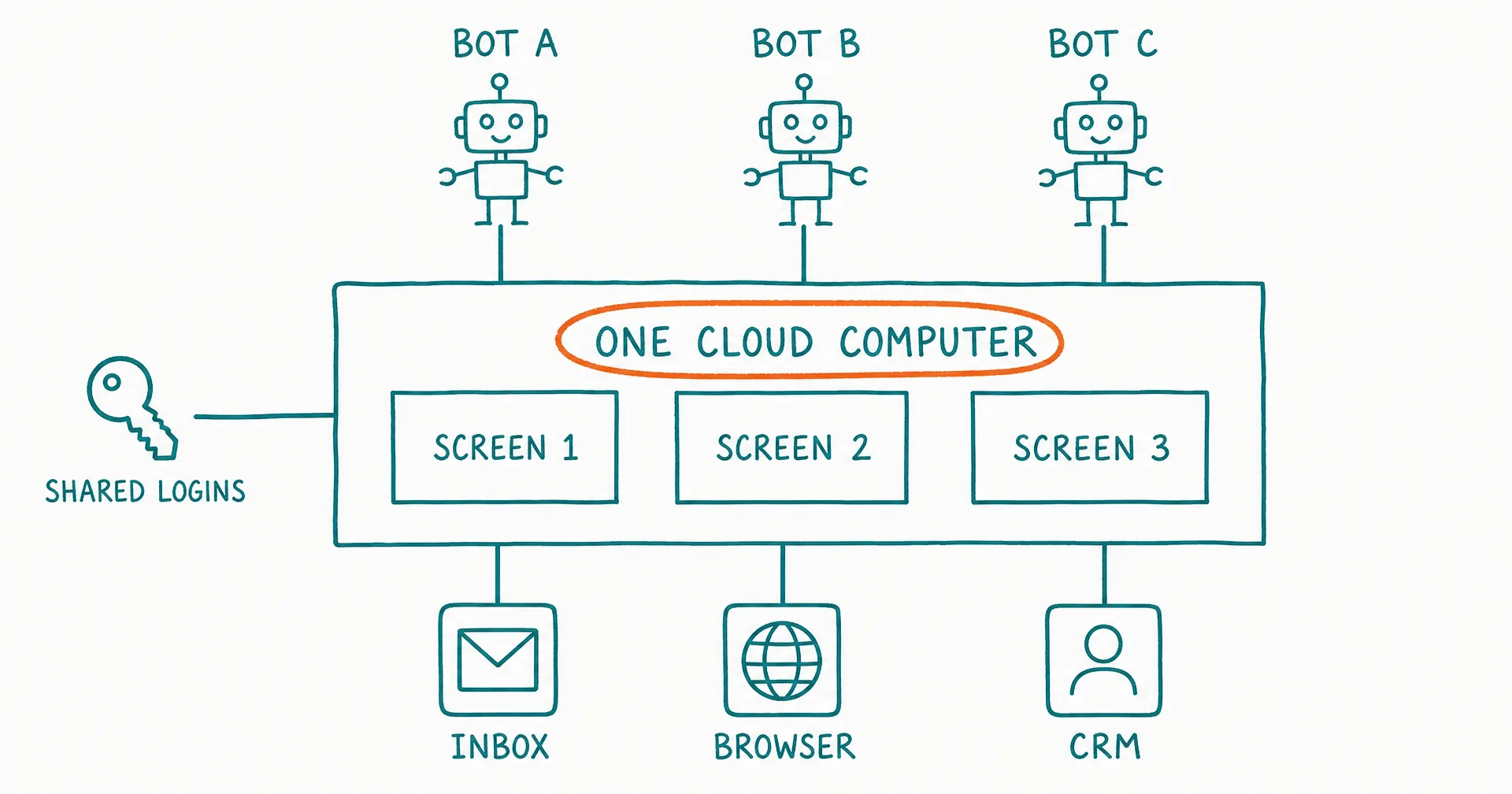
The verdict, taken from SpaceXAI’s own documentation rather than launch-day headlines: Grok Bot is real delegation at an entry price that fell from $200 to $20 in two weeks, and its one structural catch is that every Bot on your account shares one computer, one browser, and one set of logins. That is the caveat SpaceXAI flags in its own FAQ, and it is the thing to decide on before you hand a Bot real work. The rest of this page covers how the shared computer works, what access costs, where the product is genuinely strong, and where the docs draw the line.
On this page · 8 sectionsOpen
- Grok Bot is SpaceXAI’s product for always-on AI teammates, launched in early beta on August 11, 2026 for SuperGrok Heavy, Cursor Ultra, and Cursor Teams Premium subscribers.
- Bots are named, persistent agents that sign into apps and websites on a persistent cloud computer, work in the background, and come back when something needs your approval.
- All of a user’s Bots share ONE cloud computer: files, browser sessions, and logins are pooled, and SpaceXAI’s own docs say separate Bots should not be treated as a security boundary.
- Bots can learn a workflow by watching you do it once, then save it as a routine that re-runs on a schedule or on demand.
- There is no standalone price: access is bundled into Cursor and SuperGrok subscriptions, from $20 a month (base Cursor Pro) after two late-August expansions of eligible plans, up to about $300 for SuperGrok Heavy, with a weekly usage allowance plus on-demand token billing. Enterprise access opened September 3, 2026 (admin-dashboard activation, pricing unpublished).
- Grok Bot supports macOS, Windows, iOS 18+ and, since September 2, 2026, Android; Cursor’s documentation lists Linux (x64 and Arm64) as of September 9. iPad is still not supported, and the product requires cloud data storage.
- Grok Bot is strong validation for the AI employee category; the differences that remain are role ownership, memory architecture, and per-worker isolation.
§ 01What is Grok Bot?
In SpaceXAI’s own definition, a Bot is “a single persistent, named agent or one AI teammate.” You create a Bot by giving it a short name, one primary job, and a description of how it should work. Then you message it the way you would message a colleague, hand it a task with context, and it goes off to do the work.
The product started as an internal prototype. SpaceXAI says teams inside the company created Bots to handle sales outbound, marketing campaigns, office operations, and bug fixes before the public beta opened. That origin shows in the launch framing: the pitch is not a better chat window, it is delegation. In the company’s words, Bots “finish jobs end to end, and only come back when something needs your approval.”
Grok Bot is a separate application from the Grok chatbot. You install a dedicated desktop app (or the iOS app), sign in with a Cursor account, and manage team-level controls from the Cursor dashboard. The underlying model family is Grok: Grok 4.6 shipped one day after the Bot launch, and Grok 4.7 followed on September 21, 2026, trained, per xAI’s launch post, to natively understand the Grok Bot harness. Whether Bots already running move to it is not stated.
§ 02How the shared cloud computer works
The core architectural idea is that Bots do not run inside your laptop. Each user gets a managed Linux virtual machine in the cloud, with a browser, a filesystem, and a terminal. Bots use connectors and MCP servers where clean integrations exist, and computer use (driving real interfaces) for apps and websites that have no API. Work lands in the actual tool, not as a chat draft.
The detail that matters most: all of your Bots share that one computer. Files, browser sessions, and app logins live in a single account-level credential pool, which is what makes handoffs between Bots cheap. Each Bot gets its own screen on the shared machine, so several Bots can run browser and desktop tasks in parallel. SpaceXAI is unusually direct about the consequence, stating in its documentation: “Do not use separate Bots as a security boundary.”
Bots can also act on your local computer: run commands, read files, and move files between the cloud machine and your own. The first local action asks for consent, and every local action then goes through an approval card that shows the exact command.
§ 03Skills, routines, and memory
Two mechanisms make Bot work repeatable. A skill describes how to perform a task. A routine is a saved path that can re-run on a schedule or on demand. The notable feature is learning by demonstration: ask a Bot to follow along once while you walk through a multi-step, multi-system process, and it persists that path as a routine.
On memory, a Bot retains stable preferences, role context, and summaries of prior work. Its conversation and learned role are separate from other Bots, while shared files and browser sessions can move context between them. The docs add a caveat worth reading twice: “For important decisions, ask the Bot to check the current source rather than relying on memory.”
§ 04What it costs and who can get it
As of August 22, 2026, there is still no standalone Grok Bot subscription, but the list of plans that include it quietly expanded in late August. The published access routes are:
| Plan | Published price | Notes |
|---|---|---|
| Cursor Pro | $20/mo | Cheapest individual route; weekly Grok Bot usage included |
| SuperGrok (base) | $30/mo | SpaceXAI’s base consumer tier; added August 26 |
| Cursor Pro+ | $60/mo | Mid individual Cursor tier |
| SuperGrok Plus | $100/mo | Adds Grok Bot access to SpaceXAI’s mid consumer tier |
| Cursor Ultra | ~$200/mo | Cursor’s top individual plan |
| SuperGrok Heavy | ~$300/mo | SpaceXAI’s top consumer tier |
| Cursor Teams Standard | $40/seat/mo | Self-serve team seats now include Grok Bot |
| Cursor Teams Premium | ~$120/seat/mo | Premium team seats |
Subscriptions include weekly usage, and eligible accounts can add on-demand usage billed from model and token cost. The list has expanded twice since launch (August 21, then August 26 to all SuperGrok, Cursor Pro, and Cursor Teams plans), and official docs pages have lagged the live pricing page both times, so check the live access page before buying. Enterprise access opened on September 3, 2026 with access, network, and audit controls; enterprise pricing is still unpublished.
Platform support: macOS (Apple silicon and Intel), Windows (x64 and Arm64), and iPhone on iOS 18 or later at launch, plus an Android app that reached Google Play on September 2, 2026, three weeks in. Linux (x64 and Arm64) appears in Cursor’s platform list by September 9; iPad is still not supported. Grok Bot also requires cloud data storage, so accounts on Cursor’s Legacy Privacy Mode must change that setting before Bots can start.
§ 05What Grok Bot does well
Read generously, and the launch materials earn it, Grok Bot gets several hard things right.
- It finishes work in real tools. The difference between a draft in a chat window and an updated CRM record is the whole product. Computer use plus connectors means the work lands where a human would put it.
- Zero-setup delegation. There is no workflow builder. You create a Bot and message it, and the same Bot is reachable from desktop and phone.
- Parallel Bots with a manager pattern. SpaceXAI describes people running a chief-of-staff Bot on top of specialists for inbox, expenses, recruiting, and operations. Bots message each other and pass ownership so you are not the router.
- Demonstration learning. Teaching a routine by doing the task once, with the Bot following along, is a genuinely low-friction way to encode a process.
§ 06The honest caveats
The same documentation is candid about the limits, and they matter for anyone evaluating the beta.
- One computer per user, not per Bot. Logins, sessions, and files are shared across all your Bots. SpaceXAI’s own words: separate Bots are not a security boundary. Anything one Bot can reach, every Bot can reach, so the blast radius of one compromised session or one misbehaving Bot is the whole account.
- Memory is advisory. The docs recommend re-checking current sources for important decisions rather than trusting what a Bot remembers.
- It is an early beta. Access still requires a paid Cursor or SuperGrok plan (or an enterprise activation since September 3), and coverage of the first days describes rough edges as expected in a controlled rollout.
- Platform gaps. No iPad (Android arrived September 2, Linux by September 9), and a hard requirement on cloud data storage.
None of these are unusual for a v1. They are worth knowing because the product’s promise (hand real logins and real work to autonomous software) is exactly the kind of promise where the security model and the memory model are the product.
§ 07Where Grok Bot sits in the AI employee category
Grok Bot’s use-case gallery reads like a job board: Sales Outbound, Talent Scout, Paid Media, Expense Manager, Account Health, and since September 4, 2026 a procurement Bot whose full system prompt SpaceXAI published. That is the AI employee frame, arriving from the largest possible direction, and it validates the category more loudly than any startup could.
The differences are real, though. An AI employee, as we define it in our five-part test, owns a standing role with continuity, initiative, agency, and accountability. Grok Bot delivers strong agency and initiative. The gaps are role accountability (there is no task board, KPI, or standing report an owner reviews), memory that the vendor itself advises double-checking, and per-worker isolation. For a deeper cut on that contrast, see Grok Bot vs AI employees.
For contrast, CellCog has been building AI employees on Cellular Multi-Agents since October 2025: each employee runs in its own isolated workspace with its own email inbox, task board, schedule, and structured memory, so what it learns one day carries into the next, and it reports to you like a hire. You also control exactly which tools and credentials each employee can use: anything you don’t grant never enters that employee’s environment, enforced on the server rather than hidden in the UI. Plans start at $8 a month; you pay for the work, not the hire, and the cost depends purely on how much work you assign. The feature-by-feature comparison puts the two architectures side by side. Different architecture, same destination: software you can give real work to.
§ 08Update log
This is a living page; platform and plan changes land here.
September 2, 2026: Android app. Grok Bot reached Google Play in beta, three weeks after launch, closing the largest platform gap listed above. The announcement is the same pitch as the iOS app: hand a Bot a task from your phone, pick the thread up on desktop, approve work as it comes in; Bots keep running on the cloud computer after the phone locks. Sign-in is still a Cursor account, and eligibility still follows the eight-plan list. Linux desktop and iPad remained unsupported at that date.
September 9, 2026: Linux, quietly. Cursor’s Grok Bot documentation now lists the desktop app on “macOS (Apple silicon and Intel), Windows (x64 and Arm64), and Linux (x64 and Arm64)”, and the enterprise page at docs.x.ai names Linux too. We found no dated announcement: a Cursor staff post on the forum request thread still said Linux was unsupported on August 24, and the get-started page carried “there is no Linux desktop app” as late as September 3. iPad remains the one platform gap; the mobile docs say the app “is currently designed for phones, not iPad”.
September 3, 2026: Enterprise access opens. SpaceXAI’s Grok Bot for Enterprise announcement opens enterprise access: organizations activate Grok Bot from the admin dashboard, Grok and Cursor Enterprise customers get two free weeks and can invite their whole organization including people without a seat, and the release adds access, network, and audit controls. Enterprise pricing is still unpublished (contact sales). The security section says each user’s work runs in its own environment separate from every other user; that is isolation between users, and the one-computer-per-user model across a user’s Bots is unchanged. Corrected on this page the same day.
September 3, 2026: The design essay. SpaceXAI published Designing Grok Bot for a world of persistent agents, an account of moving the interface from a chat session the user operates to a Bot roster with presence, work that starts without a prompt, and a computer view designed so that users are not drawn into supervising it. The essay describes each Bot as having “its own computer”; the product docs, current the same week, keep the architecture described above: the computer is assigned per user, each Bot gets its own screen on it, and separate Bots are not a security boundary. Per-Bot memory and routines, per-user machine.
September 4, 2026: A Bot with a job. In Setting Grok Bot loose on procurement, SpaceXAI describes Haggle Bot, an internal Bot given access to vendor spend, contracts, and usage data that has identified more than $100,000 in direct savings, worked through larger SaaS renewals, and applied the same approach to recurring purchases. The post publishes the full system prompt, and it reads like a job description: the systems the Bot can reach, a named operator who makes all final decisions, and three permission lines (always allowed, needs the operator’s explicit go every time, never under any circumstances, with signing, buying, and approving charges in the last group). SpaceXAI’s own framing is the category’s: “Give a Bot a clear job and access to the tools it needs, and it can keep taking on the work within that role without being told each task.” It is the most concrete published example of a role-shaped Bot to date. The evaluation questions on this page (whose machine, whose memory, who reviews the work) are unchanged by it.
September 21, 2026: Grok 4.7 released at Grok 4.6’s price, trained to understand the Grok Bot harness per xAI; model references updated.
September 16-17, 2026: 1Password and voice. During the Grok Bot Galaxy livestream, SpaceXAI’s @bot account announced 1Password support (share vault items, approve each fill, secrets stay in the password manager) and voice, rolling out on desktop and mobile. Our Galaxy page has what the three days showed.
September 22, 2026: Grok Bot in Tesla cars. Tesla announced at 16:13 UTC that Grok Bot “lets you take on more complex tasks, like placing your usual coffee order, booking a reservation, or scheduling an appointment”, and that it is “Currently available to SuperGrok Heavy subscribers, with more tiers to follow”. Elon Musk posted that Grok Bot is now in Tesla two minutes earlier. Neither post says whether the in-car Bot works on the same cloud computer as the desktop app; we read it as a new surface for the top plan, not a new plan or price.
September 22, 2026: The first usage number. Bloomberg reported that Grok Bot had 418,000 weekly users as of September 14, up 24% from the week before, citing a presentation shown at an event in London; Mint’s write-up of the same report adds that Meta’s Muse has been downloaded four times more than Grok Bot, per Bloomberg Intelligence. SpaceXAI has published no user figure itself, so read it as the company’s own slide relayed by attendees, about five weeks after the August 11 launch.
September 26, 2026: Finance integration. SpaceXAI’s @bot account posted at 19:54 UTC: “Grok Bot now connects to your finances.” Users link bank, card and investment accounts through a new Finance integration and ask a Bot to help with spending and investments. In the same thread: “Accounts connect securely through Plaid. Access is read-only, Grok Bot never sees your logins, and you can unlink anytime.” The integration is found by searching for Finance in the Grok Bot marketplace. When we checked at 02:55 UTC on September 27, docs.x.ai release notes carried no matching entry.
Q1How much does Grok Bot cost?
There is no standalone Grok Bot price. As of August 26, 2026 the eligible plans are Cursor Pro ($20 a month), SuperGrok ($30), Cursor Teams Standard ($40 per seat), Cursor Pro+ ($60), SuperGrok Plus ($100), Cursor Teams Premium (about $120 per seat), Cursor Ultra ($200), and SuperGrok Heavy (about $300). Subscriptions include a weekly usage allowance, and eligible accounts can add on-demand usage billed from model and token cost.
Q2Does Grok Bot keep working when my laptop is closed?
Yes. Bot work runs on a persistent cloud computer, so closing the desktop app, your laptop, or your phone does not stop a background task or a scheduled routine.
Q3Do all Grok Bots share one computer?
Yes. Every Bot on an account uses the same persistent cloud computer and shares its files, browser sessions, and logins. The computer is assigned per user, not per Bot, and SpaceXAI’s documentation states plainly: do not use separate Bots as a security boundary.
Q4Which platforms does Grok Bot support?
macOS on Apple silicon and Intel, Windows on x64 and Arm64, Linux on x64 and Arm64 (listed in Cursor’s documentation by September 9, 2026, with no dated announcement), iPhone on iOS 18 or later, and Android since September 2, 2026 (a beta app on Google Play). iPad is still not supported.
Q5Is Grok Bot the same as Grok?
No. Grok is SpaceXAI’s chatbot and model family, and Grok 4.7 is the frontier model, released September 21, 2026 at the same price as Grok 4.6. Grok Bot is a separate application: a team of persistent, named agents that use a cloud computer to do work rather than answer questions in a chat window.
Q6Is Grok Bot an AI employee?
It is the closest a general AI lab has come to shipping one. Bots are persistent, named, and role-shaped. The gaps are in role accountability (no task board, KPIs, or standing reporting), memory that the docs themselves advise double-checking, and the shared-computer model instead of per-worker isolation.