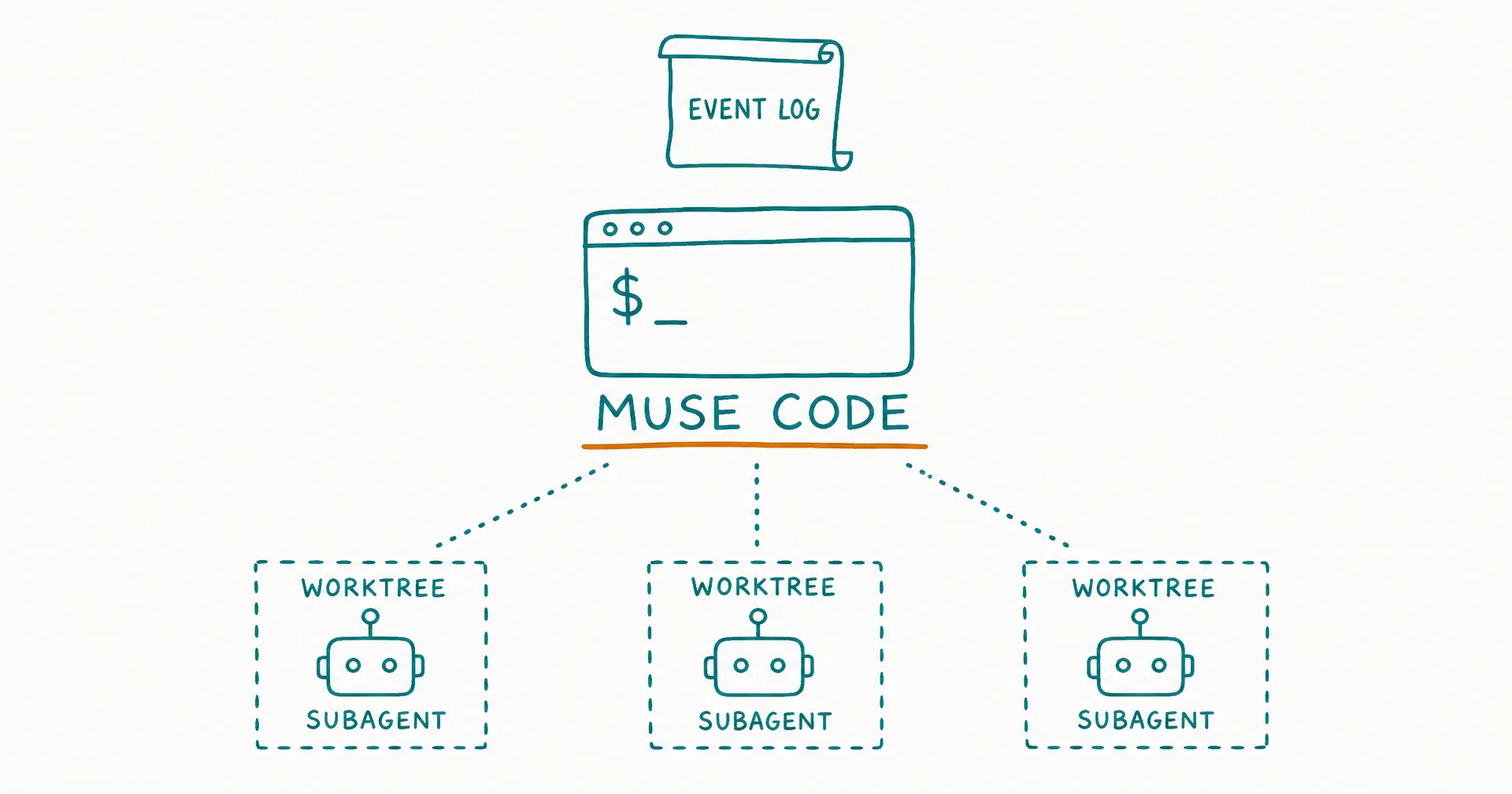
Muse Code is Meta’s first coding agent: a terminal-native CLI, in beta since August 5, 2026, powered by Muse Spark 1.2 - the model Meta says it co-trained with the harness itself. A separate Meta post about Muse Spark’s multimodal capabilities landed August 20 and led several roundups to date the whole product to late August; the launch was August 5.
Meta entering the coding-agent race matters on its own. But Muse Code is also genuinely interesting as a harness: its three distinctive bets - persistent subagents, worktree fan-out, and a replayable event log - are different from what Claude Code and Cursor emphasize. This post covers what is verified from Meta’s own materials, what is still behind a developer login, and where it sits against the field.
On this page · 8 sectionsOpen
- Muse Code is Meta’s first coding agent: a beta, terminal-native CLI launched August 5, 2026 alongside Muse Spark 1.2, the model Meta co-trained with the harness itself.
- Install is one shell command on macOS or Linux; the model runs on Meta’s service - this is a local harness around hosted inference, not local weights, and no native Windows support is documented.
- Its distinctive architecture: persistent asynchronous subagents that survive across tasks, fan-out into isolated git worktrees for parallel work, and an append-only event log that makes sessions crash-safe and replay-exact.
- Approvals are layered: an OS sandbox is on by default (workspace-writable, network-restricted, with a live enforcement probe), compound shell commands get staged approvals, and a –yolo flag disables containment entirely.
- Pricing is not publicly verifiable: Meta’s detailed developer docs sit behind a login, and no public page confirms a subscription price, plan inclusion, or exact token rates - treat third-party price claims as unverified.
- In product shape it is closest to Claude Code (terminal CLI + hosted model); Cursor remains the broader platform with an IDE, CLI, and hosted cloud agents.
§ 01What Muse Code is
The setup is one shell command on macOS or Linux, after which the agent runs as muse inside any repository. Meta describes it as handling complex software-engineering work across large repositories: planning changes, writing code, validating results, and coordinating multi-file work end to end.
Two structural facts frame everything else. First, it is a terminal product - Meta documents no Muse IDE, and no official editor extension as the primary surface. Second, the intelligence is hosted: Muse Code is a local harness around Meta’s Muse Spark 1.2 service, not local weights. You need a Meta developer account, and the product is explicitly beta.
§ 02The architecture: subagents, worktrees, event log
The most distinctive design choice is that subagents are persistent. Rather than spawning a helper per task and discarding it, Muse Code maintains specialized background agents throughout a session that gather information, pursue next steps, and report back to the primary agent.
For parallel work, Meta documents fan-out into git worktrees: a parent agent distributes tasks to write-capable subagents, each working in its own isolated worktree so concurrent edits cannot collide, while the parent monitors, steers, or stops them. Meta’s own guidance is candid about the limits - fan-out suits independently verifiable tasks; sequential work and small edits belong in the main thread.
The third bet is the event log. Muse Code records model calls, tool runs, approvals, and edits in an append-only local log, which makes sessions restart-safe (an interrupted run resumes from recorded state) and replay-exact. Meta even documents turning recorded events into deterministic CI replay fixtures - a genuinely novel idea for testing agent behavior.
§ 03Approvals and the sandbox
Muse Code layers its guardrails. The bundled /plan skill reads the project, produces a plan and validation strategy, and stops for approval before implementing. A /goal mechanism pins a durable objective across turns and gates completion on an audit of the acceptance criteria. Compound shell commands get staged approvals: safe stages run, dangerous or unparseable stages hold for review, and persistent command grants are scoped to one workspace, with deny rules taking precedence.
Underneath sits an OS-level sandbox, on by default: writes allowed in the workspace and temp roots, the rest of the filesystem read-only, network egress restricted. Notably, it probes its own enforcement before trusting itself and refuses to execute if containment is not actually working. The escape hatch is a --yolo flag that disables the sandbox entirely - useful to know exists, mostly as the thing not to run on a machine you care about.
§ 04Pricing and access: what is actually verifiable
Here the record thins out, and it is worth being precise about why. Meta’s detailed developer documentation - including the billing and rate-limit pages - sits behind a developer login. The public pages confirm the beta, the installer, and that Muse Spark 1.2 is available through both Muse Code and the Meta Model API, which Meta calls “direct, self-serve and affordable.” What no public page confirms: a flat subscription price, inclusion in any consumer Meta plan, launch credits, or exact per-token rates.
Third-party pages quote specific token prices, including a discounted contributor tier. Treat those as unverified until you can see them in the authenticated console. The practical read: expect developer-account, usage-style billing rather than a consumer subscription, and check the console before pointing Muse Code at a large repository - agent harnesses consume tokens continuously, and unpriced continuous consumption is not a plan.
§ 05How it compares
| Muse Code | Claude Code | Cursor | |
|---|---|---|---|
| Shape | Terminal CLI | Terminal CLI | IDE + CLI + cloud agents |
| Model | Muse Spark 1.2 (hosted) | Claude family (hosted) | Multi-model picker |
| OS | macOS, Linux | macOS, Linux, Windows (WSL/Git Bash) | Major desktop OSes |
| Distinctive bet | Persistent subagents, worktree fan-out, replayable event log | Classified autonomy (auto mode default) | Breadth: editor, agents, teams |
| Published pricing | Not public | From $20/mo (Claude Pro) | Free tier; Pro $20/mo |
The closest comparison is Claude Code: the same product shape with different bets. Anthropic is betting on classified autonomy - a safety classifier replacing routine approval prompts. Meta is betting on structure - persistence, parallelism, and replayability inside the session. Cursor remains the breadth play. For the wider field, our monthly harness ranking covers how these trade-offs stack up in practice.
§ 06Session persistence is not business persistence
Muse Code’s event log solves a real problem: a crashed session resumes exactly where it stopped, on that machine, in that repository. It is the best version of within-session persistence any major harness has shipped.
It is also worth being clear about what it does not cover. The log replays a session; it does not carry understanding across days, tasks, and people. An agent doing business work needs the second kind: memory of decisions made last week, handovers between working sessions, a task board that outlives any one run. That is the layer CellCog builds as architecture - AI employees whose memory is enforced rather than advisory, covered in depth in how AI employee memory works.
§ 07The honest caveats
Muse Code is a beta, and Meta’s own cookbook repeatedly warns that real model behavior varies from its demonstrations. The sandbox is only a boundary while it is on - --yolo removes it. Skills like /plan and /grilling run only when explicitly invoked, so the guardrails are opt-in habits as much as defaults. Fan-out helps only genuinely separable tasks. And the unknowns list is real: pricing, context limits, data retention, whether repository content trains models under each tier, enterprise controls, and model choice are all unverifiable from public pages today. For a beta from a company Meta’s size, most of these will resolve quickly; until they do, this page marks them as open rather than guessing.
§ 08Update, August 31, 2026: out of beta, with four additions
Meta took Muse Code out of beta on August 31, 2026, announced on its developers blog. As predicted above, the unknowns started resolving quickly. What shipped with the graduation:
- Inter-session messaging. Parallel sessions can now pass messages to each other - a warning when one session’s change affects another, or an answer to a question a sibling is blocked on. Transport is a Unix socket between local processes, nothing crosses the network, and the agent itself discovers peers and sends through two built-in tools.
- Workflow. The subagent story graduates from fan-out to orchestration: say “use a workflow” and a large task becomes a coordinated team of parallel agents you watch and steer from one control room (
/workflowsshows live progress with stop, restart, and cancel). Completed workflows can be saved and reused. Theultraeffort level triggers workflows automatically. - Rewind. Double Esc rolls the conversation back to an earlier point, with the event log supplying only safe rewind points and a confirmation gate before any work is undone - the append-only log paying off in a second way.
- SDK (developer preview). The engine behind the CLI is now a TypeScript library speaking the Muse Session Protocol (MSP), an open protocol over standard I/O with no server and no network: spawn a local host, stream answers, decide permission requests from your own code, reload sessions with state intact.
On the pricing thread this page has been tracking: subscription plans now exist - Meta announced three monthly tiers offering “more affordable Meta Model API usage than pay-as-you-go pricing.” The public announcement still names no prices, so the specific rates remain login-walled; the shape, though, is now confirmed as developer subscriptions rather than inclusion in a consumer Meta plan. This page updates when the tier prices become publicly verifiable.
One reading worth adding: inter-session messaging and Workflow are Meta building agent-to-agent coordination inside a single developer’s machine - agents discovering each other, passing messages, and dividing work. That is the same direction the whole field is moving, one machine at a time, and it is the strongest confirmation yet of the bet this page identified in August: Meta’s play is structure, not just a model.
Q1Is Muse Code free?
Unclear, and the honest answer is that nobody outside a Meta developer login can verify it as of August 24, 2026. Meta describes its Model API as self-serve and affordable, but no public page confirms Muse Code’s own billing, plan inclusion, or launch credits. Check the authenticated developer console before pointing it at a serious repository.
Q2Does Muse Code work on Windows?
Not officially. Meta documents the installer for macOS and Linux only. Third-party downloads claiming to be a free Muse desktop app for Windows are not Meta software and should not be trusted.
Q3What model does Muse Code use?
Muse Spark 1.2, which Meta says it co-trained with the Muse Code harness - the runtime alias in Meta’s own examples is muse-spark. Whether other models can be selected inside the CLI is not established in public documentation.
Q4Is Muse Code an IDE like Cursor?
No. It is a terminal CLI, like Claude Code. Meta documents no Muse IDE and no official IDE extension as the primary product. Cursor remains the broader offering, spanning an editor, a terminal agent, and hosted cloud agents.
Q5How is Muse Code different from Claude Code?
Same product shape - a terminal agent over a hosted frontier model - with different bets. Muse Code’s distinctive features are persistent subagents fanned into isolated git worktrees, an append-only replayable event log, and a default-on OS sandbox with a live enforcement probe. Claude Code’s current bet is classified autonomy: auto mode is now its default permission mode.
Q6Can Muse Code run multiple agents in parallel?
Yes, within a session. A parent agent can distribute tasks to write-capable subagents running in separate git worktrees, monitor and steer them, and stop them. Meta’s guidance is to use fan-out for independently verifiable tasks and keep sequential work in the main thread.