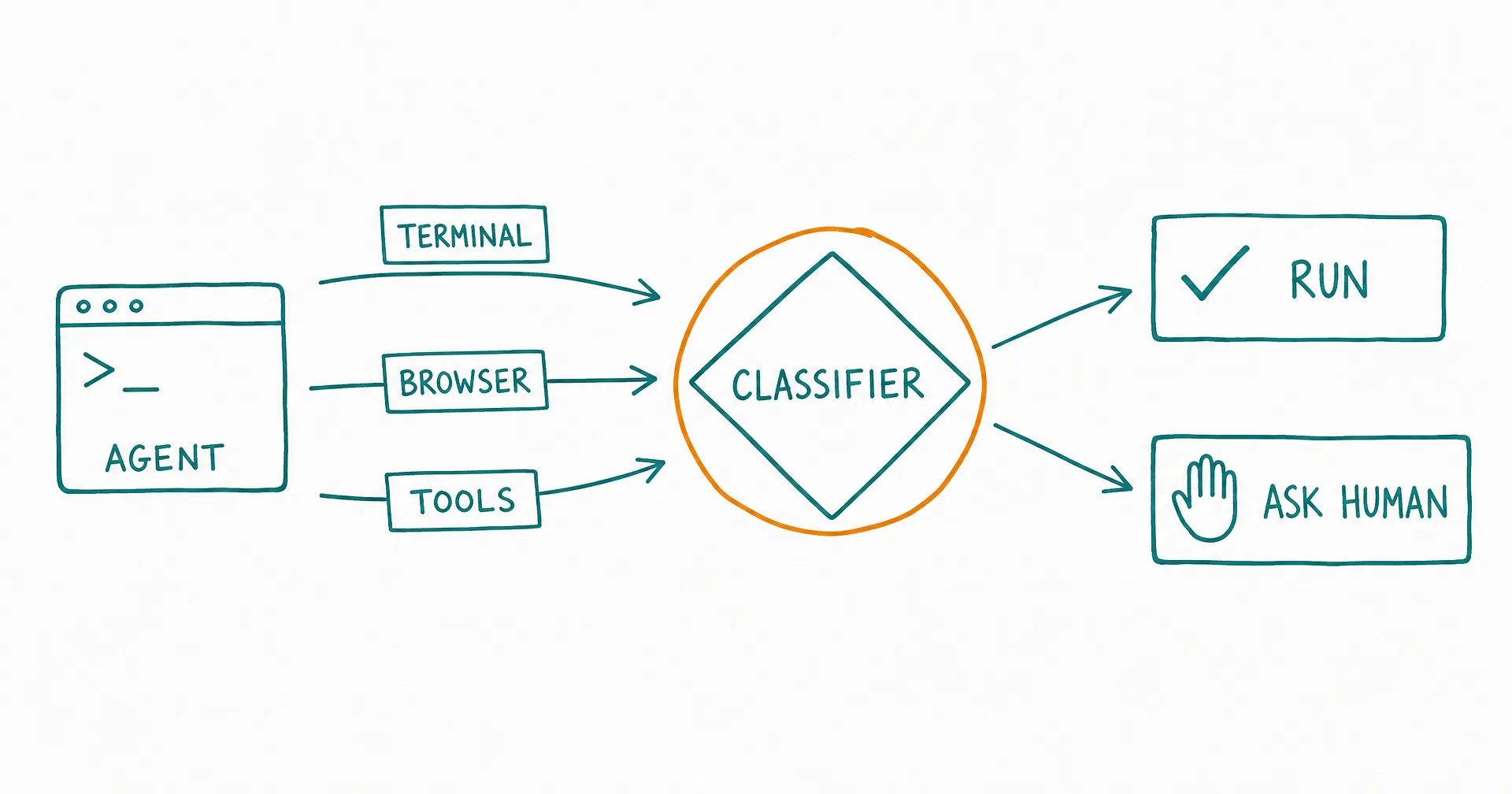
On August 7, 2026, Anthropic announced that auto mode would become the default permission mode in Claude Code, and on August 14 the switch flipped: new sessions on Pro, Max, and Team plans now start with most routine approval prompts turned off. If you opened Claude Code recently and noticed it stopped asking before editing files or running commands, this is why.
The change matters beyond one product. It is the clearest signal yet that the industry is converging on a specific pattern for agent autonomy: stop asking humans to approve every action, and put a classifier between the agent and anything consequential instead. Anthropic published unusually candid numbers about why. This post covers what auto mode actually does, what those numbers say, how to tune or disable it, and what the same pattern looks like when it is applied to more than a coding terminal.
On this page · 7 sectionsOpen
- Anthropic announced the change August 7, 2026 and flipped the default August 14: new Claude Code sessions on Pro, Max, and Team plans now start in auto mode unless a user pinned another default.
- Auto mode is not the same as skipping permissions: routine approval prompts go away, but shell commands, web fetches, external tools, subagent spawning, and out-of-project file operations route through a two-stage safety classifier.
- Anthropic’s own testing: human reviewers caught 13.6% of planted dangerous commands, the classifier caught 89%. It also reports a 17% false-negative rate on a set of real overeager actions, so the gate is better than a tired human and still not perfect.
- Explicit ask and deny rules outrank the classifier, hard-deny categories like data exfiltration cannot be auto-approved, and after 3 consecutive blocks (or 20 in a session) it falls back to manual prompting.
- You can switch a session with Shift+Tab, set a different persistent default with permissions.defaultMode, or remove auto mode entirely with permissions.disableAutoMode.
- The same pattern already runs beyond coding: CellCog AI employees pass every command that reaches your world - terminal, browser, and connected tools - through one approval rail with per-command classification and owner-set thresholds.
§ 01What changed on August 14
The mechanics of the rollout were narrower than the headlines suggested. New sessions on Pro, Max, and Team plans start in auto mode if you had not configured a default permission mode. If you had selected another default without pinning it, Claude Code could show a one-time offer to switch. Pinned defaults were left alone, and existing or resumed sessions generally kept their current mode.
The built-in default also depends on the client: v2.1.228 or newer on macOS, Linux, and WSL, and v2.1.233 or newer on native Windows. Older versions keep manual as their built-in default. Enterprise plans were not flipped: auto mode remained opt-in there at announcement time, with admins able to set an organization-wide default through managed settings.
§ 02What auto mode is, and is not
The most common misreading of this change is that Claude Code now auto-approves everything. It does not. Auto mode is a middle tier between manual prompting and the genuinely unguarded bypassPermissions mode.
| Mode | Routine prompts | Safety review |
|---|---|---|
| Manual (old default) | Yes, per action | Standard permission system |
| Auto (new default) | Mostly removed | Classifier reviews consequential calls |
| bypassPermissions | Removed | Mostly disabled |
Under auto mode, operations sort into three tiers. Intrinsically safe operations execute directly. File reads, writes, and edits inside the project also generally execute without review, on the logic that version control makes them recoverable. Everything with a larger blast radius goes through a transcript classifier: shell commands, web fetches, external integrations and MCP tools, subagent spawning, and filesystem operations outside the project.
The classifier is a two-stage system. A fast, deliberately cautious filter makes a first pass; anything it flags goes to a second reasoning stage meant to cut false positives. It evaluates whether an action escalates beyond what you asked for, touches unrecognized infrastructure, could be irreversible, could exfiltrate data, or looks influenced by hostile content. Tool results are also screened for prompt-injection payloads before Claude sees them.
Your explicit rules still outrank all of it. A permissions.ask rule (say, on git push) always prompts. A permissions.deny rule blocks the action before the classifier is consulted. Hard-deny categories such as data exfiltration cannot be approved by the classifier at all. And the system has a humility valve: after three consecutive blocks, or twenty in one session, auto mode pauses and hands control back to manual prompting.
§ 03The numbers Anthropic published
The interesting part of the announcement is the argument for why default-on autonomy is safer, not riskier. In Anthropic’s testing, human reviewers caught 13.6% of deliberately inserted dangerous commands. The classifier caught 89% of the same set. Reviewers got measurably less attentive as prompt volume grew, and in reviewed production sessions, serious unintended harm showed up more than twice as often after a human clicked approve as it did in auto mode sessions. Approval fatigue is not a theory; it is the measured failure mode of asking humans to review everything.
Anthropic is also candid about the gate’s limits: a 17% false-negative rate on a small set of real overeager actions, where Claude was pursuing the user’s goal but attempted something beyond clear authorization. A red-team exercise cut the adversarial miss rate from 12% to 7%. The company’s own recommendation is direct human review for high-stakes production infrastructure changes. The honest summary: the classifier is better than a tired human, and it is not perfect.
§ 04How to tune or disable it
For the current session, Shift+Tab switches from auto to manual. For a persistent choice, set a default in ~/.claude/settings.json:
json
{
  "permissions": {
    "defaultMode": "default"
  }
}
To remove auto mode entirely, including from the Shift+Tab cycle:
json
{
  "permissions": {
    "disableAutoMode": "disable"
  }
}
Two tuning options are worth knowing even if you keep auto mode on. permissions.ask rules put explicit human checkpoints on the actions you care about (pushes, PR creation, deploys), and they survive context compaction, which conversational instructions like “don’t push yet” may not. And autoMode.classifyAllShell set to true routes every shell command through the classifier, closing the gap where a narrow pre-existing allow rule could approve a command before review.
§ 05The same pattern, applied to a whole business
A coding session is the narrow case of this problem. The wide case is an AI worker that does not just edit a repo but sends email, updates a CRM, posts to a browser session, and runs terminal jobs, unattended, on a schedule. The review-everything model collapses even faster there, because nobody is sitting at the desk when the prompt appears.
That is the case CellCog built for. Every command that reaches your world - terminal commands on your machine, actions in your real browser, or any of 1,300+ connected tools - passes through one approval rail: the agent classifies every command before it executes, and the platform rejects any command that arrives unclassified. The owner sets each employee’s auto-approve threshold: everything at or below it runs autonomously, everything above it waits for review or for a standing approval the owner granted in advance. Nothing above the threshold executes silently. You can also control exactly which tools and credentials each employee can use - anything you don’t grant never enters that employee’s environment, enforced on the server, not just hidden in the UI. The practical effect is the same one Anthropic measured: the human reviews a handful of genuinely consequential actions instead of rubber-stamping hundreds of routine ones. The design is covered in depth in one approval rail for every tool and AI employee permissions and approvals.
§ 06Update log
This is a living page; when the story moves, the update lands here.
August 26, 2026 - a researcher publishes a working bypass, and the 0.00 percent number gets contested. Security researcher Johann Rehberger (wunderwuzzi) published “Breaking Claude Code Opus 5 Auto Mode,” reporting that a website-summary request can be chained into code execution with what he measured as a 60 to 80 percent attack success rate on a small sample. His described chain: nudge Claude off the WebFetch tool into using curl directly, redirect it to a ZIP archive of specially encoded files, and let Claude write its own Python decoder when it correctly refuses to run the supplied binary, at which point the decoder executes attacker-influenced code from inside the working directory. He notes Claude did catch the module shadowing when running the decoder from a safe parent directory.
The context that makes it notable: a third-party evaluation commissioned by Anthropic had reported a 0.00 percent indirect prompt-injection success rate for Opus 5 in Auto Mode, a number quoted in the section above. Rehberger says he sent the report and demonstration to Anthropic’s model bug bounty address before publishing and, as with his previous research, received no response.
Read the numbers carefully in both directions. His is a small-sample result from a researcher who specializes in exactly this class of attack, not a population estimate, and it does not establish that ordinary Auto Mode sessions are commonly exploited. But it does what a single working exploit always does to a zero: a classifier that scored 0.00 percent against one evaluation suite is not the same thing as a boundary. That is the distinction this post opened with, and it now has a public data point sitting on it. The practical posture is unchanged, only sharper: treat Auto Mode as a productivity default rather than a security boundary, and keep anything that reaches your real systems behind isolation and approvals instead of classification alone.
September 4, 2026 - Anthropic ships a deny-by-default switch for unattended runs, and a git-config disclosure shows where the permission model does not reach. Two developments this week sit directly on the question this post keeps returning to: what happens when nobody is at the desk?
First, Claude Code v2.1.259 (September 2) added --permission-prompts none for unattended headless hosts. In that configuration, anything that would have prompted is denied automatically, while the active permission mode, auto mode included, keeps deciding everything else. It is a small flag with a clear message: when no human can answer the prompt, the safe answer is no, not yes. The same release closed a class of gaps where Bash Read() deny rules did not cover files passed as option values, git diff and git grep file operands, or cd DIR && cat FILE compounds. v2.1.260 (September 3) kept going: path rules containing parentheses were being dropped as invalid, which left “read-only” folders writable; one uncompilable pattern made every file edit fail; and Bash checks were auto-approving zsh commands that hid a command substitution inside a REPORTTIME, REPORTMEMORY or DIRSTACKSIZE assignment. Read those as good news with a footnote. The rules engine is being hardened weekly, and every fix is also a record of an approval that went through before it.
Second, Manifold Security’s GitSpawn research (September 1) documents a gap that sits below the permission model entirely. Coding agents run git in the background to gather context, some before the first prompt, before the workspace-trust prompt, and on some agents before you have authenticated. Any git command that refreshes the index honors the repository’s own .git/config, and settings such as core.fsmonitor name a command for git to run. A repository that arrives as files (a zip, a shared drive, a sync folder) can therefore execute code on the host, as the developer, outside the sandbox, with no approval prompt and nothing on screen. Manifold reports eight findings across seven agents. Claude Code’s core.fsmonitor variant was confirmed on 2.1.193 and fixed by 2.1.196; Codex and Cursor were affected and have been patched; a second Claude Code variant reached through claude ultrareview, along with Hermes Agent, Qwen Code and Grok Build, was still unpatched at publication. No classifier could have caught any of it, because the classifier reviews actions the model proposes, and these commands were issued by the agent’s own startup code.
Both items point the same way as the August 26 entry. The classifier is a productivity default, and a boundary is something else. Deny by default when unattended, keep credentials out of the environment the agent runs in, and treat any repository you did not clone yourself as untrusted input.
Where CellCog stood, and what changed the same day. We put the disclosure’s question to our own platform the morning we read it, and the answer was not clean. Two surfaces ran git against repositories CellCog did not author with the repository’s own configuration live: the desktop app’s directory listing on an owner’s machine, and host-side checkpointing of workspace and Drive repositories. A scan of every repository on the platform (736 workspaces and 3,607 Drive repositories) found no planted configuration anywhere, so the gap existed and was never used. The fix went live on September 4: CellCog now issues git against repositories it did not author only with every command-executing configuration key overridden per invocation (fsmonitor, hooks, filter, diff and merge drivers, gpg and credential helpers, with include files resolved rather than executed), and it refuses .git files and symlinks outright. The desktop app requires version 1.0.48 or newer. We are publishing this because the argument of this post cuts both ways: a classifier that reviews what a model proposes cannot see a command the agent’s own plumbing issues, and the only honest response is to harden the plumbing and say so.
September 10, 2026 - the classifier idea moves server-side: Claude Managed Agents get an auto permission policy, and a way to answer the prompt from a terminal. Anthropic’s platform release notes for September 10 add a third permission policy to Claude Managed Agents, the hosted agent runtime, beside always_allow and always_ask. With auto, “the server evaluates each agent or MCP tool call and runs it, denies it, or pauses for your approval”, and the agent.tool_use and agent.mcp_tool_use events “report how each call was evaluated in an evaluation field alongside evaluated_permission”. Per Anthropic’s permission-policies documentation, the defaults did not move: the agent toolset defaults to always_allow and MCP toolsets to always_ask, so auto is opt-in per toolset, and a running session keeps the policy it was created with.
The second half answers the question the September 4 entry left open: when a hosted agent pauses, who is there to answer? The new ant beta:sessions connect command “attaches your terminal to a Claude Managed Agents session”, where you can “follow the session live, send messages, and allow or deny tool calls that are waiting for approval”; --web serves the Console’s session viewer locally instead. Read together, the two changes port the auto-mode shape from the terminal to the server: a policy that judges calls instead of asking about all of them, a record of how each call was judged, and a place for the human to land when the policy pauses. That is closer to the arrangement described earlier on this page than the August default was, and the same caveat travels with it: a policy that pauses is only as good as the evaluator behind it, so anything that reaches real systems still belongs behind isolation and explicit ask rules.
§ 07The honest caveats
The classifier is probabilistic, and Anthropic says so: 17% of overeager actions slipped through in its own evaluation, and the company recommends human review for high-stakes production changes regardless of mode. In the other direction, DevOps users report false positives on ordinary Terraform, kubectl, and SSH work, which forces mode-switching or trusted-environment configuration. Conversational boundaries can be lost when context compacts, so durable rules belong in ask and deny lists, not in chat. And there are rollout reports of configured defaults being ignored; those are bugs, not intended behavior, and worth a client update before deeper tuning. The pattern is right. The gate, like every gate, earns trust by being watched.
Q1How do I disable auto mode in Claude Code?
Three levels. For the current session, press Shift+Tab to switch to manual. For future sessions, set permissions.defaultMode to “default” in ~/.claude/settings.json. To remove auto mode entirely (including from the Shift+Tab cycle), set permissions.disableAutoMode to “disable”. Organizations can enforce that setting centrally through managed settings.
Q2Is auto mode the same as --dangerously-skip-permissions?
No. bypassPermissions disables permission prompts and most safety checks, and Anthropic recommends it only inside isolated containers or VMs. Auto mode skips routine prompts but keeps a classifier between Claude and consequential actions like shell commands, web fetches, and external tools.
Q3Which plans start in auto mode?
The August 14, 2026 default change covered new sessions on Pro, Max, and Team plans. Enterprise remained opt-in at announcement, with admins able to set an organization default. Anthropic’s current docs describe auto mode as available on all plans, subject to client version, models, and organization policy.
Q4What still asks for approval in auto mode?
Anything matched by an explicit permissions.ask rule, connector tools an organization set to ask, tools that genuinely need user interaction, and special handling around critical-path deletions. permissions.deny rules block actions before the classifier ever sees them, and hard-deny categories like data exfiltration cannot be approved by the classifier at all.
Q5Did the change make Claude Code less safe?
Anthropic’s published data argues the opposite: humans approved planted dangerous commands 86% of the time in testing, while the classifier caught 89% of them, and reviewed production sessions showed serious unintended harm more than twice as often after manual approval. The honest counterweight is a reported 17% false-negative rate on overeager actions, and Anthropic itself recommends direct human review for high-stakes production changes.
Q6What does the auto mode classifier actually check?
Whether an action exceeds or escalates beyond what you asked for, targets unrecognized or external infrastructure, could cause irreversible or destructive effects, could exfiltrate data, or appears influenced by hostile content such as a prompt injection in a tool result.