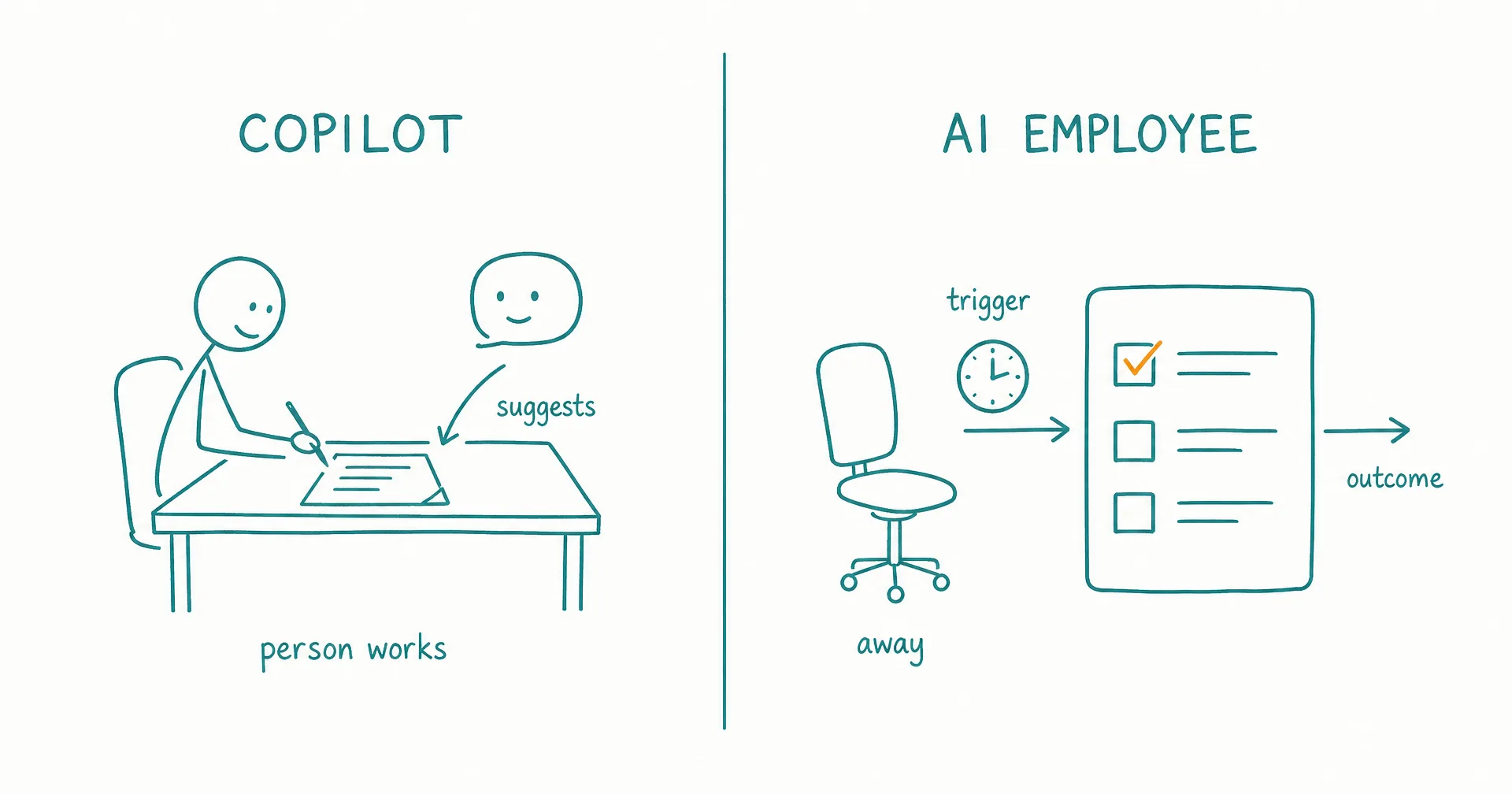
An AI copilot helps a person perform work inside an active workflow. An AI employee is assigned a bounded responsibility and carries that work forward across triggers, tools, task states, approvals, and work sessions.
The practical difference is co-production versus delegation.
With a copilot, the human remains the primary operator. The person opens the document, reviews the account, makes the judgment, and uses AI suggestions to move faster or improve quality.
With an AI employee, the human designs and supervises the operating contract. The software can start approved work, maintain a queue, choose steps, take permitted actions, wait, resume, and return an accepted outcome or escalation.
Modern copilots can use agents, actions, organizational data, and automation. Modern AI employees can collaborate with a person in real time. The feature sets overlap. The durable question is where the human sits in the loop.
On this page · 16 sectionsOpen
- AI Copilot vs AI Employee at a Glance
- What Is an AI Copilot?
- What Is an AI Employee?
- How Does a Copilot Compare With an AI Assistant?
- What Are the 9 Practical Differences Between a Copilot and an AI Employee?
- When Is a Copilot the Better Choice?
- When Is an AI Employee the Better Choice?
- How Should a Copilot and AI Employee Work Together?
- A Worked Example: Weekly Pipeline Review
- Where Should the Human Sit in the Loop?
- What Are the Cost and Productivity Trade-Offs?
- A Four-Week Augment-to-Delegate Pilot
- What Should Buyers Ask Vendors to Demonstrate?
- How CellCog Fits the Decision
- A 12-Point Augment-or-Delegate Scorecard
- Final Verdict
- A copilot augments a person who remains in the workflow. It supplies context, suggestions, drafts, analysis, or actions while the human owns the next step and final result.
- An AI employee owns a recurring outcome under a human supervisor. Work may start from a schedule, event, message, queue, or delegation and continue while the supervisor is absent.
- Choose a copilot when tacit judgment, interactive iteration, learning, or high-consequence decisions make human presence valuable.
- Choose an AI employee when the responsibility is recurring, digitally observable, bounded, and suitable for asynchronous follow-through.
- Use both when the employee gathers evidence, prepares work, and monitors state while the copilot helps a person make or execute the consequential decision.
- CellCog AI Employees implement delegated ownership through roles, inboxes, shifts, wake conditions, memory, task boards, KPIs, permissions, approvals, and handovers; CellCog’s chat agent remains available for on-demand co-working.
§ 01AI Copilot vs AI Employee at a Glance
| Decision dimension | AI copilot | AI employee | Buyer implication |
|---|---|---|---|
| Primary contract | Help a person perform work | Own a bounded recurring outcome | Choose augmentation or delegation |
| Workflow owner | Human user | AI role under human supervisor | Ownership must remain explicit |
| Typical start | User prompt or in-app action | Person, schedule, event, message, queue, or delegation | Proactivity changes the operating model |
| Context | User, open artifact, application, and permitted work data | Role, sources, memory, task state, and open commitments | Persistence needs governance |
| Tool action | Suggested or invoked while the user is active; product dependent | Performed within delegated authority, possibly asynchronously | Scope actions by consequence |
| Follow-through | Person usually returns and advances the work | Role waits, resumes, checks, closes, or escalates | Measure the chase work |
| Human review | Continuous or near-continuous | At defined approvals, exceptions, samples, and reviews | Oversight moves rather than disappears |
| Success measure | User productivity, quality, adoption, or task completion | Accepted outcomes, quality, reliability, intervention, cost, and risk | Usage is not role performance |
| Best fit | Interactive, tacit, irregular, or consequential work | Recurring, observable, bounded responsibility | Many teams need both |
| Main risk | Automation bias or weak user verification | Repeated error, excess authority, stale state, or silent drift | Human presence changes but does not erase risk |
Do not classify a product from the word “copilot” in its name. Some copilots now contain agents that operate asynchronously, and some “employees” still wait for a user to prompt every task.
§ 02What Is an AI Copilot?
Microsoft’s current general definition describes a copilot as a conversational AI assistant that provides contextual help, automates routine tasks, and analyzes data to improve a person’s productivity.
The aviation metaphor is useful: a copilot supports the operator rather than silently assuming command.
An AI copilot may answer questions in the context of the open application, summarize messages or documents, draft or revise content, explain code, analyze a table, recommend a next step, retrieve permitted work data, invoke an approved action, or help the user complete a multi-step task.
The copilot’s natural unit is the user’s workflow
A common loop is:
- The person opens an artifact or notices a need.
- The copilot receives the current context.
- The person asks, selects, or accepts help.
- The copilot suggests, drafts, analyzes, or acts.
- The person evaluates the result.
- The person chooses the next step and remains accountable for completion.
The product can be highly agentic inside step 4. The human’s operating position still makes it a copilot pattern.
Embedded context is a central advantage
A copilot inside a document, spreadsheet, IDE, CRM, inbox, or meeting can see the artifact the user is already working on, subject to access controls.
That reduces context-switching and lets the person combine domain knowledge, tacit intent, live judgment, organizational awareness, and AI speed.
The value often comes from keeping human judgment close to generation.
§ 03What Is an AI Employee?
An AI employee is agentic software placed inside a continuing role. It receives recurring work, preserves relevant state, selects steps and tools inside policy, and reports through tasks, evidence, metrics, approvals, escalation, and handovers.
The five-part AI employee test checks role, continuity, initiative, agency, and accountability.
The employee’s natural unit is the responsibility
The role contract should answer: What outcome recurs? Which work belongs in scope? What is excluded? What can start work? Which sources are authoritative? Which tools can the role use? Which actions are allowed, approved, or prohibited? What evidence proves completion? Which metrics define useful performance? When must the role escalate? Who supervises it?
The employee may ask a person for a decision. Delegation does not require unlimited autonomy.
The human moves to a different layer
The person no longer needs to initiate or guide every step. Human work moves toward role design, policy, context ownership, permissions, approval, exception handling, evaluation, performance review, incident response, and role redesign or retirement.
This can save coordination only if the role makes its work visible.
§ 04How Does a Copilot Compare With an AI Assistant?
The terms overlap. Both usually describe software that helps a person on request.
“Copilot” often emphasizes integration into a named workflow or application, context from the user’s current work, suggestions alongside the person, interactive refinement, and human control of the final result.
“AI assistant” is broader. It may be a general chat product, specialized helper, voice interface, or tool-using application.
The AI assistant versus AI employee comparison owns that broader category boundary. This article focuses on whether the human remains the active operator inside a specific workflow.
Copilots can contain agents
Microsoft’s current documentation for agents in Microsoft 365 Copilot says agents can extend Copilot with specialized knowledge, actions, triggers, and workflows. Some agent types remain user-initiated; custom approaches can support proactive actions.
That means copilot can describe the user experience; agent can describe the execution capability; and employee can describe the operating role. One product may occupy all three layers.
§ 05What Are the 9 Practical Differences Between a Copilot and an AI Employee?
1. Human-led workflow versus delegated outcome
A copilot helps the human write the proposal.
An AI employee may own the weekly proposal-preparation queue, gather approved inputs, draft the first version, request missing decisions, and route the artifact for human approval.
The final commercial commitment can remain human-owned in both patterns.
2. User initiation versus trigger coverage
A person typically invokes a copilot inside a task.
An employee can begin from a schedule, a new message, a task assignment, a data or application event, a monitored threshold, another worker’s delegation, or a person.
The trigger also needs frequency limits, deduplication, priority, concurrency, quiet periods, and stop conditions.
3. Interaction context versus role context
The copilot commonly uses the current user, the open file or record, the conversation, selected work data, and application state.
The employee needs role policy, authoritative sources, open tasks, previous decisions, commitments, account or project scope, learned preferences, evidence, and the next wake condition - with provenance, freshness, correction, and deletion built into that continuity.
4. Suggestion versus authority
A copilot may propose text, code, analysis, or an action for the user to inspect.
An employee may receive delegated authority to read, draft, classify, create, update, send, schedule, or invoke another service.
Authority should be action-specific. A role that may draft an email does not automatically need send permission.
5. Continuous review versus designed review
The copilot user sees much of the work as it happens.
An employee supervisor may review only high-consequence actions, low-confidence or conflicting cases, exceptions, sampled completed work, metric changes, incidents, and role-policy changes.
Good design places people at uncertainty and consequence boundaries rather than every step.
6. Session progress versus durable follow-through
A copilot can complete complex multi-step work during a session. The person often remembers to reopen the artifact, check a reply, or advance the next task.
An employee should represent the current owner, status, blocker, waiting event, promised follow-up, deadline, evidence, next action, and completion.
Durable state matters more than whether the initial run was long.
7. User productivity versus role performance
Copilot measures may include adoption, active use, satisfaction, time to complete, output quality, suggestion acceptance, and employee experience.
Employee measures may include accepted outcomes, first-pass quality, source completeness, cycle time, correct escalation, reopened work, correction effort, cost per accepted outcome, and incidents.
Messages, prompts, runs, or tasks started are vanity metrics for a role.
8. Local mistake versus repeated operating error
A bad copilot suggestion may affect the artifact the person is reviewing. Automation bias can still cause harm when the person accepts it without verification.
A bad employee rule, memory, or permission can affect many future tasks before a person looks. Persistence increases the value of monitoring, sampling, and pause controls.
9. Personal tool versus organizational role
A copilot is often licensed or configured for an individual user. It helps that user perform their own work.
An employee role may have a service owner, a queue serving several people, its own identity, shared or role-specific sources, service-level expectations, task history, a portfolio budget, and a retirement process.
The shift from personal augmentation to shared service changes governance even when the underlying model stays the same.
§ 06When Is a Copilot the Better Choice?
Choose a copilot when human participation materially improves the result or is required for accountability.
| Work condition | Why a copilot fits | Example |
|---|---|---|
| Tacit judgment | The person knows context not captured in systems | Executive communication |
| Interactive creation | Quality emerges through iteration | Strategy memo or design |
| Irregular work | Role overhead would not repay itself | One-off analysis |
| High consequence | Human must inspect evidence and decide | Legal or financial recommendation |
| Skill development | The person should learn rather than outsource the task | Coding, analysis, or writing |
| Real-time meeting | Context and goals shift moment to moment | Negotiation support |
| Personal workflow | One user owns the complete result | Spreadsheet or presentation work |
| Novel problem | The team is still discovering the process | Early investigation |
Copilots preserve human agency
The person can reject the suggestion, ask why, provide missing context, change direction, compare alternatives, correct a mistake, and decide whether to act.
This is valuable when the cost of formalizing a role exceeds the coordination being saved.
Do not automate away the learning loop
If a junior analyst needs to learn how to inspect evidence, an employee that delivers only final conclusions may reduce skill formation.
A copilot can surface relevant source material, ask the analyst to state a hypothesis, challenge missing evidence, explain a formula, compare interpretations, and leave the final reasoning and decision with the person.
Productivity is not the only outcome.
§ 07When Is an AI Employee the Better Choice?
Choose an employee when the same bounded responsibility returns and should progress without the user reconstructing it.
| Readiness signal | Test | Why it favors delegation |
|---|---|---|
| Recurrence | Work appears by schedule or event | Trigger can replace repeated initiation |
| Available inputs | Approved digital sources exist | Context can load consistently |
| Observable output | Result can be accepted or rejected | Role can be evaluated |
| Long-running state | Work waits across hours or days | Task state preserves ownership |
| Follow-through | Someone must check for replies or conditions | Role can resume within policy |
| Bounded authority | Actions separate into allowed, approved, prohibited | Delegation can remain narrow |
| Viable exceptions | Uncertainty can return to a named person | Human judgment remains available |
| Stable ownership | One person owns role policy and performance | Accountability is clear |
The best tasks for AI employees are usually recurring briefings, monitored research, first-pass triage, maintained content queues, source-backed reporting, or draft-and-escalate operations.
Avoid vague delegation
Weak: run our marketing.
Bounded: maintain the weekly content-production queue for approved briefs. Verify the source pack, prepare first drafts against the content-quality rubric, route every draft to the editor, record feedback, and stop before publication.
The bounded version identifies outcome, sources, authority, review, state, and stop condition.
§ 08How Should a Copilot and AI Employee Work Together?
The strongest design often uses an employee for asynchronous preparation and a copilot for human judgment.
Pattern 1: employee prepares; copilot helps decide
- Employee monitors approved sources.
- It detects a material change.
- It gathers evidence and opens an exception task.
- The decision owner enters a copilot session with the evidence attached.
- The copilot compares options and challenges assumptions.
- The person decides.
- The employee records the decision and monitors follow-through.
Pattern 2: copilot designs; employee operates
- A human uses a copilot to map the process and write the role contract.
- The team creates test cases and an acceptance rubric.
- The employee runs in observation mode.
- The copilot helps the owner inspect failures and refine policy.
- The employee receives bounded actions after evidence gates.
Pattern 3: employee handles the queue; copilot assists the reviewer
The employee prepares 30 cases. Ten require human review. The copilot summarizes the evidence, highlights policy, compares similar prior cases, surfaces disagreement, checks calculations, and records the human decision.
The reviewer remains responsible for the decision. The employee remains responsible for queue state.
Pattern 4: copilot creates a task for the employee
During interactive work, the user identifies a recurring follow-up: monitor these five competitors and alert me only when price, packaging, or positioning changes materially.
The copilot helps convert that intent into monitored sources, materiality rules, cadence, evidence requirements, a notification threshold, a task owner, permissions, and a stop date.
The employee accepts the task only when the contract is complete.
§ 09A Worked Example: Weekly Pipeline Review
A pipeline review combines repeatable preparation with consequential human judgment. It is a strong example of why copilot and employee patterns should not be collapsed.
Human-only baseline
Every Monday, a sales manager checks whether CRM records are current, reads recent email and meeting notes, identifies deals with missing next steps, compares current stage with evidence, asks representatives for updates, prepares the forecast discussion, runs the review meeting, and records decisions and follow-ups.
The manager owns both data preparation and judgment. Preparation can consume the attention needed for coaching and decisions.
Copilot-only design
The manager opens the CRM or reporting workspace and asks the copilot to summarize deal changes, identify missing fields, compare notes with stage, draft questions, and prepare a meeting brief.
This can accelerate the Monday workflow. The manager still notices that preparation is due, opens the systems, supplies context, checks the results, and follows up after the call.
Use this pattern when the process is still evolving or the manager’s tacit knowledge is central to interpreting every deal.
Employee-only design
A standing pipeline employee wakes before the review, checks approved records and activity, opens tasks for missing evidence, prepares a variance report, recommends updates, monitors representative responses, drafts the meeting brief, records decisions, and follows up during the week.
This saves more coordination, but it should not autonomously commit the forecast, change commercial strategy, or represent uncertain deal health as fact.
Combined design
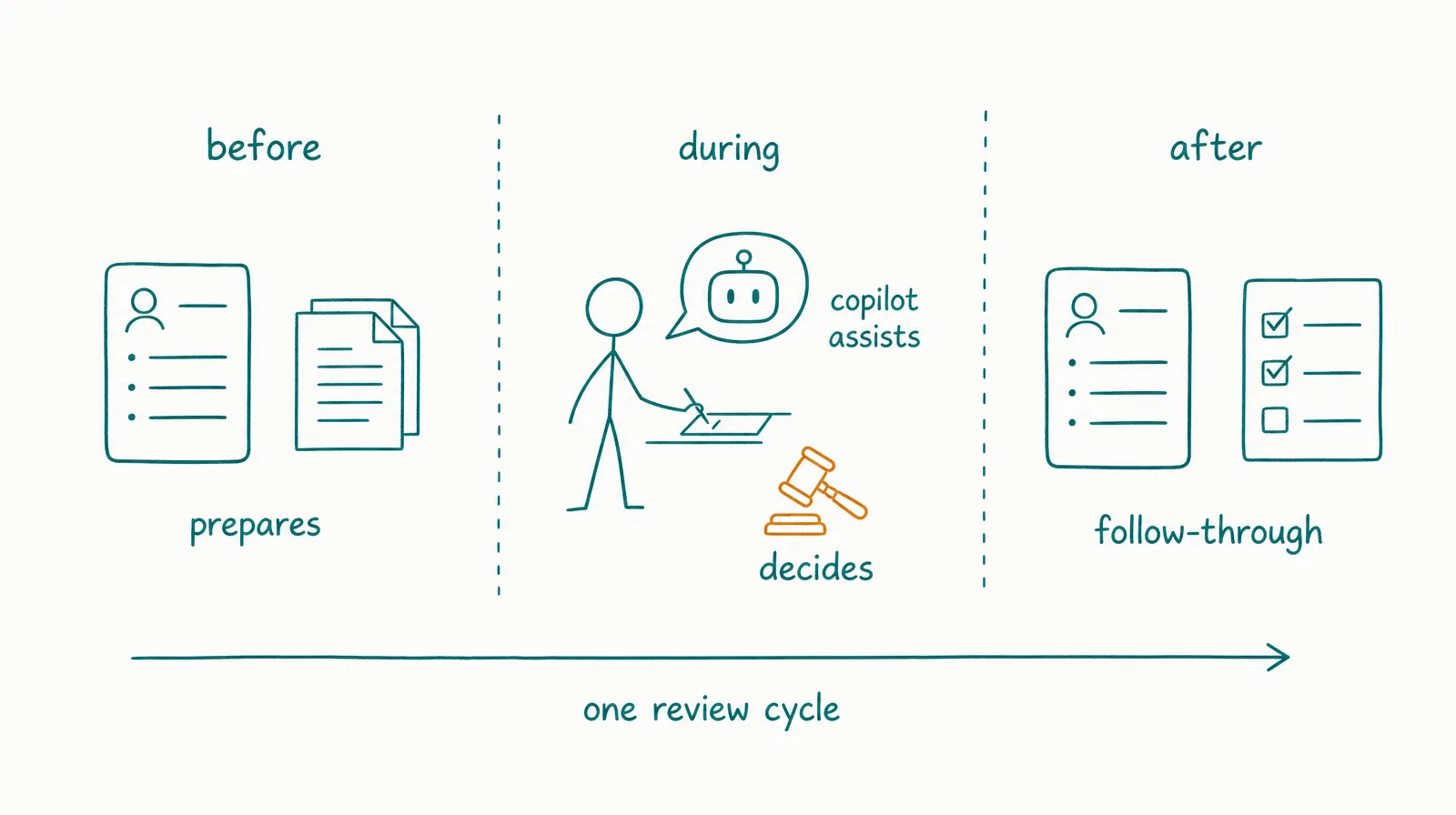
AI employee before the meeting: reconciles the approved data; flags stale and conflicting records; prepares source-linked deal packets; requests missing factual updates; ranks exceptions using declared rules; and delivers an on-time review brief.
Copilot during the meeting: retrieves the relevant evidence; compares scenarios; captures decisions; drafts coaching questions; checks arithmetic; and updates the meeting artifact as the manager directs.
Human manager: judges deal quality; challenges assumptions; makes the forecast decision; coaches representatives; approves consequential CRM changes; and owns the commercial outcome.
AI employee after the meeting: converts decisions into tasks; updates approved low-risk fields; routes gated updates for approval; monitors promised next steps; reopens stale items; and prepares the next review.
Separate facts, inferences, and decisions
The review packet should label: fact (CRM field, email date, meeting note, or source record); inference (evidence-based interpretation proposed by the AI); decision (judgment made by the accountable manager); and action (approved change with an owner and deadline).
This prevents a generated summary from becoming the source of record.
Use one task state
| State | Owner | Exit condition |
|---|---|---|
| Reconciling | AI employee | Required sources checked |
| Waiting on evidence | Sales representative | Named missing fact supplied or deadline reached |
| Ready for review | AI employee | Brief passes evidence rubric |
| In decision | Human manager | Forecast and actions approved |
| Executing | AI employee or named person | Approved updates and follow-ups complete |
| Monitoring | AI employee | Next event or review date |
| Closed | Human service owner | Outcome and evidence accepted |
The copilot does not need a separate queue. It helps the human operate the current decision state.
Measure the combined service
Track source completeness before the meeting, stale-record rate, preparation time, decision time, correction minutes, approved-update completion, reopened items, forecast-policy adherence, cost per accepted review pack, and manager confidence.
Do not claim revenue impact unless the organization can separate the effect of data preparation and process change from market, territory, product, and representative performance.
§ 10Where Should the Human Sit in the Loop?
Place the person based on uncertainty, consequence, and responsibility.
| Human position | Use when | Example |
|---|---|---|
| In every step | Work is exploratory, tacit, or high consequence | Strategy formation |
| At artifact review | Output is reversible and inspectable | Draft document |
| Before external action | Reputation, money, or rights are affected | Send, publish, approve |
| At exception | Routine cases are bounded; tail cases vary | Support escalation |
| Through sampling | Stable low-risk work has proven quality | Classification |
| At metric review | Role runs recurring low-risk operations | Weekly performance |
| At incident | Unexpected harm or control failure occurs | Pause and containment |
Review should be decision-specific
Weak: human approval required.
Operational: the account owner must approve the recipient list, factual claims, and final send for every external campaign. If approval does not arrive by the deadline, the task remains Waiting on owner and no message is sent.
The second version defines object, authority, timeout, default, and state.
Avoid the rubber-stamp problem
A reviewer cannot meaningfully approve 500 fast-moving items if the evidence is hidden and the interface rewards quick acceptance.
Reduce review load through risk tiers, strong defaults, source visibility, diffs, exception summaries, sampling, batch limits, response time, and role narrowing.
If oversight cannot be performed, reduce autonomy or volume.
§ 11What Are the Cost and Productivity Trade-Offs?
Copilot value is often measured per user workflow. Employee value is measured per recurring service.
Copilot cost model: license + user time + setup + training + verification + errors. Potential value: time saved + quality improvement + learning + decision support + reduced context switching.
AI employee cost model: subscription + usage + integration + setup + supervision + review + correction + incidents + change management. Potential value: accepted recurring outcomes + faster follow-through + added coverage + reduced coordination.
The AI employee total-cost guide keeps usage, setup, review, correction, and failure visible.
Do not double-count time saved
If the employee prepares work and the copilot helps a person review it, count the combined reviewer time once.
Compare a shared outcome such as: accepted weekly account briefing delivered by Monday 9:00 a.m.
Track the baseline human time, employee processing, copilot-assisted review time, corrections, the accepted result, missed exceptions, cost, and downstream impact.
Tool usage is not incremental value unless it changes the accepted outcome.
§ 12A Four-Week Augment-to-Delegate Pilot
Move one recurring workflow from copilot assistance toward employee ownership only through evidence.
Week 1: map the human-led workflow
Record the trigger, inputs, steps, decisions, tools, outputs, waits, exceptions, completion, time, and failure cost.
Use the copilot to help document the process, but have the operator correct the map.
Week 2: employee observes and prepares
The employee can read approved sources, create a draft task, prepare the artifact, identify missing evidence, and propose next steps.
It cannot change production state or contact external people.
Compare its preparation with the human-led baseline.
Week 3: employee owns intake and follow-through
If quality passes, authorize a scheduled or event-based start, task creation, evidence requests to an internal allowlist, low-risk tracker updates, and waiting and resume behavior.
Keep external sending, financial change, publication, access, and other consequential action in approval.
Week 4: evaluate the operating role
Review accepted outcomes, first-pass quality, correct escalation, reviewer minutes, missed work, repeated work, task aging, cost, incidents, and operator experience.
Choose one result:
- stay copilot-only;
- keep the employee in preparation mode;
- use the combined pattern;
- expand one bounded action; or
- stop the role.
Promotion gates
Do not promote because the calendar reached the next week. Require predeclared thresholds for representative-case acceptance, zero critical boundary failures, viable review burden, reliable state and follow-through, reversible actions, complete logging, and cost per accepted outcome.
The pilot is successful even if it proves that the human-led copilot pattern is the better design today.
§ 13What Should Buyers Ask Vendors to Demonstrate?
| Claim | Copilot proof | Employee proof |
|---|---|---|
| “Understands work context” | Show current artifact and permission-scoped retrieval | Show role, task, source, and memory scopes |
| “Uses tools” | Show suggested and user-approved action | Show action-specific delegated authority |
| “Works proactively” | Show notification or user-triggered agent behavior | Show trigger, deduplication, priority, and start |
| “Remembers” | Show user/session context and controls | Show provenance, correction, expiry, and deletion |
| “Completes workflows” | Show user-guided end-to-end task | Show asynchronous task state, wait, resume, and closure |
| “Keeps humans in control” | Show review and undo | Show approvals, exceptions, pause, revoke, and incidents |
| “Improves productivity” | Same-task time and quality | Accepted outcomes and reviewer burden |
Run a presence test
For the same recurring assignment, observe:
- What happens while the human is active?
- What happens after the human leaves?
- Who notices the next work item?
- Who carries open state?
- Who checks whether the action succeeded?
- Who follows up?
- Who closes or escalates?
If the work stops until the user returns, the product is operating as a copilot or assistant for that scenario. That can be the correct choice.
§ 14How CellCog Fits the Decision
CellCog provides both on-demand agent interaction and a standing AI Employee layer.
Its AI Employees product page describes roles with names and identities, inboxes, shifts, wake conditions, persistent memory, task boards, goals and KPIs, permissions and approvals, connected tools, handovers, and delegation.
That is the employee pattern.
CellCog’s general chat and Super-Agent capabilities can support interactive research, analysis, code, documents, spreadsheets, presentations, media, and other artifacts. When the person remains present and directs the work, the operating pattern is closer to a copilot or assistant even if the underlying system is agentic.
CellCog is relevant when a team recognizes a workflow it keeps re-prompting and can turn it into a bounded recurring role. Keep the on-demand surface for novel, interactive, and consequential work.
§ 15A 12-Point Augment-or-Delegate Scorecard
Score each statement from 0 to 2.
| Statement | Score |
|---|---|
| Work recurs on a predictable trigger | 0–2 |
| Approved digital inputs are available | 0–2 |
| One role can own the outcome | 0–2 |
| Completion is objectively reviewable | 0–2 |
| The path varies enough to need judgment | 0–2 |
| Actions can be tightly permissioned | 0–2 |
| Mistakes are recoverable | 0–2 |
| Exceptions can route to a named person | 0–2 |
| Work must wait and resume | 0–2 |
| Follow-through consumes current human time | 0–2 |
| Reviewer load remains viable | 0–2 |
| Value justifies ongoing operating cost | 0–2 |
Interpretation:
- 0–8: keep the work human-led and use a copilot.
- 9–16: use a hybrid; delegate preparation or monitoring only.
- 17–24: an AI employee pilot may fit, subject to consequence and access gates.
Any irreversible or high-impact action can override the total and remain human-owned.
§ 16Final Verdict
Use an AI copilot when a person should remain the active operator. Use an AI employee when a bounded recurring responsibility should progress while the person is absent.
Do not confuse tool use, model intelligence, or a long agent run with delegated ownership. Look for triggers, durable task state, authority, follow-through, accepted-outcome metrics, escalation, and a human supervisor.
The strongest organization keeps copilots close to human judgment and gives employees only the responsibilities that can be governed.
Explore CellCog AI Employees when the work needs standing ownership, and keep on-demand agent collaboration for tasks where human presence improves the result.
Q1Is Microsoft Copilot an AI employee?
Microsoft Copilot is primarily positioned as AI-powered assistance inside user workflows, while Microsoft’s ecosystem also includes agents that can use tools and automate processes. Whether a particular configuration behaves like an employee depends on triggers, durable role state, delegated authority, follow-through, evaluation, and human ownership.
Q2Can a copilot work autonomously?
Some products named copilots include proactive or autonomous agents. The brand name does not settle the operating model. Evaluate what starts the work, whether it survives the user session, what it may change, and how it is supervised.
Q3Is a copilot safer than an AI employee?
Human presence can catch errors, but it can also create automation bias and rushed approval. An employee adds persistence and asynchronous action, which can increase the blast radius. Safety depends on data, authority, consequence, evidence, review quality, monitoring, and recovery.
Q4Should every employee have a copilot?
Not automatically. Use a copilot where contextual assistance improves a real workflow and the benefit exceeds license, adoption, verification, and training cost. Organization-wide availability without workflow fit can produce use without measurable value.
Q5Can an AI employee use a copilot?
The cleaner architecture is usually for both to call bounded tools or services. A human may use a copilot to review the employee’s work. If one agent invokes another product, define identity, context, authority, cost, and result contracts explicitly.
Q6What is the best first step from copilot to AI employee?
Identify one task the team repeatedly prompts, then define its trigger, input sources, output, task state, permissions, reviewer, escalation, completion test, and stop condition. Run the employee in observation or draft-only mode before granting live action.