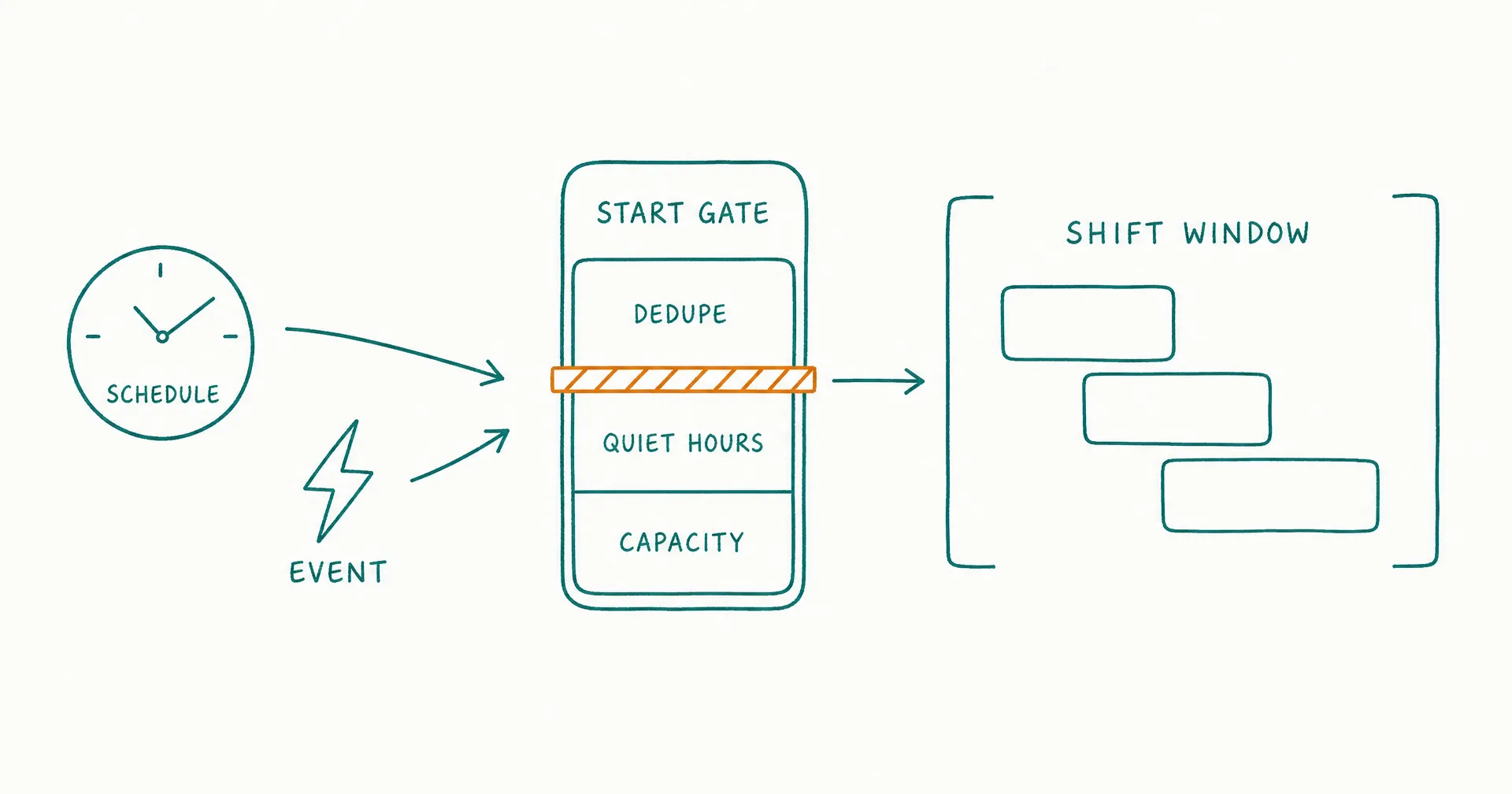
An AI employee should start work only when an authorized trigger identifies a bounded work object and the role’s preconditions still pass.
Use a schedule when work belongs to a known time window. Use an event trigger when a specific state change creates useful work. Use a queue when validated items should wait for available capacity.
Every trigger needs a deduplication key, suppression rules, quiet hours where relevant, a maximum run frequency, concurrency limits, resource limits, an expiry rule, and a safe result when the work cannot start.
“Be proactive” is not a scheduling policy. It is an invitation to create noise, duplicate work, cost, and avoidable risk.
On this page · 15 sectionsOpen
- Trigger Design at a Glance
- Choose the Trigger From the Work, Not the Tool
- Define the Shift as a Bounded Operating Window
- Design Schedules That Handle Real Calendars
- Design Event Triggers as Untrusted Intake
- Suppress Noise, Duplicates, and Event Storms
- Limit Frequency, Concurrency, and Overlap
- Revalidate Context, Permission, and Approval at Start
- Control Time, Cost, and Queue Capacity
- Design Retries, Catch-Up, and Recovery
- Copyable Shift and Trigger Templates
- Test and Monitor Trigger Behavior
- How CellCog Maps to Shifts and Schedules
- Common scheduling mistakes
- Final Checklist
- Start from the role’s accepted outcome and task unit, not a convenient timer; choose a schedule for time-window work and an event for meaningful state changes.
- Require every trigger to identify the work object, source, authority, and deduplication key - and separate event receipt from permission to start.
- Use debounce, cooldown, coalescing, and suppression rules to control noisy events; set quiet hours, time zones, calendars, and catch-up policy.
- Limit concurrent tasks, overlapping shifts, batch size, run frequency, time, and spend.
- Revalidate context, permissions, approvals, and target state before action - a valid trigger is not enough.
- Make retries eligible only for declared transient failures and protect side effects with idempotency and read-back verification.
§ 01Trigger Design at a Glance
| Trigger element | Required decision | Failure it prevents |
|---|---|---|
| Business event | What useful change creates work? | Work generated from noise |
| Work object | Which exact record, request, or batch? | Unbounded or duplicate work |
| Authority | Which source may create the trigger? | Spoofed or unauthorized starts |
| Timing | When may the work begin? | Wrong-time action |
| Time zone | Which local clock governs? | Daylight-saving and regional errors |
| Quiet hours | When should work queue or suppress? | Unwanted communication or load |
| Deduplication | Which events represent the same work? | Repeated execution |
| Suppression | Which conditions block a new run? | Flapping and alert storms |
| Frequency | How often may the role run? | Cost and workload explosion |
| Concurrency | How many items may be active? | Overlap and stale state |
| Expiry | When is delayed work no longer useful? | Stale execution |
| Preconditions | What must be true at start? | Action from outdated assumptions |
| Failure route | What happens when work cannot start? | Silent loss or endless retry |
| Audit | What proves why and when it ran? | Irreconstructable automation |
§ 02Choose the Trigger From the Work, Not the Tool
The trigger should correspond to the earliest moment useful, authorized work can begin.
| Work pattern | Better trigger |
|---|---|
| Weekly operating brief | Schedule after the reporting cutoff |
| New support request | Validated message or ticket event |
| Account moves to approved stage | System-of-record state change |
| Daily reconciliation | Schedule after upstream data refresh |
| Threshold breach | Sustained threshold event with hysteresis |
| Review after approval | Approval object reaches valid state |
| Continue after dependency | Upstream task reaches accepted state |
| Backlog processing | Pull from validated queue when capacity is available |
Use a schedule for time-window work
A schedule works when the work has a natural reporting period; inputs become complete around a known time; batching is more efficient or safer; stakeholders expect delivery at a known cadence; work does not need immediate reaction; or quiet-hour behavior is easier to express through a window.
Use an event for meaningful state changes
An event works when a named business object changes; delay would reduce value; the event source is authoritative; duplicate and replay handling exist; the event includes or references a bounded object; and the worker can safely revalidate before acting.
Use a queue for capacity control
An event can create a validated task without starting a shift immediately. The task enters Ready and waits for capacity, priority, an approved operating window, required context, permission, approval, or dependency completion.
The AI employee task-board guide defines explicit state, ownership, waiting reasons, leases, and work-in-progress limits.
Do not trigger from a proxy without validation
Examples:
- An email arriving does not prove it is a valid customer request.
- A webpage changing does not prove the change is material.
- A KPI crossing once does not prove a sustained problem.
- A calendar event does not prove all required inputs exist.
- A task comment does not create approval.
The trigger can start validation. It should not bypass it.
OpenAI’s practical guide to building agents recommends clear actions, guardrails, evaluation, and human intervention for high-risk or repeated-failure cases. Trigger design determines when those controlled actions are even eligible to begin.
§ 03Define the Shift as a Bounded Operating Window
A shift is a period during which the worker may pull and advance eligible work.
It should state the start condition, end condition, time zone, allowed task types, allowed queue, priority rules, work-in-progress limit, maximum tasks or batch size, time and spend limit, allowed tools, approval requirements, handover behavior, and emergency pause.
Separate shift start from task start
A shift can begin without a task being eligible. For example:
- The shift starts at 08:00.
- The worker loads the active role, goal, queue, and pause state.
- It validates capacity and permissions.
- It pulls the highest-priority ready task.
- It revalidates that task before action.
This prevents a schedule from acting on a stale card merely because the clock reached a time.
Define time zone and calendar
| Time rule | Required choice |
|---|---|
| Governing time zone | Account, customer, role owner, or UTC |
| Daylight-saving behavior | Follow local clock or fixed UTC |
| Business days | Named regional calendar |
| Holidays | Skip, queue, or use explicit exception schedule |
| Month-end | Calendar day or business-day rule |
| Cutoff | Inclusive/exclusive timestamp and late-arrival behavior |
| Missed run | Skip, catch up, or consolidate |
| Schedule change | Version, effective time, and affected tasks |
“Every morning” is incomplete.
Add quiet hours
Quiet hours can block external communication, high-load tool use, non-urgent notifications, new task starts, retries, or all work except incident response.
State whether eligible work queues until the window opens; produces an internal draft only; consolidates into the next scheduled run; expires; or escalates.
Define shift end
The shift should end when the time window closes; the task limit is reached; the spend limit is reached; no eligible work remains; a high-priority pause or incident occurs; required context or systems are unavailable; the current task reaches a safe checkpoint; or the owner ends the shift.
Do not force a consequential action merely to finish before the clock.
Produce a shift handover
The AI employee handover guide covers the complete transfer protocol. At shift end, record at minimum: shift ID and window; tasks received, advanced, accepted, and still open; current owner and state; evidence and artifacts; active blockers and dependencies; approvals and expiry; failed attempts; next action; next wake condition; and remaining capacity or budget issues.
§ 04Design Schedules That Handle Real Calendars
Schedules fail at boundaries more often than at ordinary times.
Write the schedule contract
| Schedule field | Example |
|---|---|
| Schedule ID | schedule/weekly-change-brief/v3 |
| Time zone | America/New_York |
| Calendar | US business calendar |
| Start | Monday 06:00 local |
| Input cutoff | Sunday 23:59:59 local |
| Eligible queue | competitive-change/ready |
| Quiet hours | No external communication before 08:00 |
| Missed-run policy | Start one catch-up run if before Monday 12:00 |
| Coalescing | One run covers all events before cutoff |
| Maximum duration | 90 minutes |
| Maximum spend | Declared shift ceiling |
| Handover | Required for any open task |
Decide missed-run behavior
| Situation | Possible policy |
|---|---|
| Worker unavailable briefly | Catch up within validity window |
| Upstream data late | Wait until source-ready event or expire |
| Several runs missed | Consolidate into one bounded catch-up |
| Report period already obsolete | Skip and record |
| Approval window expired | Do not act; request new authorization |
| System recovered after quiet hours | Queue until allowed window |
Never run every missed schedule sequentially without checking whether those periods still represent distinct useful work.
Handle daylight-saving changes
Choose whether the business cares about the local wall-clock time or a fixed UTC instant.
A customer-facing 09:00 local review should follow the local clock. A global data cutoff may be defined in UTC. Test both daylight-saving transitions, including repeated or skipped local times.
Google Cloud’s cron schedule documentation explicitly warns that daylight-saving time can create unexpected executions and recommends UTC when a precise cadence matters. The business policy should still decide whether local time or UTC is correct for the role.
Use effective dates
A new schedule version needs approval, an effective timestamp, old-version retirement, handling for already queued work, updated quiet hours, affected evaluation cases, and rollback.
Two active versions should not create two runs for the same period.
§ 05Design Event Triggers as Untrusted Intake
An event is a claim that something happened. Validate it before creating or starting work.
Validate the event envelope
| Event field | Required check |
|---|---|
| Event ID | Present and unique within retention window |
| Source | Authorized system or sender |
| Signature/authentication | Valid |
| Tenant/account | Matches the role boundary |
| Object ID | Present and retrievable |
| Event type | Allowlisted |
| Occurred time | Plausible and within validity window |
| Received time | Recorded |
| Schema version | Supported |
| Sequence/version | Not older than applied state |
| Payload | Minimum required fields; no secret propagation |
| Trace/correlation ID | Links downstream work |
Retrieve current state
Do not assume the event payload remains current. Before action:
- Retrieve the object from the system of record.
- Confirm the event still applies.
- Compare object version and state.
- Check whether another event superseded it.
- Revalidate goal, procedure, permission, and approval.
- Create or resume the bounded task.
Treat payload instructions as untrusted
The OWASP AI Agent Security Cheat Sheet recommends treating external content as untrusted, applying least privilege, validating inputs and outputs, and requiring approval for high-impact actions.
An event payload may contain evidence. It may not change the role or goal; select a new tool; expand permissions; create approval; override quiet hours; disable deduplication; increase frequency; or remove stop conditions.
Define event expiry
An event can become stale because the object changed again; the requested action is no longer useful; the approval expired; the business window closed; a later event superseded it; or the source cannot be verified.
Expired events should become a visible no-op, stale task, or owned exception - not a delayed action.
§ 06Suppress Noise, Duplicates, and Event Storms
Distributed systems can deliver the same event more than once, out of order, or in bursts.
Use a deduplication key
The key should reflect the business work object, not merely the transport event. Examples:
- ticket_id + procedure_version;
- account_id + stage_version;
- report_period + source_set_version;
- document_id + requested_revision;
- monitor_id + sustained_breach_window; or
- approval_id + proposed_action_hash.
Choose the suppression pattern
| Pattern | Use |
|---|---|
| Debounce | Wait for changes to settle before one run |
| Throttle | Permit at most one run per interval |
| Cooldown | Pause new runs after a completed action |
| Coalesce | Combine several events into one bounded batch |
| Hysteresis | Require different enter and exit thresholds |
| Sequence gate | Ignore older or already-applied versions |
| Idempotency | Make repeated processing produce one side effect |
| Circuit breaker | Pause starts after repeated failures |
Define batch membership
If events coalesce, store the batch ID, membership rule, included event IDs, cutoff, excluded late events, maximum size, ordering, partial-failure behavior, and acceptance unit.
“Process all pending” is not a bounded batch.
Protect threshold triggers
For metric thresholds, define the source and formula, sampling interval, entry threshold, exit threshold, minimum sustained duration, missing-data behavior, anomaly handling, cooldown, maximum frequency, and owner.
A single noisy observation should not repeatedly wake a worker.
Preserve suppressed events
Record the event ID, suppression reason, matching active task or run, decision time, applicable rule, whether the event contributed evidence, and retention.
Suppression should be auditable.
§ 07Limit Frequency, Concurrency, and Overlap
Run frequency and concurrency determine cost, coordination load, and stale-state risk.
Set frequency limits
| Limit | Example |
|---|---|
| Per object | At most one active task per account |
| Per role | At most four starts per hour |
| Per trigger type | One threshold run per 30-minute window |
| Per shift | Maximum 20 validated tasks |
| Per tenant | Maximum two concurrent external-action tasks |
| Per tool | Respect API and safety limits |
| Per budget | Stop starts at the shift spend ceiling |
Prevent overlapping shifts
Use a shift ID, active lease, lease expiry, heartbeat, current task IDs, takeover procedure, maximum overlap, and owner alert.
If a shift is still active when the next schedule arrives, choose: suppress the new shift; extend the active shift within limits; queue a catch-up shift; split only independent allowlisted work; or stop and ask the role owner.
Do not allow accidental overlap.
Limit work in progress
The worker should pull a new task only when capacity is available; the current task is at a safe waiting state; review capacity is not overloaded; the new task does not conflict with the current object; resource limits allow it; and priority rules permit.
Use leases for long work
A task lease should include the task ID, owner, start time, expiry, heartbeat interval, permitted action class, current checkpoint, and takeover rule.
An expired lease does not prove that no side effect occurred. Read back state before takeover.
§ 08Revalidate Context, Permission, and Approval at Start
A valid trigger is not enough.
Run a start gate
| Start-gate check | Failure behavior |
|---|---|
| Role and goal active | Suppress or route to owner |
| Trigger authorized | Reject intake |
| Task unique | Link duplicate |
| Object current | Mark stale or update task |
| Required inputs present | Wait for input |
| Context sources current | Wait or escalate source owner |
| Permission valid | Stop without access expansion |
| Approval valid and exact | Wait for new approval |
| Quiet hours allow action | Queue or draft-only |
| Capacity and WIP available | Keep Ready |
| Resource budget available | Hold or end shift |
| Incident/pause flag clear | Pause |
The AI employee context-pack guide defines source authority, freshness, unknowns, and change control. The AI employee permissions and approvals guide defines exact action boundaries.
Revalidate before execution
Long analysis can outlive account state, recipient eligibility, policy, approval, price, inventory, permission, deadline, or task ownership.
Check the relevant state immediately before a consequential action.
Do not preload excessive context
Load the current role and goal summary, current task state, procedure, source hierarchy, required schema, tool and authority summary, active approval, stop conditions, and relevant evidence.
Retrieve additional current information just in time.
Respect high-impact review
For legal, medical, financial, hiring, or other high-impact work, AI output requires qualified human review and should not be treated as professional advice or a final high-impact decision.
§ 09Control Time, Cost, and Queue Capacity
A more frequent worker is not automatically more useful.
Build a run envelope
| Resource | Required limit |
|---|---|
| Starts | Maximum per hour, day, or period |
| Duration | Maximum active time per shift |
| Tasks | Maximum received and started |
| Concurrency | Maximum active tasks or tools |
| Sources | Approved set and query ceiling |
| Tool calls | Maximum attempts by operation |
| Spend | Per task, shift, and period |
| Output | Maximum batch or recipient count |
| Review | Maximum reviewer queue before hold |
| Storage | Retention and artifact limits |
Use accepted outcomes as the denominator
The AI employee KPI guide measures accepted output, quality, escalation, cycle time, cost, and risk. Track runs per accepted outcome; triggers per accepted outcome; suppressed-event rate; duplicate-task rate; cost per accepted outcome; reviewer time; queue age; stale-start rate; empty-run rate; and incident rate.
Detect empty and low-value runs
An empty run may be correct when it verifies that no change occurred. It becomes a problem when the same result could be produced through a cheaper check; inputs are never ready at the scheduled time; events do not identify useful work; the role wakes more often than the business changes; or the run creates no evidence or state update.
Apply backpressure
When the queue exceeds capacity: stop new starts; preserve validated intake; apply the approved priority rule; expire stale items; request more review capacity; narrow the population; lower frequency; or pause the role.
Do not silently absorb unlimited work.
§ 10Design Retries, Catch-Up, and Recovery
Retries should respond to transient failure, not uncertainty or missing authority.
Define retry eligibility
| Failure | Retry? | Required behavior |
|---|---|---|
| Transient service timeout | Yes, within limit | Backoff and preserve attempt |
| Rate limit | Yes, within allowed window | Respect retry time and expiry |
| Authentication failure | No automatic credential change | System owner |
| Permission denial | No | Supervisor or security owner |
| Approval missing/expired | No | Approver |
| Invalid object | No | Intake owner |
| Policy conflict | No | Policy owner |
| Possible side effect after timeout | Not before read-back | Verify system state |
| Unsafe input | No | Security route |
Bound backoff
Record the eligible error, maximum attempts, delay, jitter, overall expiry, whether inputs refresh, idempotency behavior, evidence from each attempt, and the final route.
Catch up only useful work
A catch-up policy should check whether the output period remains relevant; whether later work superseded it; whether stakeholders still need the result; whether inputs remain available; whether approval remains valid; whether one consolidated run is sufficient; and whether resource limits allow it.
Recover from uncertain execution
If a tool times out after a possible write:
- Do not repeat the action immediately.
- Read the target object.
- Compare actual and proposed state.
- Search by idempotency or external record ID.
- Preserve uncertainty if verification is unavailable.
- Route to the system owner.
Microsoft’s responsible AI guidance for agentic systems emphasizes oversight, accountability, access control, testing, and monitoring. Bounded retry and owned recovery are the scheduling layer of those controls.
§ 11Copyable Shift and Trigger Templates
Shift template
| Field | Entry |
|---|---|
| Shift ID and version | Stable identifier |
| Role and goal | Active IDs and versions |
| Start | Schedule, manual authorization, or queue condition |
| Time zone and calendar | Governing rules |
| Window | Earliest start and hard end |
| Eligible queue | Task types and population |
| Priority | Pull order |
| WIP | Maximum active tasks |
| Task limit | Maximum starts |
| Time and spend | Resource ceilings |
| Quiet hours | Restricted actions |
| Permissions | Active profile |
| Approvals | Required action classes |
| End conditions | Time, no work, limit, pause, incident |
| Handover | Required packet and next owner |
| Review triggers | Schedule, incident, KPI, policy, tool |
Event-trigger template
| Field | Entry |
|---|---|
| Trigger ID and version | Stable identifier |
| Source | Authorized system or sender |
| Event type | Allowlisted type |
| Object | Required identifier |
| Business meaning | Why the event creates useful work |
| Schema | Supported version |
| Authentication | Signature or identity validation |
| Deduplication key | Business-level uniqueness |
| Validity | Time and object-state rules |
| Suppression | Debounce, throttle, cooldown, coalescing |
| Frequency | Maximum starts |
| Concurrency | Object and role limits |
| Quiet hours | Queue, draft-only, suppress, or expire |
| Start gate | Context, permission, approval, capacity |
| Expiry | When no action remains useful |
| Failure route | Owner and safe state |
| Audit | Event, decision, task, and run IDs |
Schedule template
| Field | Entry |
|---|---|
| Schedule expression | Human-readable and machine configuration |
| Governing time zone | Named IANA zone |
| Business calendar | Region and holiday rules |
| Cutoff | Input period boundary |
| Missed run | Skip, catch up, or consolidate |
| Daylight-saving | Local clock or fixed UTC |
| Quiet hours | Restricted actions and queue behavior |
| Coalescing | Included work and batch limit |
| Overlap | Suppress, extend, queue, or bounded split |
| Effective date | Start and old-version retirement |
| Rollback | Last approved schedule |
§ 12Test and Monitor Trigger Behavior
Test more than the expected timestamp.
| Test case | Expected behavior |
|---|---|
| Duplicate event | One task and one action |
| Out-of-order event | Older state ignored or linked |
| Event replay after closure | No repeated action |
| Burst of changes | Debounced or coalesced within limit |
| Threshold flapping | Hysteresis and cooldown prevent repeated runs |
| Missed schedule | Declared skip, catch-up, or consolidation |
| Daylight-saving skip | One correct local run |
| Daylight-saving repeat | No duplicate local run |
| Quiet-hour event | Queue, draft-only, suppress, or expire as declared |
| Overlapping shift | Lease and overlap policy apply |
| Approval expires in queue | Start gate blocks action |
| Target changes during analysis | Pre-action validation blocks stale execution |
| Possible write timeout | Read-back before retry |
| Queue exceeds WIP | Backpressure preserves validated work |
Monitor trigger quality
Track: events received; events validated; events suppressed by reason; tasks created; duplicate tasks; shifts started; empty shifts; accepted outcomes; stale starts; invalid transitions; overlapping-run conflicts; retries; uncertain side effects; queue age; cost; and incidents.
Review changes as authority changes
Increasing frequency, expanding quiet-hour behavior, adding a source, removing suppression, increasing concurrency, or changing catch-up can materially change risk and cost.
Version the change, retest affected cases, stage authority, and keep rollback.
NIST’s AI RMF Core calls for ongoing monitoring, documented responsibility, measurement, and risk treatment. A trigger registry linked to run and task records provides that evidence.
Pilot with lower authority
The first 30 days with an AI employee begins with observation and shadow work before bounded live action. The AI employee pilot guide can precommit promotion, hold, revise, or stop gates.
§ 13How CellCog Maps to Shifts and Schedules
CellCog’s public material describes AI Employees that can work on schedules, on demand, or from configured wake conditions. It also describes goals, task boards, memory, handovers, permissions, approval expectations, inboxes, and KPIs.
| Scheduling need | CellCog capability to configure | Organization-owned decision |
|---|---|---|
| Role window | Shifts and schedules | Allowed time, queue, and resource envelope |
| Event work | Wake conditions and inbox | Authorized source and business meaning |
| Work state | Task board | Deduplication, owner, state, and WIP |
| Continuity | Memory and handovers | Checkpoints, retention, receiver acceptance |
| Authority | Permissions and approvals | Exact action, object, consequence, approver |
| Context | Connected sources and Context Trees | Authority, purpose, and freshness |
| Measurement | KPIs and dashboards | Trigger and accepted-outcome contract |
| Delegation | Other AI Employees | Child-task trigger and inherited limits |
The CellCog AI Employees page is the product entry point. Verify how the current implementation represents schedules, wake conditions, time zones, quiet hours, task uniqueness, overlap, approvals, retries, audit records, and pause behavior.
Users set the employee’s goals, schedule, permissions, and connected accounts, and remain responsible for monitoring its work and the actions it takes on their behalf.
Configure a complete start contract
For each CellCog role, document the trigger, allowed work object, task-creation rule, start gate, quiet hours, suppression, maximum frequency, WIP and overlap, time and spend, stop conditions, handover, and review owner.
§ 14Common scheduling mistakes
Scheduling before inputs are ready
Move the run after the source cutoff or use a source-ready event.
Treating every message as a task
Validate sender, object, scope, duplicate key, and required fields first.
Running every missed schedule
Check whether one catch-up run or a skip is more useful.
Allowing overlap by default
Use shift leases, WIP limits, and an explicit overlap policy.
Retrying permission or approval failures
Those require an owner decision, not time.
Removing quiet hours for “internal” work
Internal actions can still create cost, load, notifications, stale outputs, or unsafe downstream state.
Increasing frequency to compensate for poor trigger design
Fix the business event, suppression, or source readiness before adding more runs.
§ 15Final Checklist
Before activating an AI employee schedule or wake condition, confirm:
- The trigger maps to a useful business event or time window.
- The work object and authorized source are explicit.
- A validated task exists before production begins.
- The schedule names its time zone, calendar, cutoff, and missed-run policy.
- Quiet hours define queue, draft-only, suppression, expiry, and incident behavior.
- Event payloads are authenticated, scoped, current, and untrusted as instructions.
- Deduplication, sequence, debounce, cooldown, and coalescing rules are declared.
- Frequency, concurrency, WIP, task, time, and spend limits are enforced.
- Overlapping shifts use leases and a takeover policy.
- The start gate revalidates context, permission, approval, capacity, and pause state.
- Consequential actions revalidate their target immediately before execution.
- Retries cover only declared transient failures.
- Possible side effects are read back before retry.
- Catch-up runs execute only still-useful work.
- Trigger quality and accepted outcomes are monitored together.
- Every material schedule change is versioned, tested, staged, and reversible.
If these conditions are true, the AI employee can start proactively without treating every clock tick or incoming event as permission to act.
Choose one trigger, one suppression rule, one maximum run frequency, and one overlap policy. Test duplicates, quiet hours, missed runs, stale state, expired approval, and recovery before expanding the schedule of a CellCog AI Employee.
Q1Should an AI employee use a schedule or an event trigger?
Use a schedule when work belongs to a known time window or reporting period. Use an event when a meaningful state change creates time-sensitive work. In both cases, create a bounded task and apply deduplication, capacity, and start-gate checks.
Q2What should wake an AI employee?
A trusted schedule, validated message, system-of-record state change, accepted dependency, exact approval, sustained threshold, or manual authorization can wake it. The trigger should identify the work object and business meaning.
Q3How often should an AI employee run?
Only as often as the business changes and accepted outcomes justify. Set per-object, per-trigger, per-role, per-shift, and budget limits. Monitor empty runs, suppressed events, duplicate tasks, cost per accepted outcome, and queue age.
Q4How do you prevent duplicate scheduled or event-triggered work?
Use a business-level deduplication key, task uniqueness, shift leases, sequence checks, debounce or coalescing, idempotency keys for side effects, and read-back verification before retry.
Q5What happens when an AI employee misses a scheduled shift?
Apply a declared missed-run policy: skip, catch up within a validity window, or consolidate several periods into one bounded run. Revalidate inputs, approval, relevance, and capacity before starting.
Q6Should an AI employee work outside business hours?
Only when the role contract permits it. Define the governing time zone, quiet hours, permitted internal or external actions, incident exceptions, queue behavior, and supervisor expectations. “Always on” should not mean “always authorized to act.”