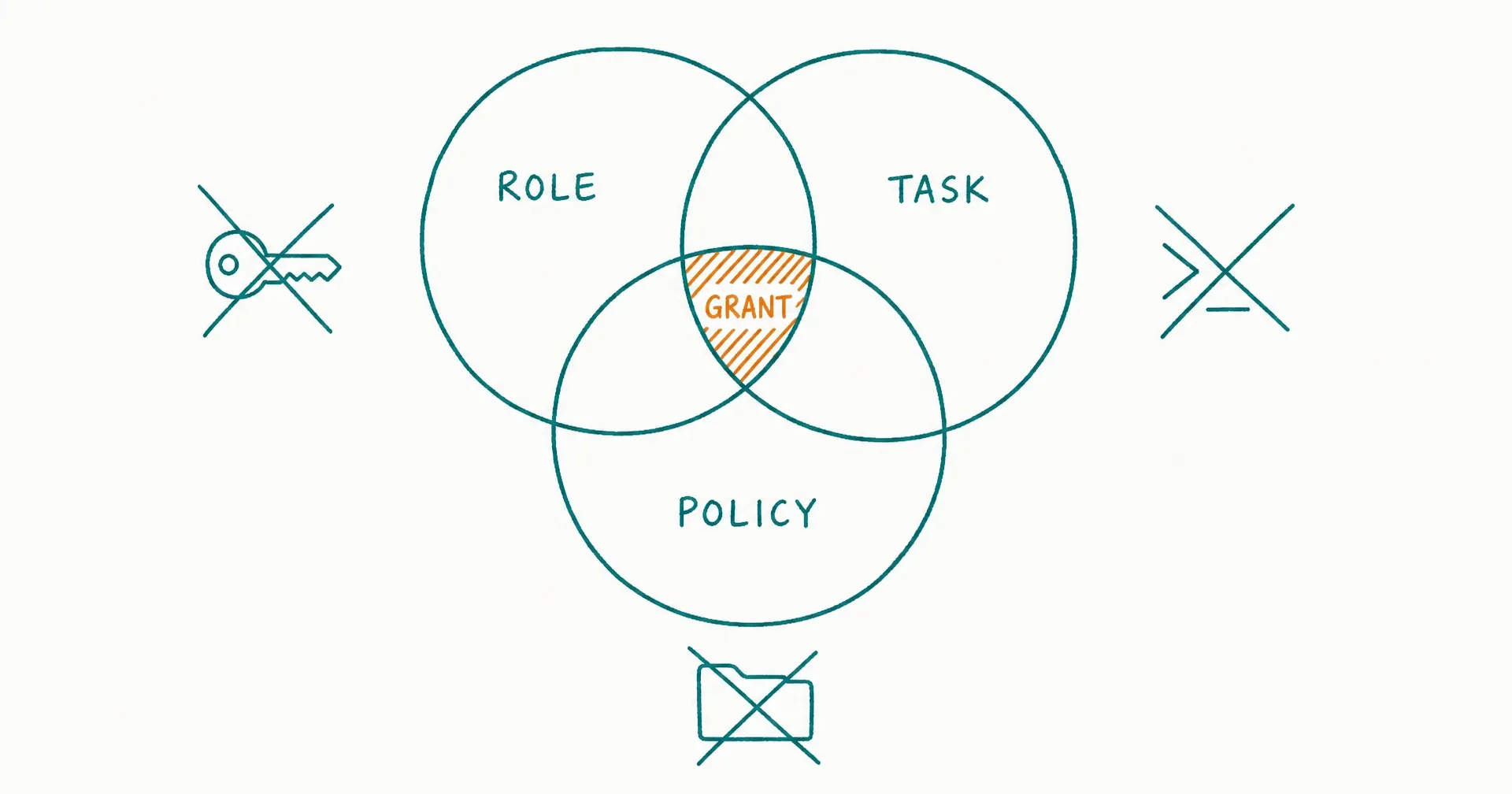
Least privilege means an AI agent receives only the authority required to complete a defined task, only over the required resources, only under the required conditions, and only for as long as that authority is needed.
Do not translate “needs to work in the CRM” into full CRM access. Translate the task into a narrow grant:
identity + environment + resource + data + function + action + conditions + limits + duration + delegation rights
For example:
The Renewal Research AI Employee may read company name, plan, renewal date, product-usage summary, and prior approved renewal notes for accounts assigned to the current renewal queue. It may create an internal research brief in the renewal workspace. It cannot export contacts, read payment details, change account fields, send messages, alter permissions, or pass the CRM connection to another agent. The grant expires when the queue closes or after eight hours, whichever comes first.
That grant is useful and constrained. “Read-only CRM access” is still too broad if it reaches every account, field, region, and export path.
Least privilege does not make an agent safe by itself. It limits the blast radius when instructions are wrong, evidence is manipulated, a tool misbehaves, an account is compromised, or an agent crosses its intended scope.
On this page · 12 sectionsOpen
- Least Privilege at a Glance
- What Least Privilege Changes for AI Agents
- Map the Reachable Authority Before Granting Access
- Give the Agent a Distinct, Protected Identity
- Reduce the Tool and Function Surface
- Scope Resources, Data, and Destinations
- Bound Actions With Conditions, Limits, and Time
- Prevent Privilege Expansion Through Delegation
- Handle Broad Connectors With Compensating Controls
- Test, Review, Revoke, and Prove the Boundary
- How to Apply Least Privilege in CellCog
- Final Checklist
- Give every AI agent or standing AI employee a distinct, attributable identity; do not lend it a broad human administrator account.
- Scope access across systems, resources, data fields, functions, actions, environments, time, volume, spend, destinations, and delegation.
- Remove unnecessary tools and dangerous functions instead of relying on a prompt that says not to use them.
- Prefer specific interfaces such as create_draft over open-ended interfaces such as arbitrary shell, browser, SQL, or HTTP execution.
- Use temporary, task-bound credentials where the connected system supports them, and revoke access when the task, role, or connection ends.
- Delegated authority must narrow or remain equal; a child agent must never gain more access than the parent and task both permit.
- Review actual use, denied attempts, dormant grants, privilege changes, and recovery tests - not only the original access request.
§ 01Least Privilege at a Glance
The smallest useful grant is the intersection of what the role needs, what the current task needs, what the environment permits, and what current policy authorizes:
Effective authority = role ∩ task ∩ environment ∩ current policy ∩ principal authority
| Privilege plane | Weak grant | Least-privilege grant |
|---|---|---|
| Identity | Shared human account | Dedicated workload or agent identity |
| Environment | Production everywhere | Named workspace, tenant, project, or staging environment |
| System | “CRM access” | One approved CRM connection |
| Resource | All objects | Assigned accounts and record types |
| Data | Every visible field | Allowlisted fields and classifications |
| Function | Full connector or shell | Minimum task-specific functions |
| Action | Read/write/admin | Read selected fields; create internal draft |
| Conditions | Always available | Current task, source, state, and policy must match |
| Limit | Unlimited | Amount, volume, rate, spend, and destination caps |
| Time | Permanent token | Shift-, task-, or session-bound access |
| Delegation | Child inherits parent | Explicit intersection; no implicit inheritance |
| Evidence | Connection exists | Grant, use, denial, change, and revocation are recorded |
NIST SP 800-53 defines least privilege as allowing only the access necessary to accomplish assigned organizational tasks. NIST SP 800-207 on Zero Trust Architecture adds a useful operational principle: access should be evaluated per session, granted to individual resources, and limited to the privileges needed for the task.
For an AI agent, that per-task emphasis matters. A standing worker may receive new goals, revisit a queue, use multiple tools, and delegate subtasks over time. A grant that was appropriate yesterday may be excessive for the action requested now.
Use four default privilege states:
| State | Technical capability | Typical use |
|---|---|---|
| Blocked | No access or function | Out-of-scope or unacceptable work |
| Observe | Read allowlisted resources | Research, triage, monitoring |
| Prepare | Create draft or proposed change without external effect | Reviewable work products |
| Bounded execute | Perform narrow actions under conditions and limits | Proven recurring operations |
Approval is separate. An agent can be technically able to perform a bounded action while still needing a human decision for a particular case. The permissions and approvals model explains that decision layer; least privilege is about reducing the capability that exists before and after the decision.
§ 02What Least Privilege Changes for AI Agents
Traditional least-privilege programs often start from users, roles, applications, and service accounts. AI agents add three design problems:
- The system may select tools and sequence actions dynamically.
- Natural-language inputs and retrieved content can influence which action is proposed.
- One agent may initiate work for another agent or use a human-connected account.
These properties do not require abandoning familiar access-control principles. They make precise enforcement more important.
Separate functionality, permission, and autonomy
| Layer | Question | Example failure |
|---|---|---|
| Functionality | Which operations does the tool expose? | A research tool also exposes deletion |
| Permission | Which exposed operations can this identity use? | Database identity can update every table |
| Autonomy | When may the agent choose and execute an allowed operation? | High-impact action executes without review |
OWASP’s Excessive Agency guidance treats excessive functionality, excessive permissions, and excessive autonomy as distinct contributors to harm. Its mitigations include removing unnecessary extensions and functions, avoiding open-ended tools where possible, minimizing downstream permissions, preserving user authorization context, and requiring approval for high-impact actions.
A prompt such as “only read customer records” addresses none of these layers if the connected identity can export, update, and delete records. Enforce the boundary in the connector, downstream system, account, policy engine, wrapper, or human-operated step.
Treat the agent as a non-human principal
An agent may act: as its own service or workload identity; on behalf of a named user; through a shared integration identity; inside an ephemeral runtime; through a browser session already authenticated as a person; or through another agent’s tool connection.
Record the full chain:
accountable principal → initiating user/system → agent identity → tool identity → target resource
If the downstream log shows only a generic integration account, preserve agent, task, session, approval, and principal context in a correlated event record.
Least privilege is not role-based convenience
Role-based access control can be useful, but a broad role such as marketing_manager may combine analytics read, contact export, campaign creation, audience upload, budget change, public launch, user administration, and integration management.
Break that role into task-relevant capabilities. A content-research agent may need analytics summaries and approved brand assets. It does not need ad-account billing, customer export, or user administration merely because those capabilities belong to the same human department.
Make the narrow path operationally complete
Least privilege fails when the approved path cannot actually complete the task. The organization then grants a broad emergency role, shares a human credential, or lets the agent improvise around the control.
Before launch, trace one normal task from trigger to accepted result:
| Work step | Required capability | Boundary proof |
|---|---|---|
| Receive | Read the assigned queue item | Unassigned items are denied |
| Understand | Read approved context and fields | Prohibited fields stay unavailable |
| Produce | Create a draft in the named workspace | No external effect occurs |
| Validate | Read the resulting artifact and status | Validation cannot change unrelated state |
| Escalate | Create a structured review request | Escalation does not add execution rights |
| Complete | Update the task record | Business object changes only if separately authorized |
If the agent needs a prohibited capability to work around a missing product feature, redesign the workflow. Do not grant arbitrary SQL because the application lacks a filtered report - create a restricted view. Do not grant mailbox deletion because the available connector bundles read and delete together - use a dedicated mailbox or a wrapper that exposes only read.
Useful denials should also preserve safe progress. When an action is blocked, return: the denied operation; the applicable boundary; whether a narrower action is available; the correct escalation owner; the evidence required for a new grant; and the task state while waiting.
Do not reveal secrets, hidden resources, or unnecessary policy details in the denial. The goal is to keep the agent inside the authorized path without teaching it to search for a bypass.
Separate normal work from elevation
Some roles occasionally need a higher privilege. Do not keep that privilege active for convenience. Design a separate elevation path:
- The agent prepares an exact request tied to the active task.
- Policy verifies that the privilege can be elevated for this action.
- An authorized person or system approves the narrow grant where required.
- A temporary credential or role becomes available.
- The agent performs the single bounded action.
- The system validates the result.
- Elevated access ends automatically.
- The event is reviewed independently if its consequence warrants it.
Routine work should continue through the non-privileged identity. NIST SP 800-53’s least-privilege control family includes using non-privileged accounts or roles for nonsecurity functions, restricting privileged accounts, reviewing privileges, and removing access after defined periods of inactivity. For agent operations, the practical lesson is simple: an identity used for ordinary research, drafting, or queue work should not stay elevated because one rare task needed more authority.
§ 03Map the Reachable Authority Before Granting Access
Start with the business task, then trace every place where the agent could read, change, transmit, spend, or delegate.
| Inventory field | Required question |
|---|---|
| Role | What outcome is this agent accountable for? |
| Task | What exact work object is active now? |
| Principal | On whose behalf is it acting? |
| Identity | Which agent, service, browser, or system account acts? |
| Environment | Local, test, staging, production, tenant, or region? |
| Entry point | API, OAuth connector, browser, desktop, shell, email, queue? |
| Resource | Which folder, repository, mailbox, account, table, project, or tab? |
| Data | Which classifications, fields, records, and time ranges? |
| Function | Which callable operations exist? |
| Action | Which reads, creates, updates, sends, deletes, or admin changes? |
| Destination | Where may data or output go? |
| Constraint | Which amount, rate, volume, time, or spend limits apply? |
| Credential | How is access issued, stored, refreshed, and revoked? |
| Delegation | May another agent receive any part of the task or authority? |
| Evidence | Which grant, action, result, and revocation events are retained? |
Model transitive reach
The first system is not the full boundary. A connected tool may reach other systems:
| Initial capability | Possible transitive reach | Control question |
|---|---|---|
| Read email | Links, attachments, reset messages, sensitive threads | Which senders, labels, folders, and attachment types? |
| Browser session | Every site logged into in that profile | Which tabs, domains, actions, and sessions? |
| Shell access | Files, credentials, network, package managers, cloud CLIs | Which directory, commands, network paths, and secrets? |
| CRM connection | Contacts, notes, sequences, exports, billing integrations | Which objects, fields, actions, and automations? |
| Cloud project | Data stores, keys, queues, logs, deployment controls | Which resource IDs and roles? |
| Document workspace | Linked files, comments, sharing, external embeds | Which folders, owners, and sharing actions? |
| Agent delegation | Child tools, identities, memory, destinations | Which authority intersection is enforced? |
If an agent can read a password-reset email, access the browser profile, and change an account credential, those capabilities combine into more authority than any single grant suggests.
Calculate maximum credible impact
For each grant, ask: What is the most sensitive data reachable? What is the most consequential write action? What is the largest batch or spend possible? Which external recipients can receive output? Which permission can the identity change? Which credential can it retrieve or mint? Which other agent or workflow can it trigger? How quickly would misuse be detected? How would the effect be contained?
Use the AI employee risk assessment to decide whether the remaining authority is acceptable. Least privilege narrows exposure; it does not decide the organization’s risk tolerance.
§ 04Give the Agent a Distinct, Protected Identity
Do not operate a standing AI employee through a human’s day-to-day administrator account. A distinct identity improves attribution, revocation, policy enforcement, and access review.
Choose the right identity pattern
| Pattern | When it fits | Main control |
|---|---|---|
| Dedicated workload identity | Recurring non-interactive system access | Single purpose and scoped role |
| User-delegated OAuth | Agent acts for a particular user | Preserve user context and narrow scopes |
| Temporary assumed role | Short task or elevated action | Short duration and explicit conditions |
| Ephemeral session identity | One run in an isolated environment | Destroy session and credential after completion |
| Human-executed action | System cannot scope access safely | Agent prepares; person performs |
| Shared integration identity | Only when unavoidable | Strong task correlation and smallest downstream grant |
Google Cloud’s service-account security guidance recommends single-purpose service accounts, avoiding keys where possible, disabling unused accounts, using fine-grained policies, and applying temporary privilege elevation rather than giving one account every permission it might occasionally need.
AWS’s IAM security best practices similarly recommend temporary credentials for workloads, least-privilege permissions, conditions that further restrict access, and regular removal of unused identities, roles, permissions, policies, and credentials. These product-specific mechanisms differ, but the access pattern is portable.
Do not share a human credential
Sharing creates several problems: agent actions look like human actions; the agent may inherit unrelated access; revoking the agent disrupts the person; multifactor or device policy may be bypassed or weakened; secrets can be copied into prompts, files, or logs; the account’s future privilege changes silently expand agent reach; and the system may act after the person’s approval context has changed.
If a browser session necessarily uses a human account, restrict the browser workspace, logged-in domains, tabs, actions, and time. Do not treat “the user was already logged in” as authorization for every reachable action.
Protect credentials as high-value resources
The agent should not receive raw long-lived secrets when a managed or temporary identity is available.
Require: no credentials in prompts, memory, handovers, or generated artifacts; secret retrieval only at the execution boundary; credentials that cannot be exported where the platform supports that property; short lifetimes; audience and resource restrictions; rotation and revocation; masked logs; detection of unusual use; and separate emergency access controlled by humans.
The ability to read or mint a credential is often equivalent to the privilege behind that credential. Include it in the authority inventory.
§ 05Reduce the Tool and Function Surface
An agent cannot misuse a function it cannot reach. Remove unnecessary tools before trying to constrain their use with instructions.
Prefer narrow tools
| Broad interface | Narrower alternative |
|---|---|
| Arbitrary shell command | Named script with fixed arguments and working directory |
| Raw SQL | Parameterized read query or task-specific stored procedure |
| General HTTP request | Allowlisted endpoint wrapper with fixed method and schema |
| Full mailbox API | Read approved labels; create drafts; no send/delete |
| Full CRM connector | Read selected objects; propose changes to a staging queue |
| General browser control | Designated domains/tabs and blocked consequential actions |
| Filesystem root | One project directory with path validation |
| Cloud administrator role | Resource-specific data-plane operation |
| General code execution | Sandboxed job with no secrets and limited network |
Narrow interfaces improve both security and reliability. They reduce the number of parameters the agent must choose, allow stronger schema validation, and make expected postconditions easier to verify.
Separate read, prepare, execute, and administer
Do not group these actions: read a customer record; generate a proposed update; apply the update; export the dataset; delete the record; change who may access the record; and create a new integration token.
Administrative functions should stay separate from ordinary work. An agent that publishes approved content should not also manage CMS users, install plugins, edit templates, or change domain settings.
Guard open-ended tools
Sometimes the task genuinely requires code, shell, browser, or general research access. In that case, restrict: runtime and container; working directory; filesystem paths; command or operation families; network destinations; inbound and outbound data; package installation; subprocess creation; environment variables; credential access; execution time; tool-call count; compute and spend; result size; and persistence after the task.
The prompt-injection guide should treat retrieved pages, documents, email, and tool output as untrusted content. Least privilege makes the resulting control failure smaller; it does not prevent the manipulation itself.
Disable dormant functions
Remove: trial connectors no longer used; debug commands left enabled; write functions needed only during setup; old browser sessions; obsolete service accounts; unused OAuth scopes; temporary allowlists; abandoned child-agent tools; and emergency access after the event.
Dormant privilege is still privilege.
§ 06Scope Resources, Data, and Destinations
“Read-only” is not enough. Reading can expose personal data, customer communications, source code, financial records, contracts, credentials, strategic plans, or cross-tenant information.
Apply resource-level scope
| System | Broad scope | Narrow scope |
|---|---|---|
| Drive | Entire organization | Approved project folder and file types |
| CRM | All accounts | Assigned segment and record IDs |
| Data warehouse | Every schema | Named views with row/column filters |
| Source control | All repositories | One repository and protected branch rules |
| Full mailbox | Dedicated inbox or selected labels | |
| Calendar | Every event | Availability-only or designated calendar |
| CMS | Entire site | Staging workspace and article objects |
| Cloud storage | All buckets | One prefix and object operation |
| Browser | Full profile | Designated tab group and approved domains |
| Desktop | Home directory | One working directory |
Apply field and classification scope
An agent that summarizes support trends may need category, date, resolution, and product fields. It may not need names, email addresses, payment data, authentication details, private attachments, or agent notes.
Define: allowed classifications; allowed fields; prohibited fields; tenant/customer boundaries; geographic or contractual boundaries; retention and memory rules; redaction before inference; aggregation thresholds; export rules; and approved destinations.
Connect this to the AI memory privacy and retention model. A narrowly scoped read can become broad persistent exposure if unnecessary data is copied into memory, a handover, or an artifact.
Restrict destinations
Exfiltration and accidental disclosure depend on where data can go.
| Output type | Allowed destination | Blocked destination |
|---|---|---|
| Internal draft | Named workspace | Personal drive or public link |
| Customer reply | Verified customer thread after required review | New recipient or unrelated address |
| Research artifact | Project folder | Unapproved external service |
| Structured export | Encrypted approved store | Local download or public bucket |
| Code diff | Designated branch | Direct production deployment |
| Agent delegation packet | Authenticated child task | General shared memory |
Validate destination identity at execution time. A saved contact, stale channel name, redirected URL, or copied address can change the effect of an otherwise valid action.
§ 07Bound Actions With Conditions, Limits, and Time
Static permission answers only “can this identity call this operation?” A production policy must also decide whether the current request is allowed.
Use conditional authorization
Evaluate:
allow = identity + task + resource + action + data + source state + destination + limits + time + incident state
Examples: allow draft creation only for an active task in the approved project; allow a CRM field update only when the record is assigned to the current queue and the source-of-record ID matches; allow an email draft only for the verified thread and no new recipients; allow a staging deployment only for the reviewed commit; allow read access only while the shift is active; or block all consequential actions while an incident flag is open.
Add per-action and cumulative limits
| Limit type | Example |
|---|---|
| Amount | Refund at or below approved threshold |
| Volume | Maximum records per run and per day |
| Rate | Messages or actions per minute |
| Spend | Tool, campaign, cloud, or purchase budget |
| Attempts | Maximum retries after failure |
| Runtime | Wall-clock or active execution time |
| Audience | Internal only or allowlisted domains |
| Change size | Maximum files, lines, fields, or objects |
| Concurrency | Maximum active tasks or child agents |
| Recursion | Maximum delegation depth |
Include cumulative limits. Ten actions below a per-action threshold can still exceed the intended daily or customer-level exposure.
Make access temporary
Prefer: per-request authorization; task-bound grants; session-bound tokens; shift-bound access; just-in-time elevation; explicit expiry; automatic revocation at terminal state; and reauthorization after material state changes.
CISA’s hardening guidance recommends minimum necessary permissions, limited session-token durations, removal of unnecessary accounts, and ongoing account monitoring. For agent work, align expiry with the shortest unit that remains operationally practical.
Recheck at execution
Do not authorize only when the task begins. Before a consequential action: reauthenticate the acting identity; verify the object and destination; confirm the task is still active; confirm the policy version; confirm limits remain; confirm approval is valid where required; confirm no incident or pause is active; and bind the action to the current proposal.
This avoids using yesterday’s authority for today’s changed state.
§ 08Prevent Privilege Expansion Through Delegation
An agent that delegates should pass a task, not a credential bundle.
The child’s effective authority must be:
child authority = parent authority ∩ delegated task need ∩ child role policy ∩ current organization policy
Never use:
child authority = everything the parent can reach
Define the delegation contract
| Field | Required content |
|---|---|
| Parent | Authenticated initiating agent and principal |
| Child | Authenticated receiving agent and role |
| Task | Specific output and completion condition |
| Inputs | Minimum data and artifact references |
| Tools | Explicit callable functions |
| Resources | Named objects and environments |
| Actions | Allowed reads, creates, updates, or sends |
| Limits | Time, volume, spend, attempts, depth |
| Destinations | Where results may be returned or stored |
| Approval | Which actions still require a person |
| Delegation | Whether the child may delegate again |
| Expiry | Automatic end of authority |
| Return | Result, evidence, unused data, and closure |
The AI agent task-delegation guide defines task ownership and return conditions. Least privilege adds the authority intersection that must hold across the same boundary.
Block authority laundering
Authority laundering occurs when a task reaches an agent or tool with broader access than the initiator could legitimately use.
Examples: a read-only agent asks an admin agent to change a record; a child agent uses a shared browser session that exposes unrelated accounts; an external agent calls an internal tool with a generic privileged key; a delegated research task receives the parent’s full memory; a workflow invokes a cloud function whose service identity is over-privileged; or a rejected action is reformulated as a new task to bypass approval.
Validate the principal and authorization chain at every handoff. NIST’s zero-trust model for cloud-native applications emphasizes application and service identities, not only user and network identity. The same idea applies when agents call agents.
Constrain downstream delegation
Set: maximum depth; maximum child count; permitted child roles; permitted tools; maximum aggregate spend; data-minimization rules; no further delegation by default; parent cancellation propagation; child access revocation at return; and complete parent-child event correlation.
If the platform cannot prove these boundaries, keep sensitive delegation blocked or pass a minimized artifact to a human-approved workflow.
§ 09Handle Broad Connectors With Compensating Controls
Some connected applications expose permissions that are wider than the task requires. Do not pretend a broad OAuth or application role is narrow. Record the gap and reduce authority elsewhere.
Use this order:
- Choose a narrower connector scope or application role.
- Create a dedicated account, workspace, project, folder, queue, or tenant segment.
- Restrict the downstream account’s permissions.
- Place a task-specific wrapper in front of the broad interface.
- Move work to staging or a review queue.
- Require human execution for the consequential step.
- Increase monitoring and shorten credential duration.
- Reject the integration if residual authority remains unacceptable.
| Broad limitation | Compensating control |
|---|---|
| Connector grants read across full workspace | Dedicated workspace with only approved resources |
| Mail API includes send | Dedicated inbox plus provider rule blocking external send |
| Browser sees multiple authenticated apps | Separate browser profile and designated tabs |
| CMS role includes publish | Staging-only account; human promotes content |
| Database role lacks field controls | Restricted view and stored procedure |
| Cloud role is coarse | Dedicated project/resource and temporary session |
| Tool exposes arbitrary command | Wrapper with allowlisted operation and arguments |
| Child agent cannot receive a scoped token | Pass artifact only; do not pass connection |
Keep policy outside the prompt
Instructions should explain the role, but enforcement should exist where the action occurs: identity provider; application IAM; OAuth scopes; database privileges; filesystem boundary; browser or desktop workspace; network policy; tool wrapper; policy engine; approval gateway; or a human-operated execution step.
A model instruction is behavior guidance, not a substitute for denied access.
§ 10Test, Review, Revoke, and Prove the Boundary
Least privilege is not complete when access is granted. It must survive normal work, error, manipulation, role change, and termination.
Test positive and negative cases
| Test | Expected result |
|---|---|
| Read required allowlisted object | Allowed and recorded |
| Read adjacent unassigned object | Denied |
| Read prohibited field on allowed object | Denied or redacted |
| Write after read-only grant | Denied |
| Send after draft-only grant | Denied |
| Change destination | Reauthorized or denied |
| Exceed per-action limit | Paused before action |
| Exceed cumulative limit | Paused before aggregate breach |
| Use expired credential | Denied |
| Use grant outside task or shift | Denied |
| Delegate to unapproved child | Denied |
| Child requests broader tool | Denied |
| Parent is revoked | Child authority ends |
| Incident pause is active | Consequential actions denied |
| Retry after ambiguous result | State read before any new side effect |
Review actual privilege use
| Signal | Decision it supports |
|---|---|
| Granted but unused function | Remove it |
| Granted but unused resource | Narrow object scope |
| Repeated denied attempt | Fix task design, policy, or possible misuse |
| Privilege elevation frequency | Decide whether workflow is too broad |
| Long-lived dormant credential | Disable and investigate |
| Cross-role shared identity | Separate identities |
| Child authority greater than task need | Fix delegation policy |
| Action without correlated task | Investigate attribution gap |
| Revocation test failure | Block production expansion |
| High-impact function exposed but never needed | Remove the function |
The AI employee audit-log guide defines the evidence needed to reconstruct grants, decisions, actions, and state changes. Access review needs that event history; a current permission snapshot cannot show how authority was used.
Revoke on lifecycle events
Revoke or re-evaluate when: the task completes or is cancelled; the shift ends; a user withdraws the request; the employee’s role changes; a tool or connector changes; the resource owner changes; data classification changes; the approval expires; the agent delegates or returns work; a credential may be exposed; an incident occurs; or the role is paused or retired.
Test revocation. Verify the agent cannot use an existing session, refresh token, browser cookie, cached credential, child task, or queued action after the boundary closes.
Connect failures to the AI employee incident-response plan: pause work, revoke credentials, contain affected resources, preserve evidence, assess impact, correct unsafe state, and recover deliberately.
§ 11How to Apply Least Privilege in CellCog
CellCog publicly describes AI Employees as standing workers with goals, permissions, schedules or wake conditions, task boards, memory, handovers, approval expectations, connected tools, browser or desktop access, and delegation to other AI Employees. Each capability creates an authority surface the organization must configure deliberately.
| Least-privilege need | CellCog capability to configure | Organization-owned boundary |
|---|---|---|
| Role need | Job description, goals, KPIs | Required outcomes and excluded work |
| Work object | Task board and queue | Current task, owner, status, completion |
| Timing | Shifts, schedules, wake conditions | Start, end, expiry, and retry |
| Context | Memory, handovers, project sources | Minimum sources and retention |
| System access | Connectors and accounts | Dedicated identity and downstream scope |
| Local access | Cowork workspace | Directory, commands, credentials, network |
| Browser access | Designated Chrome workspace | Tabs, domains, sessions, sensitive actions |
| Action authority | Permissions and approval expectations | Read, prepare, execute, limits, review |
| Delegation | Employee-to-employee task routing | Child role, inputs, tools, limits, depth |
| Monitoring | Task records and dashboards | Grant, denial, use, anomaly, revocation |
Configure in this order
- Define the task and accepted outcome.
- Identify required sources and outputs.
- Choose a distinct agent or connected-system identity.
- Connect only the required system.
- Narrow resources and data in the downstream system.
- Enable only required functions and actions.
- Add conditions, limits, and expiry.
- Place human review at consequence and uncertainty boundaries.
- Test denied actions and revocation.
- Expand only after accepted work proves the current boundary.
CellCog’s AI Employees page describes connected work across applications and persistent shifts. Verify the live product and connected application before relying on a particular scope, approval, or revocation behavior. A platform-level permission cannot narrow a downstream account that already has unnecessary authority unless an enforcement layer actually applies that restriction.
When using Cowork or browser access, grant the minimum access required, review sensitive actions, and understand that file, page, session, or command output may be transmitted for AI processing. Keep credentials and unrelated accounts outside the permitted workspace.
Users set the employee’s goals, schedule, permissions, and connected accounts, and remain responsible for monitoring its work and the actions it takes on their behalf.
§ 12Final Checklist
- The agent has a distinct and attributable identity.
- The accountable principal and full identity chain are recorded.
- No broad human or administrator credential is shared by convenience.
- The role and current task define the access need.
- Environment, system, resource, record, field, and classification scope are explicit.
- Only required tools and functions are exposed.
- Read, prepare, execute, delete, export, and administer are separate permissions.
- Open-ended shell, browser, SQL, HTTP, code, and filesystem access has additional boundaries.
- Destinations, recipients, and external sharing are allowlisted where possible.
- Per-action and cumulative volume, rate, spend, runtime, and retry limits exist.
- Access expires with the task, shift, session, approval, or defined time.
- Credentials are temporary and non-exportable where supported.
- Secrets do not enter prompts, memory, handovers, logs, or artifacts.
- Authorization is rechecked before consequential execution.
- Child agents receive a narrow authority intersection, not the parent’s full access.
- Downstream delegation is blocked unless explicitly required and tested.
- Broad connector gaps have documented compensating controls.
- Required actions succeed in tests, while adjacent and prohibited actions fail.
- Grant, use, denial, elevation, delegation, and revocation events are reconstructable.
- Unused identities, tools, functions, scopes, credentials, and sessions are removed.
- Revocation ends active sessions, refresh paths, queued work, and child authority.
- A failed boundary invokes pause, containment, evidence preservation, and recovery.
Least privilege is not a one-time connector setting. It is a continuously enforced relationship between an identity, a task, a resource, an action, and the authority that still exists at that moment.
Q1What does least privilege mean for an AI agent?
It means the agent receives only the systems, resources, data, functions, actions, destinations, limits, and duration needed for a defined task. The access is tied to a distinct identity, evaluated under current policy, recorded, reviewed, and revoked when no longer needed.
Q2Is read-only access automatically low risk?
No. Read access can expose personal data, credentials, confidential communications, source code, contracts, or cross-customer information. Restrict which resources, records, fields, classifications, time ranges, and destinations the agent can read, and control what may enter memory or artifacts.
Q3Should an AI agent use a human employee's account?
Prefer a dedicated workload, service, or agent identity or a user-delegated flow that preserves the principal’s context. A shared human account can give the agent unrelated authority, weaken attribution, and make independent revocation difficult.
Q4How is least privilege different from human approval?
Least privilege limits what the identity and tools are technically capable of doing. Approval decides whether a permitted action may proceed in a particular case. Use both where needed.
Q5Can a child agent inherit the parent agent's permissions?
Not by default. The child should receive the intersection of the parent’s legitimate authority, the delegated task’s need, the child role’s policy, and current organizational policy. Pass task-specific access or minimized artifacts, set expiry and limits, and revoke child authority when the task returns.
Q6What if a connector cannot provide narrow permissions?
Use a dedicated account or workspace, narrow access in the downstream application, place a task-specific wrapper in front of the connector, move work to staging, require human execution for consequential steps, shorten credential duration, and increase monitoring. Reject the connection if the remaining blast radius is unacceptable.