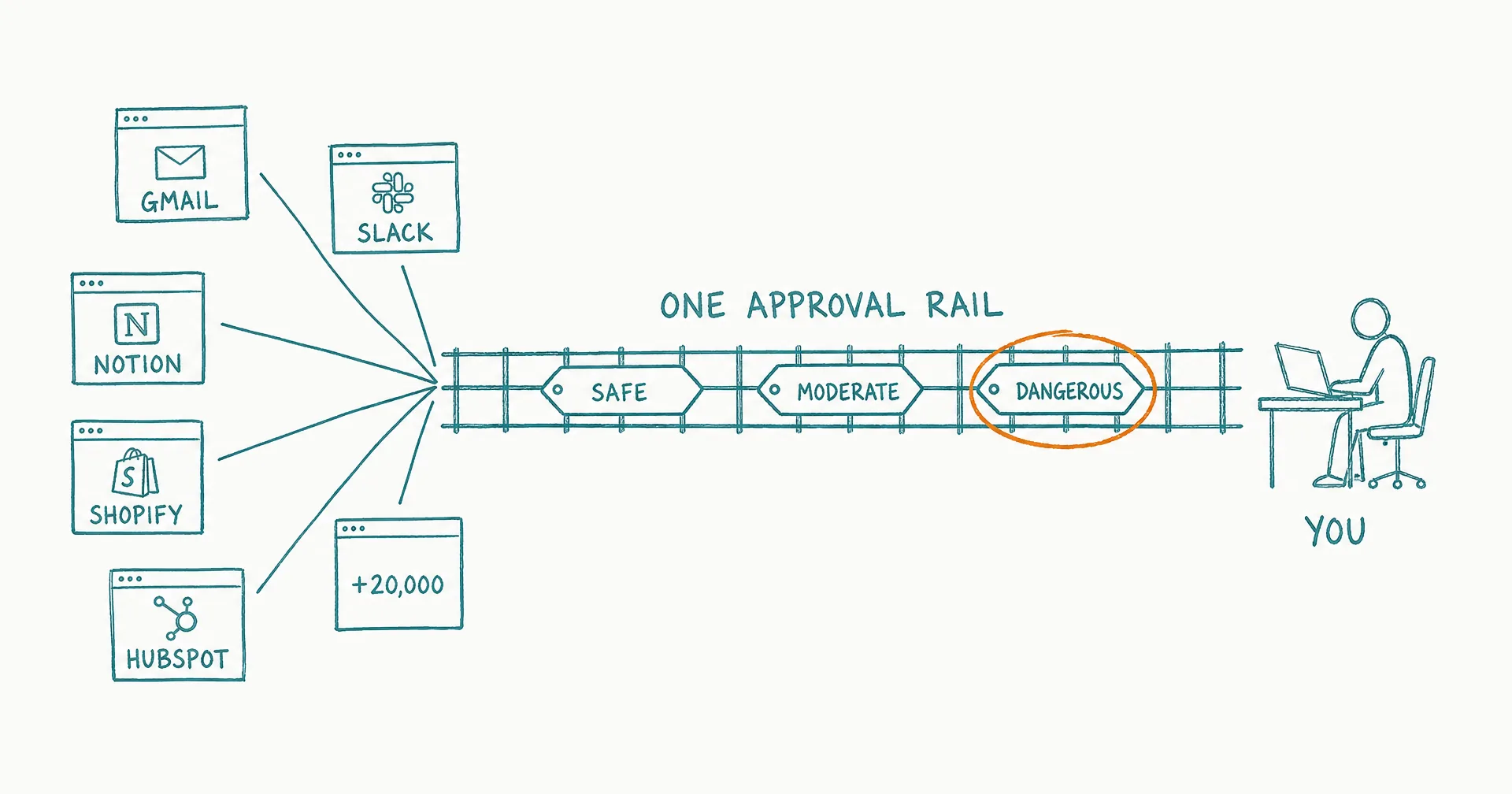
Until today, giving your agent access to your tools meant picking them one by one - and once connected, you couldn’t see what it was about to do with them. Both of those are gone.
This launch replaces tool lists with intent, and blind trust with a single approval rail that classifies every action before it runs.
- CellCog agents can now discover and use tools across 1,500+ apps and 20,000+ actions - Gmail, Shopify, Notion, Slack, LinkedIn, HubSpot - live since June 12, 2026.
- No catalogs to manage and no tools to pre-select: the agent describes what it wants to do and finds the right action.
- Every action is classified before it runs - safe, moderate, or dangerous - with a plain-English summary of what it’s about to do.
- Reading your calendar flows through; sending an email on your behalf shows up as a review card first.
- It’s the same approval system that already protects Cowork and Browse, so all three surfaces speak one language.
- Set your comfort level once, or tune it per chat - then delegate outcomes instead of managing tool lists.
§ 01Everything Is Searchable
Your agent can now discover the right action across 1,500+ apps and 20,000+ tools - Gmail, Shopify, Notion, Slack, LinkedIn, HubSpot - by simply describing what it wants to do. No catalogs to manage, no tools to pre-select.
That inversion matters more than it sounds. Tool-by-tool setup meant you had to predict, in advance, everything your agent might need - and every prediction you missed became a dead end mid-task. Discovery by intent means the agent meets the task where it is: it needs to update a product listing, so it finds the Shopify action; it needs to notify the team, so it finds the Slack action. Your job shrinks from managing an inventory to granting access.
§ 02Every Action Is Classified Before It Runs
The second half of the launch is the one we care most about. Each command your agent sends now carries a threat level - safe, moderate, or dangerous - with a plain-English summary of what it’s about to do.
Reading your calendar? Flows through. Sending an email on your behalf? That shows up as a review card first.
The classification tracks what the action actually does, not which app it belongs to. Reads of ordinary data are safe. Reads of genuinely private data - payment history, full mailboxes - are moderate. Anything that changes state outside the conversation - sending, posting, creating, deleting - is dangerous by definition, because someone other than you will see the result. That’s the same philosophy behind least privilege for AI agents: trust is granted per action class, not per app.
§ 03One Rail Across Every Surface
This is the same approval system that already protects Cowork (agents working on your machine) and Browse (agents working in your Chrome). Now all three surfaces speak one language: terminal commands, browser actions, and SaaS tool calls all arrive classified, summarized, and subject to the same threshold you control.
Set your comfort level once, or tune it per chat. Everything at or below your threshold runs autonomously; everything above it waits for your yes. The result: you stop managing tool lists and start delegating outcomes. Enable Tools, state what you need, review what matters.
For AI employees, this rail is what makes real delegation safe: an employee can work your actual stack across every task, and the permission model decides which actions are its to take and which are yours to approve.
§ 04The Honest Caveats
Classification is conservative by design: when an action’s impact is ambiguous, it escalates rather than assumes, which means your first sessions may show more review cards than you’d like until you tune your threshold. Connected tools act as your account on those platforms, so their terms of service and rate limits apply exactly as if you’d clicked yourself. And a plain-English summary is a summary: for genuinely sensitive grants, read the card before you approve it.
And this is a foundation piece. What we’re building on top of it… soon.
Q1How does the agent find the right tool?
It searches by intent. Instead of you pre-selecting tools from a catalog, the agent describes what it wants to do - ‘post an update to LinkedIn’, ‘create a Shopify discount’ - and discovers the matching action across 1,500+ connected apps.
Q2What does threat classification mean in practice?
Before any action runs, it’s classified as safe, moderate, or dangerous, with a one-sentence summary of what it’s about to do. Reads of non-sensitive data flow through; anything that changes state outside the chat - sending, posting, modifying records - is treated as dangerous and can be routed to you for review.
Q3Can I tune how much gets auto-approved?
Yes. You set the threshold where auto-approval ends - once for your account, or per chat. Everything above your threshold becomes a review card you approve or deny.
Q4Is this the same system that protects Cowork and Browse?
Yes, deliberately. Terminal commands on your machine, browser actions in your Chrome, and now tool calls across your SaaS apps all carry the same classification and the same approval flow, so you learn one safety model instead of three.
Q5What happens when a tool isn't connected yet?
The agent can still discover it and tell you what it could do - connecting takes one authorization from you, and the agent picks up from there.
Q6Why does this matter for AI employees?
An AI employee is only as useful as what it can reach. This is the foundation that lets an employee act across your real stack - inbox, CRM, storefront - while your approval rules decide what it may do on its own.