Stop supervising AI. Start employing it. Today we’re shipping the biggest thing we’ve ever built: AI Employees. Not another chat window you have to babysit - a general-purpose AI worker you hire for a role, that shows up on its own, carries what it learns from one working session into the next, and owns the role between conversations.
Every AI product you’ve used so far has been a tool: it does nothing until you pick it up, it forgets you the moment you put it down, and the burden of remembering, prioritizing, and following up stays exactly where it always was - on you. An employee inverts that. You give it a role and the outcomes you care about; it owns the work.
Here’s what that means in practice.
- AI Employees are live on CellCog: general-purpose AI workers you hire for a role, launched June 21, 2026.
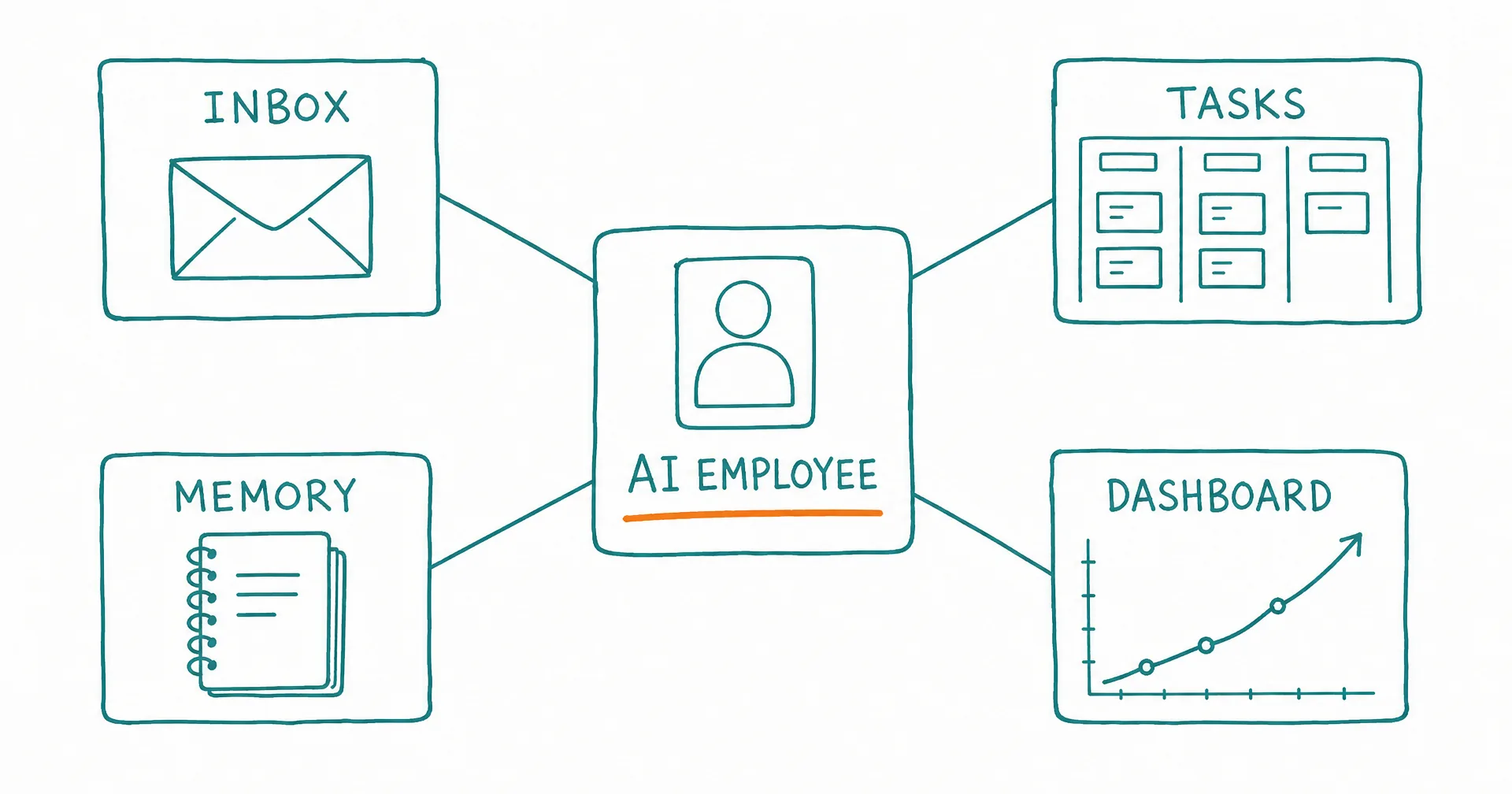
- Each employee has a real identity: a name it picks, a job title, and its own working email inbox with threads that persist between working sessions.
- Work is organized like a real job: a persistent task board, recurring tasks, and a ‘waiting on you’ lane for decisions only you can make.
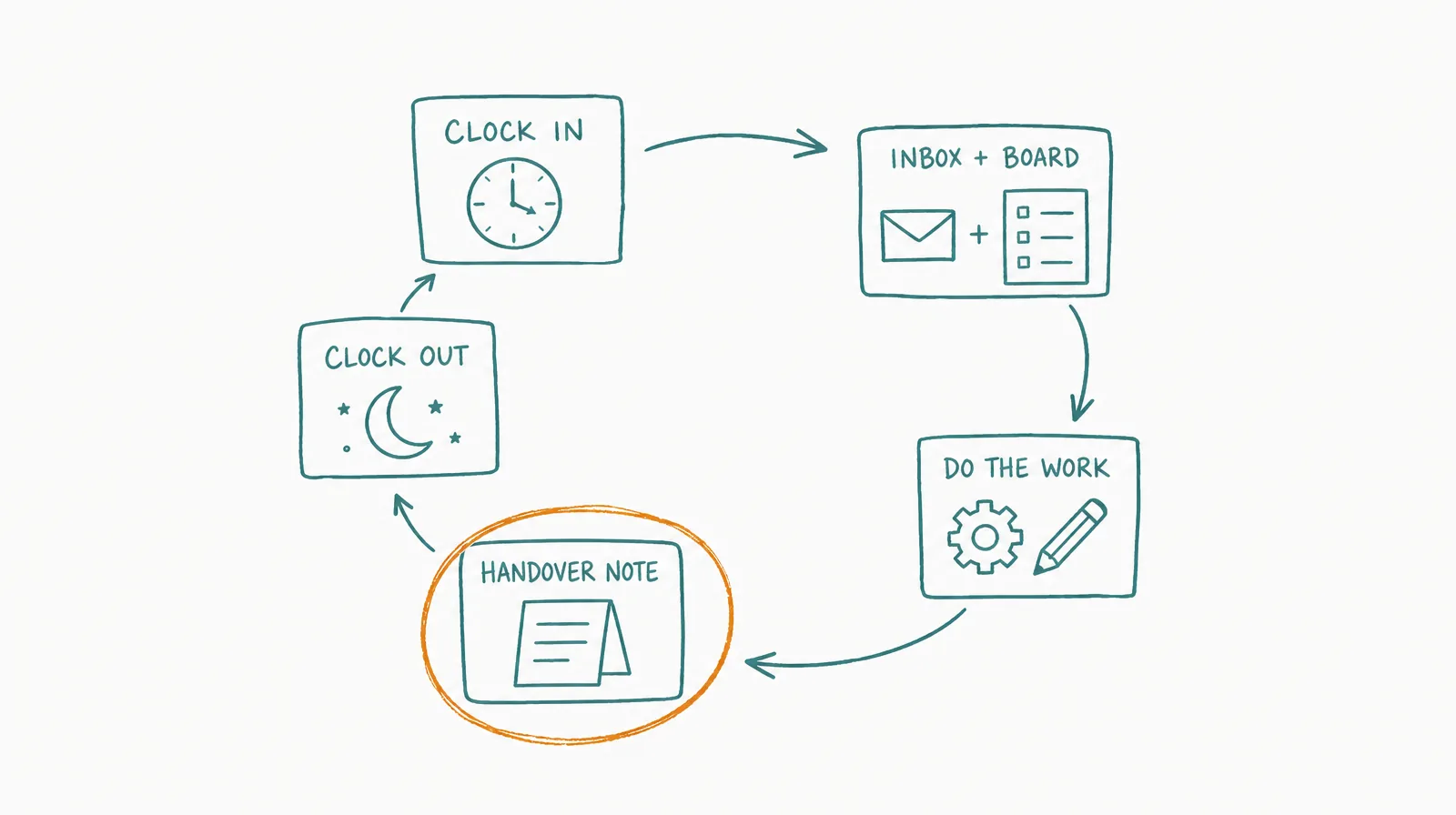
- Employees work on a schedule you set, or when something needs them, do the work, and write a handover note for the next working session.
- They don’t reset: what an employee learns in one working session carries into the next, so it gets better at the role every week.
- Under the hood every employee is a CellCog super-agent: research, code, dashboards, spreadsheets, PDFs, video, and images - real deliverables, not just chat.
- Employees work together: they find each other and hand off work, so an outreach hire can pass a qualified lead to a research hire.
§ 01The Anatomy of an AI Employee
Six parts separate an employee from every “AI tool” before it:
- Its own identity. It names itself, picks a job title, and gets its own real, working email address.
- Its own inbox. It sends and receives real email, with threads that persist across every working session - customers, partners, and coworkers can simply write to it.
- Its own task board. Persistent tasks, recurring work, dependencies, and a “waiting on you” lane for the things only you can decide.
- A memory that carries. It doesn’t reset: what it learns, decides, and sets in motion in one working session carries into the next, so it gets better at the role every week.
- Live dashboards. Your window into what it’s doing, kept fresh so you can watch the numbers move instead of asking for status.
- A team. Your employees find each other and hand off work - an outreach hire can pass a qualified lead to your research hire.
§ 02It Shows Up on Its Own, Like a Person
An AI employee doesn’t sit in a chat window waiting for you. It works on a schedule you set - or when something needs it: an inbound email, a task coming due, a message from you. It reads its inbox and its board, decides what matters most, does the work, and ends by writing a handover note so the next working session picks up exactly where this one left off.
It flags you only when it genuinely needs a decision. The rest it handles on its own. It can also join your calls under its own name: see AI employees in meetings.
§ 03Under the Hood: a Super-Agent in the Seat
Every AI employee is a CellCog super-agent. It doesn’t just chat: it researches, analyzes your data, writes code, and produces real deliverables - dashboards, spreadsheets, PDFs, video, and images. The role tells it what to aim at; the super-agent is how it gets there.
That combination is the point. A human in the seat writes the email. An employee that is also a super-agent ships the personalized onboarding video, the at-risk-accounts dashboard, and the data pipeline behind it - in the same working session.
§ 04You Stay in Control
An employee acts on your behalf, so control is designed in rather than bolted on. You decide what it’s allowed to do on its own: anything you’ve marked as needing sign-off waits for your explicit yes, and the “waiting on you” lane collects those decisions in one place. You can redirect it in plain language at any time, and it folds your feedback into how it works from then on.
§ 05The Honest Caveats
An employee is only as good as what you give it: a clear role, access to the systems the work actually lives in, and honest feedback in the first weeks while it learns how you like things done. The first working sessions front-load setup - access, baselines, a working rhythm - before the compounding output shows up. And because it asks before doing anything you’ve marked as sensitive, some of its work will wait on you.
That’s what employment is: a relationship, not a transaction. It’s also why this launch is the one we’ve been building toward from day one. This is the platform becoming what it was always meant to be: the organization of AI employees.
Q1What exactly is an AI employee?
A general-purpose AI worker you hire for a role rather than a task. It has an identity, an email inbox, a task board, dashboards, and a memory that carries between working sessions - the working parts of a real employee, not a chat window you have to babysit.
Q2When does it work?
An employee works on a schedule you set, or wakes when something needs it: an inbound email, a task coming due, a message from you. It works through its inbox and board, then writes a handover note so its next working session picks up exactly where it left off.
Q3Does it really remember what happened last week?
It doesn’t reset. What it learns, decides, and sets in motion in one working session carries into the next through its workspace, handovers, and memory - so it gets better at the role every week.
Q4What does an AI employee cost?
Pricing is usage-based rather than a flat seat fee: you pay for the work, not the hire, and the cost depends purely on how much work you assign. Hiring is free, and trying it is free with no credit card needed.
Q5Can AI employees work together?
Yes. Employees on the same account find each other and hand off work - an outreach employee can pass a qualified lead to a research employee, with the handoff visible to you on their boards.
Q6How do I hire one?
Head to the AI Employees page on cellcog.ai and describe the role in plain language. The employee onboards itself: it picks a name, asks what access it needs, sets up its workspace, and proposes its first plan of work.