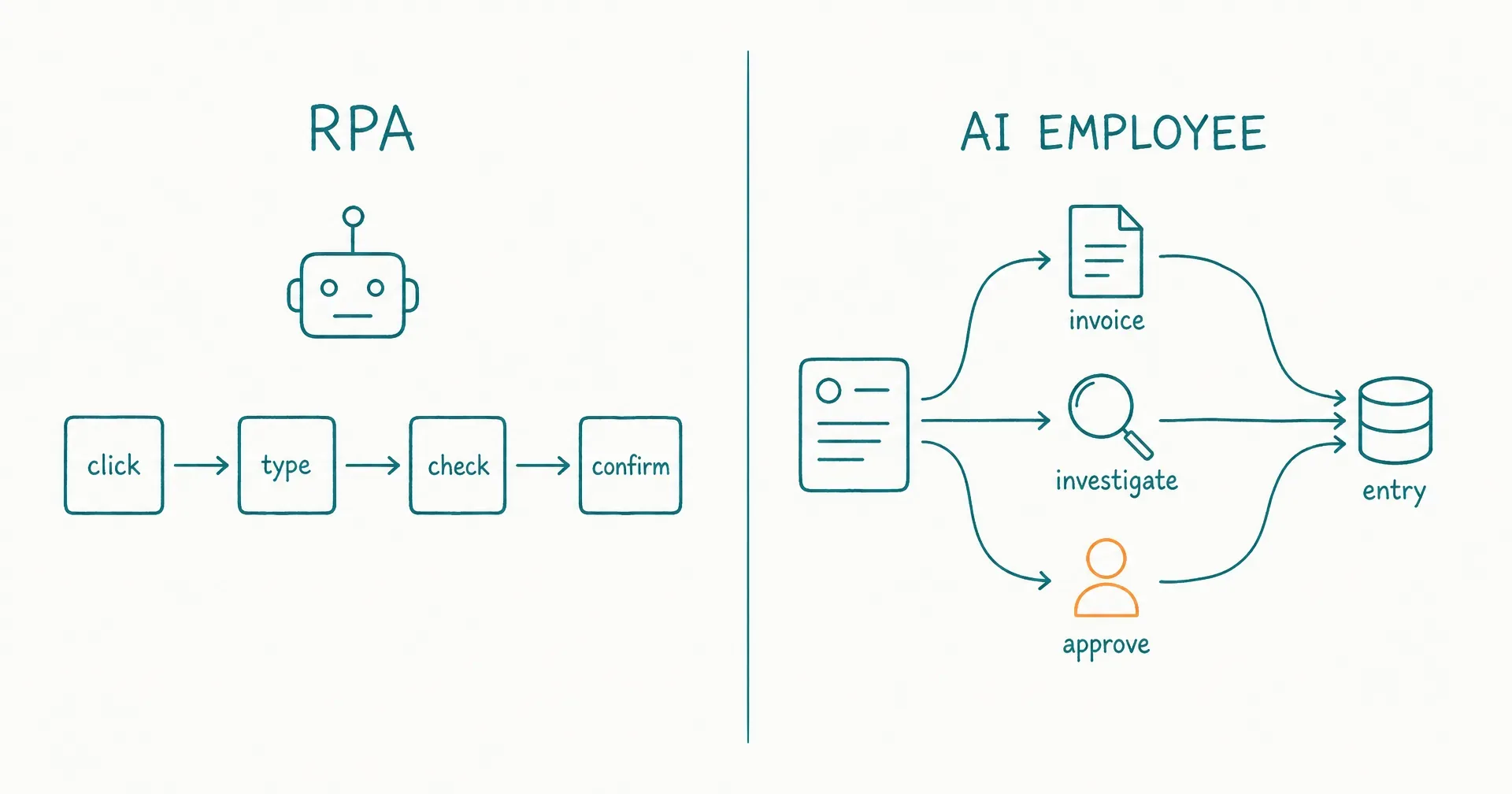
Robotic process automation, or RPA, uses software robots to perform defined actions across digital systems, often by interacting with the same screens and controls a person uses. An AI employee is assigned a bounded outcome and uses agentic reasoning to choose steps and tools inside an operating role.
The practical difference is encoded procedure versus adaptive execution.
RPA is strongest when the business can specify what to click, read, enter, validate, and do next. An AI employee is useful when the goal is stable but the inputs, evidence, or path vary too much to encode economically.
That does not make RPA obsolete. A deterministic bot may be safer, faster, cheaper, and easier to audit for high-volume transactions. Modern RPA platforms can also combine UI automation, APIs, document processing, machine learning, generative AI, and agents. The real design question is not old automation versus new AI. It is: which decisions should be fixed in code, which require model-based judgment, and which must remain with a person?
On this page · 15 sectionsOpen
- AI Employee vs RPA at a Glance
- What Is Robotic Process Automation?
- What Is an AI Employee?
- Is RPA the Same as Workflow Automation?
- What Are the 9 Practical Differences Between RPA and an AI Employee?
- When Is RPA the Better Choice?
- When Is an AI Employee the Better Choice?
- When Should You Combine RPA and an AI Employee?
- A Worked Example: Invoice Exception Handling
- What Are the Reliability Trade-Offs?
- What Are the Governance Trade-Offs?
- How Do You Choose Between RPA, an AI Employee, and a Hybrid?
- How CellCog Fits This Decision
- A Migration Playbook: From Fragile RPA to a Governed Hybrid
- Final Verdict
- RPA automates defined computer actions. It is a strong fit for repetitive, rule-based, high-volume work across screens and applications, including legacy systems without suitable APIs.
- An AI employee owns a recurring outcome. It interprets variable inputs, plans steps, selects approved tools, maintains task state, and escalates exceptions inside a standing role.
- Unattended RPA can run without a person. Proactivity and 24/7 execution do not distinguish it from an AI employee.
- AI can improve RPA by interpreting documents, messages, or exceptions. RPA can improve an AI employee by turning critical writes and stable transactions into deterministic tools.
- Choose the least variable architecture that can complete the task: direct API for a stable supported operation, RPA for a stable UI path, an AI employee for a variable path, and a human for consequential judgment.
- CellCog AI Employees provide role, memory, triggers, task state, KPIs, approvals, and handovers around agentic execution; CellCog’s computer and browser access should be governed as agentic UI use, not assumed to have RPA-level determinism.
§ 01AI Employee vs RPA at a Glance
| Decision dimension | RPA | AI employee | Default implication |
|---|---|---|---|
| Primary unit | Defined task or process step | Recurring role or outcome | Model the stable object |
| Path selection | Script, rule, workflow, or recorded action | Agentic planning inside policy | RPA for known paths |
| Input shape | Structured or predictable | Structured and unstructured | AI when interpretation dominates |
| User-interface action | Core strength | Possible tool among several | RPA for repeatable screen work |
| API action | Often orchestrated with RPA | Agent may select or call API tools | API first for stable critical writes |
| Exception handling | Predefined branch, retry, queue, or human | Investigate, gather context, propose, or escalate | AI for novel recoverable exceptions |
| Testing | Path, selector, state, and data coverage | Scenario, evaluator, trace, and outcome review | RPA is easier to test exhaustively |
| Consistency | High when environment and data match assumptions | Variable because model output is probabilistic | Do not add AI where exact rules are enough |
| Maintenance | Selectors, applications, credentials, and process changes | Context, prompts, tools, policies, evaluations, and model behavior | Both have change cost |
| Main risk | Brittle UI dependencies or silent process drift | Wrong judgment, excess authority, repeated error, or stale memory | Choose the more observable failure |
The categories can sit inside one system. An AI employee may call an RPA bot as a bounded tool, and an RPA process may call an AI model for one classification step.
§ 02What Is Robotic Process Automation?
UiPath’s current RPA definition describes software robots that handle repetitive, rule-based tasks such as data entry, file movement, and transaction processing by interacting with screens and systems.
Microsoft’s RPA overview similarly explains that software robots can trigger responses, manipulate data, and communicate with digital systems. Its examples range from a simple email response to large deployments of preprogrammed ERP bots.
The “robot” is software. It does not require a physical machine arm. It may click buttons, type into fields, copy data between applications, download and upload files, read screen elements, apply rules, call APIs, wait for a condition, create logs, and route an exception.
Attended RPA
An attended bot helps a person during an active work session. The user starts or guides the automation, and the bot handles repetitive desktop steps.
Example: a support representative opens an account; the bot gathers data from three systems; it populates the case form; the representative reviews and submits. The person remains the workflow owner.
Unattended RPA
An unattended bot runs from a schedule, event, queue, or orchestrator without someone sitting at the computer.
Example: a nightly job receives invoice records; the bot signs in to a legacy application; it enters approved records; it captures confirmation numbers; it places failures in a review queue.
This is autonomous execution in the operational sense. It does not require agentic reasoning.
The RPA bot’s natural unit is a procedure
The builder defines the start condition, allowed data, application sequence, selectors or screen targets, validation, branches, retries, exception states, and completion.
When the environment matches those assumptions, RPA can execute with high consistency. When the screen, input, policy, or process changes, the bot may fail or produce a result that is procedurally successful but operationally wrong.
§ 03What Is an AI Employee?
An AI employee is agentic software assigned a continuing business responsibility. It can begin from a person, schedule, message, event, queue item, or delegation; carry approved context and task state across work sessions; choose steps and tools; and report through outcomes, metrics, approvals, escalations, and handovers.
The five-part AI employee test evaluates role, continuity, initiative, agency, and accountability.
The employee’s natural unit is an outcome
Instead of encoding every future path, the operator defines the recurring result, approved sources, non-goals, tool and data boundaries, required evidence, approval thresholds, escalation, metrics, and stop conditions.
For example: reconcile the weekly partner pipeline, investigate material mismatches across the CRM and approved spreadsheets, prepare proposed corrections with evidence, and escalate any ownership or revenue conflict.
The goal is stable. The records, conflict types, evidence, and investigation path vary.
The employee still needs deterministic controls
Agentic reasoning should not decide a rule that the business can encode exactly.
If a correction above a defined value requires two approvals, use a rule. If a record must contain seven required fields, validate them deterministically. If a write can be made through a supported API with a schema, prefer that interface over screen clicks.
An AI employee is an operating layer around tools. It is not a reason to make every tool probabilistic.
§ 04Is RPA the Same as Workflow Automation?
No, although the terms overlap.
Workflow automation coordinates an end-to-end process through triggers, actions, branches, waits, and states. RPA is one execution method inside that process, especially when software must interact with a graphical user interface.
| Layer | Main job | Example |
|---|---|---|
| Workflow | Coordinate process state | Route an approved invoice from intake to payment |
| API integration | Perform a supported operation | Create the invoice record through an endpoint |
| RPA | Emulate defined user actions | Enter the invoice into a legacy desktop system |
| Agent | Interpret and choose variable steps | Investigate a mismatch in unstructured evidence |
| AI employee | Own the recurring outcome | Maintain the exception queue and close reconciliations |
| Human | Exercise accountable judgment | Approve a disputed or consequential payment |
The broader AI employee versus workflow automation guide decides who owns the process path. This article focuses on the narrower choice between deterministic software-robot execution and an adaptive employee role.
§ 05What Are the 9 Practical Differences Between RPA and an AI Employee?
1. Steps versus responsibility
An RPA bot is usually named for what it does: copy records, enter invoices, download statements, or update a field.
An AI employee is named for what it owns: maintain a reconciled report, prepare a briefing, keep a queue moving, or manage first-pass research.
The role may contain many procedures. Each procedure should remain as deterministic as its requirements allow.
2. Structured inputs versus interpreted inputs
RPA performs best when data shape and location are predictable. It can handle variation through branches, but each supported pattern increases implementation and test scope.
An AI employee can interpret email, documents, web pages, screenshots, or loosely structured instructions. That flexibility is valuable, but the interpretation needs evidence and evaluation.
3. Encoded branches versus dynamic planning
RPA takes a path already represented in logic.
An agentic worker can form a plan after seeing the case, call one tool, inspect the result, revise the plan, and try another permitted approach.
Anthropic’s guide to building effective agents uses a similar boundary: workflows follow predefined code paths while agents dynamically direct their process and tool use.
4. Selector stability versus semantic perception
Traditional UI automation may depend on selectors, coordinates, window titles, accessibility trees, or recognized screen elements. A layout change can break the bot even when a person still understands the screen.
Agentic computer use may interpret a screenshot or page semantically and adapt to some layout changes. That reach comes with less deterministic targeting. The system may click the wrong similar-looking control or misread page state.
5. Known exceptions versus novel exceptions
RPA handles a known exception through a branch, retry, alternate selector, queue, alert, or human review.
An AI employee can investigate a new discrepancy, gather additional evidence, and propose a next step. It should still stop when authority, evidence, or consequence crosses policy.
6. Process logs versus decision traces
An RPA log can show execution ID, start and end, application step, input, output, error, retry, and terminal state.
An AI employee also needs to preserve source evidence, retrieved context, tool selection, the decision or recommendation, approvals, task-state changes, handovers, and evaluator results - enough for a reviewer to reconstruct what happened and why.
7. Exhaustive path tests versus representative scenario tests
An RPA process can often be tested across every defined branch and representative data class.
An AI employee requires normal cases, edge cases, adversarial inputs, missing evidence, conflicting sources, tool failure, policy change, escalation, repeated runs, and outcome evaluation.
Passing a happy-path demo is weak evidence for both, but especially weak for a probabilistic worker.
8. Process maintenance versus operating maintenance
RPA maintenance follows application and process change: selectors move, screens change, credentials expire, field rules shift, and bot infrastructure needs updates.
AI employee maintenance includes sources, memory, prompts, role boundaries, permissions, tool schemas, evaluator drift, model change, and emerging failure patterns.
The AI path can reduce branch-building while increasing evaluation and governance work.
9. Transaction economics versus role economics
RPA economics often normalize around bot hours, infrastructure, licenses, developer or center-of-excellence effort, maintenance, and transactions processed.
AI employee economics add model and tool usage, review, correction, memory, incidents, and supervision across accepted outcomes.
The correct denominator is not “runs.” It is the business result that passed the acceptance standard - the cost-per-accepted-outcome frame.
§ 06When Is RPA the Better Choice?
Choose RPA when the task is repetitive, rules are explicit, screens are stable enough, inputs are predictable, and variation can be managed through known exceptions.
| RPA-ready signal | Test | Why it matters |
|---|---|---|
| Stable procedure | A trained person performs the same steps | Steps can be encoded |
| High volume | The task repeats enough to repay build and maintenance | Automation earns its overhead |
| Rule-bound decision | Outcomes follow explicit conditions | Determinism improves control |
| Predictable data | Required fields and locations are known | Fewer exception branches |
| Existing UI only | No suitable API is available | RPA bridges the interface gap |
| Clear completion | A confirmation or reconciled state proves success | Postconditions can be checked |
| Low ambiguity | The bot need not interpret intent or policy | Agentic variance adds little value |
| Manageable change | Application and process changes are controlled | Maintenance remains viable |
Good RPA examples: move values between a legacy desktop system and an approved spreadsheet; download statements from a stable portal; enter validated invoice data; create accounts from approved structured requests; generate routine reports from fixed screens; reconcile exact field matches; archive files according to a defined policy; or execute a repeatable regression setup.
Microsoft’s RPA guidance says RPA performs best on structured, rule-based, repetitive processes and is less suited to constantly changing attributes. That remains a useful qualification rule even as RPA suites add AI.
Use an API before RPA when possible
If the target system exposes a supported API for the exact operation, the API usually provides a stable contract, typed inputs, explicit errors, authentication scope, idempotency options, lower UI fragility, and easier automated testing.
RPA remains valuable when the API is absent, incomplete, unaffordable, or blocked by legacy constraints.
§ 07When Is an AI Employee the Better Choice?
Choose an AI employee when the outcome recurs but the path depends on interpretation, evidence, or changing conditions.
| AI-employee signal | Test | Required boundary |
|---|---|---|
| Variable input | Messages and documents differ materially | Approved-source and evidence rules |
| Stable outcome | The same business result is expected | Explicit acceptance criteria |
| Open-ended investigation | The next step depends on what is found | Tool and time budget |
| Cross-tool work | The role may choose among several sources or tools | Least privilege |
| Long-running state | Work waits and resumes across shifts | Durable task and wake state |
| Novel exceptions | Not every case can be prebranched | Named human escalation |
| Reviewable output | A person or evaluator can accept the result | Quality rubric |
| Recoverable action | Early actions can be reversed | Graduated autonomy |
The best first tasks for an AI employee are usually documents, analyses, draft messages, proposed updates, or exception packets - not silent irreversible transactions.
Good AI employee examples: investigate why a weekly report changed; maintain a source-backed competitor briefing; triage messages and draft policy-grounded responses; research accounts with variable public evidence; maintain a content-production queue; reconcile project-risk signals across unstructured updates; or prepare an exception narrative from validated data.
The employee should call deterministic tools for stable operations inside those outcomes.
§ 08When Should You Combine RPA and an AI Employee?
Combine them when an outcome contains ambiguous intake or investigation followed by stable execution.
Pattern 1: AI interprets, RPA transacts
- The employee reads an unstructured request.
- It identifies intent and extracts proposed fields with evidence.
- Deterministic validation checks required data.
- A person approves when the action is consequential.
- RPA enters the validated record into a legacy system.
- The bot captures the confirmation.
- The employee updates the task and handles follow-up.
The AI never types unvalidated data directly into the production screen.
Pattern 2: RPA collects, AI explains
- RPA downloads the same reports from several portals.
- Deterministic checks reconcile totals and schema.
- The employee investigates material exceptions.
- It produces a source-linked explanation.
- A human approves the recommendation.
- RPA or an API executes the approved update.
This pattern keeps data acquisition repeatable and uses judgment only where variance exists.
Pattern 3: AI repairs a known RPA failure queue
The employee does not rewrite the bot. It reviews failed cases, groups failure patterns, gathers evidence, and proposes: retry with corrected input; a known alternate path; human action; a process change; or a bot-maintenance ticket.
Automatic repair should be limited to approved, reversible failure classes.
Pattern 4: RPA becomes a tool with a strict contract
Expose the bot as a named operation - for example, an “enter validated invoice” tool that takes an invoice ID, approved fields, and an approval ID.
The employee can invoke it only after validation and approval. The operation returns an execution ID, status, confirmation, the changed record, an error class, and a recovery path.
The contract turns a fragile sequence of clicks into a bounded capability from the employee’s perspective.
§ 09A Worked Example: Invoice Exception Handling
Invoice processing shows why the right answer is often a layered system rather than one category.
The incoming work
The organization receives invoices as email attachments. Some follow a standard template; others are scans, spreadsheets, or supplier-generated PDFs. Approved invoices must be entered into a legacy finance application that has no practical write API.
Three requirements are stable: a supplier must exist in the approved vendor file; the invoice number must not already exist; and an amount above the policy threshold requires two human approvals.
The difficult cases vary: a supplier name is abbreviated; a purchase-order line is partially fulfilled; tax differs from the expected treatment; the attached file conflicts with the email; approval evidence is missing; the invoice appears duplicated under a different format; or the vendor asks for a bank-detail change.
A pure-RPA design
The bot reads attachments from a known folder, extracts fields using templates, validates required columns, checks exact supplier and invoice matches, follows the legacy UI path, captures the confirmation, and routes every mismatch to a human queue.
This design is strong when most invoices share stable formats and exception volume remains low. It becomes expensive when the team keeps adding parsing rules and exception branches for variable evidence.
A pure-agent design
An agent reads the email and attachment, interprets the invoice, searches supplier and purchase-order records, decides whether it is valid, opens the finance application, enters the transaction through the UI, and reports completion.
This appears simpler, but it gives probabilistic interpretation and UI execution too much authority in one loop. The agent could accept a plausible vendor match, miss a duplicate, misapply a threshold, or enter a value into the wrong screen state.
A governed hybrid
Use the employee layer to own the exception outcome while deterministic components enforce policy.
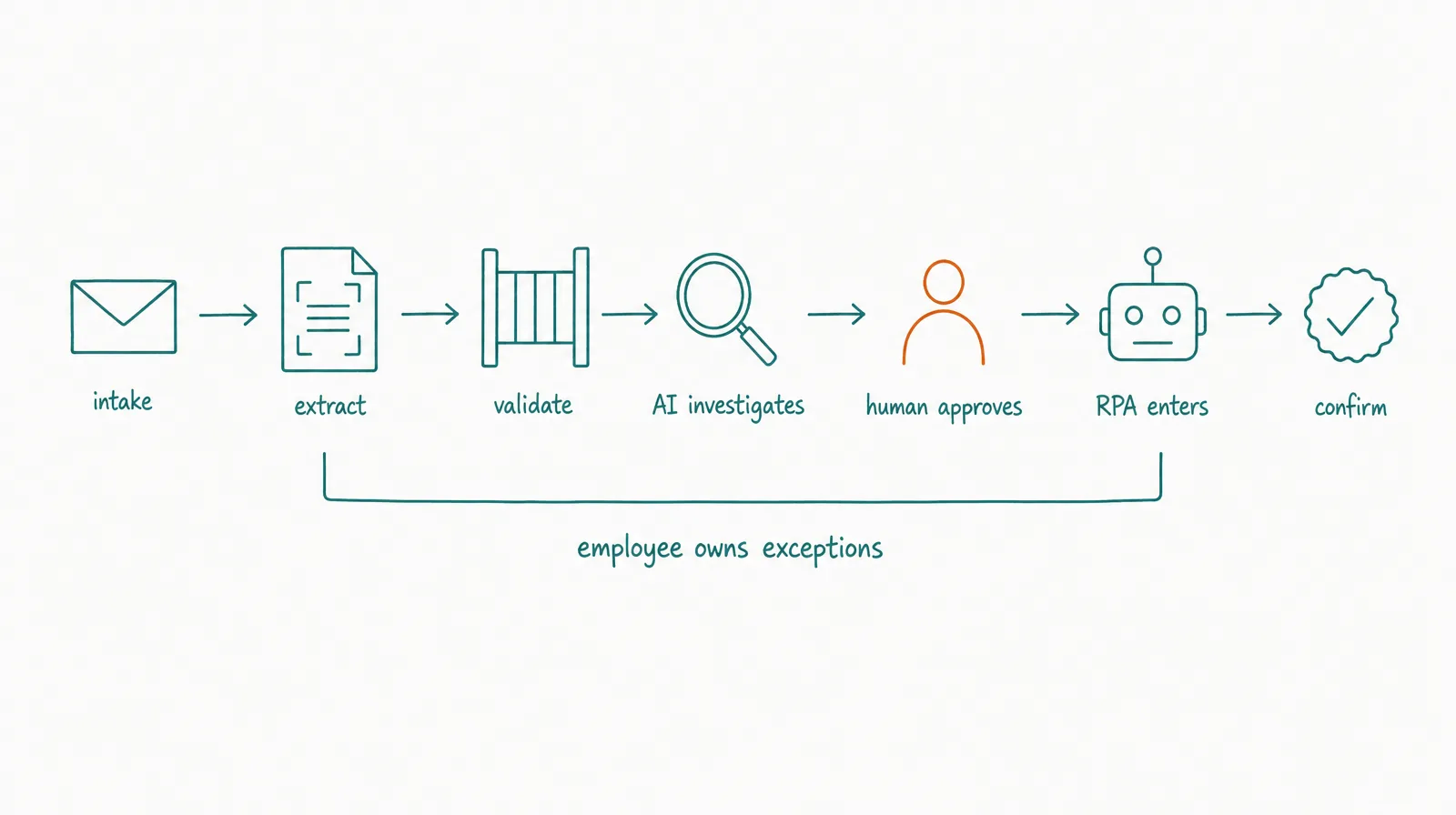
| Stage | Owner | Control |
|---|---|---|
| Receive email and file | Workflow | Allowlisted mailbox, malware scan, immutable intake ID |
| Extract proposed fields | Document tool or agent | Preserve source locations and confidence |
| Validate exact rules | Code/workflow | Supplier, duplicate, threshold, and required-field checks |
| Investigate mismatch | AI employee | Approved sources, evidence packet, no production write |
| Decide consequential exception | Human | Named approver and recorded decision |
| Enter approved record | RPA | Validated payload and approval ID |
| Confirm final state | Workflow | Read-back, reconciliation, and transaction ID |
| Close or hand over | AI employee | Task state, evidence, exception notes, and next owner |
The AI employee does not replace the bot. It reduces the human work in the variable exception queue while the bot preserves a stable transaction path.
Define the handoff contract
The employee should send the RPA tool only: the immutable intake ID, validated supplier ID, invoice number, approved amount and currency, purchase-order reference, approval IDs, source-document checksum, and an idempotency key.
The RPA tool should return: an execution ID, start and finish timestamps, terminal state, the finance-system record ID, values read back after entry, a screenshot or structured confirmation where allowed, an error class, and safe retry status.
If the returned values do not reconcile, the employee must not infer success from the absence of an error. It should reopen the task and route the discrepancy.
Measure the combined outcome
Track accepted invoices, straight-through rate, exception rate by cause, AI recommendation acceptance, reviewer minutes, duplicate prevention, policy-escalation accuracy, entry reconciliation, recovery time, cost per accepted invoice, and consequential incidents.
The hybrid earns its complexity only when accepted throughput, reviewer capacity, or recovery improves after all new operating costs are included.
Keep bank-detail changes outside the normal path
A request to change payment details is not another document exception. It creates fraud and financial risk and should move to a separately authenticated human process. Neither a confident agent nor a successful screen automation is sufficient evidence to approve it.
This is the deeper design rule: similar inputs do not imply similar authority.
§ 10What Are the Reliability Trade-Offs?
RPA is deterministic, but the environment may not be. An AI employee is adaptive, but its choices may vary.
| Failure | RPA exposure | AI employee exposure | Control |
|---|---|---|---|
| Screen redesign | Selector or coordinate breaks | Semantic misread or wrong click | Versioned tests and state verification |
| Slow page | Timeout or race | Premature action or repeated attempt | Wait conditions and retry budget |
| Unexpected dialog | Unknown state | Misinterpretation | Safe default and escalation |
| Duplicate input | Repeated transaction | Repeated task or action | Idempotency and deduplication |
| Bad source data | Consistently wrong output | Plausible reinterpretation | Validation and provenance |
| Credential change | Bot fails | Agent fails or chooses another path | Scoped secret management |
| Policy change | Old rule continues | Old context influences decision | Versioned policy and effective date |
| Partial completion | Process stops midstream | Agent may misjudge state | Postcondition and reconciliation |
Reliability is the probability of the correct business postcondition, not the absence of an application error.
Verify state after every consequential UI action
A successful click is not proof that the intended record changed. Capture the object before, the requested change, the UI or API result, the object after, a confirmation identifier, and reconciliation status.
For financial, security, legal, or customer-facing writes, require stronger verification and human approval.
§ 11What Are the Governance Trade-Offs?
Both systems may run unattended and use privileged accounts. Both need identity, access, monitoring, and revocation.
RPA governance
A mature program often governs bot identities, credential vaults, development and production separation, code review, process ownership, change control, schedules and queues, exception handling, logs, infrastructure, and license use.
AI employee governance
The role adds context and memory provenance, prompt and policy versioning, agent tool choice, output evaluation, model-provider data flow, instruction injection, cross-agent delegation, approval policy, performance review, and incident containment.
Least-privilege design scopes identity, tools, data, actions, duration, spend, and downstream delegation. Use it even when the agent’s only action tool is an RPA bot.
“Human in the loop” must name a decision
Do not add a generic approval step after every run. Define the action being approved, the evidence shown, the approver’s authority, the decision deadline, the default if no response, the audit record, and what resumes after approval.
Otherwise the human becomes a rubber stamp and the queue hides delay.
§ 12How Do You Choose Between RPA, an AI Employee, and a Hybrid?
Score each dimension from 1 to 5.
| Dimension | 1 favors RPA | 5 favors AI employee |
|---|---|---|
| Input variability | Fixed schema | Unstructured and changing |
| Path variability | Same steps | Investigation changes by case |
| Rule clarity | Exact conditions | Contextual judgment |
| UI stability | Stable and testable | Many changing sources |
| Exception novelty | Known classes | New recoverable cases |
| Evidence interpretation | Minimal | Central to the result |
| Work duration | One short transaction | Waits and resumes |
| Role continuity | Unnecessary | Important |
Interpret the total:
- 8–16: RPA or direct workflow is the default.
- 17–27: use a hybrid and isolate the variable step.
- 28–40: an AI employee may own the outcome, while stable actions remain deterministic tools.
Apply consequence as a separate gate. A high AI-fit score does not authorize autonomous payment, account access, hiring, legal, medical, or safety decisions.
§ 13How CellCog Fits This Decision
CellCog is not presented as a conventional RPA suite. Its AI Employees product places a general-purpose agent inside a role with an inbox, shifts, wake conditions, memory, task state, KPIs, permissions, approvals, and handovers.
CellCog also documents Browse my Chrome for acting in designated real-browser tabs, and Cowork for permitted access to files, commands, and a local environment.
Those capabilities extend reach where APIs or connectors may not cover the work. They should not be assumed to behave like a pretested deterministic RPA script.
For critical writes: prefer a supported API or connector; use deterministic validation; grant the narrowest action scope; require approval where consequence is material; verify the resulting state; and preserve evidence for recovery.
CellCog is a better fit than pure RPA when one role must interpret variable digital evidence and decide which bounded capability to use. RPA remains a better fit when the task is a stable, high-volume sequence of UI actions with little interpretive value.
§ 14A Migration Playbook: From Fragile RPA to a Governed Hybrid
Do not replace a working bot merely because agents are available.
Step 1: baseline the current process
Measure transaction volume, successful postconditions, exception rate, human handling time, maintenance hours, application-change failures, cycle time, and cost per accepted transaction.
Step 2: classify failures
Separate infrastructure failure, credential failure, selector or UI change, source-data problems, unknown exceptions, policy ambiguity, and process-design problems.
Only some classes benefit from agentic interpretation.
Step 3: preserve deterministic strengths
Keep validation rules, stable calculations, transaction APIs, idempotency, exact approval thresholds, postcondition checks, and audit events.
Step 4: add AI to one variable boundary
Examples: classify exception evidence; extract proposed fields from a variable document; choose among approved research sources; draft a resolution packet; or recommend a known recovery path.
Step 5: run shadow comparison
Let the AI prepare recommendations without changing production. Compare its decisions with resolved historical cases and current human reviewers.
Step 6: grant one reversible action
Authorize only a proven low-risk class. Preserve the human path for everything else.
Step 7: recalculate value
The hybrid succeeds only if accepted outcomes improve after adding model and platform usage, reviewer time, new monitoring, exception recovery, integration maintenance, and incident exposure.
Complexity is justified by measured reliability or capacity, not by architecture novelty.
§ 15Final Verdict
Use RPA for stable, rule-based, high-volume computer procedures. Use an AI employee for recurring outcomes whose paths require interpretation and can be governed through evidence, permissions, evaluation, and escalation.
Use a hybrid when the process contains both. Let AI interpret what varies. Let RPA or APIs execute what should not vary. Keep people responsible for consequential judgment.
The best design is usually the least adaptive system that can reliably reach the accepted business postcondition.
Explore CellCog AI Employees when the recurring work needs an agentic role, but retain deterministic tools for stable transactions and verify every consequential change.
Q1Will AI agents replace RPA?
Not broadly. Agents can reduce brittle branch logic for variable inputs and novel exceptions, while RPA remains valuable for repeatable UI procedures and legacy systems. Modern automation platforms increasingly combine both. The task should determine the architecture.
Q2Is unattended RPA an AI employee?
Not necessarily. Unattended RPA can start and complete work without a person, but it normally follows a defined procedure. An AI employee adds a standing role, dynamic planning, governed context, outcome metrics, and handovers. A business may still describe an RPA bot as a digital worker; evaluate the process and role evidence behind that label.
Q3Is RPA safer than an AI employee?
RPA is more predictable when its inputs and environment match its design. It can still make harmful changes consistently, expose privileged credentials, or fail silently after a UI change. An AI employee adds probabilistic judgment and therefore needs broader evaluation. Safety depends on consequence, access, verification, and recovery.
Q4Should an AI employee click a UI or call an API?
Prefer a supported API for critical stable actions because it provides a clearer contract and error model. Use UI execution when no suitable API exists or when coverage matters more than determinism. In both cases, verify the post-action state.
Q5Can an AI employee call an RPA bot?
Yes. Treat the bot as a bounded tool with validated inputs, explicit approval requirements, an execution ID, a postcondition, and structured errors. The employee should not receive raw authority to improvise inside the production UI when a narrower operation can be exposed.
Q6What is the best first RPA-to-agent migration?
Keep the current bot and add AI only to a high-volume exception queue where humans already interpret variable evidence. Run the AI in shadow mode, measure accepted recommendations and reviewer time, then authorize one reversible recovery class if the evidence supports it.