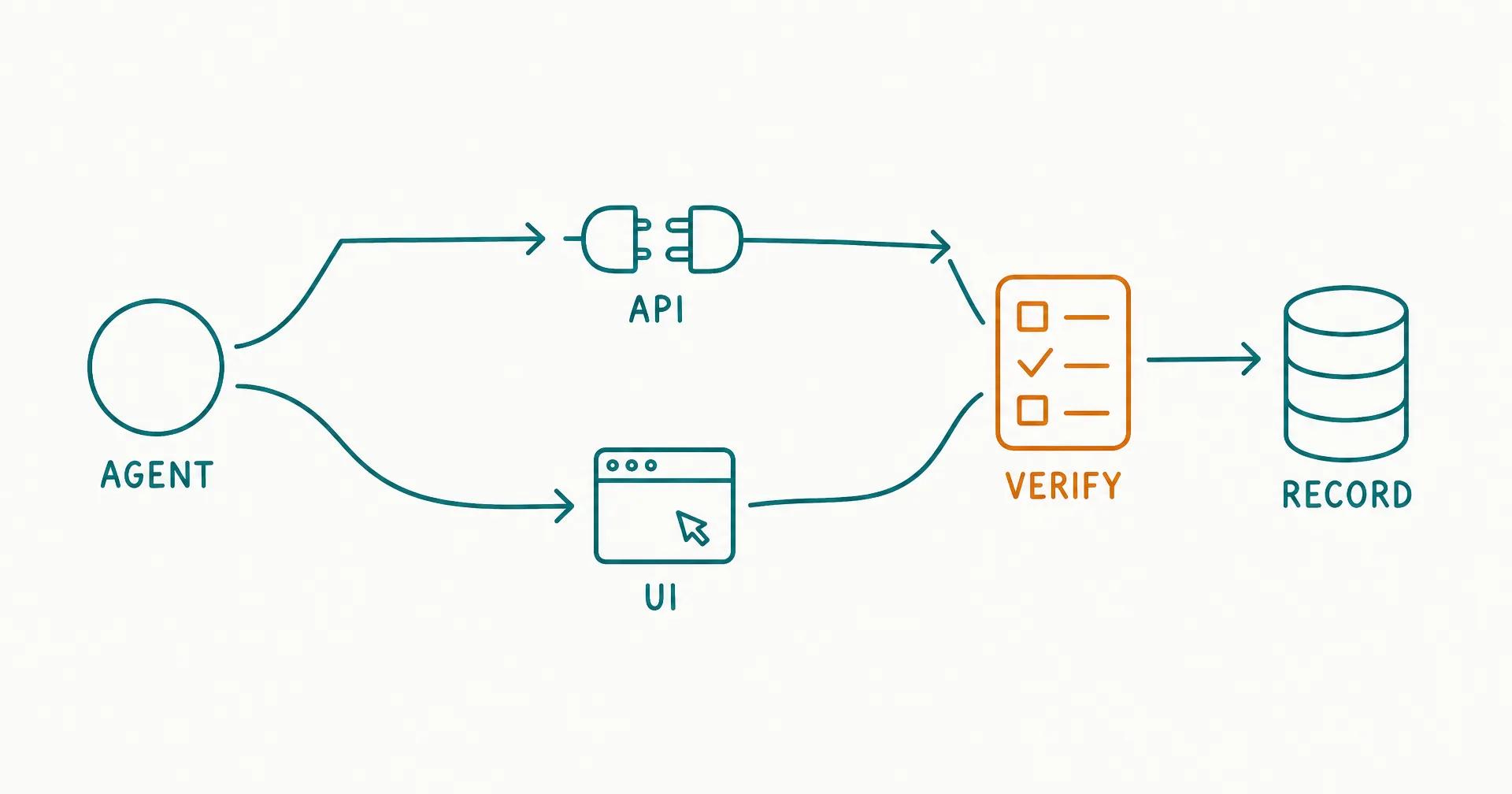
An AI agent can act through an API or through the interface a person sees.
With an API, the agent calls a defined operation such as create_record, send_message, or get_order. With computer use, it interprets a screen, moves a pointer, types into fields, and responds to the application’s visible state.
The choice is not “modern AI versus old integration.” It is a control decision.
APIs usually provide the stronger default for stable, supported, consequential writes because inputs, responses, permissions, errors, and identifiers can be made explicit. Computer use expands reach when an application has no suitable API, when the supported API omits a necessary operation, or when the task genuinely depends on a visual interface. A hybrid can use APIs for critical state changes and computer use for bounded gaps.
The safe design principle is:
Prefer the most structured action path that can complete the required outcome, then verify the resulting state independently.
On this page · 11 sectionsOpen
- What Is the Difference Between Computer Use and an API Integration?
- Why Are APIs Usually More Reliable for Critical Actions?
- When Does Computer Use Add Real Value?
- How Does the Failure Surface Change?
- How Should Permissions Differ?
- How Do You Verify That an Action Succeeded?
- What Is a Safe Hybrid Architecture?
- Which Actions Need Human Approval?
- How Do Prompt Injection and Untrusted Interfaces Change the Decision?
- How Should You Test API, UI, and Hybrid Routes?
- What Production Runbook Should You Use?
- APIs expose named operations and structured data; computer use acts through visual or accessibility-layer interfaces designed primarily for people.
- Prefer APIs for stable, supported, high-volume, or consequential writes. They usually provide clearer scopes, validation, idempotency, error handling, and audit evidence.
- Use computer use for coverage gaps, legacy applications, visual-only work, and short-lived exceptions - but treat the interface as a changing dependency.
- A click is not proof of completion. Verify the postcondition by reading the saved record, confirmation ID, status, or independent system state.
- Isolate browser or desktop sessions, minimize privileges, constrain destinations, block unapproved downloads and secrets, and require approval for irreversible actions.
- A hybrid route is often best: API first, bounded UI fallback, deterministic verification, and human escalation when state is ambiguous.
- Evaluate your own applications and case mix. General computer-use benchmarks do not establish reliability for a specific production workflow.
§ 01What Is the Difference Between Computer Use and an API Integration?
An API exposes a machine-oriented contract. Computer use operates the human-facing interface.
| Dimension | API integration | Computer use |
|---|---|---|
| Action target | Named endpoint or tool | Visible control, screen region, or accessibility element |
| Input | Structured fields | Text, clicks, keystrokes, images, files |
| Output | Structured response and status | Visible state, notification, page, or changed control |
| Identity | Service or delegated user credential | Signed-in browser/desktop session |
| Permission | Scopes, roles, endpoint policy | What the session and interface allow |
| Failure | Status code, validation error, timeout | Wrong target, stale page, modal, visual ambiguity, timeout |
| Change surface | Versioned contract and schema | Layout, labels, timing, focus, responsive behavior |
| Verification | Read endpoint, returned ID, event | Screenshot, UI readback, API readback, downstream state |
| Throughput | Often high and parallel | Often slower and stateful |
| Reach | Only exposed capabilities | Potentially any accessible interface operation |
“Computer use” can include:
- browser navigation;
- desktop applications;
- virtual desktops;
- remote application sessions;
- mobile interfaces;
- visual screenshots;
- accessibility trees;
- keyboard shortcuts;
- mouse or pointer actions; and
- file upload and download.
An API path can also take several forms:
- vendor REST or GraphQL API;
- official software development kit;
- webhook;
- database or data service;
- workflow connector;
- function tool;
- command-line interface; or
- an internal service created specifically for the agent.
The distinction is about the action boundary, not the model. The same agent can reason over a request, call an API for one step, use a browser for another, and ask a person to approve the final write.
The super-agent definition explains why broad tool reach increases the need for routing, permission, evidence, and recovery controls. More interfaces do not automatically create more reliable work.
§ 02Why Are APIs Usually More Reliable for Critical Actions?
APIs can make the operation and its postcondition explicit.
For example:
POST /invoices/{id}/approve
can require:
- a valid invoice ID;
- an authorized identity;
- an expected current version;
- an approval reason;
- an idempotency key;
- an amount or policy check; and
- a structured response with the new status and event ID.
A UI path may require the agent to:
- navigate to the application;
- locate the invoice;
- distinguish the correct record;
- wait for the page;
- open the approval control;
- interpret a confirmation prompt;
- click;
- detect whether the click registered; and
- confirm the saved state.
Every step adds a possible observation, timing, targeting, or state error.
Reliability advantages of a supported API
| API property | Operational advantage |
|---|---|
| Typed or documented schema | Invalid input can be rejected before action |
| Stable identifier | The agent can target a record without matching visual text |
| Authentication scope | Access can be limited to required operations |
| Structured error | Recovery can branch on known failure categories |
| Request ID | Retries and incidents can be traced |
| Idempotency | A repeated request can avoid duplicate effect |
| Version or precondition | A stale update can be rejected |
| Read-after-write | The postcondition can be checked |
| Rate limit | Runaway activity can be constrained |
| Event or webhook | Completion can be observed asynchronously |
HTTP does not make every request safe automatically. The current HTTP Semantics standard defines idempotent methods at the protocol level, but an application still needs correct operation design, retry policy, and business-level duplicate protection.
Reliability is designed, not inherited
An API can still be poor:
- undocumented;
- incomplete;
- weakly validated;
- broadly privileged;
- inconsistent across versions;
- eventually consistent without clear status;
- unable to express a necessary precondition;
- missing a test environment;
- subject to confusing rate limits; or
- silent about partial failure.
Do not select an API merely because one exists. Test the specific operation and its control properties.
The RPA-versus-AI-employee comparison is useful when the task is structured enough for deterministic selectors and rules. A deterministic automation can be the better option when interpretation is unnecessary.
§ 03When Does Computer Use Add Real Value?
Computer use adds value when the interface is the only practical action surface or the interface itself contains meaning that the API does not expose.
Stronger computer-use candidates
| Situation | Why computer use helps | Required constraint |
|---|---|---|
| No supported API | Reaches an otherwise manual application | Bounded task and isolated session |
| API omits one operation | Covers a narrow functional gap | API first; UI only for the missing step |
| Legacy or third-party portal | Avoids waiting for vendor integration | Change monitoring and recovery |
| Visual inspection | Uses layout, chart, image, or rendered state | Explicit visual acceptance rule |
| Low-volume back office task | Integration build may not be economical | Human review and measured reliability |
| Temporary migration | Bridges old and new systems | Sunset date and migration owner |
| Cross-application workflow | Moves through several human-facing tools | Checkpoints and durable task state |
| User-delegated session | Acts in the same interface as the user | Clear consent and approval boundaries |
The multimodal-agent guide explains the broader capability needed when tasks involve screens, documents, images, audio, and other modalities. Computer use is one execution method within that larger design.
Weak computer-use candidates
Avoid or narrow computer use when:
- a supported API performs the same critical write;
- volume or latency requires reliable parallel execution;
- the action is irreversible or high impact;
- a visual mistake can affect the wrong customer, account, or amount;
- the interface contains untrusted content that can influence the agent;
- session isolation is unavailable;
- verification cannot distinguish success from appearance;
- the workflow handles secrets that may be exposed on screen;
- anti-automation or contractual terms prohibit the behavior; or
- failure cannot be recovered safely.
Computer use should solve a coverage problem, not conceal a missing systems design.
§ 04How Does the Failure Surface Change?
An API fails through a contract. Computer use can fail through perception, interaction, application state, and environment state.
Failure taxonomy
| Layer | API failure example | Computer-use failure example |
|---|---|---|
| Identity | Expired token | Signed-out session or wrong account |
| Permission | Scope denied | Button hidden or session can do too much |
| Targeting | Wrong record ID | Similar name or wrong browser tab |
| Input | Schema validation error | Text entered in the wrong field |
| State | Version conflict | Stale page or unsaved edit |
| Timing | Timeout with request ID | Click before control is ready |
| Duplication | Retry creates second record | Double-click or repeated submission |
| Partial completion | Multi-step transaction stops | Some fields saved, others not |
| Observation | Missing response field | Confirmation appears but state did not persist |
| Environment | Endpoint unavailable | Popup, update, resolution, focus, network prompt |
| Adversarial content | Malicious tool result | Prompt injection rendered in page or document |
| Recovery | Known error but bad retry | Agent continues from an unknown screen |
Anthropic’s current computer-use tool documentation describes computer use as distinct from standard API features and highlights isolation, prompt-injection exposure, confirmation for consequential actions, and domain restrictions. Google’s current Gemini computer-use documentation likewise exposes a loop in which the application executes proposed UI actions, returns updated visual state, and handles safety decisions.
These are implementation references, not proof that a particular workflow is safe.
Interface drift is a production dependency
Track:
- application version;
- viewport and scale;
- language and locale;
- role-specific layout;
- feature flags;
- accessibility state;
- browser version;
- modal and notification behavior;
- loading and transition times; and
- selector or visual-anchor changes.
A small UI change may be harmless to a person yet break an agent’s next action. The workflow needs canary tests against the real supported configurations.
The W3C WebDriver Recommendation standardizes remote browser control through defined commands. When a task can be handled reliably through selectors and deterministic browser automation, adding open-ended visual interpretation to every step may be unnecessary.
§ 05How Should Permissions Differ?
Use least privilege for both routes, but account for the broader ambient authority of a signed-in interface.
An API credential can often be limited to:
- specific scopes;
- selected resources;
- read versus write operations;
- tenant or workspace;
- environment;
- network;
- time;
- rate; and
- delegated identity.
A browser session may inherit everything the signed-in person can see and do, including navigation to functions unrelated to the assigned task.
Permission design
| Control | API route | Computer-use route |
|---|---|---|
| Identity | Dedicated service or delegated token | Dedicated low-privilege user/session |
| Resource scope | Endpoint and object policy | Restricted account, tenant, or application role |
| Network | Allowlisted service paths | Domain and download/upload allowlist |
| Secret exposure | Credential held outside model context | Password manager or session injection; never typed from prompt |
| Write authority | Operation-specific scopes | Disable or approve high-impact UI controls |
| Time | Short-lived token | Ephemeral session with forced expiry |
| Volume | Rate and quota | Action, task, and time limits |
| Data movement | Field and endpoint controls | Clipboard, file, print, download, and upload restrictions |
| Approval | Policy before API call | Intercept before consequential click or submit |
| Revocation | Token or role revocation | Terminate session and invalidate credentials |
The least-privilege guide for AI agents provides a role-level method for minimizing tools, resources, actions, duration, and context.
Isolate the environment
For computer use:
- use a dedicated browser profile, virtual machine, or container;
- separate production from test;
- disable unnecessary extensions;
- prevent access to personal mail, messaging, password stores, and local files;
- allow only required domains;
- control clipboard and downloads;
- clean the environment between tasks where appropriate;
- capture the environment version; and
- stop the session when the task ends.
Isolation does not make an unsafe action safe. It limits the blast radius when perception or instruction fails.
§ 06How Do You Verify That an Action Succeeded?
Do not use action completion as outcome evidence.
Action attempted != postcondition satisfied
The agent needs a verifiable postcondition such as:
- record exists with the expected unique ID;
- status equals the requested state;
- field values match the approved payload;
- message has a server-assigned ID and correct recipients;
- file checksum or version matches;
- payment is in the intended state;
- downstream event was emitted;
- queue count changed by one;
- no duplicate exists; or
- a human accepted the result.
Verification hierarchy
| Verification method | Strength | Example |
|---|---|---|
| Independent API read | High | Read the saved record after a UI write |
| Structured response/event | High | Capture ID, status, and event sequence |
| Database or authoritative system read | High | Confirm final persisted state |
| Separate UI readback | Moderate | Reopen record and compare visible fields |
| Confirmation page | Moderate to weak | Confirm page includes unique transaction ID |
| Visual toast or button state | Weak | “Saved” notification appears |
| Agent assertion | Not evidence | “I clicked submit successfully” |
Use the strongest available method.
Define postconditions before execution
| Action | Required postcondition | Failure response |
|---|---|---|
| Create CRM note | Note ID exists on correct account with exact text hash | Stop; search for duplicate before retry |
| Send email | Provider message ID, recipient set, subject, and sent state match | Escalate if state cannot be reconciled |
| Update status | Record version increments and status matches | Re-read; reject stale version |
| Upload file | File ID, name, size, checksum, and parent match | Remove wrong upload if authorized; escalate |
| Submit form | Confirmation ID and downstream case exist | Do not resubmit until duplicate check |
The AI employee audit-log framework shows how to preserve who or what acted, the request, policy decision, tool result, postcondition, approval, and final outcome.
Prefer read-after-write through a different path
If the agent writes through the UI, verify through an API or authoritative read when available. If it writes through an API, verify through a separate read endpoint or event. Independent verification reduces the chance that one faulty interface produces both the action and the evidence.
§ 07What Is a Safe Hybrid Architecture?
A hybrid architecture chooses the execution path per step, not once for the entire role.
Use:
Task > classify operation > API if supported and authorized > bounded UI fallback if permitted > verify postcondition > continue or escalate
Route selection
| Operation | Primary route | Fallback | Verification |
|---|---|---|---|
| Read structured record | API | UI read if permitted | Compare required fields |
| Search legacy portal | UI | Human | Capture source and record ID |
| Create high-impact record | API with approval | Human, not UI fallback | Independent read and event |
| Download approved report | API | Bounded UI | File metadata and checksum |
| Set unsupported preference | UI | Human | Reopen settings and compare |
| Send external commitment | API after approval | Human | Provider ID and content check |
| Visual chart review | Computer use | Human specialist | Evidence image and rubric |
Critical writes should not silently fall back from a controlled API to a weaker UI route.
Path policy
Define:
- allowed API operations;
- allowed UI applications and pages;
- allowed data classes;
- write and approval rules;
- route priority;
- conditions that permit fallback;
- maximum actions and elapsed time;
- retry policy;
- required checkpoints;
- postcondition method;
- escalation owner; and
- incident response.
The API-automation versus agent-to-agent guide helps separate deterministic system contracts from delegated collaboration between agents. A computer-use fallback should not replace a well-defined system contract merely because the model can click.
Preserve durable state outside the UI
Record:
- case ID;
- current step;
- selected route;
- environment;
- action proposal;
- approval;
- action result;
- postcondition;
- retry count;
- artifact IDs; and
- escalation state.
If the browser closes or the agent loses context, the workflow should resume from verified state rather than reconstructing history from the screen.
Add circuit breakers and compensation
A hybrid path needs automatic stopping rules. Otherwise, an unreliable UI step can consume time, repeat actions, and create a larger reconciliation problem.
| Signal | Example threshold | Automatic response |
|---|---|---|
| Consecutive targeting failures | 2 | Stop the application route |
| Unverified write | 1 consequential write | Freeze further writes and reconcile |
| Duplicate detected | 1 | Disable retries for that operation |
| Unexpected domain | Any | End the session |
| Action count | 40 per case | Save state and escalate |
| Elapsed time | 15 minutes per case | Stop unless a human extends |
| UI drift | 2 missing expected controls | Quarantine workflow version |
| Failed login/session refresh | 1 | Do not request or expose credentials; escalate |
| Mandatory approval absent | Any | Block the proposed action |
| Severe incident | 1 | Stop the affected role and open incident response |
The threshold should be lower for high-consequence work. A repeated search failure can be recoverable; one unverified account deletion is not.
When a multi-step process changes state before failing, define a compensating action:
| Completed step | Failure | Compensating response |
|---|---|---|
| Draft record created | Attachment fails | Leave draft labeled incomplete; do not publish |
| File uploaded | Case update fails | Preserve file ID; attach after reconciliation or remove if authorized |
| Reservation held | Confirmation fails | Check authoritative reservation state before release or retry |
| Message drafted | Approval expires | Keep draft; require a new approval |
| Status changed | Downstream event missing | Reconcile event ledger; do not toggle status blindly |
Compensation is not always rollback. Some systems cannot undo a write safely, and an attempted rollback can cause a second error. The runbook should state whether to reverse, complete forward, quarantine, or escalate.
Keep fallbacks explicit
Use a route table with ordered, permitted alternatives:
API v2 > API v1 read-only fallback > approved UI read > human
Do not let the model invent a new website, credential, application, or action path because the preferred route failed. A fallback is a pre-authorized operating mode with its own tests and postconditions.
For each fallback, record:
- triggering error class;
- permitted operations;
- narrower authority if required;
- maximum attempts;
- effect on service level;
- verification method;
- review requirement;
- owner notification; and
- exit condition back to the primary route.
This turns “try another way” into a controlled state transition.
§ 08Which Actions Need Human Approval?
Approval should depend on consequence, reversibility, uncertainty, and authority - not on whether the action uses an API or a mouse.
Approval matrix
| Action class | Example | Default |
|---|---|---|
| Read-only, low sensitivity | Open approved internal record | Pre-authorized |
| Reversible internal draft | Save draft note | Pre-authorized with log |
| Bounded reversible write | Apply approved tag | Policy-based approval or sample review |
| External communication | Send customer message | Human approval until validated and authorized |
| Financial or contractual | Purchase, refund, accept terms | Mandatory human approval |
| Identity or access | Add user, reset credential, change role | Mandatory privileged approval |
| Destructive | Delete, cancel, overwrite, revoke | Mandatory approval and recovery plan |
| Ambiguous target | Similar account or uncertain record | Stop and ask |
| New domain or application | Unseen website or changed app | Stop pending validation |
| Security warning | Certificate, download, macro, login alert | Stop and escalate |
UI interactions add moments that deserve interception:
- before typing sensitive data;
- before uploading a file;
- before downloading or opening executable content;
- before accepting terms;
- before submitting an external form;
- before sending a message;
- before a financial change;
- before granting access; and
- before destructive or irreversible action.
The permissions-and-approvals guide turns those moments into explicit authority levels rather than relying on the model to infer what is consequential.
Approval needs an evidence packet
Give the approver:
- intended outcome;
- target identity;
- proposed action;
- affected data;
- source evidence;
- before-state;
- predicted after-state;
- risk or exception;
- reversibility; and
- expiry.
“Approve this click?” is too weak. The person must be able to understand the business effect.
§ 09How Do Prompt Injection and Untrusted Interfaces Change the Decision?
A computer-use agent can encounter instructions embedded in:
- web pages;
- ads;
- comments;
- messages;
- documents;
- images;
- filenames;
- form labels;
- support content; and
- attacker-controlled application state.
Those instructions may attempt to redirect the agent, expose data, alter its goal, or trigger an unsafe action.
Trust boundaries
| Input | Default trust | Allowed influence |
|---|---|---|
| Authenticated task from approved system | Higher, still validated | Defines requested outcome within policy |
| Role and policy configuration | Authoritative | Defines scope and constraints |
| Application data | Untrusted content | Supplies facts, not agent instructions |
| Web page text | Untrusted | Evidence only unless explicitly expected |
| Downloaded file | Untrusted | Quarantine and inspect |
| Tool response | Untrusted until validated | Supplies structured result |
| Model-generated plan | Proposal | Must pass policy and permission checks |
The prompt-injection guide for AI employees explains why data from a page must not be treated as higher-authority instruction merely because it is visible to the agent.
Controls
- separate trusted instructions from untrusted content;
- restrict domains and navigation;
- block arbitrary code and downloads;
- scan files;
- prevent secrets from entering model-visible text;
- validate every proposed action against policy;
- require approval for sensitive data movement and consequential writes;
- limit action count and duration;
- inspect unexpected redirects and login prompts;
- stop on novel warnings; and
- review the complete trajectory after an incident.
API routes can also carry malicious content in fields or tool results. They usually provide a narrower, more structured surface, but content validation and policy enforcement remain necessary.
§ 10How Should You Test API, UI, and Hybrid Routes?
Test the exact task in a controlled environment, with the same acceptance rule for every route.
Evaluation set
| Case class | Example |
|---|---|
| Normal | Expected record and stable application state |
| Missing input | Required identifier absent |
| Ambiguous target | Similar account names or duplicate records |
| Stale state | Record changed after planning |
| Slow state | Delayed page, API, or background job |
| Partial failure | First step succeeds; second fails |
| Duplicate/retry | Response lost after successful write |
| UI drift | Label, layout, viewport, or modal changes |
| Untrusted content | Page includes conflicting instruction |
| Permission denied | Credential cannot perform action |
| High consequence | Action requires approval |
| Recovery | Resume after browser, network, or process interruption |
Run enough cases to represent the production mix. Record results by application, operation, version, and route.
Metrics
| Metric | Formula |
|---|---|
| Accepted outcome rate | Accepted outcomes / eligible cases |
| First-pass success | Accepted without retry/correction / attempted |
| Correct-stop rate | Correct stops / cases requiring stop |
| Wrong-target rate | Actions on wrong object / attempted writes |
| Duplicate rate | Duplicate effects / attempted writes |
| Verification coverage | Actions with verified postcondition / completed actions |
| Human minutes | Review + correction + exception minutes |
| Recovery success | Successfully resumed cases / interrupted cases |
| Cost per accepted outcome | Full workflow cost / accepted outcomes |
| Worst-error severity | Highest observed consequence class |
The NeurIPS 2024 OSWorld paper introduced execution-based evaluation across real operating-system tasks and documented the difficulty of GUI grounding and operational knowledge in the systems it tested. Use such research to understand the category, not to predict your workflow’s performance. Models, harnesses, tasks, applications, and benchmark versions change.
Worked route comparison
Consider a fictional monthly workflow that gathers evidence from an account system, updates a case, and attaches a report. The API supports the standard account and case operations but cannot retrieve reports from one legacy portal. The UI can reach every application. A hybrid uses the API for supported reads and all case writes, then uses the UI only for the legacy report.
The outcome contract requires:
- the correct account and case;
- evidence from the approved period;
- the expected report;
- a complete case update;
- a verified attachment ID;
- no duplicate write;
- completion within 1 business day; and
- human escalation when identity, authority, or state is ambiguous.
The following results are illustrative. They do not represent CellCog, an external product, or a benchmark.
| Monthly result | API-only route | UI-only route | Hybrid route |
|---|---|---|---|
| Eligible cases | 1,000 | 1,000 | 1,000 |
| Attempted | 850 | 950 | 970 |
| Accepted first pass | 825 | 760 | 840 |
| Accepted after correction | 10 | 80 | 60 |
| Accepted outcomes | 835 | 840 | 900 |
| Correct escalations | 5 | 50 | 45 |
| Rejected/unresolved/incident | 10 | 60 | 25 |
| Coverage | 85.0% | 95.0% | 97.0% |
| Acceptance per eligible case | 83.5% | 84.0% | 90.0% |
| First-pass share of accepted | 98.8% | 90.5% | 93.3% |
The API-only route is highly reliable within its supported scope but leaves 150 eligible cases untouched because it cannot reach the legacy report. The UI-only route reaches more cases, yet 80 accepted outcomes depend on correction and 60 cases end rejected, unresolved, or in an incident state. The hybrid covers 970 cases while preserving structured case writes.
The cost view adds another layer:
| Monthly cost | API-only | UI-only | Hybrid |
|---|---|---|---|
| Platform, model, and action usage | $1,700 | $2,600 | $2,200 |
| Integration/environment allocation | $900 | $800 | $1,000 |
| Review | $1,200 | $4,800 | $2,700 |
| Correction | $300 | $1,800 | $1,080 |
| Monitoring and operations | $400 | $900 | $700 |
| Expected failure cost | $200 | $900 | $500 |
| Full cost | $4,700 | $11,800 | $8,180 |
| Cost per accepted outcome | $5.63 | $14.05 | $9.09 |
The API-only route has the lowest unit cost but does not cover the complete eligible workload. The hybrid costs more per accepted outcome than API-only and less than UI-only while delivering 65 more accepted outcomes than API-only. The business must decide whether those additional legacy-portal outcomes justify the marginal cost.
Hybrid incremental cost = $8,180 - $4,700 = $3,480
Hybrid incremental accepted outcomes = 900 - 835 = 65
Marginal cost per additional accepted outcome = $3,480 / 65 = $53.54
That $53.54 figure is different from the hybrid average of $9.09. It represents the cost of expanding beyond the API-supported scope under these assumptions. If the alternative is 65 cases of manual work at $80 each, the hybrid extension may be economically useful. If the cases are low value, it may not be.
Compare the evidence, not only acceptance
An accepted-outcome decision still needs route-specific failure measures:
| Control result | API-only | UI-only | Hybrid |
|---|---|---|---|
| Writes with strong postcondition evidence | 99.6% | 94.2% | 99.1% |
| Wrong-target writes | 0 | 4 | 1 |
| Duplicate effects | 1 | 7 | 2 |
| Blind retries | 0 | 12 | 1 |
| Median review minutes/accepted | 1.4 | 5.7 | 3.0 |
| Median correction minutes/corrected item | 30 | 22.5 | 18 |
| Severe incidents | 0 | 1 | 0 |
One severe UI-only incident would block expansion even if its dollar average looked attractive. The acceptance contract and guardrails have priority over the cost ranking.
Set a reliability budget
A reliability budget converts an overall service expectation into limits for the execution path.
Suppose the role needs at least 98.0% verified completion among attempted standard cases. A simplified success chain is:
Observed success = target accuracy x action completion x postcondition verification x persistence
If each independent layer performs at 99.5%, the combined rate is:
0.995 x 0.995 x 0.995 x 0.995 = 98.0%
The exact independence assumption is rarely true, so do not use this multiplication as a forecast without evidence. Use it to show why several “almost perfect” steps can miss the end-to-end requirement.
Allocate explicit budgets:
| Failure class | Maximum rate for standard cases | Response at breach |
|---|---|---|
| Wrong target | 0.00% | Stop writes and investigate |
| Duplicate effect | 0.05% | Disable retry path |
| Unverified completion | 0.50% | Route to reconciliation queue |
| Recoverable technical failure | 1.00% | Retry within limit or escalate |
| Stale-state conflict | 0.25% | Re-read and require fresh decision |
| Missed mandatory escalation | 0.00% | Stop affected scope |
| Severe incident | 0 | Incident response and launch review |
Budgets should reflect consequence. A marketing tag and an access-control change should not share the same tolerance.
Test route degradation
Production conditions change. Run controlled tests for:
- API latency at 2x and 5x the baseline;
- HTTP 429 and 5xx responses;
- response loss after a successful write;
- expiring credentials;
- page load at 2x and 5x the baseline;
- 1 unexpected modal;
- 1 changed label or shifted control;
- 2 visually similar target records;
- 1 untrusted instruction on the page;
- session expiry after a completed first step;
- an unavailable verification endpoint; and
- a workflow restart after 50% completion.
The route should fail into a known state. “The agent usually figures it out” is not a recovery design.
Compare routes per operation
| Result | Decision |
|---|---|
| API meets outcome and controls | Use API |
| Deterministic browser automation meets outcome | Use deterministic automation |
| UI adds required visual or coverage capability | Use bounded computer use |
| Hybrid improves coverage without weakening critical writes | Use hybrid |
| UI cannot verify or recover safely | Keep human-owned |
| Neither route meets guardrails | Redesign or stop |
§ 11What Production Runbook Should You Use?
Turn the route choice into an operating contract.
Preflight
- confirm case eligibility;
- confirm target identity and environment;
- load the approved workflow version;
- select the route from policy;
- validate credentials and scopes;
- confirm application/API health;
- establish expected precondition;
- define the postcondition;
- set action, retry, time, and spend limits; and
- obtain required approval.
During execution
- preserve the case ID;
- log observations and proposed actions;
- revalidate target before every write;
- stop on unexpected domains, dialogs, warnings, or state;
- never infer success from an attempted click or call;
- avoid blind retries;
- checkpoint after meaningful state change;
- keep untrusted content separated from instruction; and
- route uncertainty to the named owner.
After execution
- verify the postcondition;
- reconcile created or changed object IDs;
- detect duplicates;
- save evidence;
- update task state;
- close or invalidate the session;
- record review and correction;
- classify failures;
- notify the owner where required; and
- feed the case into regression evaluation.
Launch checklist
| Question | Pass condition |
|---|---|
| Is an official API available? | Supported operations have been inventoried |
| Why is UI needed? | A specific coverage or visual requirement is documented |
| Is the session isolated? | Dedicated, least-privilege environment exists |
| Are destinations constrained? | Domain, application, file, and network policy enforced |
| Are critical writes protected? | API or human route; no silent UI fallback |
| Are postconditions independent? | Strong verification defined per write |
| Are retries safe? | Duplicate check and state reconciliation exist |
| Is untrusted content contained? | Instruction/data separation and policy validation enforced |
| Can the workflow stop? | Escalation owner and durable task state exist |
| Has the real case mix been tested? | Versioned evaluation and guardrails pass |
For CellCog, verify the current capabilities and integration details on the Super Agents page and agent-to-agent page before designing a production route. Product capabilities can change; this guide defines the buyer’s execution and control decision, not a claim that every interface or fallback is available.
Choose the narrowest route that can produce the outcome. Prefer APIs for consequential writes, use computer use for justified gaps, and require state evidence after both.
Q1Is computer use the same as browser automation?
Not always. Traditional browser automation usually follows deterministic commands and selectors. AI computer use can interpret screenshots or interface state and choose actions dynamically. A workflow may combine both. Use deterministic automation when it can complete the bounded task reliably; add model interpretation only where variability or visual meaning requires it.
Q2Is an API always safer than computer use?
No. A broadly privileged, poorly validated API can create serious risk. APIs usually offer stronger control primitives - scopes, schemas, identifiers, errors, preconditions, and readback - but those controls must be designed and enforced. Compare the actual operation, credential, and verification path.
Q3When should an agent use a UI fallback?
Use a UI fallback only when policy permits it, the API is unavailable or lacks the required operation, the case remains within the validated UI scope, the action is not a prohibited critical write, and the postcondition can be verified. Otherwise, escalate.
Q4How can duplicate actions be prevented?
Use stable case IDs, business-level idempotency keys, precondition checks, read-before-retry, read-after-write verification, and a duplicate search. Never repeat a submission merely because the response or confirmation was unclear.
Q5Should screenshots be treated as audit evidence?
Screenshots can support a trajectory, but they are weaker than authoritative state. They can miss hidden fields, later persistence failures, or changes outside the frame. Pair them with record IDs, structured responses, event logs, readback, and outcome state.
Q6What is the first step in choosing between API and computer use?
Inventory the required operations and the supported API surface. Mark each action’s consequence, reversibility, volume, state requirements, and verification method. Use the API where it satisfies the outcome and controls; justify every remaining UI step separately.