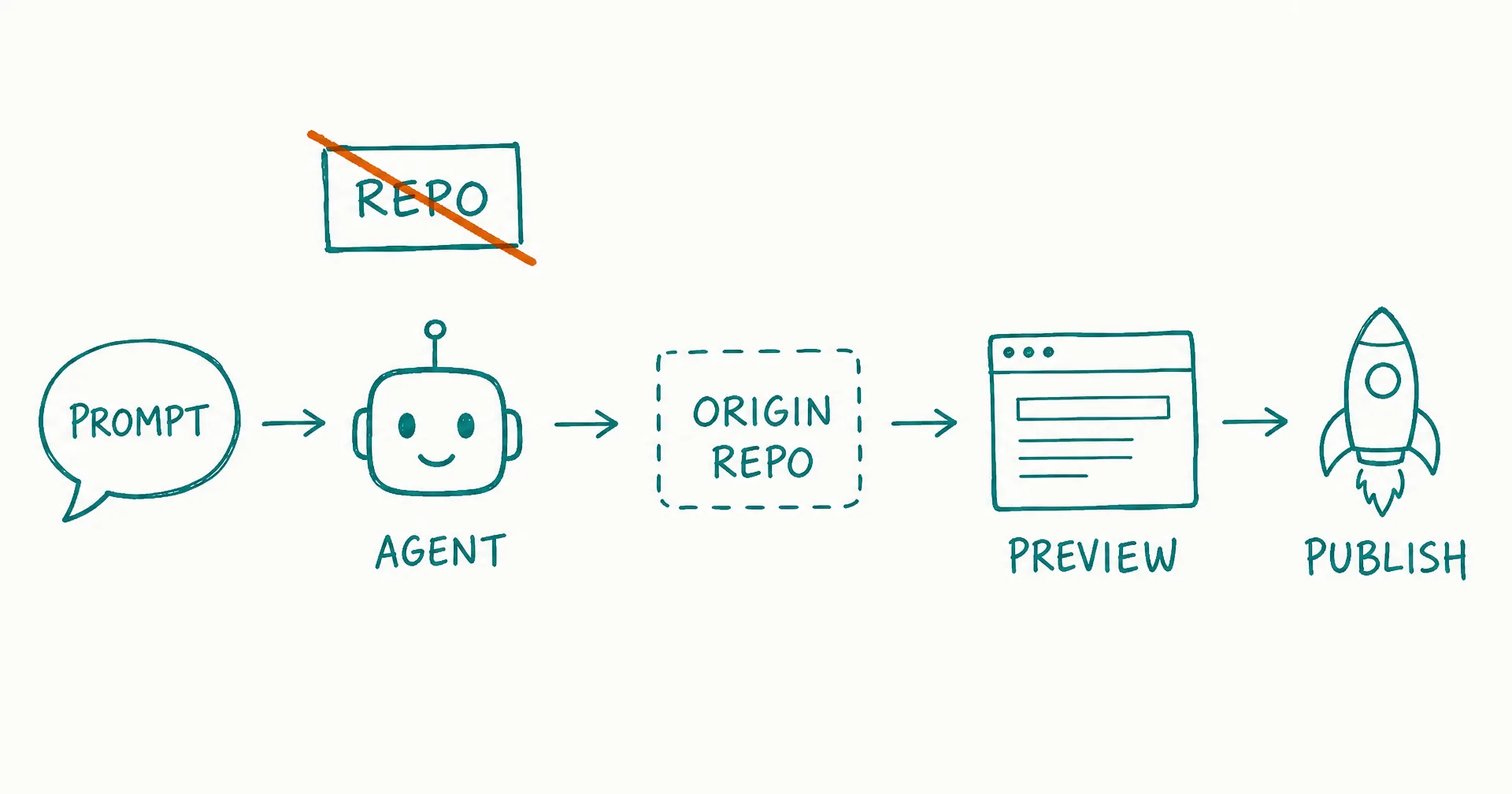
Until this week, Cursor’s Cloud Agents had one prerequisite: a connected repository. On August 27, 2026, that requirement disappeared. Select Start from scratch in the repo picker, prompt the agent, and Cursor creates an Origin repository for you in the background. Preview the running app right in your browser, then publish it to a live URL through Vercel. Prompt to product, with the repo demoted from prerequisite to byproduct.
This explainer is sourced from Cursor’s own changelog. It covers what shipped, the loop step by step, why Cursor keeps pulling more of the pipeline inside itself, and the limits worth knowing before you lean on it.
- On August 27, 2026 Cursor shipped ‘Start from scratch’: Cloud Agents no longer require a connected GitHub or other source-control provider - you prompt first, and Cursor creates an Origin repo in the background.
- When the build looks right, a Create repo button saves the work as a fully scaffolded Cursor Origin repository, with a custom or suggested name and private or internal visibility, findable later in the Codebase tab.
- Cursor now port-forwards the cloud agent’s live environment straight to your browser, so you can preview the running app and use tools like design mode before any repo exists.
- Publishing is one click through a connected Vercel account, which is required for the publish feature: prompt to live URL without leaving Cursor.
- The strategic read: with agents, Origin hosting, live previews, and deploys in one loop, Cursor is assembling a vertically integrated pipeline where the repository is a byproduct of the prompt.
- The honest limits: publish requires Vercel, the repo lands on Origin (an early beta with no public repos and no Issues), and Cloud Agents are a paid Cursor surface.
§ 01What shipped, exactly
| Step | What happens |
|---|---|
| Start | Select Start from scratch in the repo picker; prompt the agent. No GitHub or other SCM needed |
| Build | The agent works in a cloud environment; Cursor creates an Origin repo in the background |
| Preview | The live environment is port-forwarded to your browser; design mode works against it |
| Keep it | Click Create repo: a fully scaffolded Origin repo, custom or suggested name, private or internal |
| Publish | Connect Vercel, hit publish, get a live URL (a Vercel account is required) |
| Find it later | The Codebase tab lists the repo for sharing or further building |
Each piece existed somewhere before; the removal of the starting condition is the news. Two weeks ago, Cursor Origin launched as a Git host you migrate repositories to. Now repositories materialize out of prompts, which is a much better answer to the question “why does Cursor need its own forge?”
§ 02Why the repo became optional
Cursor’s August 19 changelog said the goal out loud: cloud agents that “operate as a system, building and shipping software on their own without the need for intervention at each loop,” holding a goal until it is met. A goal-holding agent that cannot begin until a human wires up source control has a hole at step zero. Start from scratch closes it.
It also completes a vertically integrated pipeline: prompt, agent, code, repo, preview, deploy - every hop inside Cursor except the final Vercel publish. For developers, that is convenience. For non-developers and solo founders, it is a threshold change: the distance between an idea and a working, previewable, publishable app is now one prompt and zero setup. That is the same direction everything in the agent category is moving - our harness ranking tracks who is assembling which pieces of it.
§ 03The honest limits
- Publish requires Vercel. There is no Cursor-native hosting for the deployed app; no account, no publish button.
- The repo lands on Origin’s early beta. Private and internal visibility only, no Issues, no public repos, and the beta’s other gaps apply - the Origin explainer has the full map, and the pricing guide covers what is and isn’t committed.
- This is a paid surface. Cloud Agents ride Cursor’s paid plans, and agent usage is metered - see our Cursor Auto pricing breakdown for how the metering behaves.
- Starting is the optimized part. Once the demo becomes real software, you inherit everything software owners inherit: review, CI, maintenance, and a repo that needs tending. The loop is built for genesis, not stewardship.
§ 04Prompt-to-app, prompt-to-role
Start from scratch collapses project setup into a sentence. The next question is who runs what got built - and that is a different layer of the stack. A cloud agent’s loop ends at a published URL. A standing worker’s loop keeps going: watching the numbers, iterating the thing, reporting on it, owning the outcome over time. That second shape is what an AI employee is, and the work it produces spans research, code, dashboards, spreadsheets, PDFs, video, and images - not just the app.
For anyone already inside Cursor, the practical advice mirrors what we said about Origin: try it on something disposable. Prompt an app into existence, poke the preview, publish it, and notice which parts of your old setup ritual you never missed. The repo-optional era of agentic development started this week, and it is going to be very hard to argue software back into requiring ceremony.
Q1What is Start from scratch in Cursor?
A Cloud Agents option shipped August 27, 2026 that removes the repository prerequisite. Select Start from scratch in the repo picker, prompt the agent, and Cursor creates an Origin repo for you in the background while the agent builds.
Q2Do Cloud Agents still work with GitHub?
Yes. Connecting GitHub or another provider still works, and mirroring remains the designed migration path for existing projects. What changed is the starting requirement: new work no longer needs any connected provider.
Q3Where does the code actually live?
In a Cursor Origin repository. Once the build is to your liking, the Create repo button saves it as a fully scaffolded Origin repo with private or internal visibility, accessible from the Codebase tab. Origin is an early beta - our Cursor Origin explainer covers what it does and doesn’t have yet.
Q4How does the live preview work?
Cursor port-forwards the cloud agent’s running environment straight to your browser, so you can use the app the agent is building, including tools like design mode, before deciding whether to keep it.
Q5How do I publish what the agent built?
Connect a Vercel account and hit publish to get a live URL. Per Cursor’s changelog, a Vercel account is required to use the publish feature - there is no Cursor-native hosting for the deployed app.
Q6Who is this for?
Anyone who wants software to exist without setting up a project first: solo founders, prototypers, and non-developers testing an idea. It lowers the entry bar for agentic development to a single prompt - which is exactly the bet the whole agent category is making.