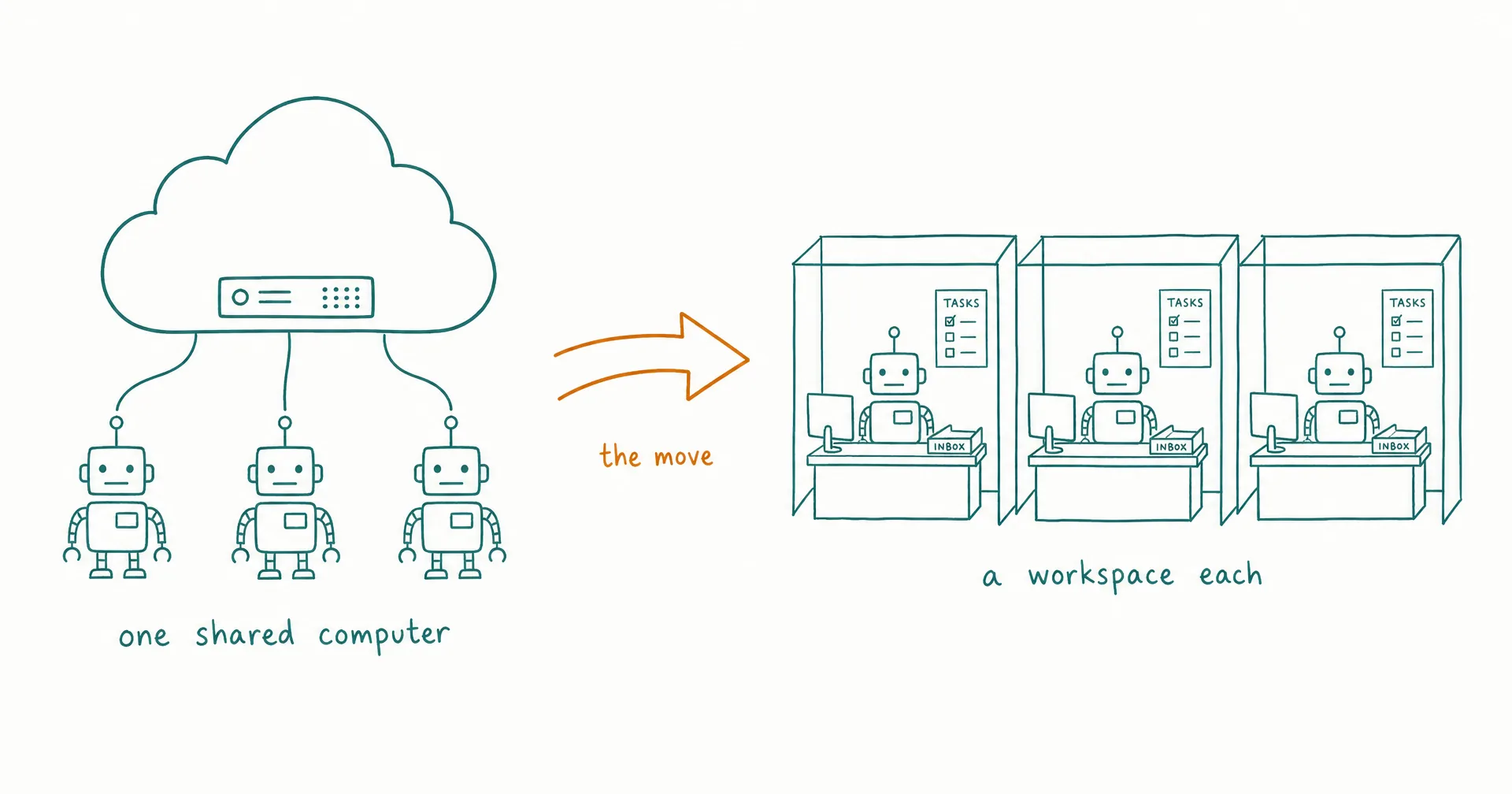
SpaceXAI’s Grok Bot, in beta since August 11, 2026, did more for this category in two weeks than years of explainer posts: it taught a mainstream audience that a persistent, named AI teammate is a real thing you can have. If you built a team of Bots, gave them roles and logins, and watched them work while you did something else, you already think in the right paradigm.
This guide is for the day you decide the paradigm deserves sturdier architecture. A Grok Bot setup has four movable parts: roles, logins, remembered context, and routines. Each one has a direct equivalent on an AI employee platform, and none of them is locked in. Below is the move, step by step, in the order that keeps you safest.
The concrete steps use CellCog, because that is what we build and what we can show receipts for. The mapping itself applies across the category, and where staying with Grok Bot is the better call, we say so.
On this page · 9 sectionsOpen
- A Grok Bot setup has four movable parts: roles, logins, remembered context, and routines. Each has a direct equivalent on an AI employee platform, and this guide moves them in that order.
- Bots become standing employees: the same persistent, named worker, plus the accountability layer of a task board, shift reports, and an inbox of record.
- The credential step matters most: SpaceXAI’s docs say separate Bots should not be treated as a security boundary (as of late August 2026), while employee platforms scope tools and credentials per worker, enforced server-side.
- Memory moves as a structured handoff brief per Bot, then changes architecture: Grok Bot’s own FAQ calls its memory something to double-check, while CellCog refuses an employee’s clock-out until its handover note exists.
- Routines map to three primitives: shift schedules, recurring tasks, and wake conditions.
- Honest gate: light workloads on an already-bundled plan are a fine reason to stay. Run the switch as a one-week parallel test, not a cutover.
- What you give up: ecosystem adjacency to Cursor and Grok surfaces, the live-pixel view of a shared computer, and the iteration pace of the biggest lab in consumer AI.
§ 01Before you switch: an honest gate
If Grok Bot came bundled with a Cursor or SuperGrok plan you keep anyway and your workloads are light, staying is a defensible answer. We say the same in our ranked alternatives list, and it stays true here.
The move pays when specific walls start costing you: weekly usage allowances that heavy work burns through in days, the one-computer security model, memory the vendor itself tells you to double-check, or the missing organizational layer once you run more than a handful of Bots. Each of those is documented, with dates and sources, in our running problems record.
One more gate before any step: you do not have to cancel anything to start. Because access is bundled with plans most subscribers keep for other reasons, the sane migration is parallel, not a cutover. Hire one employee, run it alongside your Bots for a week, and compare the work. If you want the paper version first, the feature-by-feature comparison is one page.
§ 02The map: what each concept becomes
| In Grok Bot | On CellCog | What actually changes |
|---|---|---|
| A Bot: persistent, named, role-shaped | An AI employee: a standing role | The role gains accountability: a task board, shift reports, an inbox of record |
| One shared cloud computer for all Bots | An isolated workspace per employee, each with its own Employee Computer view (shipped August 22, 2026) | Isolation becomes the default instead of a documented caveat |
| One shared login and credential pool | Tools and credentials scoped per employee, enforced on the server | You decide which worker can touch what |
| Bot memory, advisory by the vendor’s own FAQ | Shift memory that is mechanically enforced: handover notes, a fact tree, skills | An employee cannot clock out until its handover note exists |
| Sidebar sections that group Bots | Teams with leaders, reporting lines, and one org-wide task board | Structure replaces grouping |
| A weekly usage allowance tied to your plan | Usage-based work, pay for the work, not the hire | The cost depends purely on how much work you assign |
The rest of this guide walks the four moves in order: inventory, roles, logins, memory, routines.
§ 03Step 1: inventory what your Bots actually do
For each Bot, write down four things: the role it plays, the logins it uses, the routines it runs, and the accumulated context that actually matters. Be strict on that last list. SpaceXAI’s own FAQ advises asking a Bot to check current sources rather than relying on its memory for important decisions, which means the context that matters mostly lives in your documents and tools already. That is convenient for a migration: the sources move themselves.
This inventory becomes the role descriptions in step 2 and the credential checklist in step 3. Ten minutes per Bot is usually enough.
§ 04Step 2: hire roles, not prompts
The common instinct is to copy each Bot’s setup prompt into the new platform. Resist it. A prompt describes behavior; a role describes an outcome someone owns. On CellCog you hire an employee by describing the role in plain language, the way you would brief a contractor: what the business is, what this role owns, what good looks like. The employee onboards itself from there: it researches your business, proposes the metrics it should own, asks for the access it needs, and agrees an approval policy with you before touching anything consequential.
Hire one employee per standing role from your inventory, and resist merging three Bot roles into one worker to save setup time. The platform’s structure, one task board and inbox per employee, works best when a role has one accountable owner. The full walkthrough is in how to hire an AI employee, and the first 30 days covers what the settling-in period should look like.
§ 05Step 3: move the logins deliberately
This is the step to slow down on. In Grok Bot, every Bot on your account works on one shared computer with one pool of logins, and the documentation is direct about the consequence: separate Bots should not be treated as a security boundary (their security docs, as of late August 2026). Whatever one Bot can reach, every Bot can reach.
On CellCog the model inverts. You connect your tools once at the account level, then scope: you control exactly which tools and credentials each AI employee can use, and anything you don’t grant never enters that employee’s environment, enforced on the server, not just hidden in the UI. A new employee can use everything you have connected until you narrow it, so make the narrowing part of the hire itself: the bookkeeping employee gets the accounting stack, the content employee gets the CMS, and the sales employee never has a path to either. The decisions the shared-computer model let you skip are exactly the ones worth making.
§ 06Step 4: move the memory
Before retiring a Bot, ask it for a structured handoff brief: what it does, the sources it works from, the preferences and decisions it has learned, and its open items. Paste that brief into the matching employee’s first conversation. That single document is the whole data transfer, and writing it takes the Bot a minute.
From there, memory diverges architecturally. Grok Bot’s guidance treats Bot memory as advisory, something to verify against sources. On CellCog, memory is enforced: an employee cannot end a shift until it writes a handover note for its next shift, and every new shift wakes with that note, the employee’s accumulated fact tree, and its learned skills already in front of it. Employees don’t reset; what one shift learns carries into the next, so the worker gets better every week. The design is covered in how AI employee memory works and shift handovers.
§ 07Step 5: rebuild routines as shifts and watches
Bot routines map onto three primitives, and choosing the right one is most of the work. Recurring working sessions become shift schedules: the employee clocks in on your cadence and works its board. Cadenced work items become recurring tasks, including offset watches like “check this campaign’s numbers on day 3, 7, and 14.” Event-driven behavior becomes wake conditions: an inbound email, a task assignment, or a mention brings the employee online outside its schedule.
The practical upgrade over routine lists in a chat sidebar: outcomes come back to a task board on the right day, visible to you, instead of scrolling away in a conversation. Shifts and schedules covers the mechanics.
§ 08What you give up
An honest migration guide states the costs of leaving, so here they are.
- Ecosystem adjacency. If your working day lives inside Cursor and the Grok surfaces, Bots sit next to your work in a way an outside platform will not. For heavily Cursor-centric coding workflows, that proximity is real value.
- The live-pixel window. Grok Bot streams its shared computer’s screen, and watching an agent’s actual pixels is an honest kind of transparency. CellCog renders each employee’s world as structured apps instead: its mail, tasks, files, and dashboards on its own Employee Computer. We think structured beats streamed for knowing where everything stands, but if you specifically want to watch a cursor move, that is a real difference.
- The biggest lab’s iteration pace. SpaceXAI moves fast: the August 21 expansion took Grok Bot from three eligible plans to six and added a limited free trial in one announcement. Betting on that velocity is not irrational.
What you gain is the architecture this guide just walked through: a workspace and scoped credentials per worker, memory that is enforced rather than advisory, routines with a board that reports back, and usage-based cost: you pay for the work, not the hire. And the output range is wider than a chat window: the same employee ships research, code, dashboards, spreadsheets, PDFs, video, and images.
§ 09The part you cannot copy over
Everything above migrates: roles, logins, context, routines. The one thing with no Grok Bot equivalent to migrate from is the organizational layer. Bots run in parallel under you, and their docs describe a chief-of-staff pattern within one account. Employees form an organization: teams with leaders, reporting lines the employees themselves rewire as work shifts, and one task board spanning humans and AI workers alike.
That claim is checkable rather than promised. Our own org chart is public at cellcog.ai/ai-organization, and the company that sells the product runs on it daily. Per-worker isolation, another platform could ship next quarter. Advisory memory could be fixed with an architecture change. An organization of AI employees managing each other, running a real business in public, is not a feature anyone ships in a sprint. That is the thing you graduate to.
Q1Can I import my Grok Bots into CellCog directly?
There is no one-click importer, and in practice a migration does not need one. A Grok Bot setup is four movable parts: roles, logins, accumulated context, and routines. On CellCog, roles become hired employees, logins become per-employee scoped tools, context moves as a structured handoff brief, and routines become shift schedules, recurring tasks, and wake conditions.
Q2Do I have to cancel my Grok Bot plan to switch?
No. Grok Bot access is bundled into Cursor and SuperGrok subscriptions rather than sold standalone (as of late August 2026), so most subscribers keep the underlying plan anyway. The lowest-risk migration is parallel: hire one AI employee, run it alongside your Bots for a week, and compare the results before moving anything else.
Q3How much does switching to an AI employee cost?
CellCog is usage-based: trying it is free with no credit card, and you pay for the work, not the hire. There is no seat count or bundle matrix to decode; the cost depends purely on how much work you assign.
Q4Will an AI employee remember more reliably than a Grok Bot?
The difference is architectural. SpaceXAI’s own FAQ advises asking a Bot to re-check current sources rather than relying on its memory for important decisions. On CellCog, memory is enforced rather than advisory: an employee cannot end a shift until it writes a handover note, and each new shift starts with that note, the employee’s fact tree, and its skills in front of it. What it learns in one shift carries into the next.
Q5What is the hardest part of leaving Grok Bot?
Credential discipline, not data transfer. On Grok Bot every Bot shares one computer and one login pool, so nobody had to decide which worker could touch what. Moving to per-employee scoping forces those decisions, and making them deliberately during the hire is exactly what closes the security gap the shared model leaves open.