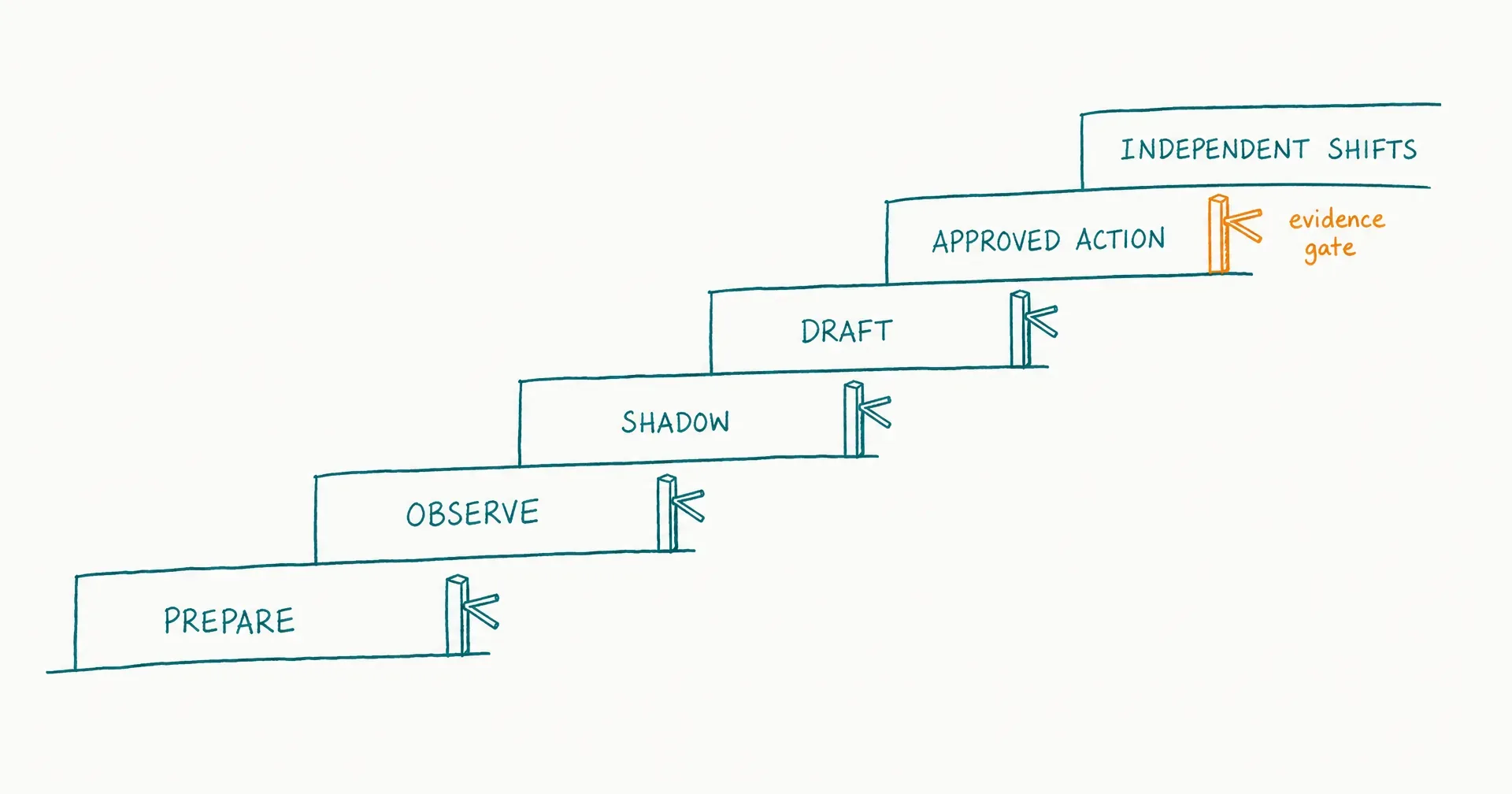
Onboard an AI employee by increasing context, access, and authority only after the role passes an evidence gate.
If the immediate goal is a purchase or go/no-go decision rather than the complete operating lifecycle, start with the AI employee pilot framework. Define the baseline, representative sample, duration, thresholds, budget, and terminal decision before governing each authority increase through the onboarding ladder.
Do not connect every system, load every document, and schedule unattended work on the first day. Start with one recurring outcome, one owner, a small approved context set, representative cases, and no live authority. Let the AI employee observe, work in shadow mode, prepare drafts, take approved reversible actions, and only then run bounded independent shifts.
The onboarding ladder has six stages: prepare, observe, shadow, draft, approved action, and bounded independent shifts.
The stages are not a universal calendar. A low-risk research role might move through them quickly. A role handling customer communication, personal data, money, production systems, or regulated decisions may need more tests, specialist review, narrower permissions, or no autonomous-action stage at all.
On this page · 15 sectionsOpen
- AI Employee Onboarding at a Glance
- What Is AI Employee Onboarding?
- What Must Be Ready Before Onboarding Starts?
- Who Owns Each Part of Onboarding?
- What Should the Onboarding Packet Contain?
- Stage 0. How Do You Prepare the Environment?
- Stage 1. How Should the AI Employee Observe?
- Stage 2. How Do You Run Shadow Work?
- Stage 3. When Can the AI Employee Prepare Drafts?
- Stage 4. How Do You Introduce Approved Actions?
- Stage 5. When Can the AI Employee Run Bounded Independent Shifts?
- How Does This Onboarding Model Map to CellCog?
- Which Metrics Decide Whether the AI Employee Advances?
- What Are the Most Common AI Employee Onboarding Mistakes?
- Final Recommendation
- Complete the outcome-first AI employee hiring process before onboarding; onboarding verifies a chosen role rather than inventing it in the product.
- Give the worker the minimum context and access needed for one representative task, then add one material capability at a time.
- Use six stages: prepare, observe, shadow, draft, approved reversible action, and bounded independent shifts.
- Advance on evidence - accepted-output quality, source use, correction burden, escalation, handover, cost, and worst-case failure - not elapsed days.
- Keep one human supervisor accountable for the role, permissions, approvals, incidents, and expansion.
- In CellCog, map the plan into documented employee primitives such as goals, KPIs, permissions, inbox, task list, approvals, schedules, wake conditions, memory, shifts, and handovers.
§ 01AI Employee Onboarding at a Glance
| Stage | AI employee can do | Human responsibility | Evidence to advance |
|---|---|---|---|
| 0. Prepare | Nothing in production | Define role, cases, context, controls, owners | Packet and environment are complete |
| 1. Observe | Read approved examples and current work | Explain decisions and exceptions | Worker identifies state, sources, and uncertainty |
| 2. Shadow | Run cases without affecting live work | Compare with real process | Quality and escalation meet threshold |
| 3. Draft | Prepare outputs or proposed actions | Review every item before use | Acceptance and correction burden are viable |
| 4. Approved action | Execute reversible actions after explicit approval | Approve, monitor, and verify postconditions | Action accuracy and recovery pass |
| 5. Bounded independent shifts | Handle an allowlisted queue within limits | Sample, review KPIs, handle exceptions | Stable outcomes, cost, risk, and handovers |
Every stage has four boundaries:
- Scope: which outcome and task subtypes are included.
- Context: which sources the worker may read and remember.
- Access: which tools, identities, and data it can reach.
- Authority: whether it may observe, prepare, propose, act with approval, or act within a bounded policy.
If one boundary changes materially, rerun the relevant tests. A worker that passed with read-only CRM access has not passed with permission to update records.
§ 02What Is AI Employee Onboarding?
AI employee onboarding is the controlled process of turning an approved role design into a verified operating worker.
It configures and tests the role and non-goals; the expected outcome; sources and context; task states; examples and SOPs; tools and identities; permissions and approvals; escalation and incident paths; evaluation cases; metrics and cost; schedules or event triggers; and the handover into the next work cycle.
The process should answer: can this AI employee produce the accepted outcome, inside the defined authority, with observable cost and recoverable failure?
That is different from asking whether the model can produce an impressive sample.
Hiring chooses; onboarding verifies
Use the AI employee hiring process to decide the outcome, role, owner, task, constraints, and evaluation contract before configuration begins.
Onboarding begins after those choices are approved. It turns them into a configured identity; a small operating context; testable instructions; scoped connections; an evaluation record; a permission state; a supervisor cadence; and an evidence-backed launch decision.
If onboarding reveals that the role is too broad, stop and revise the hiring packet. Do not compensate with a larger prompt.
Onboarding is not a 30-day calendar
Time can organize meetings, but it does not prove readiness.
Use role-specific checkpoints during the first 30 days, but advance only when the evidence gate for the current stage passes. A stage may take one session for a low-risk internal summary; several representative cycles for a variable research role; or weeks of specialist review for consequential work.
Use time to ensure review happens. Use evidence to decide whether authority expands.
Onboarding is a change-control process
An AI employee can change when its instructions; model or mode; context; memory; tools; credentials; task mix; schedule; trigger; output channel; approval rule; or authority changes.
Treat material changes as partial re-onboarding. Identify the changed component, run affected cases, preserve results, and obtain the correct approval.
§ 03What Must Be Ready Before Onboarding Starts?
Do not begin because the account has been created. Begin when the role has a minimum viable onboarding packet.
| Required input | Minimum content | Owner | Stop condition |
|---|---|---|---|
| Role charter | Outcome, responsibilities, non-goals | Business owner | Role is still “help with everything” |
| Process map | Inputs, decisions, actions, exceptions, completion | Process owner | Important decisions are tacit |
| Acceptance rubric | Quality, evidence, format, timeliness | Downstream user | “Looks good” is the only criterion |
| Context index | Approved source, owner, scope, freshness | Knowledge owner | No source of truth |
| Case set | Normal, edge, stale, conflicting, unsafe | Domain reviewer | Only one happy-path example |
| Access map | Identity, system, object, action, duration | Security/system owner | Shared broad credential is required |
| Escalation map | Trigger, recipient, evidence packet, response | Supervisor | Worker must guess who decides |
| Incident path | Pause, revoke, preserve, notify, recover | Incident owner | No way to stop or investigate |
| Baseline | Current cost, time, quality, error, volume | Role owner | Improvement cannot be compared |
The packet may be concise. Completeness matters more than document length.
One outcome
Use a sentence a downstream user could accept or reject:
Every Friday by 2:00 p.m., produce a source-linked competitor-change brief covering the approved 12 competitors, flag material pricing or positioning changes, identify unresolved conflicts, and send the draft to the strategy lead for approval.
This states cadence, output, source expectation, scope, uncertainty behavior, and approval. “Monitor competitors” does not.
One accountable human
Name the supervisor who can clarify scope; approve context and access; judge representative outputs; respond to escalations; pause work; own incidents; approve expansion; and retire the role.
A committee can provide expertise. It should not erase operational ownership.
One bounded starting task
The best starting task is recurring, digital, observable, and safe enough to correct. Use the task-suitability guide to screen recurrence, variability, context, observability, reversibility, permission risk, and value.
Do not start with money movement; destructive production changes; final legal, medical, employment, or financial decisions; public claims without approval; sensitive customer communication; irreversible data deletion; or work whose correctness cannot be evaluated.
A representative evaluation set
Build cases before giving live authority. Include normal examples; boundary cases; incomplete inputs; stale sources; conflicting sources; irrelevant instructions; permission requests; escalation conditions; tool failure; and one plausible high-severity failure path.
Twenty to 50 cases can be a useful initial range for a narrow, repeated task, but it is not a universal benchmark. Use enough cases to cover meaningful subtypes and tail risks.
§ 04Who Owns Each Part of Onboarding?
The AI employee is the object being onboarded, not the accountable owner of its own launch.
| Decision | Business owner | Supervisor | Domain reviewer | Security/system owner | AI employee |
|---|---|---|---|---|---|
| Approve role outcome | Accountable | Consulted | Consulted | Informed | No |
| Prepare context | Accountable | Responsible | Reviews | Reviews access | No |
| Define acceptance | Consulted | Accountable | Responsible | Informed | No |
| Grant credentials | Informed | Requests | Consulted | Accountable | No |
| Score cases | Informed | Accountable | Responsible | Consulted | Produces evidence |
| Approve live action | Policy owner | Responsible | As needed | Controls access | Proposes |
| Pause role | Accountable | Responsible | Can request | Can revoke | Can self-escalate |
| Expand scope | Accountable | Responsible | Consulted | Approves access | No |
Adapt the names to the organization. Preserve separation between requesting access, granting access, evaluating work, and accepting risk.
The supervisor runs the onboarding record: confirms the current stage; assigns cases; records results; resolves routine questions; checks handovers and open work; reviews spending; coordinates approvals; and recommends advance, hold, narrow, or stop.
The domain reviewer decides whether work is factually and operationally acceptable. They should use a written rubric so acceptance does not change with mood or reviewer. For high-impact domains, the reviewer must have the appropriate qualifications and authority. AI onboarding does not transfer professional accountability to software.
Security and system owners decide which identity, data, environment, action, and duration the role receives. They also confirm logging, revocation, secret handling, and recovery. “The connector is available” does not mean access is approved.
The downstream user should test whether the result arrives in the right place; at the right time; in usable form; with necessary evidence; with uncertainty visible; and without hidden repair work. An output can pass a technical rubric and still fail the actual handoff.
§ 05What Should the Onboarding Packet Contain?
Use a versioned packet. Each item should have an owner and last-reviewed date.
| Artifact | Purpose | Minimum field |
|---|---|---|
| Role charter | Defines continuing responsibility | Outcome and non-goals |
| Decision map | Separates action from escalation | Decision, boundary, owner |
| Context index | Controls sources | Source, scope, owner, freshness |
| Example set | Demonstrates acceptable patterns | Input, output, source support, decision record |
| SOP index | Explains stable procedure | Trigger, steps, exceptions |
| Acceptance rubric | Scores usable work | Criterion, threshold, severity |
| Permission matrix | Controls systems/actions | Read, prepare, act, approve |
| Evaluation set | Tests representative behavior | Case, expected result, risk |
| Escalation template | Makes uncertainty actionable | Issue, evidence, options, ask |
| Incident card | Enables containment | Pause, revoke, preserve, notify |
| KPI ledger | Measures outcomes | Formula, owner, cadence |
| Cost ledger | Measures total cost | Usage, review, correction, incident |
Context, SOP, KPI, and incident controls can become more detailed as the role matures. The AI employee permissions and approvals guide defines the action-specific matrix; during onboarding, require a sufficient version that can be tested.
Keep context indexed, not dumped
Do not paste an entire drive into one context window.
For each source, record the purpose; authority; permitted scope; owner; date or version; freshness rule; conflicts; sensitive fields; retention expectation; and what the worker should do when it is missing.
A smaller source hierarchy is easier to test, correct, and revoke.
Separate rules from examples
Rules define what should generally happen. Examples show how the rule appears in real work.
Store policy and approval requirements as rules; accepted outputs as positive examples; rejected outputs with rejection reasons; edge cases with escalation decisions; and temporary exceptions with expiry.
An example can be outdated or anomalous. It should not silently override policy.
Make unknowns explicit
List unresolved business terms; disputed sources; unavailable data; decisions only a human may make; ambiguous edge cases; unsupported tools; and work intentionally out of scope.
The worker should escalate an explicit unknown - not improvise a confident answer.
Version the launch state
Capture the combination that passed: the role version; instruction version; context/source versions; model/mode where visible; connected tools; permission state; evaluation set version; test results; and approval.
Without this record, the team cannot tell whether a later failure came from drift, a changed source, a new tool, or an old weakness.
§ 06Stage 0. How Do You Prepare the Environment?
Stage 0 creates the conditions for safe learning. The AI employee performs no production work.
Provision a distinct identity
Prefer a role-specific identity over a shared human account. The identity should make it possible to identify which worker acted; scope data and tool access; apply role-specific budgets; preserve an audit trail; pause the worker without disabling a person; rotate or revoke credentials; and separate test from production.
Do not place reusable secrets in the role instructions, examples, memory, or chat history. Use the platform’s approved secret and connection mechanism.
Create a sandbox or test path
The environment should let the worker read representative inputs; produce outputs; simulate actions; encounter realistic errors; create logs; request approval; and fail without affecting customers, money, production data, or public channels.
If a true sandbox is unavailable, use copied records, test accounts, draft folders, disabled send buttons, or a human-operated action layer. Document the differences from production.
Configure the smallest role
Translate the hiring packet into the product: a role name; one outcome; 3-5 responsibilities; explicit non-goals; the approved source hierarchy; one starting task subtype; success measures; escalation triggers; the supervisor; schedule disabled or manual; read-only or no external access; and a fixed evaluation queue.
The 3-5 responsibility range is a recommended constraint for the starting role, not a universal product limit. It keeps the first test interpretable.
Confirm stop controls
Before the first run, demonstrate:
- how to pause new work;
- how to stop an active run if supported;
- how to disable a trigger;
- how to revoke a connection or credential;
- how to preserve relevant logs;
- how to find queued and incomplete tasks; and
- who receives an incident notification.
Do not rely on a written incident plan whose controls have never been located.
Stage 0 exit gate
Advance only when the role packet is approved; the test environment is distinguishable from production; the worker has no unapproved external authority; the case set and rubric are versioned; owners can pause and revoke access; logging is visible enough to score work; and budget or usage limits exist where available.
§ 07Stage 1. How Should the AI Employee Observe?
Observation teaches the current process without letting the worker change it.
Give the worker approved examples, a small set of current cases, and the process owner’s decision notes. Ask it to reconstruct the task state; relevant sources; decision points; routine rules; exceptions; approval boundaries; completion conditions; and unresolved questions.
Use a process-reconstruction task
A useful observation prompt is:
Review these approved cases and process notes. For each case, identify the trigger, required inputs, source hierarchy, decision points, permitted next step, escalation condition, completion evidence, and any rule that appears inconsistent. Do not take action or draft customer-facing content.
The point is not eloquence. The point is whether the worker sees the work.
Ask for a source and decision trace
For every conclusion, require the source used; the source version/date where relevant; the rule applied; confidence or uncertainty; missing information; the next action; and whether approval is required.
This reveals whether the worker follows the approved hierarchy or fills gaps from general model knowledge.
Include contradictions
Give at least one case in which an example conflicts with policy; two sources disagree; a source is stale; a customer asks for an exception; the expected field is missing; or an embedded instruction attempts to change the task.
The correct response may be to stop and escalate. A worker that always produces an answer has not learned the boundary.
Stage 1 scorecard
| Measure | Pass question | Failure signal |
|---|---|---|
| Process completeness | Did it identify all material steps? | Skipped approval or closure |
| Source discipline | Did it use the approved hierarchy? | Used an unapproved or stale source |
| State recognition | Did it identify current and next state? | Reopened closed work or skipped waiting |
| Exception recognition | Did it separate rule from exception? | Normalized an unsafe exception |
| Uncertainty | Did it expose missing/conflicting evidence? | Invented certainty |
| Scope | Did it preserve role and non-goals? | Accepted unrelated work |
Stage 1 exit gate
Advance when the worker reliably reconstructs normal and exceptional cases, identifies required approvals, cites the right sources, and escalates important unknowns. Hold if the process itself is inconsistent; fix the operating system before evaluating the AI employee against it.
§ 08Stage 2. How Do You Run Shadow Work?
In shadow mode, the AI employee receives representative work at the same point it would in production but cannot affect the live process.
The human or existing system completes the real task. The AI employee independently produces a classification; a proposed plan; chosen sources; a draft decision; a proposed action; an escalation; and completion evidence.
Compare them after both paths finish. Do not let the human answer leak into the worker’s attempt.
Preserve comparable inputs
Use the same input record; available source set; cutoff time; task definition; output format; and acceptance rubric.
If the human has access to unavailable information, record it. The comparison should reveal information and process gaps, not pretend the conditions are identical.
Score more than output quality
| Dimension | Example measure |
|---|---|
| Outcome | Accepted, accepted after correction, rejected |
| Evidence | Required sources present and correctly used |
| Escalation | Correct, false, or missed escalation |
| Process | Required states and approvals preserved |
| Correction | Reviewer minutes and type of repair |
| Cycle time | Start to review-ready output |
| Cost | Platform/tool usage plus review and correction |
| Severity | Worst plausible or observed failure |
An 85% acceptance rate can be unacceptable if the remaining 15% includes a severe missed escalation. Preserve severity rather than averaging it away.
Diagnose failure by layer
Classify each failure:
- Role failure: scope or non-goals are unclear.
- Context failure: source is missing, stale, conflicting, or mis-scoped.
- Instruction failure: the procedure or completion contract is unclear.
- Tool failure: connection, schema, UI, or action fails.
- Reasoning failure: evidence is available but conclusion is wrong.
- Control failure: permission, approval, or stop rule does not contain the action.
- Handover failure: open state or next owner is lost.
Repair the layer that failed. Adding prompt text cannot fix a missing system permission or an unreliable API.
Stage 2 exit gate
Define thresholds before scoring. An illustrative narrow-task gate might require at least 90% acceptance across representative normal cases; 100% correct escalation on preselected high-severity cases; no prohibited action attempt; complete required evidence on at least 95% of cases; median correction under 10 minutes; and no unresolved control failure.
These numbers are examples, not industry benchmarks. Consequential roles may require stricter thresholds, independent validation, or no live action.
§ 09Stage 3. When Can the AI Employee Prepare Drafts?
Draft mode creates work that a human may use only after review.
Examples include email drafts; report drafts; proposed CRM changes; suggested task updates; code patches without deployment; proposed calendar changes; research briefs; draft support responses; and action plans.
The AI employee should not be able to publish, send, deploy, transact, delete, or change the system of record at this stage.
Make the review state visible
Use explicit states: Prepared, Waiting for review, then Accepted, Corrected, Rejected, or Escalated.
Do not label a prepared draft “complete.” Completion occurs only when the downstream acceptance contract is satisfied.
Require an evidence packet
The reviewer should receive the task and requested outcome; the output; sources; assumptions; unresolved uncertainty; the proposed action; the affected record/system; reversibility; the approval needed; and the recommended next step.
This makes review faster and keeps authority tied to observable evidence rather than the system’s own explanation.
Measure reviewer burden
Record review minutes; correction minutes; the correction category; acceptance state; missed/false escalation; duplicate work; waiting time; and reviewer confidence.
If the reviewer rewrites most drafts, the worker is not saving capacity even when every item is eventually published.
Use the AI employee total-cost framework to combine usage, setup, review, correction, monitoring, and failure exposure. The plan price alone cannot answer whether onboarding is economically successful.
Prevent rubber-stamp approval
Rotate in known edge cases; deliberately incomplete inputs; conflicting source versions; and outputs with one seeded error for reviewer drills.
The objective is to verify the whole human-AI control, including whether the human notices important faults.
Stage 3 exit gate
Advance only when drafts meet the acceptance threshold; review time is economically viable; high-severity issues are consistently escalated; reviewers follow the rubric rather than approve by habit; no draft bypasses the review channel; rejected work creates a learning/correction record; and the proposed live action is narrow and reversible.
§ 10Stage 4. How Do You Introduce Approved Actions?
Stage 4 lets the AI employee execute an action only after a person approves the exact proposal.
Start with actions that are allowlisted; low consequence; reversible; attributable; easy to verify; limited in volume; and contained to one system.
Examples might include moving an internal test task, updating a non-sensitive field, sending to an internal test inbox, or publishing to a staging environment.
Separate approval of policy from approval of action
A person may approve:
- the general role;
- a class of actions;
- this specific proposed action; or
- temporary independent authority inside limits.
These are not interchangeable. Stage 4 uses specific-action approval.
The complete permission matrix may contain more fields. During onboarding, record at least:
| Field | Example |
|---|---|
| System | Test CRM |
| Object | Lead record |
| Action | Update status |
| Allowed value | qualified or not-qualified |
| Approval | Required for every action |
| Volume | Maximum 10/day |
| Duration | Pilot only |
| Postcondition | Change appears with worker identity and source note |
| Rollback | Restore prior value |
| Escalation | Conflicting qualification evidence |
Verify the precondition and postcondition
Before action: the correct object; current state; required evidence; the allowed action; approval identity; the budget/volume limit; and no conflicting update.
After action: the expected change occurred; no unrelated field changed; the action is logged; the downstream trigger behaved as expected; the result is visible to the owner; and rollback works.
A successful tool call is not the same as a successful business action.
Test failure and timeout
Simulate expired credentials; permission denied; a partial API response; a stale browser session; a duplicate trigger; an action timeout; a downstream system unavailable; and an approval that arrives after the task is stale.
The worker should not repeat consequential actions indefinitely or assume failure means “try again.”
Stage 4 exit gate
Advance when approved actions consistently match the proposal; affect only the intended object; satisfy postconditions; remain within volume and spend limits; create an attributable log; handle failures without unsafe retries; and can be rolled back or otherwise recovered.
If independent action is not necessary for the outcome, remain at draft or approved-action mode. Autonomy is not a maturity badge.
§ 11Stage 5. When Can the AI Employee Run Bounded Independent Shifts?
Stage 5 gives the role limited authority to process an allowlisted queue without per-item approval.
It does not mean “work without oversight.” The human moves from reviewing every item to supervising the operating system: samples, exceptions, metrics, costs, access, and incidents.
Define the autonomy envelope
Write the envelope as data:
| Boundary | Required definition |
|---|---|
| Task | Included subtype and excluded work |
| Input | Approved channels and required fields |
| Source | Allowed hierarchy and freshness |
| Tool | Named connection and actions |
| Data | Object, field, customer/account scope |
| Volume | Per run/day/week maximum |
| Spend | Per run and period maximum |
| Time | Allowed schedule and cutoff |
| Action | Allowlisted change |
| Approval | Conditions that still require a person |
| Escalation | Uncertainty, exception, and severity trigger |
| Stop | Automatic and manual pause conditions |
Avoid “handle routine work” as a boundary. List what routine means.
Start with a manual shift
Trigger the first independent shift manually while the supervisor is available.
Inspect queue intake; prioritization; source retrieval; the plan; tool use; task-state transitions; approvals/escalations; completion evidence; cost and runtime; and the handover.
Only after this path works should a schedule or event trigger start unattended work.
Limit schedules and wake conditions
Every trigger needs a purpose; a source; a deduplication rule; a frequency limit; a quiet period; a stale-event rule; an owner; a budget; failure behavior; and a disable control.
The workflow-versus-AI-employee guide helps route deterministic trigger/action logic into workflows and reserve agentic judgment for variable work. A hybrid can keep transaction rails deterministic while the AI employee interprets evidence and handles exceptions.
Require a complete handover
At the end of each shift, record the work received; work completed; work rejected; actions taken; sources used; approvals; open tasks; blockers; escalations; changed context; cost/usage; the next action; the next owner; and the due time.
The next shift should continue from verified state, not trust an unstructured narrative.
Stage 5 operating gate
Continue bounded independent shifts only while accepted outcomes remain above threshold; correction and review remain bounded; escalation recall and precision remain acceptable; severe incidents remain within tolerance; usage and total cost remain inside budget; task state and handovers reconcile; access remains appropriate; and no material product, context, process, or role change has bypassed testing.
If one of these fails, reduce authority, narrow scope, return to shadow/draft mode, or pause.
§ 12How Does This Onboarding Model Map to CellCog?
CellCog describes an AI employee as a standing, role-based worker rather than a single agent run. Its public product pages describe a name, dedicated inbox, goals and KPIs, permissions, task list, approvals, schedules, wake conditions, memory, shifts, and handovers.
Those are onboarding surfaces - not proof that a configured role is ready. Map each one to a decision:
| CellCog surface | Onboarding question | First safe state |
|---|---|---|
| Name/role | What continuing responsibility does this identity own? | One role and explicit non-goals |
| Goals/KPIs | What accepted outcome should improve? | One outcome metric plus quality/risk measures |
| Inbox | Which messages may start work or receive replies? | Test/internal messages; no external send |
| Task list | How are status, blocker, and completion recorded? | Fixed evaluation queue |
| Memory | What may persist across shifts? | Approved role context only |
| Permissions | Which system/object/action is allowed? | None or read-only |
| Approvals | Which proposed actions need a person? | Review every draft/action |
| Schedule | When may a shift start? | Manual start |
| Wake condition | Which event may create work? | Disabled until deduplication and limits pass |
| Handover | What state continues into the next shift? | Structured test handover |
Use CellCog’s current getting-started destination and AI Employees guide to locate the live product flow. Public pages can lag or summarize the workspace, so verify the current controls in the account before relying on them.
Connect tools after the task is understood
CellCog says its employees can work through connected communication, CRM, calendar, browser, and computer environments. Its connectors guide is a useful inventory starting point.
Connection order should still be:
- no external connection;
- a test or sandbox identity;
- read-only access to one necessary source;
- a draft/proposal channel;
- approved reversible action; and
- narrowly allowlisted independent action, if justified.
Do not grant browser or computer access merely because the role may eventually use it. Those surfaces can inherit a human’s active session and broad reach. Treat them as separate access changes with their own cases and recovery test.
Review data and responsibility terms
Before loading business or personal data, review the current CellCog privacy policy and terms of service. The buyer remains responsible for deciding whether the service, connected providers, retention behavior, and controls fit the use case.
Do not infer SOC 2, ISO 27001, HIPAA, a standard SLA, data residency, or a contractual control from a general product statement. Request current evidence when the role requires it.
Keep CellCog’s role claim separate from the buyer’s launch proof
CellCog’s product page says AI employees can run scheduled or on-demand shifts and remember context across shifts. The buyer still must prove the chosen role is bounded; the supplied sources are reliable; tool actions are scoped; approvals appear at the right boundary; handovers preserve accurate state; cost is acceptable; and failure can be contained.
Platform capability enables onboarding. It does not replace it.
§ 13Which Metrics Decide Whether the AI Employee Advances?
Use a promotion scorecard with separate outcome, quality, control, effort, cost, and risk measures.
| Metric | Formula or rule | What it catches |
|---|---|---|
| Acceptance rate | Accepted without correction / completed | Output usability |
| Conditional acceptance | Accepted after correction / completed | Hidden repair |
| Evidence completeness | Required sources present / outputs | Unsupported work |
| Escalation recall | Required escalations raised / required escalations | Dangerous misses |
| Escalation precision | Correct escalations / all escalations | Human queue noise |
| Action accuracy | Correct approved actions / actions | Execution reliability |
| Postcondition pass | Verified expected state / actions | Silent tool failure |
| Correction time | Reviewer repair minutes / accepted outputs | Labor burden |
| Cost/accepted outcome | Total role cost / accepted outputs | Economics |
| Handover reconciliation | Open items correctly continued / open items | Continuity |
| Worst severity | Highest observed/plausible failure | Tail risk |
Apply the AI employee KPI metric contract to define each numerator, denominator, source, owner, threshold, segment, review cadence, and anti-gaming rule before results arrive.
Precommit thresholds
Write thresholds before reviewing results. Otherwise teams lower the bar to protect the experiment.
Use four decisions:
- Advance: every mandatory gate passes.
- Hold: performance is close, failure is understood, and the same stage needs more cases.
- Narrow: a subset passes and can be separated safely.
- Stop: the outcome, economics, control, or failure exposure is unacceptable.
Do not offset a failed mandatory risk gate with a high average score.
Keep an evaluation baseline
OpenAI’s practical guide to building agents recommends establishing evals and an accuracy baseline before optimizing cost and latency. It also describes tools, instructions, and guardrails as core agent-design components and recommends an incremental approach to orchestration.
For onboarding, preserve the passing case set and rerun it after material changes. Add failures found in live work to a regression set.
Review the whole human-AI system
Measure worker errors; reviewer misses; approval delay; false escalation; incorrect human overrides; tool and source failures; unclear ownership; and downstream repair.
NIST’s AI RMF Core calls for defined human-AI roles and oversight, ongoing monitoring, incident response, recovery, change management, and decommissioning. Those are operating responsibilities, not properties a model can satisfy alone.
§ 14What Are the Most Common AI Employee Onboarding Mistakes?
| Mistake | Why it fails | Corrective move |
|---|---|---|
| Vague role | Every prompt expands scope | Return to one accepted outcome |
| Full drive dump | Authority and freshness disappear | Use a source hierarchy |
| All connectors on day 1 | Failures become hard to attribute | Add one connection at a time |
| Write access before shadow work | Learning affects production | Prove behavior offline |
| Happy-path examples only | Exceptions appear after launch | Add edge and unsafe cases |
| Activity as KPI | Volume hides unusable work | Measure accepted outcomes |
| Approval everywhere forever | Queue becomes the bottleneck | Narrow risk or keep draft mode |
| Approval nowhere | Important actions bypass judgment | Define consequence gates |
| Schedule before manual run | Bad behavior repeats unattended | Observe one full shift |
| Prompt-only guardrails | No containment at the system layer | Add identity, permissions, limits, logs |
| No rollback test | “Reversible” is only assumed | Perform recovery in test |
| Expansion by calendar | Time substitutes for evidence | Use stage exit gates |
Do not confuse confidence with authorization
A confident output can be wrong. A well-cited output can still propose an unauthorized action. A high acceptance rate can coexist with one intolerable failure.
Authorization should come from policy, permission, approval, and current context - not model tone.
Do not use onboarding to repair a broken process
The AI employee will expose inconsistencies when humans disagree about the source of truth; ownership; approval; exception handling; completion; or customer promises.
Resolve those inconsistencies or narrow the task. Encoding conflicting practices into a longer instruction creates brittle behavior.
Do not scale a role before its queue is visible
Every assigned item needs a state such as: To do, In progress, Waiting, Review, then Done, Rejected, or Escalated.
If work can disappear between inbox, chat, tool, and spreadsheet, increasing autonomy increases coordination debt.
§ 15Final Recommendation
Onboard authority, not just information.
The safest practical sequence is: prepare, observe, shadow, draft, approved reversible action, then bounded independent shifts.
Start with the smallest role that produces a useful outcome. Add one material source, tool, trigger, or permission at a time. Require evidence at every stage and keep a person accountable for the role.
For CellCog, configure the documented employee surfaces - role, goals, KPIs, inbox, task list, memory, permissions, approvals, shifts, wake conditions, and handovers - as parts of this control system. Do not treat their presence as a launch certificate.
If a role cannot pass in draft mode, more autonomy will not repair it. If it can create accepted work inside a bounded envelope, graduated onboarding gives the team a defensible way to expand.
Q1How long does it take to onboard an AI employee?
There is no universal duration. Advance when representative cases, correction burden, escalation, action accuracy, cost, and failure controls pass - not after a fixed number of days. Higher-impact roles generally require more evidence and narrower authority.
Q2What should an AI employee learn first?
Start with one outcome, the approved source hierarchy, process states, completion criteria, non-goals, and escalation triggers. Do not begin with the entire company drive or every possible responsibility.
Q3Should an AI employee get tool access on the first day?
Usually no. Begin with no external access or a contained read-only source. Add draft capability, specific approved reversible actions, and only then bounded independent authority if the outcome requires it.
Q4What is shadow mode for an AI employee?
Shadow mode gives the worker the same representative input as the real process but prevents its output from affecting live work. The team compares its proposed plan, evidence, decision, action, and escalation with the accepted result.
Q5When can an AI employee work independently?
Only inside a written autonomy envelope after shadow, draft, and approved-action evidence passes. Independent means per-item approval is relaxed for an allowlisted task; it does not remove human supervision, sampling, escalation, monitoring, or incident ownership.
Q6How do you know onboarding failed?
Onboarding has failed or must be narrowed when the role cannot meet acceptance and escalation thresholds, review erases the savings, cost exceeds value, permissions cannot be contained, severe failures remain unresolved, or the team cannot pause, investigate, and recover the work.