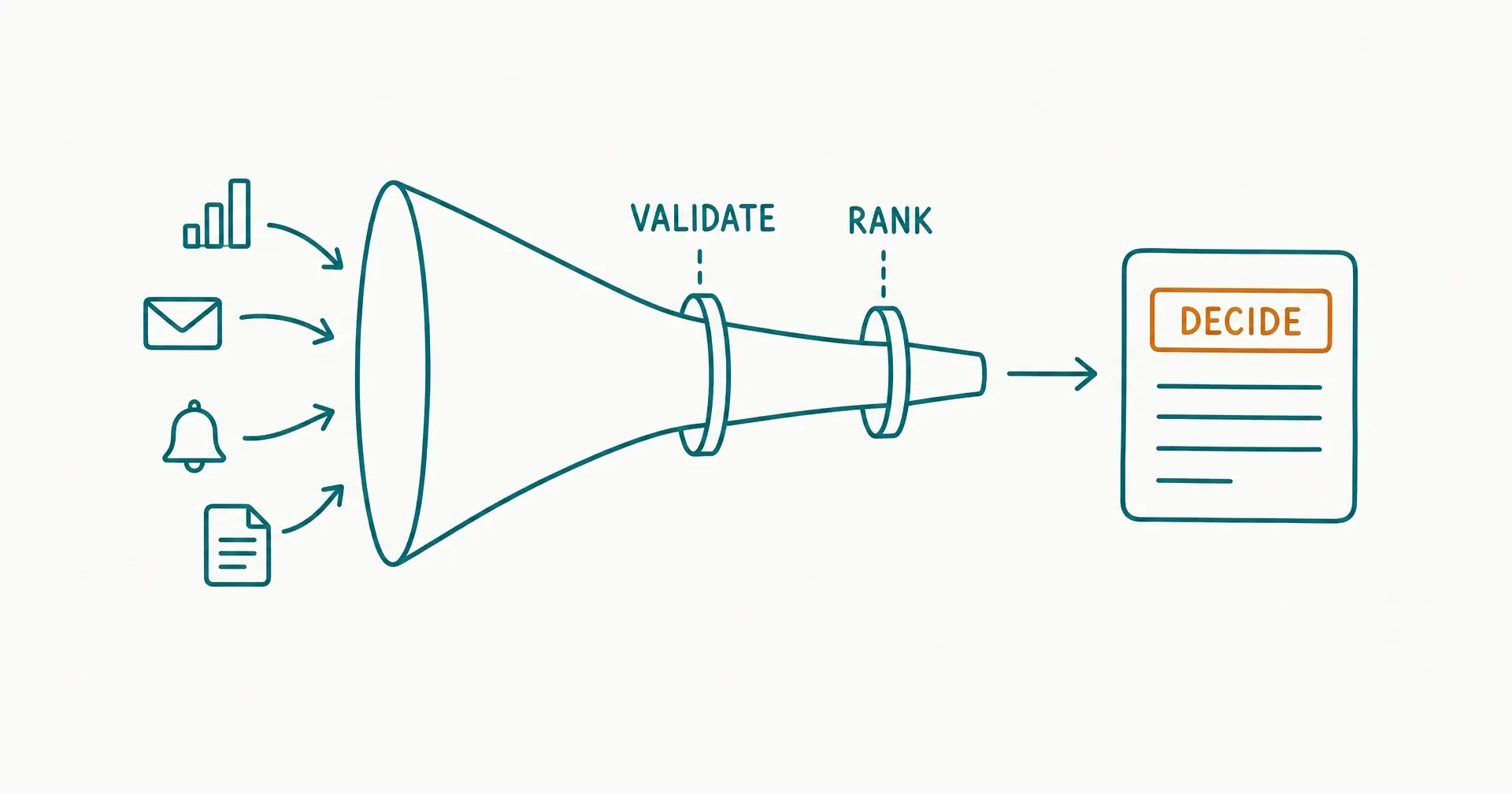
An executive briefing should reduce decision latency, not compress more noise onto one page.
The useful output is not “everything that happened.” It is a reviewed, source-linked view of:
- what materially changed;
- why it matters now;
- what remains uncertain;
- which decision or intervention is needed;
- what can wait;
- who owns the next action; and
- when the item will return.
An AI employee can help collect recurring signals, reconcile known fields, identify threshold breaches, draft concise briefing items, and maintain the action loop. It should not invent executive priorities, turn weak evidence into confidence, or make consequential decisions without the named owner.
The operating pattern is:
Schedule > collect approved signals > validate and reconcile > rank exceptions > draft decision items > human review > deliver > capture decisions and actions > follow up
On this page · 11 sectionsOpen
- What Is an AI Executive Briefing Workflow?
- What Should the Briefing Charter Define?
- How Should the Workflow Collect and Normalize Signals?
- How Do You Validate Evidence Before Drafting?
- How Should the Workflow Detect and Rank Exceptions?
- How Do You Turn an Exception into a Decision Item?
- Who Should Do What in the Workflow?
- What Should Human Review Check?
- How Do You Capture Decisions, Actions, and Handovers?
- How Should You Pilot and Measure the Workflow?
- What Template and Runbook Should You Use?
- Begin with a briefing charter: audience, decisions, source scope, thresholds, cadence, deadline, owner, and excluded topics.
- Collect from approved systems and preserve direct source links, timestamps, reporting periods, and data owners.
- Separate observed facts, derived measures, assumptions, judgments, recommendations, and decisions. Do not let fluent prose blur them.
- Rank exceptions by consequence, urgency, magnitude, confidence, and executive actionability - not by novelty or the amount of available text.
- Draft each item as: change, evidence, implication, decision or attention needed, options, recommendation, owner, and deadline.
- Require human review for materiality, uncertainty, recommendation, sensitive content, and external or irreversible action.
- Close the loop by recording the decision, action owner, due date, dependencies, and next checkpoint; otherwise the briefing becomes a recurring summary.
§ 01What Is an AI Executive Briefing Workflow?
An AI executive briefing workflow is a recurring operating process that turns approved organizational signals into a concise, reviewed decision artifact.
The AI may perform bounded parts of that process:
- retrieve reports and records;
- compare periods;
- run approved calculations;
- detect threshold breaches;
- group duplicate signals;
- trace a metric to its source;
- identify missing or conflicting data;
- draft briefing items;
- route items for review;
- assemble the approved brief;
- distribute it through an authorized channel; and
- capture decisions and assigned actions.
The executive and accountable business owners retain authority over interpretation, tradeoffs, commitments, and action.
Briefing versus summary versus dashboard
| Artifact | Primary job | Reader action | Main failure |
|---|---|---|---|
| Dashboard | Show current measures and trends | Explore and monitor | Too much interpretation left to reader |
| Summary | Condense source material | Understand | No decision or priority |
| Alert | Signal a threshold or event | Investigate quickly | Context is too narrow |
| Executive briefing | Frame material exceptions and decisions | Decide, direct, or acknowledge | Unsupported recommendation |
| Decision memo | Analyze one consequential choice | Approve a selected option | Too slow or detailed for daily cadence |
| Action register | Track commitments and ownership | Execute and follow up | Detached from evidence and decision context |
The briefing can link to dashboards, alerts, memos, and action records. It should not duplicate them.
The AI employee examples guide distinguishes attractive demos from production roles with stable inputs, observable outcomes, clear authority, and human ownership. An executive briefing qualifies only when the recurring information and decision job is genuinely defined.
The accepted outcome
Define one accepted briefing as:
Delivered by the agreed deadline, complete for all required domains, source-linked, reconciled to the approved reporting periods, within the length limit, reviewed by the named owner, and followed by a decision or acknowledgement record for every action item.
This is stricter than “brief generated.”
§ 02What Should the Briefing Charter Define?
The charter prevents a daily brief from expanding into an unbounded request to know everything.
Briefing charter
| Field | Required decision | Example |
|---|---|---|
| Audience | Who receives and acts? | CEO and operating team |
| Cadence | When is it produced? | Weekdays at 7:30 a.m. |
| Decision window | What period does it support? | Decisions before 10:00 a.m. |
| Scope | Which domains are included? | Revenue, delivery, cash, customer, people |
| Exclusions | What is handled elsewhere? | Legal advice, personnel cases, incident command |
| Source authority | Which systems are approved? | CRM, finance, support, project, incident systems |
| Thresholds | What earns attention? | Material variance, deadline risk, severe incident |
| Length | How much can the brief contain? | 5 decision items plus appendix |
| Review | Who approves the final brief? | Chief of staff |
| Distribution | Where can it be sent? | Restricted executive workspace |
| Retention | How long is it kept? | According to records policy |
| Owner | Who operates and improves it? | Strategy operations lead |
The charter should also define sensitive categories that are excluded, redacted, or restricted to a smaller audience.
Decision inventory
Start with recurring executive decisions, not available data.
| Decision family | Example question | Required evidence |
|---|---|---|
| Resource | Where does capacity need to move? | Demand, backlog, constraints, forecast |
| Commercial | Does a deal or forecast need intervention? | Stage, value, evidence, risk, owner |
| Delivery | Which commitment may miss? | Milestone, dependency, variance, recovery |
| Customer | Which account needs leadership action? | Impact, history, sentiment, response owner |
| Financial | Which variance needs explanation or action? | Actual, plan, driver, forecast |
| Risk | What crossed an escalation threshold? | Event, consequence, confidence, control |
| People | Where is a capacity or coverage issue material? | Approved aggregate workforce signals |
| Strategy | What external change affects an active assumption? | Source, timing, scenario, exposure |
An input without a decision, owner, or monitoring purpose probably does not belong in the main brief.
The best-tasks framework for AI employees helps test whether collection and drafting are recurring, evidence-rich, observable, bounded, and supported by a safe escalation path.
§ 03How Should the Workflow Collect and Normalize Signals?
Use a source registry rather than giving the agent open-ended access.
Source registry
| Source | Owner | Authoritative for | Refresh | Expected availability | Access |
|---|---|---|---|---|---|
| CRM forecast | Revenue operations | Opportunity stage and forecast category | Nightly | 6:00 a.m. | Read selected fields |
| Finance actuals | Finance | Booked actuals and approved plan | Daily/monthly | 6:30 a.m. | Read approved report |
| Support system | Customer operations | Severity, age, and status | Near real time | Current | Read aggregate and allowed cases |
| Project system | Delivery operations | Milestones, owners, dependencies | Hourly | Current | Read approved portfolios |
| Incident system | Security/operations | Severity and incident state | Event-driven | Current | Read allowed summary |
| Market feed | Strategy | Approved external signals | Daily | 5:30 a.m. | Read allowlisted sources |
For every retrieval, record:
- source ID;
- source owner;
- reporting period;
- extraction time;
- freshness;
- filter or query;
- record count;
- version or snapshot;
- access identity;
- missing fields;
- validation result; and
- destination briefing item.
Normalize before comparing
Two fields with the same label may not have the same definition.
| Signal | Normalization question |
|---|---|
| Revenue | Booked, billed, recognized, contracted, or forecast? |
| Pipeline | Gross, weighted, qualified, or committed? |
| Customer count | Logo, contract, workspace, account, or active user? |
| Churn | Customer, revenue, gross, net, voluntary, or total? |
| Incident | Event, case, confirmed incident, or severe incident? |
| Delivery status | Team-reported color, schedule variance, or forecast date? |
| Headcount | Approved, filled, active, full-time equivalent, or total worker? |
Create a metric dictionary with formula, source, owner, reporting period, exclusions, rounding, and current version. If definitions differ, keep them separate.
Handle freshness explicitly
Use a freshness state:
| State | Rule | Briefing treatment |
|---|---|---|
| Current | Available within expected window | Normal use |
| Delayed | Late but within approved tolerance | Label age and assess impact |
| Stale | Older than tolerance | Do not present as current |
| Missing | Retrieval failed or source absent | Show gap and owner |
| Replaced | A newer authoritative snapshot exists | Use newer snapshot |
| Conflicting | Two authoritative paths disagree | Escalate for reconciliation |
Never fill a missing current value with an older value without labeling the substitution.
The AI employee context-pack guide helps separate stable role context from current task evidence. Briefing definitions and audience rules belong in governed context; today’s numbers belong in time-stamped evidence.
§ 04How Do You Validate Evidence Before Drafting?
Validation occurs before narrative generation.
Evidence checks
| Check | Question | Failure state |
|---|---|---|
| Authority | Is this the approved source for the claim? | Unapproved source |
| Identity | Does the record belong to the right entity? | Wrong account/project/period |
| Completeness | Are required fields present? | Incomplete |
| Freshness | Is the reporting period current enough? | Stale |
| Reconciliation | Do totals and components agree? | Unreconciled |
| Definition | Does the metric use the approved formula? | Definition mismatch |
| Duplication | Is the event already represented elsewhere? | Duplicate |
| Provenance | Can the briefing link to the source record? | Untraceable |
| Sensitivity | Is the data allowed for this audience/channel? | Restricted |
| Plausibility | Does the change exceed a sanity boundary? | Requires owner check |
Deterministic checks should handle exact rules:
- required fields;
- date windows;
- identity matches;
- arithmetic;
- duplicate IDs;
- threshold comparisons;
- approved status values;
- source allowlists; and
- audience restrictions.
The AI can help interpret variable evidence after those checks pass.
Separate information types
Every briefing sentence should have a clear type:
| Type | Example | Required support |
|---|---|---|
| Observation | “Backlog is 420 items.” | Direct source |
| Comparison | “Backlog rose 18% week over week.” | Current and baseline values |
| Assumption | “The recovery plan assumes 2 contractors start Monday.” | Named owner and status |
| Judgment | “The delivery risk is high.” | Criteria and evidence |
| Forecast | “The milestone is likely to move 7-10 days.” | Method, assumptions, range |
| Recommendation | “Move 1 reviewer for 2 weeks.” | Options, tradeoff, owner |
| Decision | “COO approved the temporary reassignment.” | Decision record |
The Office of the Director of National Intelligence’s current ICD 203 Analytic Standards require analytic products to address source quality, explain uncertainty, distinguish information from assumptions and judgments, consider alternatives, and show relevance. A company briefing is not an intelligence product, but those disciplines are useful whenever evidence is compressed for decision makers.
Maintain a claim ledger
| Item ID | Claim | Type | Source | Period | Transformation | Confidence | Reviewer |
|---|---|---|---|---|---|---|---|
| B-014 | Support backlog is 420 | Observation | Support report S-882 | 06:00 | Filtered open eligible cases | High | CX ops |
| B-014 | Backlog rose 18% | Comparison | S-882 + S-875 | Week/week | (420-356)/356 | High | CX ops |
| B-014 | Staffing gap is main driver | Judgment | Schedule + queue analysis | Current | Owner analysis | Moderate | CX lead |
The ledger supports the published brief without exposing private model deliberation. Preserve evidence, formulas, declared assumptions, policy decisions, and reviewer actions.
§ 05How Should the Workflow Detect and Rank Exceptions?
The main brief should be exception-led. Routine healthy signals can remain in an appendix or dashboard.
Exception rules
| Rule family | Example |
|---|---|
| Threshold | Cash runway below approved floor |
| Variance | Actual differs from plan by more than 10% |
| Trend | Measure worsens for 3 consecutive periods |
| Deadline | Critical milestone forecast exceeds commitment |
| Severity | Confirmed incident reaches defined class |
| Dependency | Blocking item lacks owner or date |
| Confidence | Forecast confidence falls below threshold |
| Contradiction | Two authoritative sources disagree |
| Silence | Required source or owner update is missing |
| Decision age | Pending executive choice exceeds 2 business days |
Thresholds must be approved by the business owner. The AI can calculate whether a rule fired; it should not silently redefine materiality.
Rank with a decision score
Use a bounded score to order human attention:
Priority score = consequence + urgency + magnitude + actionability + confidence adjustment
Example 0-4 scales:
| Factor | 0 | 2 | 4 |
|---|---|---|---|
| Consequence | Negligible | Material team impact | Enterprise/customer/financial critical |
| Urgency | More than 10 days | Decision within 3-5 days | Decision today |
| Magnitude | Within normal range | Meaningful variance | Threshold severely exceeded |
| Actionability | No executive action | Direction may help | Explicit decision/commitment required |
| Confidence adjustment | Weak evidence: subtract 2 | Moderate: 0 | Strong: add 1 |
The score orders items; it does not make the decision.
Worked exception queue
Suppose 8 signals remain after validation and deduplication. The organization uses the 0-4 factor scales above, with a confidence adjustment of -2, 0, or +1.
| Candidate item | Consequence | Urgency | Magnitude | Actionability | Confidence adjustment | Total |
|---|---|---|---|---|---|---|
| Priority onboarding backlog | 3 | 4 | 3 | 4 | 1 | 15 |
| Forecast gap, quarter close in 20 days | 3 | 3 | 4 | 3 | 1 | 14 |
| Critical project dependency unowned | 4 | 4 | 2 | 4 | 0 | 14 |
| Large renewal sentiment decline | 3 | 3 | 2 | 3 | 0 | 11 |
| Cash variance awaiting reconciliation | 4 | 3 | 3 | 2 | -2 | 10 |
| Website traffic below plan | 1 | 1 | 3 | 1 | 1 | 7 |
| New market report published | 2 | 1 | 2 | 1 | 0 | 6 |
| Routine hiring update | 1 | 1 | 1 | 1 | 1 | 5 |
The queue is not sorted mechanically by total score.
The critical project dependency and forecast gap both score 14. The project item may rank first because it requires an executive to assign an owner today, while the forecast gap has a revenue-operations working session this afternoon. The cash variance has high consequence but weak confidence; the right main-brief item may be “reconciliation required before decision,” not a confident financial conclusion.
Use tie-breakers in this order:
- mandatory escalation;
- decision deadline;
- irreversible consequence;
- unowned dependency;
- effect on other active decisions;
- stronger evidence;
- larger affected scope; and
- oldest unresolved decision.
Do not let the score suppress a weak-evidence, high-consequence item. Low confidence can change the requested action from “approve” to “investigate now.”
Control the item budget
If the charter allows 5 main items:
- include the 3 items needing executive decision or assignment;
- include the renewal item if leadership involvement changes the customer response;
- include the cash reconciliation gap if a decision is blocked;
- place the traffic variance in the appendix unless a threshold or active commitment elevates it;
- link the market report to the strategy channel unless it changes an approved assumption; and
- exclude the routine hiring update unless it crosses a capacity threshold.
This is curation against a written decision contract, not a request for the AI to decide what executives should care about.
Use hard overrides
Regardless of score, include or escalate:
- severe incident;
- legal, regulatory, or safety threshold;
- major customer commitment at risk;
- material financial control issue;
- suspected data compromise;
- executive decision due today;
- source conflict that invalidates a current decision; or
- mandatory escalation defined by policy.
The AI customer-support escalation guide applies similar stop logic to customer cases. In executive briefings, a severe exception should route to its incident or business owner rather than wait for the next scheduled digest.
§ 06How Do You Turn an Exception into a Decision Item?
A decision item should be short because its evidence is well organized, not because important uncertainty was removed.
Decision-item structure
| Field | Content |
|---|---|
| Headline | Material change in one sentence |
| Status | New, worsening, improving, unchanged, resolved |
| Evidence | 2-4 source-linked facts |
| Why now | Decision window or consequence |
| Uncertainty | Gap, assumption, confidence, conflicting view |
| Options | Feasible choices, including defer where valid |
| Recommendation | Owner’s proposed course, not AI authority |
| Decision needed | Exact choice, approval, or direction |
| Owner | Person accountable after the meeting |
| Deadline | Time by which action or decision is needed |
| Next checkpoint | When the item returns |
Example
Decision needed by 10:00 a.m.: approve temporary review capacity for the onboarding queue.
- Eligible backlog increased from 356 to 420 over 7 days, an 18.0% increase.
- Median queue age rose from 1.8 to 3.1 business days.
- Twelve priority accounts now exceed the 2-day service target.
- The operations lead attributes 70% of the gap to 2 unfilled reviewer shifts; this attribution has moderate confidence pending today’s staffing reconciliation.
- Option A moves 1 trained reviewer for 2 weeks; Option B delays low-priority onboarding; Option C accepts the current service breach.
- The operations lead recommends Option A, subject to the delivery lead confirming the capacity tradeoff.
That item names the decision, shows the evidence, qualifies the uncertain causal claim, presents alternatives, and identifies the recommendation owner.
Avoid summary-shaped failure
| Weak pattern | Why it fails | Better pattern |
|---|---|---|
| “Pipeline was active this week.” | No comparison or decision | Show material movement and required action |
| “Customer sentiment is mixed.” | Undefined and unsupported | Show evidence, cohort, and uncertainty |
| “Consider improving delivery.” | Generic recommendation | Name owner, option, resource, and deadline |
| “Revenue is $2.4M.” | No period or plan | State period, definition, variance, and source |
| “There may be risk.” | No consequence or threshold | State trigger, exposure, confidence, and next step |
| 12 paragraphs of chronology | Reader must find the point | Lead with decision and exception |
Government Accountability Office guidance on evidence-based policymaking emphasizes planning for results, building relevant evidence, using evidence in decisions, and creating a learning cycle. The briefing should connect evidence to an accountable decision while leaving the supporting record available for inspection.
§ 07Who Should Do What in the Workflow?
Treat the briefing as a multi-owner production process.
Responsibility map
| Step | AI employee | Data/business owner | Briefing editor | Executive |
|---|---|---|---|---|
| Schedule | Trigger collection | Confirm calendar changes | Own delivery deadline | Set decision cadence |
| Retrieve | Collect approved sources | Maintain source and access | Monitor gaps | - |
| Validate | Run defined checks | Reconcile exceptions | Confirm completeness | - |
| Rank | Apply approved rules | Validate materiality | Curate main brief | Set priority policy |
| Draft | Assemble evidence-led item | Own interpretation/recommendation | Edit clarity and balance | - |
| Approve | Route and record | Approve domain facts | Approve final brief | Receive |
| Decide | Capture selected option | Advise | Record decision | Decide/direct |
| Follow up | Track dates and changes | Execute action | Maintain action register | Resolve blockers |
The AI should not become the unnamed owner of:
- metric definitions;
- business materiality;
- causal interpretation;
- policy exceptions;
- sensitive personnel judgment;
- financial or contractual commitments;
- external communications;
- incident command; or
- final executive recommendation.
Schedule and cutoff
Suppose delivery is 7:30 a.m.:
| Time | State |
|---|---|
| 5:30 | Source collection opens |
| 6:00 | Required internal snapshots due |
| 6:15 | Validation and reconciliation queue closes for main brief |
| 6:25 | Exception scoring complete |
| 6:40 | Domain-owner review due |
| 7:00 | Editor review and final ordering |
| 7:20 | Final approval and access check |
| 7:30 | Delivery |
| 8:00 | Decisions and actions captured as meeting occurs |
Late data should not be smuggled into the brief without review. Route it as a labeled update, hold it for the next issue, or escalate it if policy requires immediate attention.
The AI employee shifts and schedules guide explains how triggers, cutoffs, queue ownership, and coverage windows keep scheduled work from turning into an invisible always-on promise.
§ 08What Should Human Review Check?
Review should be role-specific, not one generic “looks good” approval.
Review layers
| Reviewer | Checks | May approve |
|---|---|---|
| Data owner | Definition, period, reconciliation, source link | Domain facts |
| Business owner | Materiality, interpretation, options, recommendation | Domain item |
| Risk/privacy owner | Sensitive content, policy, audience, retention | Restricted item |
| Briefing editor | Duplication, ordering, clarity, balance, length | Final composition |
| Executive office | Audience, timing, distribution | Delivery |
Review checklist
- Does each number include the correct definition and period?
- Does each material claim link to an authoritative source?
- Are observations separate from assumptions and judgments?
- Is uncertainty visible where it changes the decision?
- Are alternatives represented fairly?
- Is the recommendation attributed to an accountable owner?
- Is the exact decision or attention needed clear?
- Does the item belong in this audience?
- Are sensitive details minimized?
- Are prior decisions and open actions reconciled?
- Has duplicate reporting been removed?
- Does the brief meet its length and deadline?
The UK Government’s SAGE guidance notes that decision makers must make sense of complex evidence, differences in expert opinion should be surfaced, and evidence should inform rather than dictate decisions. Those principles fit executive review even outside emergency or public-sector settings.
Calibrate reviewers
Give 2 reviewers the same 10 historical items. Compare:
- include versus appendix versus exclude;
- materiality;
- confidence;
- severity;
- required decision;
- acceptable wording; and
- sensitive-data treatment.
Resolve disagreements by updating the charter, rubric, or example set. Do not hide systematic disagreement behind an average reviewer score.
Protect the audience boundary
An executive audience does not justify unrestricted data aggregation.
The brief should contain the minimum information needed for the decision. A customer-service trend may need aggregate counts and a link to a restricted case queue, not copied case notes. A workforce-capacity issue may need role coverage and schedule risk, not individual medical, performance, or protected information. A security item may need severity, affected service, containment state, and decision request, not credentials or exploit details.
| Data class | Main-brief treatment | Supporting-detail treatment |
|---|---|---|
| Public business information | Include when relevant | Link to source |
| Internal operational metric | Include approved measure and period | Link to governed dashboard |
| Customer confidential | Minimize and restrict audience | Link to access-controlled case |
| Personal data | Aggregate or omit unless necessary and authorized | Restricted owner system |
| Security-sensitive | Include decision-safe summary | Incident system with role-based access |
| Legal/privileged | Follow counsel-defined process | Do not copy into general brief |
| Credentials/secrets | Never include | Secret system only |
| Unverified allegation | Do not present as fact | Route to authorized investigator |
The workflow needs:
- audience membership from an authoritative group;
- role-based access to each linked source;
- prevention of forwarding to an unauthorized channel;
- redaction rules;
- download and copy policy where necessary;
- retention and deletion rules;
- distribution logs;
- an emergency revocation process; and
- a human owner for sensitive classification.
If a recipient cannot open the source because their role does not permit it, the workflow should not broaden access automatically. Route the access decision to the source owner.
NIST’s AI Risk Management Framework resources emphasize contextual measurement, documented limits, human oversight, and ongoing monitoring. Applied here, that means the briefing workflow should document the audience, data boundary, known gaps, review controls, and failure response - not merely test whether the model can produce a concise page.
Handle late corrections and retractions
A briefing can be wrong even after review. Define 3 correction levels:
| Level | Example | Response |
|---|---|---|
| Clarification | Wording did not change the decision | Update record and notify affected readers |
| Material correction | Number, source, or interpretation changed | Issue corrected item, identify affected action, reconfirm decision |
| Retraction | Evidence was invalid or the item should not have been distributed | Withdraw artifact, stop dependent action, notify audience and control owners |
Every correction should record:
- original briefing and item ID;
- field or claim affected;
- discovery time;
- cause;
- corrected evidence;
- decisions or actions that relied on it;
- notification recipients;
- owner;
- required reapproval; and
- evaluation or control change.
Do not silently edit the archived artifact and erase the earlier state. Preserve the approved version, correction event, and current authoritative version according to records policy.
Test sensitivity before launch
Use at least 12 adverse cases:
- wrong reporting period;
- duplicate signal from 2 systems;
- missing source link;
- stale dashboard snapshot;
- conflicting authoritative totals;
- sensitive customer name in an aggregate item;
- unsupported causal claim;
- recommendation without an accountable owner;
- decision deadline already passed;
- high-severity item with a low score;
- restricted link sent to a broader group; and
- material correction after delivery.
The workflow should reject, restrict, label, or escalate each case according to the charter. A fluent draft is a failed test if the control response is wrong.
§ 09How Do You Capture Decisions, Actions, and Handovers?
The briefing is incomplete until its outputs become durable work.
Decision record
| Field | Example |
|---|---|
| Briefing/item ID | EB-2026-07-29-03 |
| Decision | Temporarily reassign 1 reviewer |
| Decision owner | COO |
| Decided at | 8:14 a.m. |
| Effective period | July 30 - August 12 |
| Conditions | Delivery lead confirms coverage by noon |
| Action owner | Customer operations lead |
| Due date | July 30, 9:00 a.m. |
| Evidence | Links to queue, staffing, and service reports |
| Next checkpoint | August 3 briefing |
| Status | Conditional approval |
Do not use an AI-generated meeting summary as the final decision record without owner confirmation.
Action lifecycle
Proposed > assigned > accepted > in progress > blocked > completed > verified > closed
Every action needs:
- one accountable owner;
- acceptance by that owner;
- a due date;
- dependencies;
- completion evidence;
- a verifier where consequence requires it; and
- a return condition for the briefing.
The AI employee handover guide provides the context, evidence, state, authority, and acceptance fields needed when a briefing item moves from information production to human execution.
Reappearance rules
Bring an item back when:
- the decision deadline arrives;
- the owner rejects or does not accept the action;
- a dependency blocks progress;
- the expected result misses its threshold;
- new evidence changes the recommendation;
- a condition of approval is unmet;
- the item reaches its checkpoint; or
- verification fails.
Remove it from the main brief only when it is resolved, delegated to a visible operating forum, or explicitly accepted as monitored risk.
§ 10How Should You Pilot and Measure the Workflow?
Pilot one briefing for 4 weeks with a fixed charter and an approved source set.
Pilot phases
| Week | Focus | Exit condition |
|---|---|---|
| 1 | Shadow collection and source reconciliation | All required inputs have owners and freshness states |
| 2 | Draft beside the current human process | Item-level differences are reviewed |
| 3 | Human-reviewed distribution to a limited audience | No unresolved control or audience issue |
| 4 | Decision/action loop and retrospective | Owner decides continue, change, narrow, or stop |
Metrics
| Dimension | Metric |
|---|---|
| Timeliness | Briefs delivered by deadline / scheduled briefs |
| Completeness | Required domains with valid current data / required domains |
| Traceability | Material claims with valid source links / material claims |
| Reconciliation | Numeric claims passing source checks / numeric claims |
| Precision | Included items judged executive-relevant / included items |
| Recall | Required material exceptions included / known required exceptions |
| Review burden | Reviewer minutes per brief and per item |
| Correction | Corrected items / drafted items |
| Decision utility | Items receiving decision/direction/acknowledgement / main items |
| Action closure | Actions closed with evidence by due date / due actions |
| Escalation | Mandatory exceptions routed within policy |
| Severity | Worst missed or misstated item |
Measure exclusions too. A concise briefing can appear precise because it omitted a critical issue.
Fictional pilot example
Over 20 scheduled weekday briefs:
| Result | Count/rate |
|---|---|
| Delivered by 7:30 a.m. | 19 of 20, 95% |
| Required domain snapshots valid | 96 of 100, 96% |
| Main briefing items | 82 |
| Material claims with valid source links | 241 of 244, 98.8% |
| Items accepted without correction | 65 of 82, 79.3% |
| Items accepted after correction | 15 of 82, 18.3% |
| Rejected items | 2 of 82, 2.4% |
| Reviewer time | 610 minutes, 30.5 minutes/brief |
| Executive decisions or directions | 49 of 82, 59.8% |
| Acknowledged monitoring items | 27 of 82, 32.9% |
| Actions due and closed with evidence | 34 of 38, 89.5% |
| Known material exceptions missed | 1 |
The missed exception is more important than the 98.8% link rate. Investigate:
- why the source or rule failed;
- whether the exception belonged in scope;
- why human review did not catch it;
- potential consequence;
- whether similar cases exist; and
- whether distribution should pause.
The Office for Statistics Regulation’s current analytical-leadership guidance recommends making evidence visible and accessible, sharing uncertainty, aligning analysis with organizational priorities, and embedding evidence into decision structures. Those are useful success criteria for the workflow, not a claim that volume alone creates decision value.
§ 11What Template and Runbook Should You Use?
Use one repeatable briefing structure.
Main briefing
- Decision queue: items requiring choice or approval today.
- Intervention queue: material exceptions requiring leadership attention.
- Changed assumptions: evidence that affects an active plan.
- Committed actions: overdue, blocked, or due before the next brief.
- Monitored items: material but no action now.
- Data gaps: stale, missing, or conflicting inputs that limit confidence.
- Appendix: routine scorecard and links.
Item template
| Field | Entry |
|---|---|
| ID/status | Stable item ID; new/worsening/improving/unchanged/resolved |
| Headline | Material change and consequence |
| Evidence | Source-linked facts with period |
| Why now | Decision or attention window |
| Uncertainty | Gap, assumption, confidence, alternative |
| Options | Feasible choices and tradeoffs |
| Recommendation | Named owner’s recommendation |
| Ask | Exact decision, approval, or direction |
| Owner/deadline | Action owner and due time |
| Checkpoint | Return date or closure rule |
Pre-delivery runbook
- confirm schedule and audience;
- retrieve only approved sources;
- reconcile required periods;
- mark freshness and conflicts;
- run threshold rules;
- deduplicate related signals;
- build claim ledger;
- route domain review;
- resolve or disclose disagreements;
- rank by approved materiality rules;
- verify every link and access permission;
- check sensitive-content policy;
- approve final brief;
- deliver through authorized channel; and
- record delivery evidence.
Post-delivery runbook
- capture decisions and conditions;
- assign actions;
- obtain owner acceptance;
- update task state;
- schedule checkpoints;
- route urgent exceptions immediately;
- reconcile corrections;
- preserve the approved brief and decision record;
- measure review and utility;
- add difficult cases to evaluation; and
- update rules only through owner approval.
The AI KPI reporting workflow provides a deeper method for reconciled metrics, variance analysis, and recurring report ownership. Executive briefing can consume that reviewed KPI output; it should not independently redefine the numbers.
For a CellCog deployment, verify the current capabilities and configuration of the AI Executive Assistant role. Product behavior can change. The buyer still needs to define approved sources, materiality, review, audience, authority, retention, and action ownership.
Start with one briefing, 5 decision items, required source links, explicit exception thresholds, and a 30-minute review budget. Expand only after the brief consistently helps the executive team decide and follow through.
Q1Can an AI executive assistant send the briefing automatically?
It can be technically possible, but automatic distribution should depend on the audience, data sensitivity, source validation, and review policy. Begin with human approval. Consider narrower automation only after the brief consistently meets traceability, materiality, confidentiality, and correction thresholds.
Q2How long should an executive briefing be?
Set a charter-based limit rather than a universal page count. One useful starting point is no more than 5 main decision or intervention items, with routine measures and supporting detail linked in an appendix. A longer brief can be valid during an incident or planning cycle if the audience and decision job require it.
Q3How should confidence be shown?
Explain what drives uncertainty: source quality, missing data, conflicting evidence, unstable assumptions, or limited history. Use a consistent scale approved by the organization, and keep confidence in the evidence separate from the likelihood of a future event.
Q4What if two executives want different briefing priorities?
Create audience-specific views or an agreed shared charter. Do not let the workflow infer hidden priorities. Record which decisions each view supports, what content is shared, who owns the ranking rules, and how conflicting requests are resolved.
Q5Should every KPI appear in the briefing?
No. Keep the full KPI set in the governed dashboard or report. Bring a KPI into the main brief when it crosses a material threshold, changes a decision, invalidates an assumption, requires intervention, or needs acknowledgement from the audience.
Q6What is the first pilot to run?
Choose one recurring briefing with 3-5 approved sources, 3-5 decision domains, explicit exception rules, one editor, and one executive audience. Run it beside the current process for at least 2 weeks before using it as the primary artifact.